
Apache Sentry虽然可以将HDFS、Hive与Impala三个组件的权限认证统一,但是只能按照给组授予角色的方式来进行授权,不能直接授权给组中的用户,显得不太灵活。有时候为了兼容已有大数据平台的授权体系,比如只使用Sentry控制Impala服务的权限,而不控制Hive和HDFS服务的权限,希望通过调用Sentry客户端API的方式将已有的Hive和HDFS服务的权限信息导入到Sentry中,就需要通过调用Sentry API来达到这个目的。Sentry支持通过调用服务方式整合公司特定的数据权限需求,提供了外调接口来动态获得和更改权限信息,使我们可以同步其它大数据平台的组织架构,复用已有的权限模型,实现权限信息的统一。
环境
Impala版本:2.12.0-cdh5.16.1
Sentry版本:1.5.1-cdh5.16.1
JDK版本:jdk1.8.0_212
整合步骤
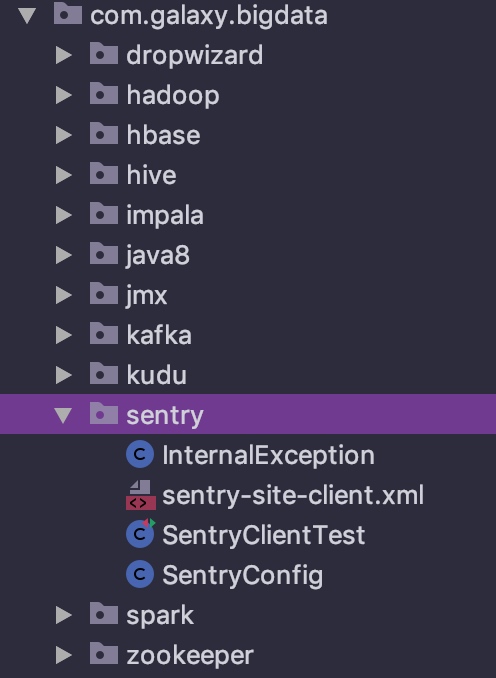
首先得确认Sentry服务端安装好并已启动,以下是整合步骤及测试用例。整个工程目录如下:
1、加入maven依赖:
1<dependency>
2    <groupId>org.apache.sentry</groupId>
3    <artifactId>sentry-provider-db</artifactId>
4    <version>1.5.1-cdh5.16.1</version>
5</dependency>
2、Sentry客户端配置文件——sentry-site.xml:
1<?xml version="1.0"?>
2<?xml-stylesheet type="text/xsl" href="configuration.xsl"?>
3<!--
4   Licensed to the Apache Software Foundation (ASF) under one or more
5   contributor license agreements.  See the NOTICE file distributed with
6   this work for additional information regarding copyright ownership.
7   The ASF licenses this file to You under the Apache License, Version 2.0
8   (the "License"); you may not use this file except in compliance with
9   the License.  You may obtain a copy of the License at
10
11       http://www.apache.org/licenses/LICENSE-2.0
12
13   Unless required by applicable law or agreed to in writing, software
14   distributed under the License is distributed on an "AS IS" BASIS,
15   WITHOUT WARRANTIES OR CONDITIONS OF ANY KIND, either express or implied.
16   See the License for the specific language governing permissions and
17   limitations under the License.
18-->
19
20<!-- WARNING!!! This file is provided for documentation purposes ONLY!              -->
21<!-- WARNING!!! You should copy to sentry-site.xml and make modification instead.   -->
22
23<configuration>
24
25    <property>
26        <name>sentry.service.client.server.rpc-port</name>
27        <value>8038</value>
28    </property>
29
30    <property>
31        <name>sentry.service.client.server.rpc-addresses</name>
32        <value>hadoop21-test1-rgtj5-tj1</value>
33    </property>
34
35    <property>
36        <name>sentry.service.client.server.rpc-connection-timeout</name>
37        <value>200000</value>
38    </property>
39
40    <!-- Properties required for setting the DB provider-->
41    <property>
42        <name>sentry.hive.provider.backend</name>
43        <value>org.apache.sentry.provider.db.SimpleDBProviderBackend</value>
44    </property>
45
46    <property>
47        <name>sentry.service.security.mode</name>
48        <value>none</value>
49    </property>
50
51</configuration>
3、异常处理类——InternalException:
1public class InternalException extends Exception{
2
3    public InternalException(String msg, Throwable cause) {
4        super(msg, cause);
5    }
6
7    public InternalException(String msg) {
8        super(msg);
9    }
10}
4、配置文件加载类——SentryConfig:
1public class SentryConfig {
2  // Absolute path to the sentry-site.xml configuration file.
3  private final String configFile_;
4
5  // The Sentry configuration. Valid only after calling loadConfig().
6  private final Configuration config_;
7
8  public SentryConfig(String configFilePath) {
9    configFile_ = configFilePath;
10    config_ = new Configuration();
11  }
12
13  /**
14   * Initializes the Sentry configuration.
15   */
16  public void loadConfig() {
17    if (Strings.isNullOrEmpty(configFile_)) {
18      throw new IllegalArgumentException("A valid path to a sentry-site.xml config " +
19          "file must be set using --sentry_config to enable authorization.");
20    }
21
22    File configFile = new File(configFile_);
23    if (!configFile.exists()) {
24      String configFilePath = "\"" + configFile_ + "\"";
25      throw new RuntimeException("Sentry configuration file does not exist: " +
26          configFilePath);
27    }
28
29    if (!configFile.canRead()) {
30      throw new RuntimeException("Cannot read Sentry configuration file: " +
31          configFile_);
32    }
33
34    // Load the config.
35    try {
36      config_.addResource(configFile.toURI().toURL());
37    } catch (MalformedURLException e) {
38      throw new RuntimeException("Invalid Sentry config file path: " + configFile_, e);
39    }
40  }
41
42  public Configuration getConfig() { return config_; }
43  public String getConfigFile() { return configFile_; }
44}
5、测试类——SentryClientTest:
1public class SentryClientTest {
2
3    // SentryConfig类需要的sentry配置文件路径视配置文件实际存放路径而定
4    private static SentryConfig sentryConfig = new SentryConfig("/test/spring-boot-galaxy/bigdata-galaxy/src/test/scala/com/galaxy/bigdata/sentry/sentry-site-client.xml");
5
6    /**
7     * 测试获取已有角色信息
8     * @throws InternalException
9     */
10    @Test
11    public void testListRoles() throws InternalException {
12        SentryServiceClient client = null;
13        try {
14            client = new SentryServiceClient();
15            // 这里为了测试方便,使用hadoop管理员作为请求用户,来获取所有角色信息
16            Set<TSentryRole> roles = client.get().listRoles("hadoop");
17            for (TSentryRole role : roles) {
18                System.out.println(role);
19            }
20        } catch (InternalException | SentryUserException e) {
21            e.printStackTrace();
22        } finally {
23            client.close();
24        }
25    }
26
27    /**
28     * 删除已有角色信息
29     * @throws InternalException
30     */
31    @Test
32    public void testDropRoleIfExists() throws InternalException {
33        SentryServiceClient client = null;
34        try {
35            client = new SentryServiceClient();
36            client.get().dropRoleIfExists("hadoop","admin_role");
37        } catch (InternalException | SentryUserException e) {
38            e.printStackTrace();
39        } finally {
40            client.close();
41        }
42    }
43
44
45    /**
46     * Wrapper around a SentryPolicyServiceClient.
47     * TODO: When SENTRY-296 is resolved we can more easily cache connections instead of
48     * opening a new connection for each request.
49     */
50    static class SentryServiceClient implements AutoCloseable {
51        private final SentryPolicyServiceClient client_;
52
53        /**
54         * Creates and opens a new Sentry Service thrift client.
55         */
56        public SentryServiceClient() throws InternalException {
57            client_ = createClient();
58        }
59
60        /**
61         * Get the underlying SentryPolicyServiceClient.
62         */
63        public SentryPolicyServiceClient get() {
64            return client_;
65        }
66
67        /**
68         * Returns this client back to the connection pool. Can be called multiple times.
69         */
70        public void close() throws InternalException {
71            try {
72                client_.close();
73            } catch (Exception e) {
74                throw new InternalException("Error closing client: ", e);
75            }
76        }
77
78        /**
79         * Creates a new client to the SentryService.
80         */
81        private SentryPolicyServiceClient createClient() throws InternalException {
82            SentryPolicyServiceClient client;
83            try {
84                sentryConfig.loadConfig();
85                client = SentryServiceClientFactory.create(sentryConfig.getConfig());
86            } catch (Exception e) {
87                throw new InternalException("Error creating Sentry Service client: ", e);
88            }
89            return client;
90        }
91    }
92}
在该类中,定义了静态内部类SentryServiceClient,它的主要职责是创建SentryPolicyServiceClient接口的对象,SentryPolicyServiceClient接口是Sentry与外部系统交互的窗口,它的主要方法定义如下:
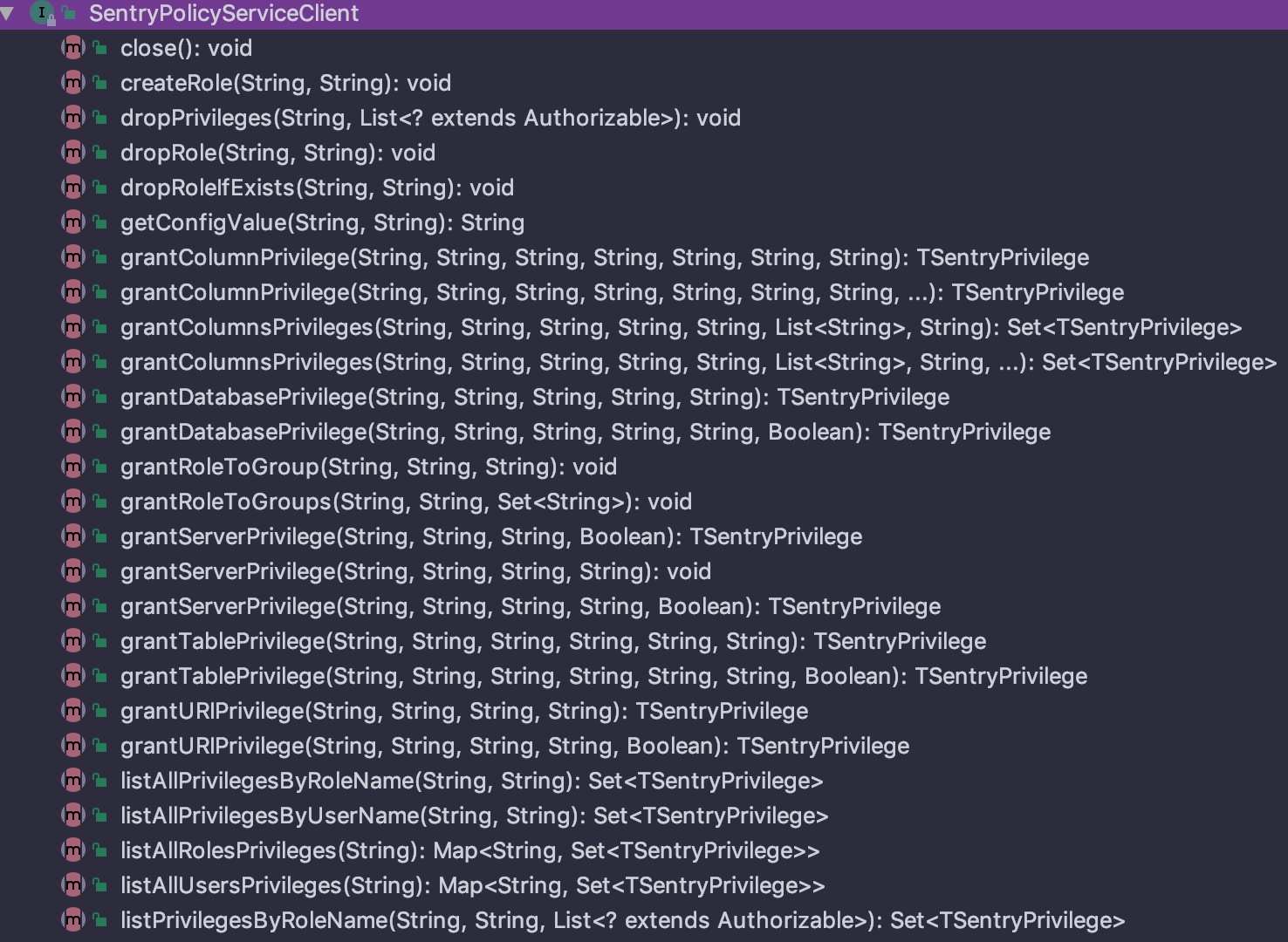
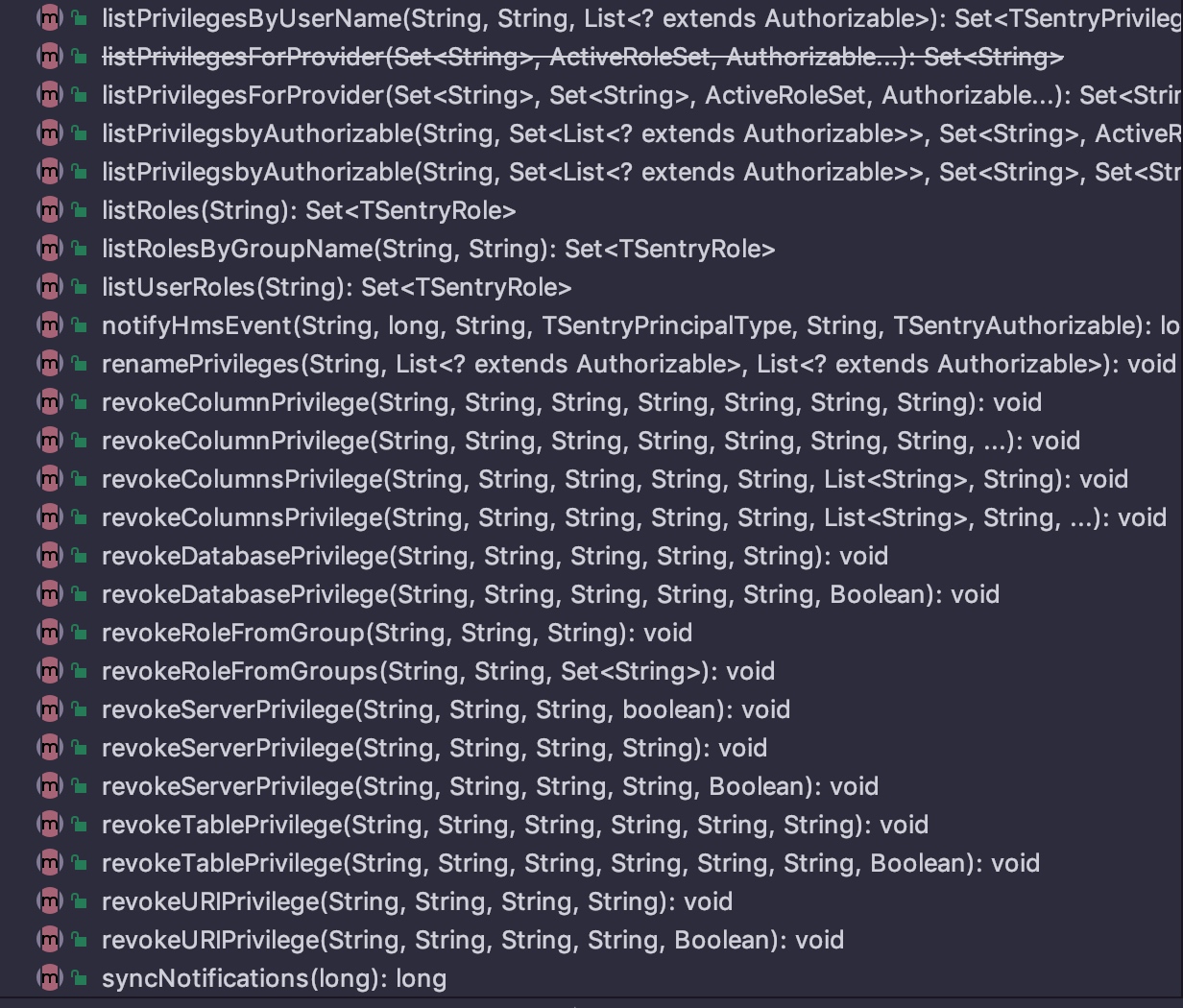
可以看到,创建(create)、删除(drop)、查询(list)、授权(grant)和撤销(revoke)这些与权限有关的操作,都定义在该方法中,方法的定义一目了然,顾名就能思义。
6、运行SentryClientTest类,测试服务调用是否正常,相关操作是否成功。
参考资料
1、Impala-2.12.0-cdh5.16.1源码SentryPolicyService.java类中的实现。