转载自:http://www.cnblogs.com/zhangweizhong/p/4874396.html
前段时间,花了大量的时间,将原先的计划任务,切换到Quartz.NET来进行管理。原先的后台定时服务都是通过计划任务来实现的,但是随着业务增长,计划任务也越来越多,每个后台服务,都得创建一个计划任务。日常的维护和管理非常麻烦。
于是乎,一咬牙,决定引入Quartz.NET框架,统一都管理全部的后台定时服务。切换过程确实很麻烦。直到今天,才终于有时间整理总结Quartz.NET的相关内容。
Quartz.NET的优点和使用场景,这里不再多说,网上有很多说明,总的来说就是,Quartz.NET是一个开源的作业调度框架,非常适合在平时的工作中,定时轮询数据库同步,定时邮件通知,定时处理数据等。 Quartz.NET允许开发人员根据时间间隔(或天)来调度作业。它实现了作业和触发器的多对多关系,还能把多个作业与不同的触发器关联,配置灵活方便。
参考官方学习文档:http://www.quartz-scheduler.net/documentation/index.html
快速搭建一个Quartz,源代码下载
第一步:新建解决方案和相关项目,并安装相关程序包,如下图所示:
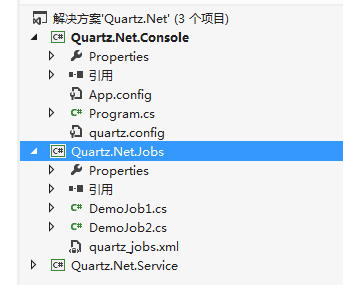
Quartz依赖Common.Logging和Common.Logging.Log4Net,而且Log4Net也是比较熟悉的日志工具,因此我们实际使用中,也是log4net记录日志,另外定时作业一般都是在window服务中,我们也可用Topshelf来创建我们的window服务。
第二步:创建两个Job类Job1,Job2。实现IJob,在Execute方法里编写要处理的业务逻辑,系统就会按照Quartz的配置,定时处理。

1  using System;
2
3  using System.Threading;
4  namespace Quartz.Net.Jobs
5  {
6    /// <summary>
7    /// 实现IJob接口
8    /// </summary>
9    public class Job1 : IJob
10    {
11      private static readonly Common.Logging.ILog logger = Common.Logging.LogManager.GetLogger(System.Reflection.MethodBase.GetCurrentMethod().DeclaringType);
12      public void Execute(IJobExecutionContext context)
13      {
14        try
15        {
16          logger.Info("Job1 任务运行开始");
17
18          for (int i = 0; i < 5; i++)
19          {
20
21            Thread.Sleep(100);
22            logger.InfoFormat("Job1 正在运行{0}", i);
23          }
24
25          logger.Info("Job1任务运行结束");
26        }
27        catch (Exception ex)
28        {
29          logger.Error("Job1 运行异常", ex);
30        }
31
32      }
33    }
34  }
第三步:配置quartz.config、quartz_jobs.xml
Quartz 实例的基础配置:quartz.config
1  # You can configure your scheduler in either <quartz> configuration section
2
3  # or in quartz properties file
4
5  # Configuration section has precedence
6
7  quartz.scheduler.instanceName = QuartzTest
8
9  # configure thread pool info
10
11  quartz.threadPool.type = Quartz.Simpl.SimpleThreadPool, Quartz
12
13  quartz.threadPool.threadCount = 10
14
15  quartz.threadPool.threadPriority = Normal
16
17  # job initialization plugin handles our xml reading, without it defaults are used
18
19  quartz.plugin.xml.type = Quartz.Plugin.Xml.XMLSchedulingDataProcessorPlugin, Quartz
20
21  quartz.plugin.xml.fileNames = ~/quartz_jobs.xml
22
23  # export this server to remoting context
24
25  #quartz.scheduler.exporter.type = Quartz.Simpl.RemotingSchedulerExporter, Quartz
26
27  #quartz.scheduler.exporter.port = 555
28
29  #quartz.scheduler.exporter.bindName = QuartzScheduler
30
31  #quartz.scheduler.exporter.channelType = tcp
32
33  #quartz.scheduler.exporter.channelName = httpQuartz
各个Job 任务的配置 :quartz_jobs.xml
1<?xml version="1.0" encoding="UTF-8"?>
2  <!-- This file contains job definitions in schema version 2.0 format -->
3  <job-scheduling-data xmlns="http://quartznet.sourceforge.net/JobSchedulingData" xmlns:xsi="http://www.w3.org/2001/XMLSchema-instance" version="2.0">
4  <processing-directives>
5    <overwrite-existing-data>true</overwrite-existing-data>
6  </processing-directives>
7  <schedule>
8    <!--定义Job1 Job-->
9    <job>
10      <name>Job1</name>
11      <group>JobGroup</group>
12      <description>Quartz Job1</description>
13      <job-type>Quartz.Net.Jobs.Job1,Quartz.Net.Jobs</job-type>
14      <durable>true</durable>
15      <recover>false</recover>
16    </job>
17    <!--定义Job2 Job-->
18    <job>
19      <name>Job2</name>
20      <group>JobGroup</group>
21      <description>Quartz Job2</description>
22      <job-type>Quartz.Net.Jobs.Job2,Quartz.Net.Jobs</job-type>
23      <durable>true</durable>
24      <recover>false</recover>
25    </job>
26    <!--定义Job1 触发器 每30秒执行一次Job1任务-->
27    <trigger>
28      <cron>
29        <name>Job1Trigger</name>
30        <group>JobTriggerGroup</group>
31        <job-name>Job1</job-name>
32        <job-group>JobGroup</job-group>
33        <cron-expression>0/30 * * * * ?</cron-expression>
34      </cron>
35    </trigger>
36    <!--定义Job2 触发器 每分钟执行一次Job2任务-->
37    <trigger>
38      <cron>
39        <name>Job2Trigger1</name>
40        <group>JobTriggerGroup</group>
41        <job-name>Job2</job-name>
42        <job-group>JobGroup</job-group>
43        <cron-expression>0 * * * * ?</cron-expression>
44      </cron>
45    </trigger>
46  </schedule>
47  </job-scheduling-data>
第四步:宿主程序,可以是window服务,也可以是后台Console程序,如何用Topshelf来创建我们的window服务,请看另外一篇文章《使用Topshelf 开发windows服务》。
1 namespace Quartz.Net.Console
2  {
3    class Program
4    {
5      private static IScheduler scheduler;
6      static void Main(string[] args)
7      {
8        ISchedulerFactory schedulerFactory = new StdSchedulerFactory();
9        scheduler = schedulerFactory.GetScheduler();
10
11        scheduler.Start();
12      }
13    }
14  }
注意:quartz_jobs.xml和quartz.config这两个文件,要手动复制到输出目录下,或者在vs中,分别选中这两个文件→右键属性→复制到输入目录设为:始终复制。
否则读取不到这两个配置文件,程序无法运行。
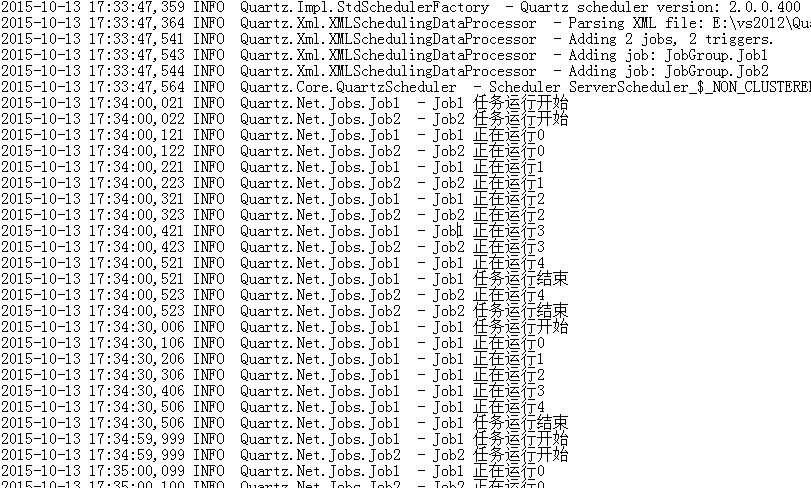
运行后,效果如下图: