
一、使用方式
数据权限控制需要对查询出的数据进行筛选,对业务入侵最少的方式就是利用mybatis或者数据库连接池的切片对已有业务的sql进行修改。切片逻辑完成后,仅需要在业务中加入少量标记代码,就可以实现对数据权限的控制。这种修改方式,对老业务的逻辑没有入侵或只有少量入侵,基本不影响老业务的逻辑和可读性;对新业务,业务开发人员无需过多关注权限问题,可以集中精力处理业务逻辑。
由于部门代码中使用的数据库连接池种类较多,不利于切片控制逻辑的快速完成,而sql拼接的部分基本只有mybatis和java字符串直接拼接两种方式,因此使用mybatis切片的方式来完成数据权限控制逻辑。在mybatis的mapper文件的接口上添加注解,注解中写明需要控制的权限种类、要控制的表名、列名即可控制接口的数据权限。

由于mybatis的mapper文件中的同一接口在多个地方被调用,有的需要控制数据权限,有的不需要,因此增加一种权限控制方式:通过ThreadLocal传递权限控制规则来控制当前sql执行时控制数据权限。

权限控制规则格式如下:
限权规则code1(表名1.字段名1,表名2.字段名2);限权规则code2(表名3.字段名3,表名4.字段名4)
例如:enterprise(channel.enterprise_code);account(table.column);channel(table3.id)
上下文传递工具类如下所示,使用回调的方式传递ThreadLocal可以防止使用者忘记清除上下文。
1public class DataAuthContextUtil {
2    /**
3     * 不方便使用注解的地方,可以直接使用上下文设置数据规则
4     */
5    private static ThreadLocal<String> useDataAuth = new ThreadLocal<>();
6
7    /**
8     * 有的sql只在部分情况下需要使用数据权限限制
9
10     * 上下文和注解中均可设置数据权限规则,都设置时,上下文中的优先
11     *
12     * @param supplier
13     */
14    public static <T> T executeSqlWithDataAuthRule(String rule, Supplier<T> supplier) {
15        try {
16            useDataAuth.set(rule);
17            return supplier.get();
18        } finally {
19            useDataAuth.remove();
20        }
21    }
22
23    /**
24     * 获取数据权限标志
25     *
26     * @return
27     */
28    public static String getUseDataAuthRule() {
29        return useDataAuth.get();
30    }
31}
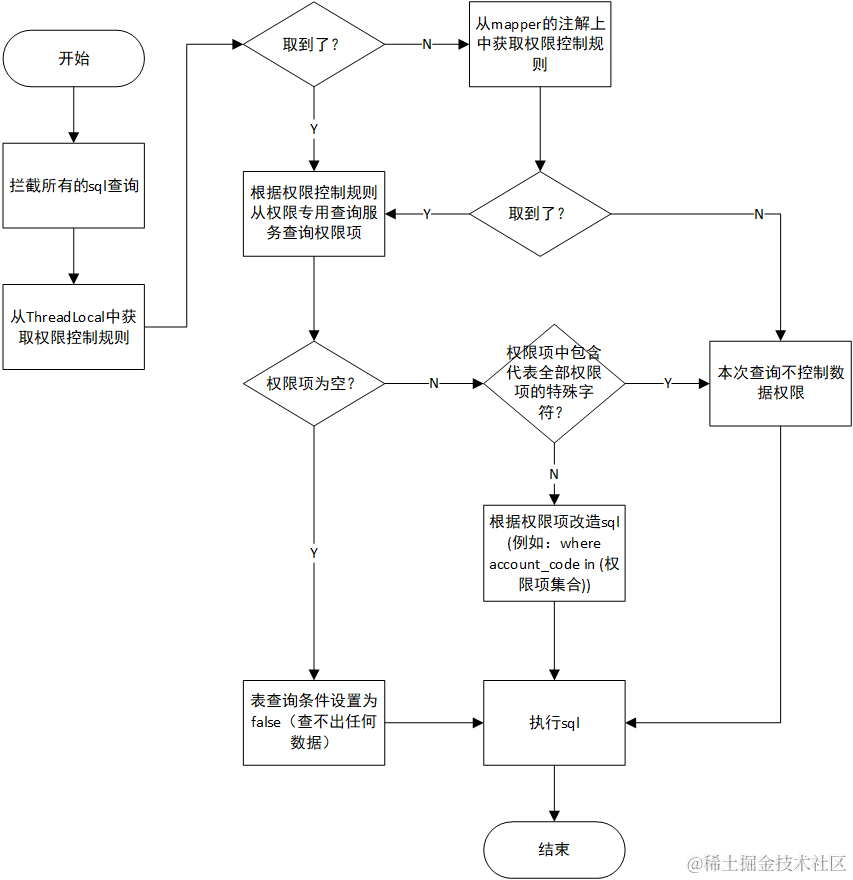
二、切片实现流程
三、其他技术细节
(1)在切面中获取原始sql
1import lombok.extern.slf4j.Slf4j;
2import org.apache.commons.collections4.CollectionUtils;
3import org.apache.commons.lang3.StringUtils;
4import org.apache.ibatis.cache.CacheKey;
5import org.apache.ibatis.executor.Executor;
6import org.apache.ibatis.mapping.BoundSql;
7import org.apache.ibatis.mapping.MappedStatement;
8import org.apache.ibatis.mapping.SqlSource;
9import org.apache.ibatis.plugin.Interceptor;
10import org.apache.ibatis.plugin.Intercepts;
11import org.apache.ibatis.plugin.Invocation;
12import org.apache.ibatis.plugin.Signature;
13import org.apache.ibatis.reflection.DefaultReflectorFactory;
14import org.apache.ibatis.reflection.MetaObject;
15import org.apache.ibatis.reflection.factory.DefaultObjectFactory;
16import org.apache.ibatis.reflection.wrapper.DefaultObjectWrapperFactory;
17import org.apache.ibatis.session.ResultHandler;
18import org.apache.ibatis.session.RowBounds;
19import org.springframework.beans.factory.annotation.Autowired;
20import org.springframework.stereotype.Component;
21import reactor.util.function.Tuple2;
22
23import java.lang.reflect.Method;
24import java.util.HashMap;
25import java.util.List;
26import java.util.Map;
27import java.util.Set;
28
29@Component
30@Intercepts({
31//        @Signature(type = Executor.class, method = "update", args = {MappedStatement.class, Object.class}),
32        @Signature(type = Executor.class, method = "query", args = {MappedStatement.class, Object.class, RowBounds.class, ResultHandler.class}),
33        @Signature(type = Executor.class, method = "query", args = {MappedStatement.class, Object.class, RowBounds.class, ResultHandler.class, CacheKey.class, BoundSql.class})
34})
35@Slf4j
36public class DataAuthInterceptor implements Interceptor {
37
38    @Override
39    public Object intercept(Invocation invocation) throws Throwable {
40        try {
41            MappedStatement mappedStatement = (MappedStatement) invocation.getArgs()[0];
42            BoundSql boundSql = mappedStatement.getBoundSql(invocation.getArgs()[1]);
43            String sql = boundSql.getSql();
44        } catch (Exception e) {
45            log.error("数据权限添加出错,当前sql未加数据权限限制!", e);
46            throw e;
47        }
48        return invocation.proceed();
49    }
50}
(2)将权限项加入原始sql中
使用druid附带的ast解析功能修改sql,代码如下
1/**
2     * 权限限制写入sql
3     *
4     * @param sql
5     * @param tableAuthMap key:table value1:column value2:values权限项
6     * @return
7     */
8    public static StringBuilder addAuthLimitToSql(String sql, Map<String, Tuple2<String, Set<String>>> tableAuthMap) {
9        List<SQLStatement> stmtList = SQLUtils.parseStatements(sql, "mysql");
10        StringBuilder authSql = new StringBuilder();
11        for (SQLStatement stmt : stmtList) {
12            stmt.accept(new MySqlASTVisitorAdapter() {
13                @Override
14                public boolean visit(MySqlSelectQueryBlock x) {
15                    SQLTableSource from = x.getFrom();
16                    Set<String> tableList = new HashSet<>();
17                    getTableList(from, tableList);
18                    for (String tableName : tableList) {
19                        if (tableAuthMap.containsKey(tableName)) {
20                            x.addCondition(tableName + "in (...略)");
21                        }
22                    }
23                    return true;
24                }
25            });
26            authSql.append(stmt);
27        }
28        return authSql;
29    }
30
31    private static void getTableList(SQLTableSource from, Set<String> tableList) {
32        if (from instanceof SQLExprTableSource) {
33            SQLExprTableSource tableSource = (SQLExprTableSource) from;
34            String name = tableSource.getTableName().replace("`", "");
35            tableList.add(name);
36            String alias = tableSource.getAlias();
37            if (StringUtils.isNotBlank(alias)) {
38                tableList.add(alias.replace("`", ""));
39            }
40        } else if (from instanceof SQLJoinTableSource) {
41            SQLJoinTableSource joinTableSource = (SQLJoinTableSource) from;
42            getTableList(joinTableSource.getLeft(), tableList);
43            getTableList(joinTableSource.getRight(), tableList);
44        } else if (from instanceof SQLSubqueryTableSource) {
45            SQLSubqueryTableSource tableSource = (SQLSubqueryTableSource) from;
46            tableList.add(tableSource.getAlias().replace("`", ""));
47        } else if (from instanceof SQLLateralViewTableSource) {
48            log.warn("SQLLateralView不用处理");
49        } else if (from instanceof SQLUnionQueryTableSource) {
50            //union 不需要处理
51            log.warn("union不用处理");
52        } else if (from instanceof SQLUnnestTableSource) {
53            log.warn("Unnest不用处理");
54        } else if (from instanceof SQLValuesTableSource) {
55            log.warn("Values不用处理");
56        } else if (from instanceof SQLWithSubqueryClause) {
57            log.warn("子查询不用处理");
58        } else if (from instanceof SQLTableSourceImpl) {
59            log.warn("Impl不用处理");
60        }
61    }
62}
(3)将修改过后的sql写回mybatis
1        MappedStatement ms = (MappedStatement) invocation.getArgs()[0];
2        BoundSql boundSql = ms.getBoundSql(invocation.getArgs()[1]);
3        // 组装 MappedStatement
4        MappedStatement.Builder builder = new MappedStatement.Builder(ms.getConfiguration(), ms.getId(), new MySqlSource(boundSql), ms.getSqlCommandType());
5        builder.resource(ms.getResource());
6        builder.fetchSize(ms.getFetchSize());
7        builder.statementType(ms.getStatementType());
8        builder.keyGenerator(ms.getKeyGenerator());
9        if (ms.getKeyProperties() != null && ms.getKeyProperties().length != 0) {
10            StringBuilder keyProperties = new StringBuilder();
11            for (String keyProperty : ms.getKeyProperties()) {
12                keyProperties.append(keyProperty).append(",");
13            }
14            keyProperties.delete(keyProperties.length() - 1, keyProperties.length());
15            builder.keyProperty(keyProperties.toString());
16        }
17        builder.timeout(ms.getTimeout());
18        builder.parameterMap(ms.getParameterMap());
19        builder.resultMaps(ms.getResultMaps());
20        builder.resultSetType(ms.getResultSetType());
21        builder.cache(ms.getCache());
22        builder.flushCacheRequired(ms.isFlushCacheRequired());
23        builder.useCache(ms.isUseCache());
24        MappedStatement newMappedStatement = builder.build();
25        MetaObject metaObject = MetaObject.forObject(newMappedStatement, new DefaultObjectFactory(), new DefaultObjectWrapperFactory(), new DefaultReflectorFactory());
26        metaObject.setValue("sqlSource.boundSql.sql", newSql);
27        invocation.getArgs()[0] = newMappedStatement;
参考文章: https://blog.csdn.net/e_anjing/article/details/79102693