
公众号配置
根据提示设置即可:【图中信息均为无意义数据,仅供参考。注意服务器地址需可接收 GET/POST 两种请求】
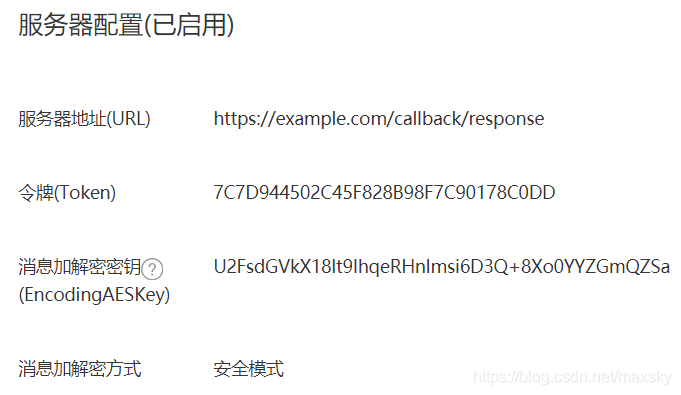
AESKey 直接点一下随机生成即可,Token 可以生成一个 UUID 再把 UUID 进行 MD5 一次即可。
接收关注事件消息示例
请求参数校验
这一步根据项目情况,可供参考:(Lumen 框架)
1$validateData = Validator::validate($request->all(), [
2	'signature' => 'required|string|size:40',
3    'timestamp' => 'required|string|size:10',
4    'nonce' => 'required|numeric',
5    'echostr' => 'filled|string',
6    'openid' => 'filled|string',
7    'encrypt_type' => 'filled|string|in:aes',
8    'msg_signature' => 'filled|string|size:40',
9]);
消息签名校验
1/**
2 * 消息签名验证
3 *
4 * @param string      $signature   签名
5 * @param string      $timestamp   10 位时间戳
6 * @param string      $nonce       随机数
7 * @param string|null $encrypt_msg 加密消息
8 *
9 * @return bool
10 */
11public function checkSignature(string $signature, string $timestamp, string $nonce, ?string $encrypt_msg = null): bool {
12    $array = [$this->serverToken, $timestamp, $nonce];
13
14    if ($encrypt_msg) {
15        $array[] = $encrypt_msg;
16    }
17
18    sort($array, SORT_STRING);
19
20    return sha1(implode($array)) === $signature;
21}
通过公众号配置
在公众号后台配置服务器地址时,需要进行一次 Token 响应的校验,所以我们应该在 checkSignature 只上再添加一层用以通过验证并保存配置。
1/**
2 * @param array $data 请求参数,传入通过校验的请求参数 $validateData
3 *
4 * @return bool|int|string
5 */
6public function checkSign(array $data) {
7    if ($this->checkSignature($data['signature'], $data['timestamp'], $data['nonce'])) {
8        return (isset($data['echostr']) && !isset($data['msg_signature'])) ? $data['echostr'] : true;
9    }
10
11    return -40001;
12}
随后在控制器中,只要请求 $request->method() 是个 GET 就可以直接返回 echostr 字符串了。
错误码返回值参考下方附录。
消息解密
加密消息中,有 5 个参数通过 query 的形式请求,而密文则为 XML 格式通过 POST 请求。
5 个参数分别为:
- signature 消息请求签名
- timestamp 时间戳
- nonce 随机数
- encrypt_type(加密类型固定
aes) - msg_signature 消息签名(不能和 signature 搞混)
解密消息需要 4 个参数,分别是:XML(密文)、msg_signature、timestamp、nonce。
解码函数
1/**
2 * @param string $text
3 *
4 * @return string
5 */
6public function decode(string $text): string {
7    $pad = ord(substr($text, -1));
8
9    if ($pad < 1 || $pad > 32) {
10        $pad = 0;
11    }
12
13    return substr($text, 0, (strlen($text) - $pad));
14}
解密
AESKey 处理
此处是重点,必须提前处理 AESKey,否则将影响解密结果。
1$this->aesKey = base64_decode('U2FsdGVkX18lt9IhqeRHnImsi6D3Q+8Xo0YYZGmQZSa' . '=');
解密函数
1/**
2 * 密文解密
3 * $this->aesKey 以及 $this->appId 自行调整配置
4 *
5 * @param string $encrypted
6 *
7 * @return int|string
8 */
9public function decrypt(string $encrypted) {
10    $iv = substr($this->aesKey, 0, 16);
11
12    // decrypt
13    $decrypted = openssl_decrypt($encrypted, 'AES-256-CBC', $this->aesKey, OPENSSL_ZERO_PADDING, $iv);
14
15    if (!$decrypted) {
16        return -40007;
17    }
18
19    $result = $this->decode($decrypted);
20
21    if (strlen($result) < 16) {
22        return '';
23    }
24
25    $content = substr($result, 16, strlen($result));
26    $lenList = unpack('N', substr($content, 0, 4));
27
28    $lenXML = $lenList[1];
29
30    $fromAppId = substr($content, $lenXML + 4);
31
32    if ($fromAppId !== $this->appId) {
33        return -40001;
34    }
35
36    return substr($content, 4, $lenXML);
37}
消息解密处理
1/**
2 * 消息解密
3 *
4 * @param string $message
5 * @param string $msg_signature
6 * @param string $timestamp
7 * @param string $nonce
8 *
9 * @return SimpleXMLElement|int
10 */
11public function decryptMessage(string $message, string $msg_signature, string $timestamp, string $nonce) {
12    // get message
13    try {
14        $message = simplexml_load_string($message, 'SimpleXMLElement', LIBXML_COMPACT + LIBXML_NOCDATA);
15    } catch (Exception $e) {
16        return -40002;
17    }
18
19    // get encrypt text
20    $encrypt = $message->Encrypt->__toString();
21
22    if (!$encrypt) {
23        return -40002;
24    }
25
26    // check sign
27    if (!$this->checkSignature($msg_signature, $timestamp, $nonce, $encrypt)) {
28        return -40001;
29    }
30
31    $decrypted = $this->decrypt($encrypt);
32
33    if (is_int($decrypted)) {
34        return $decrypted;
35    }
36
37    try {
38        return simplexml_load_string($decrypted, 'SimpleXMLElement', LIBXML_COMPACT + LIBXML_NOCDATA);
39    } catch (Exception $e) {
40        return -40002;
41    }
42}
至此消息解密已经成功,例如微信用户 OpenID 可通过 decryptMessage 方法的返回值获取:
1$openId = $decrypted_msg->FromUserName->__toString();
对于解密后消息内所含属性,参阅:基础消息能力 | 微信开放文档
消息加密
当微信用户首次关注公众号时,微信会发送“关注事件”消息到服务端,我们可以使用和公众号后台内相同的“自动回复”功能响应回复内容给微信,从而实现自动回复,这时我们需要对响应的消息进行加密。
根据文档所述,除了消息加密后的响应,如果无需响应任何操作可返回字符串 success 或长度为 0 的空内容,但微信推荐的是 success。所以我们应当保证服务端仅会响应两种结果:一是 success 字符串;二是 XML 格式内容。
以下内容使用了 Laravel/Lumen 的 View 功能,供参考。
构建响应内容
文件路径:Project/resources/views/wechat/subscribe/default.blade.php
1嗨,终于等到你啦!🌹
2关注 XX 公众号~
3了解更多请点击下方分类菜单吧!
注意:底部如有空行,会在响应给微信用户时显示。文本消息内容是支持 Emoji、超链接的。
构建消息模板
明文消息模板
末尾不能存在空行。
1<!-- 文件路径 Project/resources/xml/WeChatReplyMsg.xml -->
2<xml>
3    <ToUserName><![CDATA[%s]]></ToUserName>
4    <FromUserName><![CDATA[%s]]></FromUserName>
5    <CreateTime>%d</CreateTime>
6    <MsgType><![CDATA[$s]]></MsgType>
7    <Content><![CDATA[%s]]></Content>
8</xml>
加密消息模板
末尾不能存在空行。
1<!-- 文件路径 Project/resources/xml/WeChatReplyMsgCrypt.xml -->
2<xml>
3    <Encrypt><![CDATA[%s]]></Encrypt>
4    <MsgSignature><![CDATA[%s]]></MsgSignature>
5    <TimeStamp>%s</TimeStamp>
6    <Nonce><![CDATA[%s]]></Nonce>
7</xml>
填充响应消息
1$retMsg = view('wechat.subscribe.default')->render();
2
3// $openId 和 $toUser 可以通过已解密的消息获得,$timestamp 可以自己生成或直接取微信请求中的 timestamp
4// 此处的 text 根据需要进行影响的消息进行调整,内容同理
5$replyMessage = sprintf(
6    file_get_contents(resource_path('xml/WeChatReplyMsg.xml')), $openId, $toUser, $timestamp, 'text', $retMsg
7);
加密
编码函数
1// 固定值
2$this->blockSize = 32;
3
4/**
5 * @param string $text
6 *
7 * @return string
8 */
9public function encode(string $text): string {
10    $text_length = strlen($text);
11
12    $amount_to_pad = $this->blockSize - ($text_length % $this->blockSize);
13
14    if ($amount_to_pad == 0) {
15        $amount_to_pad = $this->blockSize;
16    }
17
18    $pad_chr = chr($amount_to_pad);
19    $tmp = '';
20
21    for ($index = 0; $index < $amount_to_pad; $index++) {
22        $tmp .= $pad_chr;
23    }
24
25    return $text . $tmp;
26}
加密函数
1/**
2 * @param string $text
3 *
4 * @return int|string
5 */
6public function encrypt(string $text) {
7    // Laravel/Lumen 中可直接生成 16 位随机字符串
8    // 如非该框架请参考附录
9    $random = Illuminate\Support\Str::random();
10
11    $text = $random . pack('N', strlen($text)) . $text . $this->appId;
12
13    $text = $this->encode($text);
14
15    $iv = substr($this->aesKey, 0, 16);
16
17    // encrypt
18    $encrypted = openssl_encrypt($text, 'AES-256-CBC', $this->aesKey, OPENSSL_ZERO_PADDING, $iv);
19
20    return $encrypted ?: -40006;
21}
生成签名
1/**
2  * @param string $encrypt_msg
3  * @param string $timestamp
4  * @param string $nonce
5  *
6  * @return string
7  */
8 public function generateSignature(string $encrypt_msg, string $timestamp, string $nonce): string {
9     $array = [$encrypt_msg, $this->serverToken, $timestamp, $nonce];
10
11     sort($array, SORT_STRING);
12
13     return sha1(implode($array));
14 }
消息加密处理
1/**
2 * @param string $reply_message
3 * @param string $timestamp
4 * @param string $nonce
5 *
6 * @return int|string
7 */
8public function encryptMessage(string $reply_message, string $timestamp, string $nonce) {
9    // encrypt
10    $encrypted = $this->encrypt($reply_message);
11
12    if (is_int($encrypted)) {
13        return $encrypted;
14    }
15
16    // $nonce 同 $timestamp 可以自己生成或直接取微信请求中的 nonce
17    $signature = $this->generateSignature($encrypted, $timestamp, $nonce);
18
19    if (!$signature) {
20        return -40001;
21    }
22
23    return sprintf(
24        file_get_contents(resource_path('xml/WeChatReplyMsgCrypt.xml')),
25        $encrypted, $signature, $timestamp, $nonce
26    );
27}
最后将加密结果响应即可,注意响应头需加上 Content-Type: application/xml。
多说两句
在接收到微信发来的请求后,根据场景进行业务逻辑处理,在无需响应任何消息(被动回复)时,应直接在方法里返回 success 或空字符串、null 之类。上层根据返回情况判断是否加密消息并返回,尽可能满足 5 秒内响应微信。
附录
错误码
1const RET_ERRCODE = [
2    -40001 => '签名验证错误',
3    -40002 => 'XML 解析失败',
4    -40003 => '生成签名失败',
5    -40004 => 'EncodingAESKey 错误',
6    -40005 => 'AppID 校验错误',
7    -40006 => 'AES 加密失败',
8    -40007 => 'AES 解密失败',
9    -40008 => 'Buffer 非法',
10    -40009 => 'Base64 编码失败',
11    -40010 => 'Base64 解码失败',
12    -40011 => '生成 XML 失败'
13];
14
15// 可以通过 self::RET_ERRCODE[-40001] 的形式返回字符串
随机字符串
1/**
2 * 随机生成 16 位字符串
3 *
4 * @return string 生成的字符串
5 */
6function getRandomStr(): string {
7    $str = '';
8    $str_pol = 'ABCDEFGHIJKLMNOPQRSTUVWXYZ0123456789abcdefghijklmnopqrstuvwxyz';
9    $max = strlen($str_pol) - 1;
10
11    for ($i = 0; $i < 16; $i++) {
12        $str .= $str_pol[mt_rand(0, $max)];
13    }
14
15    return $str;
16}