目录
一、导入clickhouse jdbc 依赖
二、编写 Flink 写入ClickHouse代码
三、创建ClickHouse 表
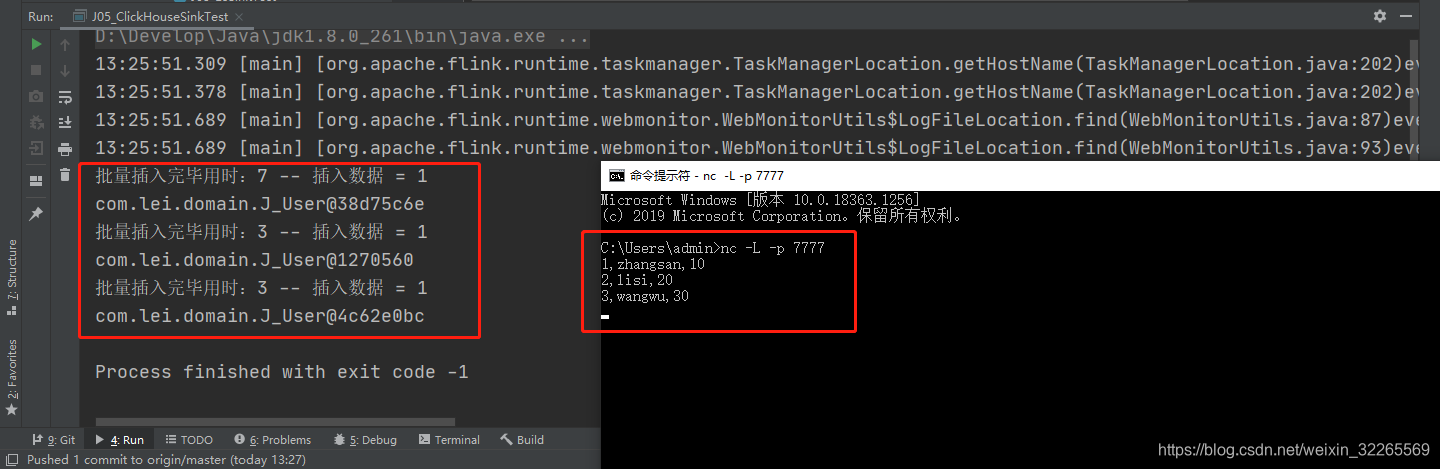
四、运行向localhost,7777端口发送数据,并启动Flink应用程序
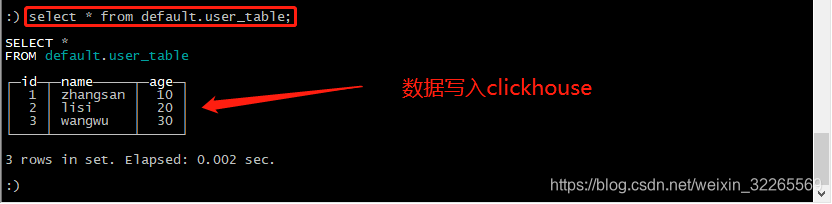
五、查询ClickHouse 数据结果,验证数据是否写入成功
一、导入clickhouse jdbc 依赖
1        <!-- 写入数据到clickhouse -->
2        <dependency>
3            <groupId>ru.yandex.clickhouse</groupId>
4            <artifactId>clickhouse-jdbc</artifactId>
5            <version>0.1.54</version>
6        </dependency>
二、编写 Flink 写入ClickHouse代码
Java Bean实体类
1package com.lei.domain;
2
3public class J_User {
4    public int id;
5    public String name;
6    public int age;
7
8    public J_User(int id, String name, int age) {
9        this.id = id;
10        this.name = name;
11        this.age = age;
12    }
13
14    public static J_User of(int id, String name, int age) {
15        return new J_User(id, name, age);
16    }
17}
编写ClickHouseUtil 工具类
1package com.lei.util;
2
3import java.sql.Connection;
4import java.sql.DriverManager;
5import java.sql.SQLException;
6
7
8public class ClickHouseUtil {
9    private static Connection connection;
10
11    public static Connection getConn(String host, int port, String database) throws SQLException, ClassNotFoundException {
12        Class.forName("ru.yandex.clickhouse.ClickHouseDriver");
13        String  address = "jdbc:clickhouse://" + host + ":" + port + "/" + database;
14        connection = DriverManager.getConnection(address);
15        return connection;
16    }
17
18    public static Connection getConn(String host, int port) throws SQLException, ClassNotFoundException {
19        return getConn(host,port,"default");
20    }
21    public static Connection getConn() throws SQLException, ClassNotFoundException {
22        return getConn("node-01",8123);
23    }
24    public void close() throws SQLException {
25        connection.close();
26    }
27}
编写 业务写入ClickHouse类
1package com.lei.util;
2
3import com.lei.domain.J_User;
4import org.apache.flink.configuration.Configuration;
5import org.apache.flink.streaming.api.functions.sink.RichSinkFunction;
6
7import java.sql.Connection;
8import java.sql.PreparedStatement;
9
10
11public class J_MyClickHouseUtil extends RichSinkFunction<J_User> {
12    Connection connection = null;
13
14    String sql;
15
16    public J_MyClickHouseUtil(String sql) {
17        this.sql = sql;
18    }
19
20    @Override
21    public void open(Configuration parameters) throws Exception {
22        super.open(parameters);
23        connection = ClickHouseUtil.getConn("node-01", 8123, "default");
24    }
25
26    @Override
27    public void close() throws Exception {
28        super.close();
29        if (connection != null) {
30            connection.close();
31        }
32    }
33
34    @Override
35    public void invoke(J_User user, Context context) throws Exception {
36        PreparedStatement preparedStatement = connection.prepareStatement(sql);
37        preparedStatement.setLong(1, user.id);
38        preparedStatement.setString(2, user.name);
39        preparedStatement.setLong(3, user.age);
40        preparedStatement.addBatch();
41
42        long startTime = System.currentTimeMillis();
43        int[] ints = preparedStatement.executeBatch();
44        connection.commit();
45        long endTime = System.currentTimeMillis();
46        System.out.println("批量插入完毕用时:" + (endTime - startTime) + " -- 插入数据 = " + ints.length);
47    }
48}
编写Flink 业务类,即执行业务逻辑
1package com.lei.sinktest;
2
3import com.lei.domain.J_User;
4import com.lei.util.J_MyClickHouseUtil;
5import org.apache.flink.api.common.functions.MapFunction;
6import org.apache.flink.streaming.api.datastream.DataStream;
7import org.apache.flink.streaming.api.datastream.DataStreamSource;
8import org.apache.flink.streaming.api.datastream.SingleOutputStreamOperator;
9import org.apache.flink.streaming.api.environment.StreamExecutionEnvironment;
10
11/*
12    进入clickhouse-client
13    use default;
14    drop table if exists user_table;
15
16    CREATE TABLE default.user_table(id UInt16, name String, age UInt16 ) ENGINE = TinyLog();
17 */
18public class J05_ClickHouseSinkTest {
19    public static void main(String[] args) throws Exception {
20        StreamExecutionEnvironment env = StreamExecutionEnvironment.createLocalEnvironment();
21        env.setParallelism(1);
22
23        // source
24        DataStream<String> inputStream = env.socketTextStream("localhost", 7777);
25
26        // Transform 操作
27        SingleOutputStreamOperator<J_User> dataStream = inputStream.map(new MapFunction<String, J_User>() {
28            @Override
29            public J_User map(String data) throws Exception {
30                String[] split = data.split(",");
31                return J_User.of(Integer.parseInt(split[0]),
32                        split[1],
33                        Integer.parseInt(split[2]));
34            }
35        });
36
37        // sink
38        String sql = "INSERT INTO default.user_table (id, name, age) VALUES (?,?,?)";
39        J_MyClickHouseUtil jdbcSink = new J_MyClickHouseUtil(sql);
40        dataStream.addSink(jdbcSink);
41        dataStream.print();
42
43        env.execute("clickhouse sink test");
44    }
45}
三、创建ClickHouse 表
1-- 进入clickhouse-client
2use default;
3drop table if exists user_table;
4
5CREATE TABLE default.user_table(id UInt16, name String, age UInt16 ) ENGINE = TinyLog();
四、运行向localhost,7777端口发送数据,并启动Flink应用程序
五、查询ClickHouse 数据结果,验证数据是否写入成功
文章最后,给大家推荐一些受欢迎的技术博客链接_:_
- JAVA相关的深度技术博客链接
- Flink 相关技术博客链接
- Spark 核心技术链接
- 设计模式 —— 深度技术博客链接
- 机器学习 —— 深度技术博客链接
- Hadoop相关技术博客链接
- 超全干货--Flink思维导图,花了3周左右编写、校对
- 深入JAVA 的JVM核心原理解决线上各种故障【附案例】
- 请谈谈你对volatile的理解?--最近小李子与面试官的一场“硬核较量”
- 聊聊RPC通信,经常被问到的一道面试题。源码+笔记,包懂
- 深入聊聊Java 垃圾回收机制【附原理图及调优方法】
欢迎扫描下方的二维码或 搜索 公众号“大数据高级架构师”,我们会有更多、且及时的资料推送给您,欢迎多多交流!