
1.概述
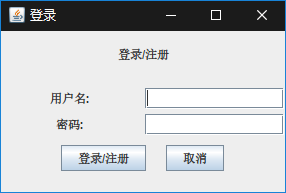
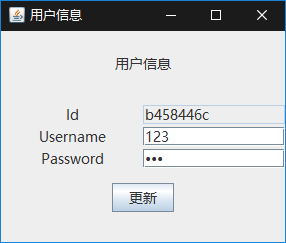
一个简单的swing登录界面,使用了简单的JDBC. 如图:
2.UI
(1)主界面
主界面使用了3_1网格布局+三个JPanel,中间的JPanel使用了2_2网格布局:
1import java.awt.FlowLayout;
2import java.awt.Font;
3import java.awt.GridLayout;
4import java.util.Enumeration;
5import java.awt.Container;
6
7import javax.swing.JButton;
8import javax.swing.JFrame;
9import javax.swing.JLabel;
10import javax.swing.JOptionPane;
11import javax.swing.JPanel;
12import javax.swing.JPasswordField;
13import javax.swing.JTextField;
14import javax.swing.UIManager;
15import javax.swing.plaf.FontUIResource;
16
17public class UserManagement
18{
19    private JFrame mainFrame = new JFrame("登录");
20    private Container container = mainFrame.getContentPane();
21    private JLabel titleLabel = new JLabel("登录/注册", JLabel.CENTER);
22
23    private JPanel inputField = new JPanel();
24    private JLabel usernameLabel = new JLabel("用户名:", JLabel.CENTER);
25    private JTextField username = new JTextField();
26    private JLabel passwordLabel = new JLabel("密码:", JLabel.CENTER);
27    private JPasswordField password = new JPasswordField();
28
29    private JPanel buttonField = new JPanel();
30    private JButton save = new JButton("登录/注册");
31    private JButton cancel = new JButton("取消");
32
33    public UserManagement()
34    {
35        init();
36        setFont(new Font("微软雅黑",Font.PLAIN,14));
37        addEvent();
38    }
39
40    private void init()
41    {
42        container.setLayout(new GridLayout(3, 1, 0, 10));
43        container.add(titleLabel);
44
45        inputField.setLayout(new GridLayout(2, 2, 5, 5));
46        inputField.add(usernameLabel);
47        inputField.add(username);
48        inputField.add(passwordLabel);
49        inputField.add(password);
50        container.add(inputField);
51
52        buttonField.setLayout(new FlowLayout(FlowLayout.CENTER,20,0));
53        buttonField.add(save);
54        buttonField.add(cancel);
55        container.add(buttonField);
56
57        mainFrame.setDefaultCloseOperation(JFrame.EXIT_ON_CLOSE);
58        mainFrame.setSize(300, 200);
59        mainFrame.setLocationRelativeTo(null);
60        mainFrame.setVisible(true);
61    }
62
63    private void setFont(Font font)
64    {
65        FontUIResource fontRes = new FontUIResource(font);
66        for(Enumeration<Object> keys = UIManager.getDefaults().keys();keys.hasMoreElements();)
67        {
68            Object key = keys.nextElement();
69            Object value = UIManager.get(key);
70            if(value instanceof FontUIResource)
71                UIManager.put(key, fontRes);
72        }
73    }
74
75    private void addEvent()
76    {
77        save.addActionListener(
78            e->
79            {
80                User user = new User();
81                user.setName(username.getText());
82                user.setPassword(new String(password.getPassword()));
83                if(DBUtils.exists(user))
84                    new UserInformation(DBUtils.getByName(user.getName()));
85                else
86                    JOptionPane.showConfirmDialog(null,
87                    "添加"+(DBUtils.add(user) ? "成功" : "失败"), "",JOptionPane.CLOSED_OPTION);
88            }
89        );
90
91        cancel.addActionListener(
92            e->
93            {
94                mainFrame.dispose();
95            }
96        );
97    }
98
99    public static void main(String[] args)
100    {
101        new UserManagement();
102    }
103}
重点说一下几行代码:
mainFrame.setLocationRelativeTo(null);
使整个JFrame处于屏幕水平居中与垂直居中位置.
1private void setFont(Font font)
2{
3    FontUIResource fontRes = new FontUIResource(font);
4    for(Enumeration<Object> keys = UIManager.getDefaults().keys();keys.hasMoreElements();)
5    {
6        Object key = keys.nextElement();
7        Object value = UIManager.get(key);
8        if(value instanceof FontUIResource)
9            UIManager.put(key, fontRes);
10    }
11}
设置所有组件的字体.
1cancel.addActionListener(
2  e->
3    {
4        mainFrame.dispose();
5    }
6);
按钮添加关闭窗口事件.
JOptionPane.showConfirmDialog(null,"添加"+(DBUtils.add(user) ? "成功" : "失败"), "",JOptionPane.CLOSED_OPTION);
提示信息框.
(2)用户信息界面
用户信息界面采用了3_1网格,同样3个JPanel,中间的JPanel布局为3_2网格.
1import java.awt.FlowLayout;
2import java.awt.Font;
3import java.awt.GridLayout;
4import java.util.Enumeration;
5import java.awt.Container;
6
7import javax.swing.JButton;
8import javax.swing.JFrame;
9import javax.swing.JLabel;
10import javax.swing.JOptionPane;
11import javax.swing.JPanel;
12import javax.swing.JPasswordField;
13import javax.swing.JTextField;
14import javax.swing.UIManager;
15import javax.swing.plaf.FontUIResource;
16
17public class UserInformation
18{
19    private JFrame mainFrame = new JFrame("用户信息");
20    private Container container = mainFrame.getContentPane();
21    private JLabel titleLabel = new JLabel("用户信息", JLabel.CENTER);
22
23    private JPanel inputField = new JPanel();
24    private JLabel idLabel = new JLabel("Id",JLabel.CENTER);
25    private JTextField id = new JTextField();
26    private JLabel usernameLabel = new JLabel("Username", JLabel.CENTER);
27    private JTextField username = new JTextField();
28    private JLabel passwordLabel = new JLabel("Password", JLabel.CENTER);
29    private JPasswordField password = new JPasswordField();
30
31    private JPanel buttonField = new JPanel();
32    private JButton update = new JButton("更新");
33    private User user;
34
35    public UserInformation(User user)
36    {
37        if(user == null)
38            mainFrame.dispose();
39        this.user = user;
40        init();
41        setFont(new Font("微软雅黑", Font.PLAIN, 14));
42        addEvent();
43    }
44
45    private void init()
46    {
47        container.setLayout(new GridLayout(3,1,0,10));
48        container.add(titleLabel);
49
50        inputField.setLayout(new GridLayout(3,2,0,3));
51        inputField.add(idLabel);
52        inputField.add(id);
53        id.setText(user.getId());
54        id.setEditable(false);
55        inputField.add(usernameLabel);
56        username.setText(user.getName());
57        inputField.add(username);
58        inputField.add(passwordLabel);
59        password.setText(user.getPassword());
60        inputField.add(password);
61        container.add(inputField);
62
63        buttonField.setLayout(new FlowLayout());
64        buttonField.add(update);
65        container.add(buttonField);
66
67        mainFrame.setVisible(true);
68        mainFrame.setDefaultCloseOperation(JFrame.DISPOSE_ON_CLOSE);
69        mainFrame.setLocationRelativeTo(null);
70        mainFrame.setSize(300,250);
71    }
72
73    private void setFont(Font font)
74    {
75        FontUIResource fontRes = new FontUIResource(font);
76        for (Enumeration<Object> keys = UIManager.getDefaults().keys(); keys.hasMoreElements();)
77        {
78            Object key = keys.nextElement();
79            Object value = UIManager.get(key);
80            if (value instanceof FontUIResource)
81                UIManager.put(key, fontRes);
82        }
83    }
84
85    private void addEvent()
86    {
87        update.addActionListener(
88            e->
89            {
90                user.setName(username.getText());
91                user.setPassword(new String(password.getPassword()));
92                JOptionPane.showConfirmDialog(null, "更新"+(DBUtils.modify(user) ? "成功" : "失败"),"确认",JOptionPane.CLOSED_OPTION);
93            }
94        );
95    }
96}
这个JFrame不能设置EXIT_ON_CLOSE.因为这不是"主窗体",不然的话点击关闭主窗体也没了.
mainFrame.setDefaultCloseOperation(JFrame.DISPOSE_ON_CLOSE);
3.数据库操作
1import java.sql.Connection;
2import java.sql.DriverManager;
3import java.sql.PreparedStatement;
4import java.sql.ResultSet;
5import java.sql.SQLException;
6import java.util.UUID;
7
8public class DBUtils
9{
10    private final static String driver = "com.mysql.cj.jdbc.Driver";
11    private final static String username = "aa";
12    private final static String password = "123456";
13    private final static String url = "jdbc:mysql://127.0.0.1/user_test";
14    private final static String insert = "insert into user(id,username,password) values(?,?,?)";
15    private final static String update = "update user set username = ?,password = ? where id = ?";
16    private final static String delete = "delete from user where id = ?";
17    private final static String select = "select * from user where username = ?";
18
19    private static Connection connection;
20
21    static
22    {
23        try
24        {
25            Class.forName(driver);
26            connection = DriverManager.getConnection(url,username,password);
27        }
28        catch(Exception e)
29        {
30            e.printStackTrace();
31            connection = null;
32        }
33    }
34
35    public static boolean exists(User user)
36    {
37        try
38        {
39            PreparedStatement exist = connection.prepareStatement(select);
40            exist.setString(1,user.getName());
41            ResultSet existResult = exist.executeQuery();
42            return existResult.next();
43        }
44        catch (SQLException e)
45        {
46            e.printStackTrace();
47            return false;
48        }
49    }
50
51    public static boolean add(User user)
52    {
53        try
54        {
55            PreparedStatement add = connection.prepareStatement(insert);
56            user.setId(UUID.randomUUID().toString().substring(0, 8));
57            add.setString(1, user.getId());
58            add.setString(2, user.getName());
59            add.setString(3, user.getPassword());
60            return add.executeUpdate() == 1;
61        }
62        catch (SQLException e)
63        {
64            e.printStackTrace();
65            return false;
66        }
67    }
68
69    public static boolean modify(User user)
70    {
71        try
72        {
73            PreparedStatement modify = connection.prepareStatement(update);
74            System.out.println(user.getName());
75            modify.setString(1, user.getName());
76            modify.setString(2, user.getPassword());
77            modify.setString(3, user.getId());
78            return modify.executeUpdate() == 1;
79        }
80        catch (SQLException e)
81        {
82            e.printStackTrace();
83            return false;
84        }
85    }
86
87    public static boolean delete(User user)
88    {
89        if(exists(user))
90        {
91            try
92            {
93                PreparedStatement del = connection.prepareStatement(delete);
94                del.setString(1, user.getId());
95                return del.executeUpdate() == 1;
96            }
97            catch (SQLException e)
98            {
99                e.printStackTrace();
100            }
101        }
102        return false;
103    }
104
105    public static User getByName(String name)
106    {
107        try
108        {
109            PreparedStatement exist = connection.prepareStatement(select);
110            exist.setString(1, name);
111            ResultSet existResult = exist.executeQuery();
112            if(existResult.next())
113            {
114                User user = new User();
115                user.setId(existResult.getString("id"));
116                user.setName(existResult.getString("username"));
117                user.setPassword(existResult.getString("password"));
118                return user;
119            }
120            return null;
121        }
122        catch (SQLException e)
123        {
124            e.printStackTrace();
125            return null;
126        }
127    }
128}
注册驱动后,增删查改,就是注意一下mysql版本与驱动名对应.