在写这个文章前不得不吐槽目前国内一些blog的文章,尽是些复制粘贴的文章,提到点上但没任何的深入和例子。.........
经过测试下来总结一下RabbitMQ的Exchange的特性:
1、direct
生产者可以指定路由键,消费者可以指定路由键,但不能讲路由键设置为#(全部)。
2、topic
生产者可以指定路由键,消费者可以指定路由键,也可以不指定(或者是#)。
3、fanout
生产者和消费都忽略路由键。
在现实的场景里,通常是生产者会生产多个路由键的消费,然后多个消费来消费指定路由键的消息,但通常生产者的生产代码是同一份,如何在发消息的时候动态指定当前消息的路由键呢?
例子:门店平台系统集中处理多个门店的数据,然后分别将不同门店的数据发送到不同的门店(即:A门店只消费属于A门店的消息,B门店只消费属于B的消息)
看例子:
application.yml
1 1 spring:
2 2     cloud:
3 3         stream:
4 4             # 设置默认的binder
5 5             default-binder: pos
6 6             binders:
7 7                 scm:
8 8                     type: rabbit
9 9                     environment:
1010                         spring:
1111                           rabbitmq:
1212                             # 连接到scm的host和exchange
1313                             virtual-host: scm
1414             pos:
1515                 type: rabbit
1616                 environment:
1717                     spring:
1818                         rabbitmq:
1919                             # 连接到pos的host和exchange
2020                             virtual-host: pos
2121
2222             shop:
2323                 type: rabbit
2424                   environment:
2525                     spring:
2626                       rabbitmq:
2727                         # 连接到shop的host和exchange
2828                         virtual-host: shop
2929
3030           bindings:
3131             # ---------消息消费------------
3232
3333             # 集单开始生产消费
3434             order_set_start_produce_input:
3535               binder: pos
3636               destination: POS_ORDER_SET_STRAT_PRODUCE
3737               group: pos_group
3838
3939             # 门店ID为1的消费者
4040             shop_consumer_input_1:
4141                 binder:    shop
4242                 destination: POS_ORDER_SET_STRAT_PRODUCE
4343                 group: shop_1_group
4444
4545
4646             #-----------消息生产-----------
4747             # 集单开始生产通知生产
4848             order_set_start_produce_output:
4949               binder: pos
5050               destination: POS_ORDER_SET_STRAT_PRODUCE
5151
5252           rabbit:
5353             bindings:
5454               # 集单开始生产消费者
5555               order_set_start_produce_input:
5656                 consumer:
5757                   exchangeType: topic
5858                   autoBindDlq: true
5959                   republishToDlq: true
6060                   deadLetterExchange: POS_ORDER_SET_STRAT_PRODUCE_POS_DLX
6161                   #bindingRoutingKey: '#'
6262               # 门店1的消费者
6363               shop_consumer_input_1:
6464                 consumer:
6565                   exchangeType: topic
6666                   autoBindDlq: true
6767                   republishToDlq: true
6868                   deadLetterExchange: POS_ORDER_SET_STRAT_PRODUCE_SHOP_1_DLX
6969                   bindingRoutingKey: 1
7070                   deadLetterRoutingKey: 1
7171
7272               # 生产者配置
7373               order_set_start_produce_output:
7474                 producer:
7575                   exchangeType: topic
7676                   routingKeyExpression: headers.shopId
7777                   # routingKeyExpression: headers['shopId']
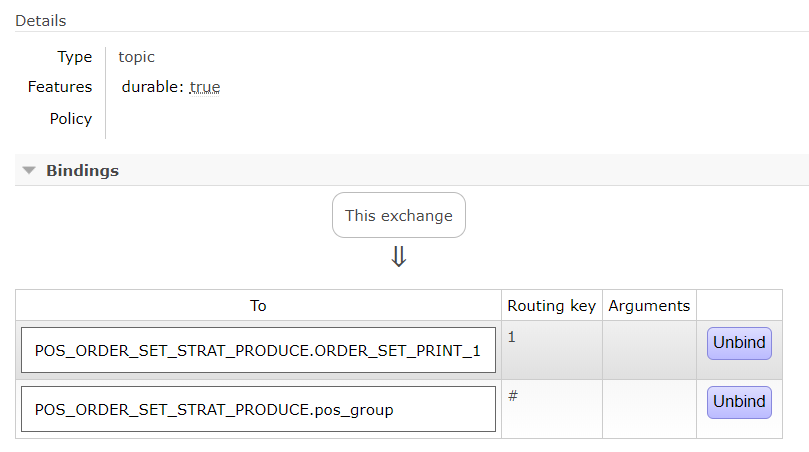
上面的配置文件配置了一个动态的基于shopId做路由的生产者配置,一个消费全部路由键的消费者,如果要配置指定路由键的可以在配置文件里设置bindingRoutingKey属性的值。
生产者java代码:
1import org.springframework.messaging.MessageChannel;
2import org.springframework.messaging.support.MessageBuilder;
3
4import com.alibaba.fastjson.JSON;
5import com.alibaba.fastjson.JSONObject;
6import com.longge.pos.production.mq.dto.OrderSetProductionMsg;
7
8import lombok.extern.slf4j.Slf4j;
9
10@Slf4j
11public class MqSendUtil {
12    private static MessageChannel orderSetStartProduceChannel;
13
14    public static void setSfOrderCreateChannel(MessageChannel channel) {
15        sfOrderCreateProduceChannel = channel;
16    }
17
18    public static void sendOrderSetPrintMsg(OrderSetProductionMsg msg) {
19        // add kv pair - routingkeyexpression (which matches 'type') will then evaluate
20        // and add the value as routing key
21        log.info("发送开始生产的MQ:{}", JSONObject.toJSONString(msg));
22        orderSetStartProduceChannel.send(MessageBuilder.withPayload(JSON.toJSONString(msg)).setHeader("shopId", msg.getOrderSet().getShopId()).build());
23        //orderSetStartProduceChannel.send(MessageBuilder.withPayload(JSON.toJSONString(msg)).build());
24    }
25}
动态路由的核心在于上面那个红色的字体的地方,这个是和配置文件里的 routingKeyExpression 的配置是匹配的。