
数据库连接池负责分配、管理和释放数据库连接,它允许应用程序重复使用一个现有的数据库连接,而不是再重新建立一个;释放空闲时间超过最大空闲时间的数据库连接来避免因为没有释放数据库连接而引起的数据库连接遗漏。通过数据库连接池能明显提高对数据库操作的性能。在Java应用程序开发中,常用的连接池有DBCP、C3P0、Proxool等。
Spring Boot默认提供了若干种可用的连接池,默认的数据源是:org.apache.tomcat.jdbc.pool.DataSource。而Druid是阿里系提供的一个开源连接池,除在连接池之外,Druid还提供了非常优秀的数据库监控和扩展功能。在此,根据项目实践中的应用,讲解如何实现Spring Boot与Druid连接池的集成。
Druid介绍
Druid是阿里开源的一个JDBC应用组件, 其包括三部分:
- DruidDriver: 代理Driver,能够提供基于Filter-Chain模式的插件体系。
- DruidDataSource: 高效可管理的数据库连接池。
- SQLParser: 实用的SQL语法分析
通过Druid连接池中间件, 我们可以实现:
- 可以监控数据库访问性能,Druid内置提供了一个功能强大的StatFilter插件,能够详细统计SQL的执行性能,这对于线上分析数据库访问性能有帮助。
- 替换传统的DBCP和C3P0连接池中间件。Druid提供了一个高效、功能强大、可扩展性好的数据库连接池。
- 数据库密码加密。直接把数据库密码写在配置文件中,容易导致安全问题。DruidDruiver和DruidDataSource都支持PasswordCallback。
- SQL执行日志,Druid提供了不同的LogFilter,能够支持Common-Logging、Log4j和JdkLog,你可以按需要选择相应的LogFilter,监控你应用的数据库访问情况。
- 扩展JDBC,如果你要对JDBC层有编程的需求,可以通过Druid提供的Filter-Chain机制,很方便编写JDBC层的扩展插件。
更多详细信息参考官方文档:https://github.com/alibaba/druid/wiki
添加依赖
添加 druid 相关的 maven 依赖。
1<dependency>
2   <groupId>com.alibaba</groupId>
3   <artifactId>druid-spring-boot-starter</artifactId>
4   <version>1.1.10</version>
5</dependency>
Druid Spring Boot Starter 是阿里官方提供的 Spring Boot 插件,用于帮助在Spring Boot项目中轻松集成Druid数据库连接池和监控。
更多资料参考:
Druid: https://github.com/alibaba/druid
Druid Spring Starter: https://github.com/alibaba/druid/tree/master/druid-spring-boot-starter
添加配置
把原有的数据源配置替换成 druid 数据源并配置数据源相关参数。
kitty-boot/application.yml
1# Tomcat
2server:
3  tomcat:
4    uri-encoding: UTF-8
5    max-threads: 1000
6    min-spare-threads: 30
7  port: 8088
8    #context-path: /kitty-admin
9
10# DataSource
11spring:
12  datasource:
13    name: druidDataSource
14    type: com.alibaba.druid.pool.DruidDataSource
15    druid:
16      driver-class-name: com.mysql.jdbc.Driver
17      url: jdbc:mysql://localhost:3306/kitty?useUnicode=true&zeroDateTimeBehavior=convertToNull&autoReconnect=true&characterEncoding=utf-8
18      username: root
19      password: 123456
20      filters: stat,wall,log4j,config
21      max-active: 100
22      initial-size: 1
23      max-wait: 60000
24      min-idle: 1
25      time-between-eviction-runs-millis: 60000
26      min-evictable-idle-time-millis: 300000
27      validation-query: select 'x'
28      test-while-idle: true
29      test-on-borrow: false
30      test-on-return: false
31      pool-prepared-statements: true
32      max-open-prepared-statements: 50
33      max-pool-prepared-statement-per-connection-size: 20
参数说明:
- spring.datasource.druid.max-active 最大连接数
- spring.datasource.druid.initial-size 初始化大小
- spring.datasource.druid.min-idle 最小连接数
- spring.datasource.druid.max-wait 获取连接等待超时时间
- spring.datasource.druid.time-between-eviction-runs-millis 间隔多久才进行一次检测,检测需要关闭的空闲连接,单位是毫秒
- spring.datasource.druid.min-evictable-idle-time-millis 一个连接在池中最小生存的时间,单位是毫秒
- spring.datasource.druid.filters=config,stat,wall,log4j 配置监控统计拦截的filters,去掉后监控界面SQL无法进行统计,’wall’用于防火墙
Druid提供以下几种Filter信息:
Filter类名
别名
default
com.alibaba.druid.filter.stat.StatFilter
stat
com.alibaba.druid.filter.stat.StatFilter
mergeStat
com.alibaba.druid.filter.stat.MergeStatFilter
encoding
com.alibaba.druid.filter.encoding.EncodingConvertFilter
log4j
com.alibaba.druid.filter.logging.Log4jFilter
log4j2
com.alibaba.druid.filter.logging.Log4j2Filter
slf4j
com.alibaba.druid.filter.logging.Slf4jLogFilter
commonlogging
com.alibaba.druid.filter.logging.CommonsLogFilter
wall
com.alibaba.druid.wall.WallFilter
自定义配置属性
如果需要通过定制的配置文件对druid进行自定义属性配置,添加配置类如下:
1package com.louis.kitty.boot.config;
2
3import org.springframework.boot.context.properties.ConfigurationProperties;
4
5@ConfigurationProperties(prefix = "spring.datasource.druid")
6public class DruidDataSourceProperties {
7
8    // jdbc
9    private String driverClassName;
10    private String url;
11    private String username;
12    private String password;
13    // jdbc connection pool
14    private int initialSize;
15    private int minIdle;
16    private int maxActive = 100;
17    private long maxWait;
18    private long timeBetweenEvictionRunsMillis;
19    private long minEvictableIdleTimeMillis;
20    private String validationQuery;
21    private boolean testWhileIdle;
22    private boolean testOnBorrow;
23    private boolean testOnReturn;
24    private boolean poolPreparedStatements;
25    private int maxPoolPreparedStatementPerConnectionSize;
26    // filter
27    private String filters;
28
29    public int getInitialSize() {
30        return initialSize;
31    }
32
33    public void setInitialSize(int initialSize) {
34        this.initialSize = initialSize;
35    }
36
37    public int getMinIdle() {
38        return minIdle;
39    }
40
41    public void setMinIdle(int minIdle) {
42        this.minIdle = minIdle;
43    }
44
45    public int getMaxActive() {
46        return maxActive;
47    }
48
49    public void setMaxActive(int maxActive) {
50        this.maxActive = maxActive;
51    }
52
53    public long getMaxWait() {
54        return maxWait;
55    }
56
57    public void setMaxWait(long maxWait) {
58        this.maxWait = maxWait;
59    }
60
61    public long getTimeBetweenEvictionRunsMillis() {
62        return timeBetweenEvictionRunsMillis;
63    }
64
65    public void setTimeBetweenEvictionRunsMillis(long timeBetweenEvictionRunsMillis) {
66        this.timeBetweenEvictionRunsMillis = timeBetweenEvictionRunsMillis;
67    }
68
69    public long getMinEvictableIdleTimeMillis() {
70        return minEvictableIdleTimeMillis;
71    }
72
73    public void setMinEvictableIdleTimeMillis(long minEvictableIdleTimeMillis) {
74        this.minEvictableIdleTimeMillis = minEvictableIdleTimeMillis;
75    }
76
77    public String getValidationQuery() {
78        return validationQuery;
79    }
80
81    public void setValidationQuery(String validationQuery) {
82        this.validationQuery = validationQuery;
83    }
84
85    public boolean isTestWhileIdle() {
86        return testWhileIdle;
87    }
88
89    public void setTestWhileIdle(boolean testWhileIdle) {
90        this.testWhileIdle = testWhileIdle;
91    }
92
93    public boolean isTestOnBorrow() {
94        return testOnBorrow;
95    }
96
97    public void setTestOnBorrow(boolean testOnBorrow) {
98        this.testOnBorrow = testOnBorrow;
99    }
100
101    public boolean isTestOnReturn() {
102        return testOnReturn;
103    }
104
105    public void setTestOnReturn(boolean testOnReturn) {
106        this.testOnReturn = testOnReturn;
107    }
108
109    public boolean isPoolPreparedStatements() {
110        return poolPreparedStatements;
111    }
112
113    public void setPoolPreparedStatements(boolean poolPreparedStatements) {
114        this.poolPreparedStatements = poolPreparedStatements;
115    }
116
117    public int getMaxPoolPreparedStatementPerConnectionSize() {
118        return maxPoolPreparedStatementPerConnectionSize;
119    }
120
121    public void setMaxPoolPreparedStatementPerConnectionSize(int maxPoolPreparedStatementPerConnectionSize) {
122        this.maxPoolPreparedStatementPerConnectionSize = maxPoolPreparedStatementPerConnectionSize;
123    }
124
125    public String getFilters() {
126        return filters;
127    }
128
129    public void setFilters(String filters) {
130        this.filters = filters;
131    }
132
133    public String getDriverClassName() {
134        return driverClassName;
135    }
136
137    public void setDriverClassName(String driverClassName) {
138        this.driverClassName = driverClassName;
139    }
140
141    public String getUrl() {
142        return url;
143    }
144
145    public void setUrl(String url) {
146        this.url = url;
147    }
148
149    public String getUsername() {
150        return username;
151    }
152
153    public void setUsername(String username) {
154        this.username = username;
155    }
156
157    public String getPassword() {
158        return password;
159    }
160
161    public void setPassword(String password) {
162        this.password = password;
163    }
164
165}
Druid Spring Starter 简化了很多配置,如果默认配置满足不了你的需求,可以自定义配置。更多配置参考:
Druid Spring Starter: https://github.com/alibaba/druid/tree/master/druid-spring-boot-starter
配置Servlet和Filter
1package com.louis.kitty.boot.config;
2
3import java.sql.SQLException;
4
5import javax.servlet.Filter;
6import javax.servlet.Servlet;
7import javax.sql.DataSource;
8
9import org.springframework.beans.factory.annotation.Autowired;
10import org.springframework.boot.autoconfigure.condition.ConditionalOnMissingBean;
11import org.springframework.boot.context.properties.EnableConfigurationProperties;
12import org.springframework.boot.web.servlet.FilterRegistrationBean;
13import org.springframework.boot.web.servlet.ServletRegistrationBean;
14import org.springframework.context.annotation.Bean;
15import org.springframework.context.annotation.Configuration;
16
17import com.alibaba.druid.pool.DruidDataSource;
18import com.alibaba.druid.support.http.StatViewServlet;
19import com.alibaba.druid.support.http.WebStatFilter;
20
21@Configuration
22@EnableConfigurationProperties({DruidDataSourceProperties.class})
23public class DruidConfig {
24    @Autowired
25    private DruidDataSourceProperties properties;
26
27    @Bean
28    @ConditionalOnMissingBean
29    public DataSource druidDataSource() {
30        DruidDataSource druidDataSource = new DruidDataSource();
31        druidDataSource.setDriverClassName(properties.getDriverClassName());
32        druidDataSource.setUrl(properties.getUrl());
33        druidDataSource.setUsername(properties.getUsername());
34        druidDataSource.setPassword(properties.getPassword());
35        druidDataSource.setInitialSize(properties.getInitialSize());
36        druidDataSource.setMinIdle(properties.getMinIdle());
37        druidDataSource.setMaxActive(properties.getMaxActive());
38        druidDataSource.setMaxWait(properties.getMaxWait());
39        druidDataSource.setTimeBetweenEvictionRunsMillis(properties.getTimeBetweenEvictionRunsMillis());
40        druidDataSource.setMinEvictableIdleTimeMillis(properties.getMinEvictableIdleTimeMillis());
41        druidDataSource.setValidationQuery(properties.getValidationQuery());
42        druidDataSource.setTestWhileIdle(properties.isTestWhileIdle());
43        druidDataSource.setTestOnBorrow(properties.isTestOnBorrow());
44        druidDataSource.setTestOnReturn(properties.isTestOnReturn());
45        druidDataSource.setPoolPreparedStatements(properties.isPoolPreparedStatements());
46        druidDataSource.setMaxPoolPreparedStatementPerConnectionSize(properties.getMaxPoolPreparedStatementPerConnectionSize());
47
48        try {
49            druidDataSource.setFilters(properties.getFilters());
50            druidDataSource.init();
51        } catch (SQLException e) {
52            e.printStackTrace();
53        }
54
55        return druidDataSource;
56    }
57
58    /**
59     * 注册Servlet信息, 配置监控视图
60     *
61     * @return
62     */
63    @Bean
64    @ConditionalOnMissingBean
65    public ServletRegistrationBean<Servlet> druidServlet() {
66        ServletRegistrationBean<Servlet> servletRegistrationBean = new ServletRegistrationBean<Servlet>(new StatViewServlet(), "/druid/*");
67
68        //白名单:
69        servletRegistrationBean.addInitParameter("allow","192.168.1.195");
70        //IP黑名单 (存在共同时,deny优先于allow) : 如果满足deny的话提示:Sorry, you are not permitted to view this page.
71        servletRegistrationBean.addInitParameter("deny","192.168.1.119");
72        //登录查看信息的账号密码, 用于登录Druid监控后台
73        servletRegistrationBean.addInitParameter("loginUsername", "admin");
74        servletRegistrationBean.addInitParameter("loginPassword", "admin");
75        //是否能够重置数据.
76        servletRegistrationBean.addInitParameter("resetEnable", "true");
77        return servletRegistrationBean;
78
79    }
80
81    /**
82     * 注册Filter信息, 监控拦截器
83     *
84     * @return
85     */
86    @Bean
87    @ConditionalOnMissingBean
88    public FilterRegistrationBean<Filter> filterRegistrationBean() {
89        FilterRegistrationBean<Filter> filterRegistrationBean = new FilterRegistrationBean<Filter>();
90        filterRegistrationBean.setFilter(new WebStatFilter());
91        filterRegistrationBean.addUrlPatterns("/*");
92        filterRegistrationBean.addInitParameter("exclusions", "*.js,*.gif,*.jpg,*.png,*.css,*.ico,/druid/*");
93        return filterRegistrationBean;
94    }
95}
说明:
- @EnableConfigurationProperties({DruidDataSourceProperties.class}) 用于导入上一步Druid的配置信息
- public ServletRegistrationBean druidServlet() 相当于Web Servlet配置
- public FilterRegistrationBean filterRegistrationBean() 相当于Web Filter配置
如果不使用上述的Servlet和Filter配置, 也可以通过下述监控器配置实现:
配置监控拦截器(相当于FilterRegistrationBean)
1package com.louis.kitty.boot.config;
2
3import javax.servlet.annotation.WebFilter;
4import javax.servlet.annotation.WebInitParam;
5
6import com.alibaba.druid.support.http.WebStatFilter;
7
8/**
9 * 配置监控拦截器, druid监控拦截器
10 */
11@WebFilter(filterName="druidWebStatFilter",
12urlPatterns="/*",
13initParams={
14    @WebInitParam(name="exclusions",value="*.js,*.gif,*.jpg,*.bmp,*.png,*.css,*.ico,/druid/*"), // 忽略资源
15})
16public class DruidStatFilter extends WebStatFilter {
17
18}
配置Druid监控视图(相当于ServletRegistrationBean)
1package com.louis.kitty.boot.config;
2
3import javax.servlet.annotation.WebInitParam;
4import javax.servlet.annotation.WebServlet;
5
6import com.alibaba.druid.support.http.StatViewServlet;
7
8/**
9 * druid监控视图配置
10 */
11@WebServlet(urlPatterns = "/druid/*", initParams={
12    @WebInitParam(name="allow",value="192.168.6.195"),    // IP白名单 (没有配置或者为空,则允许所有访问)
13    @WebInitParam(name="deny",value="192.168.6.73"),    // IP黑名单 (存在共同时,deny优先于allow)
14    @WebInitParam(name="loginUsername",value="admin"),    // 用户名
15    @WebInitParam(name="loginPassword",value="admin"),    // 密码
16    @WebInitParam(name="resetEnable",value="true")    // 禁用HTML页面上的“Reset All”功能
17})
18public class DruidStatViewServlet extends StatViewServlet {
19    private static final long serialVersionUID = 7359758657306626394L;
20}
启动问题
启动应用,发现出错了,错误内容大致如下,提示 log4j 相关的类查找不到,然后查看依赖,发现确实没有 log4j 的依赖,有些奇怪,尝试了一下,也没发现其他办法,手动加一下吧。
1org.springframework.beans.factory.UnsatisfiedDependencyException: Error creating bean with name 'mybatisConfig': Unsatisfied dependency expressed through field 'dataSource'; nested exception is org.springframework.beans.factory.BeanCreationException: Error creating bean with name 'druidDataSource' defined in class path resource [com/louis/kitty/boot/config/DruidConfig.class]: Bean instantiation via factory method failed; nested exception is org.springframework.beans.BeanInstantiationException: Failed to instantiate [javax.sql.DataSource]: Factory method 'druidDataSource' threw exception; nested exception is java.lang.NoClassDefFoundError: org/apache/log4j/Priority
2    at org.springframework.beans.factory.annotation.AutowiredAnnotationBeanPostProcessor$AutowiredFieldElement.inject(AutowiredAnnotationBeanPostProcessor.java:586) ~[spring-beans-5.0.8.RELEASE.jar:5.0.8.RELEASE]
3    at org.springframework.beans.factory.annotation.InjectionMetadata.inject(InjectionMetadata.java:91) ~[spring-beans-5.0.8.RELEASE.jar:5.0.8.RELEASE]
4    at org.springframework.beans.factory.annotation.AutowiredAnnotationBeanPostProcessor.postProcessPropertyValues(AutowiredAnnotationBeanPostProcessor.java:372) ~[spring-beans-5.0.8.RELEASE.jar:5.0.8.RELEASE]
5    at org.springframework.beans.factory.support.AbstractAutowireCapableBeanFactory.populateBean(AbstractAutowireCapableBeanFactory.java:1341) ~[spring-beans-5.0.8.RELEASE.jar:5.0.8.RELEASE]
6    at org.springframework.beans.factory.support.AbstractAutowireCapableBeanFactory.doCreateBean(AbstractAutowireCapableBeanFactory.java:572) ~[spring-beans-5.0.8.RELEASE.jar:5.0.8.RELEASE]
7    at org.springframework.beans.factory.support.AbstractAutowireCapableBeanFactory.createBean(AbstractAutowireCapableBeanFactory.java:495) ~[spring-beans-5.0.8.RELEASE.jar:5.0.8.RELEASE]
8    at org.springframework.beans.factory.support.AbstractBeanFactory.lambda$doGetBean$0(AbstractBeanFactory.java:317) ~[spring-beans-5.0.8.RELEASE.jar:5.0.8.RELEASE]
9    at org.springframework.beans.factory.support.DefaultSingletonBeanRegistry.getSingleton(DefaultSingletonBeanRegistry.java:222) ~[spring-beans-5.0.8.RELEASE.jar:5.0.8.RELEASE]
10    at org.springframework.beans.factory.support.AbstractBeanFactory.doGetBean(AbstractBeanFactory.java:315) ~[spring-beans-5.0.8.RELEASE.jar:5.0.8.RELEASE]
11    at org.springframework.beans.factory.support.AbstractBeanFactory.getBean(AbstractBeanFactory.java:199) ~[spring-beans-5.0.8.RELEASE.jar:5.0.8.RELEASE]
12    at org.springframework.beans.factory.support.DefaultListableBeanFactory.preInstantiateSingletons(DefaultListableBeanFactory.java:759) ~[spring-beans-5.0.8.RELEASE.jar:5.0.8.RELEASE]
13    at org.springframework.context.support.AbstractApplicationContext.finishBeanFactoryInitialization(AbstractApplicationContext.java:869) ~[spring-context-5.0.8.RELEASE.jar:5.0.8.RELEASE]
14    at org.springframework.context.support.AbstractApplicationContext.refresh(AbstractApplicationContext.java:550) ~[spring-context-5.0.8.RELEASE.jar:5.0.8.RELEASE]
15    at org.springframework.boot.web.servlet.context.ServletWebServerApplicationContext.refresh(ServletWebServerApplicationContext.java:140) ~[spring-boot-2.0.4.RELEASE.jar:2.0.4.RELEASE]
16    at org.springframework.boot.SpringApplication.refresh(SpringApplication.java:762) [spring-boot-2.0.4.RELEASE.jar:2.0.4.RELEASE]
17    at org.springframework.boot.SpringApplication.refreshContext(SpringApplication.java:398) [spring-boot-2.0.4.RELEASE.jar:2.0.4.RELEASE]
18    at org.springframework.boot.SpringApplication.run(SpringApplication.java:330) [spring-boot-2.0.4.RELEASE.jar:2.0.4.RELEASE]
19    at org.springframework.boot.SpringApplication.run(SpringApplication.java:1258) [spring-boot-2.0.4.RELEASE.jar:2.0.4.RELEASE]
20    at org.springframework.boot.SpringApplication.run(SpringApplication.java:1246) [spring-boot-2.0.4.RELEASE.jar:2.0.4.RELEASE]
21    at com.louis.kitty.boot.KittyApplication.main(KittyApplication.java:10) [classes/:na]
...
Caused by: java.lang.ClassNotFoundException: org.apache.log4j.Priority
at java.net.URLClassLoader.findClass(URLClassLoader.java:381) ~[na:1.8.0_131]
at java.lang.ClassLoader.loadClass(ClassLoader.java:424) ~[na:1.8.0_131]
at sun.misc.Launcher$AppClassLoader.loadClass(Launcher.java:335) ~[na:1.8.0_131]
at java.lang.ClassLoader.loadClass(ClassLoader.java:357) ~[na:1.8.0_131]
... 49 common frames omitted
添加 log4j 依赖
在 kitty-boot/pom.xml 添加 log4j 依赖,最新版本是 1.2.17。
1<!-- log4j -->
2<dependency>
3    <groupId>log4j</groupId>
4    <artifactId>log4j</artifactId>
5    <version>1.2.17</version>
6</dependency>
添加 log4j 配置
在 kitty-boot/resources 目录下,新建一个 log4j.properties 参数配置文件,并键入如下内容:
1### set log levels ###
2log4j.rootLogger = INFO,DEBUG, console, infoFile, errorFile ,debugfile,mail
3LocationInfo=true
4
5log4j.appender.console = org.apache.log4j.ConsoleAppender
6log4j.appender.console.Target = System.out
7log4j.appender.console.layout = org.apache.log4j.PatternLayout
8
9log4j.appender.console.layout.ConversionPattern =[%d{yyyy-MM-dd HH:mm:ss,SSS}]-[%p]:%m   %x %n
10
11log4j.appender.infoFile = org.apache.log4j.DailyRollingFileAppender
12log4j.appender.infoFile.Threshold = INFO
13log4j.appender.infoFile.File = D:/logs/log
14log4j.appender.infoFile.DatePattern = '.'yyyy-MM-dd'.log'
15log4j.appender.infoFile.Append=true
16log4j.appender.infoFile.layout = org.apache.log4j.PatternLayout
17log4j.appender.infoFile.layout.ConversionPattern =[%d{yyyy-MM-dd HH:mm:ss,SSS}]-[%p]:%m  %x %n
18
19log4j.appender.errorFile = org.apache.log4j.DailyRollingFileAppender
20log4j.appender.errorFile.Threshold = ERROR
21log4j.appender.errorFile.File = D:/logs/error
22log4j.appender.errorFile.DatePattern = '.'yyyy-MM-dd'.log'
23log4j.appender.errorFile.Append=true
24log4j.appender.errorFile.layout = org.apache.log4j.PatternLayout
25log4j.appender.errorFile.layout.ConversionPattern =[%d{yyyy-MM-dd HH:mm:ss,SSS}]-[%p]:%m  %x %n
26
27#log4j.appender.debugfile = org.apache.log4j.DailyRollingFileAppender
28#log4j.appender.debugfile.Threshold = DEBUG
29#log4j.appender.debugfile.File = D:/logs/debug
30#log4j.appender.debugfile.DatePattern = '.'yyyy-MM-dd'.log'
31#log4j.appender.debugfile.Append=true
32#log4j.appender.debugfile.layout = org.apache.log4j.PatternLayout
33#log4j.appender.debugfile.layout.ConversionPattern =[%d{yyyy-MM-dd HH:mm:ss,SSS}]-[%p]:%m  %x %n
配置完成后,重新编译启动,发现已经可以启动了。按理说,Spring Boot 已经集成了 log4j, 这个问题出现的有点奇怪,有知道答案的朋友,欢迎赐教,感激不尽。
查看监控
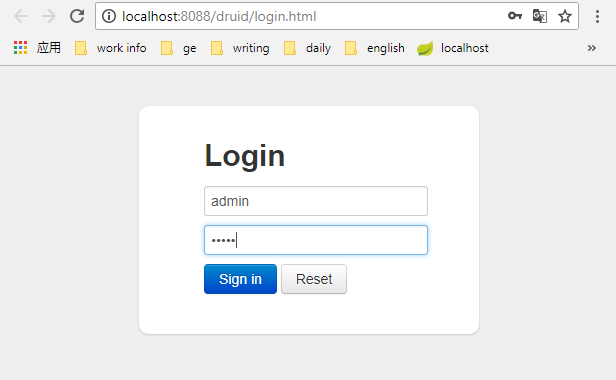
登录界面
启动应用,访问: http://localhost:8088/druid/login.html, 进入Druid监控后台页面。
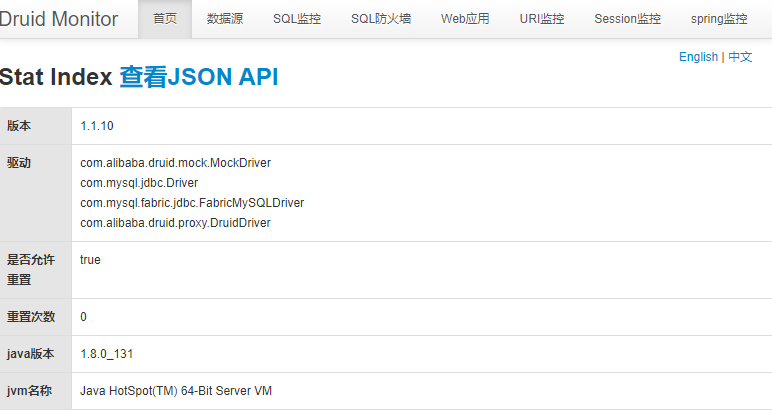
登录首页
首页信息。
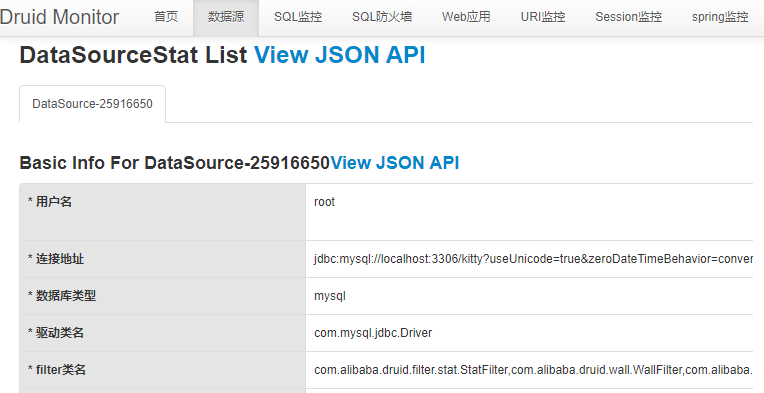
数据源
显示连接数据源的相关信息。
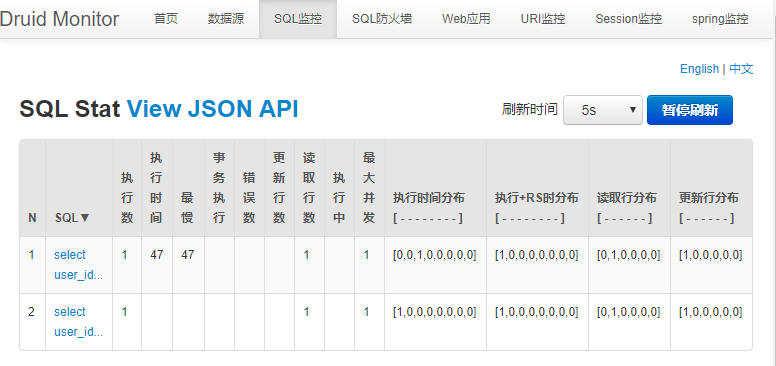
SQL监控
分别访问下面两个接口之后,SQL监控的记录结果。
http://localhost:8088/user/findByUserId?userId=1
http://localhost:8088/user/findAll
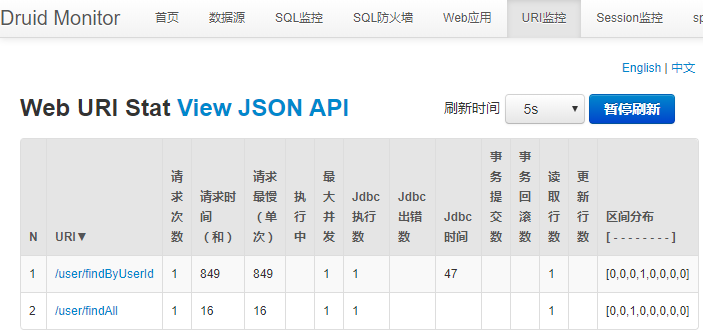
URI监控
分别访问下面两个接口之后,URI监控的记录结果。
http://localhost:8088/user/findByUserId?userId=1
http://localhost:8088/user/findAll
参考资料
https://github.com/alibaba/druid/wiki
https://blog.csdn.net/garyond/article/details/80189939
https://github.com/alibaba/druid/tree/master/druid-spring-boot-starter
源码下载
后端:https://gitee.com/liuge1988/kitty
前端:https://gitee.com/liuge1988/kitty-ui.git
作者:朝雨忆轻尘
出处:https://www.cnblogs.com/xifengxiaoma/
版权所有,欢迎转载,转载请注明原文作者及出处。