
作者:京东工业 孙磊
一、认识Caffeine
1、Caffeine是什么?
Caffeine是一个基于Java8开发的提供了近乎最佳命中率的高性能的缓存库, 也是SpringBoot内置的本地缓存实现。
2、Caffeine提供了灵活的构造器去创建一个拥有下列特性的缓存:
•自动加载条目到缓存中,可选异步方式
•可以基于大小剔除
•可以设置过期时间,时间可以从上次访问或上次写入开始计算
•异步刷新
•keys自动包装在弱引用中
•values自动包装在弱引用或软引用中
•条目剔除通知
•缓存访问统计
3、核心类和参数
核心工具类:Caffeine是创建高性能缓存的基类。
核心参数:
maximumSize:缓存最大值
maximumWeight:缓存最大权重,权重和最大值不能同时设置
initialCapacity:缓存初始容量
expireAfterWriteNanos:在写入多少纳秒没更新后过期
expireAfterAccessNanos:在访问多少纳秒没更新后过期
refreshAfterWriteNanos:写入多少纳秒没更新后更新
二、数据加载
Caffeine提供了四种缓存添加策略
1、手动加载
1public static void demo() {
2    Cache<String, String> cache =
3            Caffeine.newBuilder()
4                    .expireAfterAccess(Duration.ofMinutes(1))
5                    .maximumSize(100)
6                    .recordStats()
7                    .build();
8
9    // 插入数据
10    cache.put("a", "a");
11    // 查询某个key,如果没有返回空
12    String a = cache.getIfPresent("a");
13    System.out.println(a);
14    // 查找缓存,如果缓存不存在则生成缓存元素,  如果无法生成则返回null
15    String b = cache.get("b", k -> {
16        System.out.println("begin query ..." + Thread.currentThread().getName());
17        try {
18            Thread.sleep(1000);
19        } catch (InterruptedException e) {
20        }
21        System.out.println("end query ...");
22        return UUID.randomUUID().toString();
23    });
24    System.out.println(b);
25
26    // 移除一个缓存元素
27    cache.invalidate("a");
28}
2、自动加载
1public static void demo() {
2
3        LoadingCache<String, String> loadingCache = Caffeine.newBuilder()
4                .maximumSize(100)
5                .expireAfterWrite(10, TimeUnit.MINUTES)
6                .build(new CacheLoader() {
7
8                    @Nullable
9                    @Override
10                    public Object load(@NonNull Object key) throws Exception {
11                        return createExpensiveValue();
12                    }
13
14                    @Override
15                    public @NonNull Map loadAll(@NonNull Iterable keys) throws Exception {
16
17                        if (keys == null) {
18                            return Collections.emptyMap();
19                        }
20                        Map<String, String> map = new HashMap<>();
21                        for (Object key : keys) {
22                            map.put((String) key, createExpensiveValue());
23                        }
24                        return map;
25                    }
26                });
27
28        // 查找缓存,如果缓存不存在则生成缓存元素,  如果无法生成则返回null
29        String a = loadingCache.get("a");
30        System.out.println(a);
31
32        // 批量查找缓存,如果缓存不存在则生成缓存元素
33        Set<String> keys = new HashSet<>();
34        keys.add("a");
35        keys.add("b");
36        Map<String, String> allValues = loadingCache.getAll(keys);
37        System.out.println(allValues);
38    }
39
40    private static String createExpensiveValue() {
41        {
42            System.out.println("begin query ..." + Thread.currentThread().getName());
43            try {
44                Thread.sleep(1000);
45            } catch (InterruptedException e) {
46            }
47            System.out.println("end query ...");
48            return UUID.randomUUID().toString();
49        }
50    }
一个LoadingCache是Cache附加一个CacheLoader能力之后的缓存实现。
getAll方法中,将会对每个key调用一次CacheLoader.load来生成元素,当批量查询效率更高的时候,你可以自定义loadAll方法实现。
3、手动异步加载
1public static void demo() throws ExecutionException, InterruptedException {
2    AsyncCache<String,String> asyncCache = Caffeine.newBuilder()
3            .maximumSize(100)
4            .buildAsync();
5
6    // 添加或者更新一个缓存元素
7    asyncCache.put("a",CompletableFuture.completedFuture("a"));
8
9    // 查找一个缓存元素, 没有查找到的时候返回null
10    CompletableFuture<String> a = asyncCache.getIfPresent("a");
11    System.out.println(a.get());
12
13    // 查找缓存元素,如果不存在,则异步生成
14    CompletableFuture<String> completableFuture = asyncCache.get("b", k ->createExpensiveValue("b"));
15
16    System.out.println(completableFuture.get());
17
18    // 移除一个缓存元素
19    asyncCache.synchronous().invalidate("a");
20    System.out.println(asyncCache.getIfPresent("a"));
21}
22
23private static String createExpensiveValue(String key) {
24    {
25        System.out.println("begin query ..." + Thread.currentThread().getName());
26        try {
27            Thread.sleep(1000);
28        } catch (InterruptedException e) {
29        }
30        System.out.println("end query ...");
31        return UUID.randomUUID().toString();
32    }
33}
一个AsyncCache是 Cache的一个变体,AsyncCache提供了在 Executor上生成缓存元素并返回 CompletableFuture的能力。这给出了在当前流行的响应式编程模型中利用缓存的能力。
synchronous()方法给 Cache提供了阻塞直到异步缓存生成完毕的能力。
异步缓存默认的线程池实现是 ForkJoinPool.commonPool() ,你也可以通过覆盖并实现 Caffeine.executor(Executor)方法来自定义你的线程池选择。
4、自动异步加载
1public static void demo() throws ExecutionException, InterruptedException {
2
3    AsyncLoadingCache<String, String> cache = Caffeine.newBuilder()
4            .maximumSize(10_000)
5            .expireAfterWrite(10, TimeUnit.MINUTES)
6            // 你可以选择: 去异步的封装一段同步操作来生成缓存元素
7            //.buildAsync(key -> createExpensiveValue(key));
8            // 你也可以选择: 构建一个异步缓存元素操作并返回一个future
9            .buildAsync((key, executor) ->createExpensiveValueAsync(key, executor));
10
11    // 查找缓存元素,如果其不存在,将会异步进行生成
12    CompletableFuture<String> a = cache.get("a");
13    System.out.println(a.get());
14
15    // 批量查找缓存元素,如果其不存在,将会异步进行生成
16    Set<String> keys = new HashSet<>();
17    keys.add("a");
18    keys.add("b");
19    CompletableFuture<Map<String, String>> values = cache.getAll(keys);
20    System.out.println(values.get());
21}
22
23private static String createExpensiveValue(String key) {
24    {
25        System.out.println("begin query ..." + Thread.currentThread().getName());
26        try {
27            Thread.sleep(1000);
28        } catch (InterruptedException e) {
29        }
30        System.out.println("end query ...");
31        return UUID.randomUUID().toString();
32    }
33}
34
35private static CompletableFuture<String> createExpensiveValueAsync(String key, Executor executor) {
36    {
37        System.out.println("begin query ..." + Thread.currentThread().getName());
38        try {
39            Thread.sleep(1000);
40            executor.execute(()-> System.out.println("async create value...."));
41        } catch (InterruptedException e) {
42        }
43        System.out.println("end query ...");
44        return CompletableFuture.completedFuture(UUID.randomUUID().toString());
45    }
46}
一个 AsyncLoadingCache是一个 AsyncCache 加上 AsyncCacheLoader能力的实现。
在需要同步的方式去生成缓存元素的时候,CacheLoader是合适的选择。而在异步生成缓存的场景下, AsyncCacheLoader则是更合适的选择并且它会返回一个 CompletableFuture。
三、驱除策略
Caffeine 提供了三种驱逐策略,分别是基于容量,基于时间和基于引用三种类型;还提供了手动移除方法和监听器。
1、基于容量
1// 基于缓存容量大小,缓存中个数进行驱逐
2Cache<String, String> cache =
3        Caffeine.newBuilder()
4                .maximumSize(100)
5                .recordStats()
6                .build();
7
8// 基于缓存的权重进行驱逐
9AsyncCache<String,String> asyncCache = Caffeine.newBuilder()
10                .maximumWeight(10)
11                .buildAsync();
2、基于时间
1// 基于固定时间
2Cache<Object, Object> cache =
3        Caffeine.newBuilder()
4//距离上次访问后一分钟删除
5                .expireAfterAccess(Duration.ofMinutes(1))
6                .recordStats()
7                .build();
8
9Cache<Object, Object> cache =
10                Caffeine.newBuilder()
11// 距离上次写入一分钟后删除
12                        .expireAfterWrite(Duration.ofMinutes(1))
13                        .recordStats()
14                        .build();
15// 基于不同的过期驱逐策略
16Cache<String, String> expire =
17                Caffeine.newBuilder()
18                        .expireAfter(new Expiry<String, String>() {
19                            @Override
20                            public long expireAfterCreate(@NonNull String key, @NonNull String value, long currentTime) {
21                                return LocalDateTime.now().plusMinutes(5).getSecond();
22                            }
23
24                            @Override
25                            public long expireAfterUpdate(@NonNull String key, @NonNull String value, long currentTime, @NonNegative long currentDuration) {
26                                return currentDuration;
27                            }
28
29                            @Override
30                            public long expireAfterRead(@NonNull String key, @NonNull String value, long currentTime, @NonNegative long currentDuration) {
31                                return currentDuration;
32                            }
33                        })
34                        .recordStats()
35                        .build();
Caffeine提供了三种方法进行基于时间的驱逐:
•expireAfterAccess(long, TimeUnit): 一个值在最近一次访问后,一段时间没访问时被淘汰。
•expireAfterWrite(long, TimeUnit): 一个值在初次创建或最近一次更新后,一段时间后被淘汰。
•expireAfter(Expiry): 一个值将会在指定的时间后被认定为过期项。
3、基于引用
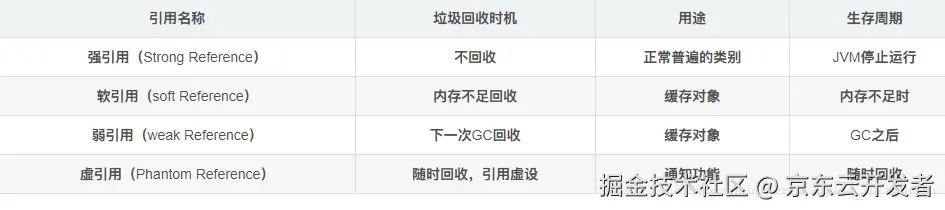
java对象引用汇总表:
1// 当key和缓存元素都不再存在其他强引用的时候驱逐
2LoadingCache<Object, Object> weak = Caffeine.newBuilder()
3        .weakKeys()
4        .weakValues()
5        .build(k ->createExpensiveValue());
6
7// 当进行GC的时候进行驱逐
8LoadingCache<Object, Object> soft = Caffeine.newBuilder()
9        .softValues()
10        .build(k ->createExpensiveValue());
weakKeys:使用弱引用存储key时,当没有其他的强引用时,则会被垃圾回收器回收。
weakValues:使用弱引用存储value时,当没有其他的强引用时,则会被垃圾回收器回收。
softValues:使用软引用存储key时,当没有其他的强引用时,内存不足时会被回收。
4、手动移除
1Cache<Object, Object> cache =
2                Caffeine.newBuilder()
3                        .expireAfterWrite(Duration.ofMinutes(1))
4                        .recordStats()
5                        .build();
6// 单个删除
7cache.invalidate("a");
8// 批量删除
9Set<String> keys = new HashSet<>();
10keys.add("a");
11keys.add("b");
12cache.invalidateAll(keys);
13
14// 失效所有key
15cache.invalidateAll();
任何时候都可以手动删除,不用等到驱逐策略生效。
5、移除监听器
1Cache<Object, Object> cache =
2        Caffeine.newBuilder()
3                .expireAfterWrite(Duration.ofMinutes(1))
4                .recordStats()
5                .evictionListener(new RemovalListener<Object, Object>() {
6                    @Override
7                    public void onRemoval(@Nullable Object key, @Nullable Object value, @NonNull RemovalCause cause) {
8                        System.out.println("element evict cause" + cause.name());
9                    }
10                })
11                .removalListener(new RemovalListener<Object, Object>() {
12                    @Override
13                    public void onRemoval(@Nullable Object key, @Nullable Object value, @NonNull RemovalCause cause) {
14                        System.out.println("element removed cause" + cause.name());
15                    }
16                }).build();
你可以为你的缓存通过Caffeine.removalListener(RemovalListener)方法定义一个移除监听器在一个元素被移除的时候进行相应的操作。这些操作是使用 Executor异步执行的,其中默认的 Executor 实现是 ForkJoinPool.commonPool()并且可以通过覆盖Caffeine.executor(Executor)方法自定义线程池的实现。
注意:Caffeine.evictionListener(RemovalListener)。这个监听器将在 RemovalCause.wasEvicted()为 true 的时候被触发。
6、驱逐原因汇总
EXPLICIT:如果原因是这个,那么意味着数据被我们手动的remove掉了 REPLACED:就是替换了,也就是put数据的时候旧的数据被覆盖导致的移除 COLLECTED:这个有歧义点,其实就是收集,也就是垃圾回收导致的,一般是用弱引用或者软引用会导致这个情况 EXPIRED:数据过期,无需解释的原因。 SIZE:个数超过限制导致的移除
四、缓存统计
Caffeine通过使用Caffeine.recordStats()方法可以打开数据收集功能,可以帮助优化缓存使用。
1// 缓存访问统计
2CacheStats stats = cache.stats();
3System.out.println("stats.hitCount():"+stats.hitCount());//命中次数
4System.out.println("stats.hitRate():"+stats.hitRate());//缓存命中率
5System.out.println("stats.missCount():"+stats.missCount());//未命中次数
6System.out.println("stats.missRate():"+stats.missRate());//未命中率
7System.out.println("stats.loadSuccessCount():"+stats.loadSuccessCount());//加载成功的次数
8System.out.println("stats.loadFailureCount():"+stats.loadFailureCount());//加载失败的次数,返回null
9System.out.println("stats.loadFailureRate():"+stats.loadFailureRate());//加载失败的百分比
10System.out.println("stats.totalLoadTime():"+stats.totalLoadTime());//总加载时间,单位ns
11System.out.println("stats.evictionCount():"+stats.evictionCount());//驱逐次数
12System.out.println("stats.evictionWeight():"+stats.evictionWeight());//驱逐的weight值总和
13System.out.println("stats.requestCount():"+stats.requestCount());//请求次数
14System.out.println("stats.averageLoadPenalty():"+stats.averageLoadPenalty());//单次load平均耗时