
LEADTOOLS v18(即LEADTOOLS Anywhere)将其世界领先的成像技术扩展到了WinRT、iOS、Android、Windows Phone和Linux等平台。不仅如此,用户还可以在所有流行平台中实现查看、注释和标记、OCR、条形码、PDF、图像格式、压缩和图像处理等功能。
LEADTOOLS在每个开发平台上面都提供了一组非常相似的开发库,这是LEADTOOLS的一个非常明显的优势,让开发者既能够开发原生的应用程序,又不用花费太多的时间进行完全的代码重写。
LEADTOOLS Anywhere功能
- 提供了专门针对.NET, HTML5, WinRT, Windows Phone, iOS, OS X和Android的图像查看器;
- 支持加载、转换和保存超过150种图像格式;
- 支持条形码读写,包括:QR码,PDF417,二维码,UPC/EAN等;
- OCR将图像转换为可搜索的文本,PDF,DOC;
- 全面的注释和标记,包括几何形状,便条,编校,亮点和橡皮图章;
- 拥有超过200多种图像处理功能,如图像增强,图像纠偏等
接下来,我们就一起展示一下LEADTOOLS Anywhere如何在每个平台上面读取条形码。
.NET
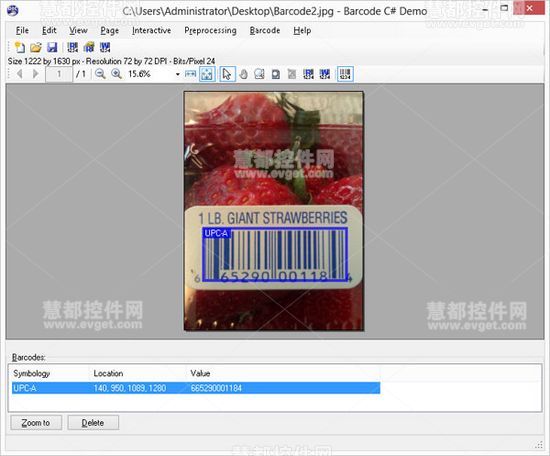
1System.Drawing.Bitmap bitmap = ... //
2// Get a LEADTOOLS RasterImage from the platform image
3RasterImage rasterImage = RasterImageConverter.FromImage(bitmap);
4// Create a LEADTOOLS Barcode Engine instance
5private BarcodeEngine barcodeEngine = new BarcodeEngine();
6// Read the first barcode found in the image
7BarcodeData barcodeData = barcodeEngine.Reader.ReadBarcode(rasterImage,
8LogicalRectangle.Empty, BarcodeSymbology.Unknown);
9// For this example, simply output the barcode type, location and data in the console
10if (barcodeData != null) {
11Console.WriteLine("Symbology:{0}", barcodeData.Symbology);
12Console.WriteLine("Location:{0},{1},{2},{3}", barcodeData.Bounds.X,
13barcodeData.Bounds.Y, barcodeData.Bounds.Width, barcodeData.Bounds.Height);
14Console.WriteLine("Value:{0}", barcodeData.Value);
15} else {
16Console.WriteLine("No barcodes found");
17}
WinRT & Windows Phone
1Windows.UI.Xaml.Media.ImageSource imageSource = ... //
2// Get a LEADTOOLS RasterImage from the platform image
3RasterImage rasterImage = RasterImageConverter.ConvertFromImageSource(
4imageSource, ConvertFromImageOptions.None);
5// Create a LEADTOOLS Barcode Engine instance
6private BarcodeEngine barcodeEngine = new BarcodeEngine();
7// Read the first barcode found in the image
8BarcodeData barcodeData = barcodeEngine.Reader.ReadBarcode(rasterImage,
9LogicalRectangle.Empty, BarcodeSymbology.Unknown);
10// For this example, simply output the barcode type, location and data in the console
11if (barcodeData != null) {
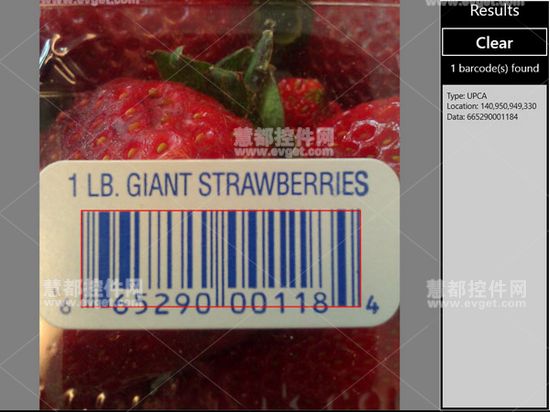
12Console.WriteLine("Symbology:{0}", barcodeData.Symbology);
13Console.WriteLine("Location:{0},{1},{2},{3}", barcodeData.Bounds.X,
14barcodeData.Bounds.Y, barcodeData.Bounds.Width, barcodeData.Bounds.Height);
15Console.WriteLine("Value:{0}", barcodeData.Value);
16} else {
17Console.WriteLine("No barcodes found");
18}
iOS & OS X
1UIImage* uiImage = ... //
2// Get a LEADTOOLS RasterImage from the platform image
3LTRasterImage* rasterImage = [LTRasterImageConverter convertFromImage:uiImage
4options:LTConvertFromImageOptions_None error:nil];
5// Create a LEADTOOLS Barcode Engine instance
6LTBarcodeEngine* barcodeEngine = [LTBarcodeEngine new];
7// Read the first barcode found in the image
8LTBarcodeData* barcodeData = [barcodeEngine.reader readBarcode:rasterImage
9searchBounds:LeadRect_Empty() symbologies:nil symbologiesCount:0 error:nil];
10// For this example, simply retrieve the barcode type, location and data
11if(barcodeData != nil) {
12NSLog(@"Symbology:%u", barcodeData.symbology);
13NSLog(@"Location:%u,%u,%u,%u", barcodeData.bounds.x, barcodeData.bounds.y,
14barcodeData.bounds.width, barcodeData.bounds.height);
15NSLog(@"Value:%@", barcodeData.value);
16} else {
17NSLog(@"No barcodes found");
18}

Android
1android.graphics.Bitmap bitmap = ... //
2// Get a LEADTOOLS RasterImage from the platform image
3RasterImage rasterImage = RasterImageConverter.convertFromBitmap(
4bitmap, ConvertFromImageOptions.NONE);
5// Create a LEADTOOLS Barcode Engine instance
6private BarcodeEngine barcodeEngine = new BarcodeEngine();
7// Read the first barcode found in the image
8BarcodeData barcodeData = barcodeEngine.getReader().readBarcode(
9rasterImage, LeadRect.getEmpty(), BarcodeSymbology.UNKNOWN);
10// For this example, simply output the barcode type, location and data in the console
11if (barcodeData != null) {
12Log.i("LEADTOOLS.BarcodeDemo", String.format("Symbology:%s", barcodeData.getSymbology()));
13Log.i("LEADTOOLS.BarcodeDemo", String.format("Location:%1$s,%2$s,%3$s,%4$s",
14barcodeData.getBounds().getX(), barcodeData.getBounds().getY(),
15barcodeData.getBounds().getWidth(), barcodeData.getBounds().getHeight()));
16Log.i("LEADTOOLS.BarcodeDemo", String.format("Value:%s", barcodeData.getValue()));
17} else {
18Log.i("LEADTOOLS.BarcodeDemo", "No barcodes found");
19}