
jdbc 执行时序图
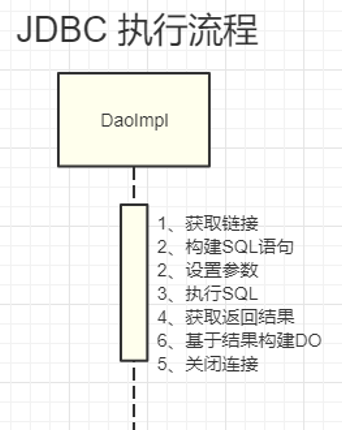
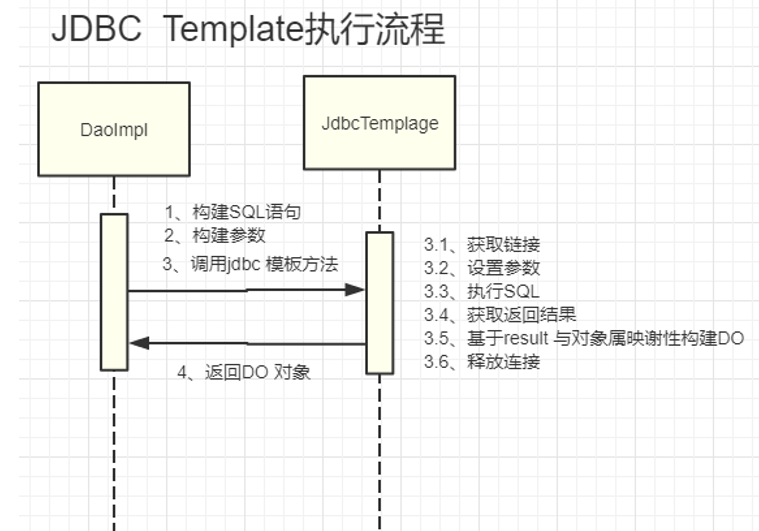
JdbcTemplate 执行时序图
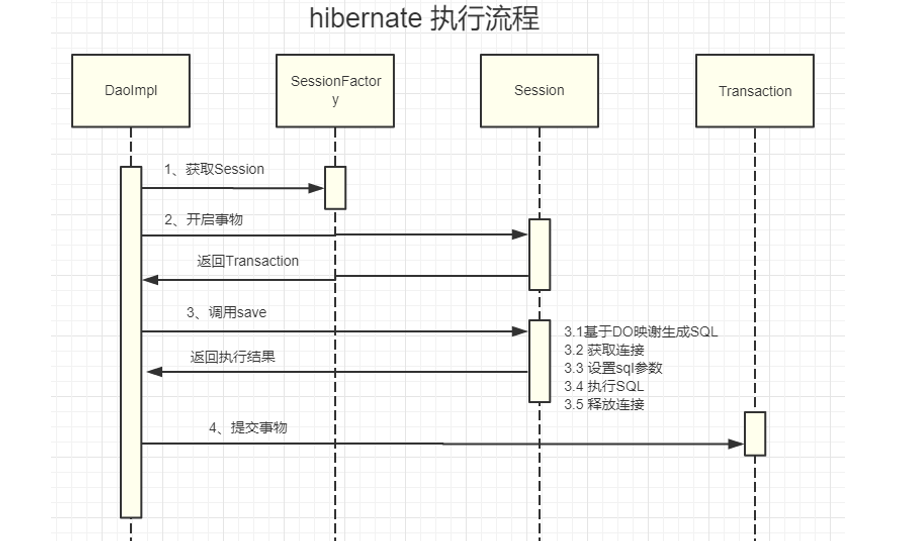
hibernate 执行流程
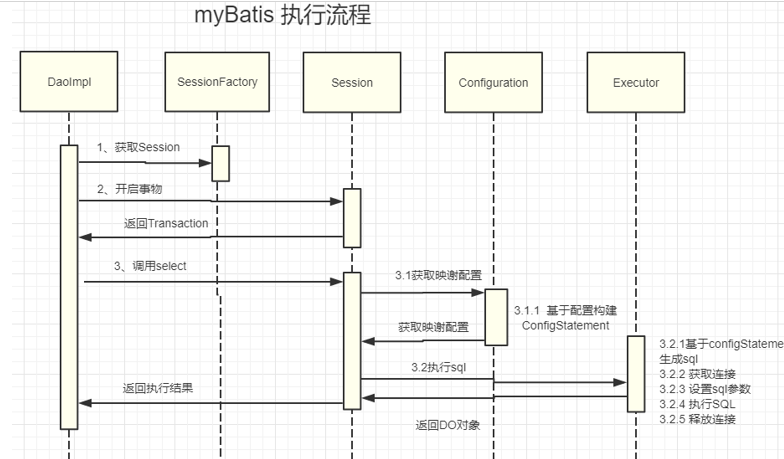
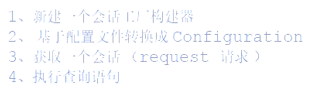
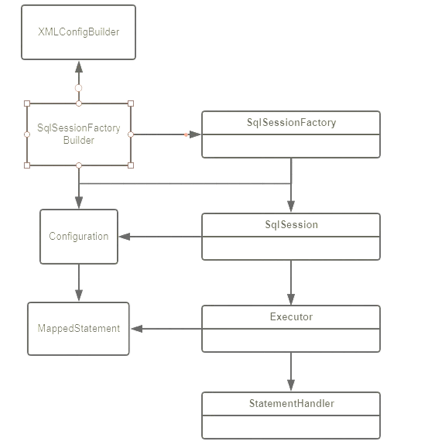
myBatis 执行流程
优点 缺点
jdbc 简单、纯粹 1、需要手动关闭链接 2、结果集不能自动映谢 jdbcTemplate 简单、纯粹、自动会话管理、结果集映谢 1、手动拼装SQL管理混乱 hirbernate 编程效率高,无需编写sql。数据库更换成本低、较完善的二级缓存、自动防SQL注入 完全掌握的门槛高、性能优化较麻烦、复杂映谢 myBatis 学习成本低、可以进行更为细致的SQL优化,减少查询字段、统一的SQL管理 功能相对简陋、需要手动编写维护SQL、表结构变更之后需要手动维护SQL与映谢
使用流程

Config 上下文配置
1、属性配置 <properties resource="app.properties"> <property name="jdbc.driver" value="com.mysql.jdbc.Driver"/> </properties> 三种设置方式:
- 构建sessionFactory 时传递 (优先级:高)
- 基于resource 属性加载 或 url 加载 (优先级:中)
- 基于 <propertite> 属性设置 (优先级:低)
2、全局参数配置 <settings> <setting name="mapUnderscoreToCamelCase" value="true" /> </settings> 具体参考:http://www.mybatis.org/mybatis-3/zh/configuration.html#settings
3、环境配置
1<environments default="development">
2<environment id="development">
3<transactionManager type="JDBC" />
4<dataSource type="POOLED" >
5<property name="driver" value="${jdbc.driver}" />
6<property name="url" value="${jdbc.url}" />
7<property name="username" value="${jdbc.username}" />
8<property name="password" value="${jdbc.password}" />
9</dataSource>
10</environment>
11</environments>
4、数据源: unpooled 普通连接,每次获取时都会重新建立一个新的连接.属性下如下: • driver :数据库驱动类 • url: URL地址 • username:用户名。 • password :登录数据库的密码。 pooled: 连接池模式,所有连接从连接池当中获取,由连接池来来进行连接的建立与回收关于等操作,除支持unpooled属性外还支持属性如下: • poolMaximumActiveConnections : 最大活跃数,默认值:10 • poolMaximumIdleConnections :最大空闲连接数 • poolMaximumCheckoutTime :获取连接超时等待最大(checked out)时间,默认值:20000 毫秒 • poolTimeToWait : 单次获取连接 最大等待时间 默认:20000 毫秒(即 20 秒)。 • poolMaximumLocalBadConnectionTolerance 获取连接重试次数 默认:3 • poolPingQuery 用于检测连接是否断开的测试 语句 • poolPingEnabled 是否通过执行poolPingQuery 语句做检测,默认值:false。 • poolPingConnectionsNotUsedFor 连接检测间隔时间 ,默认60000。 5 、typeAliases 别名配置 <typeAliases> <typeAlias type="com.tuling.dao"/> <typeAlias type="com.tuling.dao.UserInfo" alias="UserInfo"/> </typeAliases> 6、mappers 文件引入 <mappers> <mapper resource="userInfo.xml" /> <package name="com.tuling.dao"/> </mappers> 基于 mapper 引入指定资源文件: resource| url |class 基于package 引入:扫描指定包路径当下的url
mapper 映谢文件配置
mapper 常用元素 • select – 映射查询语 • insert – 映射插入语句 • update – 映射更新语句 • sql – 可被其他语句引用的可重用语句块。 • delete – 映射删除语句 • resultMap 用来描述如何从数据库结果集中来加载对象。 • cache – 给定命名空间的缓存配置。 • cache-ref – 其他命名空间缓存配置的引用。 1、<select > 查询标签 其表示一个查询语句映谢,其简单示例如下: 示例 <select id="selectUser" resultType="com.tuling.mybatis.test.UuserInfo"> select * from user_info where id = #{id} </select> 其支持属性如下: <select id="selectUser" // statement id parameterType="int" // 参数类型 resultType="hashmap"// 返回结果类别 resultMap="personResultMap" // 返回结果映谢 flushCache="false" // useCache="true" timeout="10000" fetchSize="256" statementType="PREPARED"> 参数的引用的办法 #{id, mode=in, jdbcType=INT, jdbcTypeName=MY_TYPE}
2、<insert> <update> <delete> 示例 标签 <insert id="addUser" parameterType="com.tuling.mybatis.test.UuserInfo"> INSERT INTO user_info (user_name,nick_name,password) VALUES (#{userName},#{nickName},#{password}) </insert>
<update id="updateUser" parameterType="com.tuling.mybatis.test.UuserInfo" > update user_info set user_name=#{userName} where id=#{id} </update>
<delete id="deleteUser" parameterType="int"> DELETE from user_info where id=#{id} </delete> 属性说明: <insert id="insertUuser" parameterType="com.tuling.mybatis.test.UuserInfo" flushCache="true" statementType="PREPARED" keyProperty="" keyColumn="" useGeneratedKeys="" timeout="20">
<update id="updateUuser" parameterType="com.tuling.mybatis.test.UuserInfo" flushCache="true" statementType="PREPARED" timeout="20"> <delete id="deleteUuser" parameterType="com.tuling.mybatis.test.UuserInfo" flushCache="true" statementType="PREPARED" timeout="20">3、<sql> 标签 将重复的sql 语句定文为一个字段 <sql id="base\_colume"> id,user_name,nick_name</sql> 可通过 <include > 进行引入 如: <include refid="base\_colume"/>
4、<resultMap> 标签 resultMap 是myBatis 对象的映谢 • 动态SQL配置
<if> 标签 trim (where, set) 标签 foreach 标签