
 

RSA —— JAVA代码
二话不说,先把代码实现再学习原理!
1import javax.crypto.Cipher;
2import java.security.*;
3import java.security.spec.PKCS8EncodedKeySpec;
4import java.security.spec.X509EncodedKeySpec;
5import java.util.Base64;
6
7/**
8 * @author : R&M www.rmworking.com/blog
9 *         2019/8/17 22:09
10 *         demo
11 *         org.security.utils
12 */
13public class RSAUtil {
14
15    public static void main(String[] args) throws Exception {
16        // 需要加密的数据
17        String str = "qnloft.com(青柠Loft)";
18
19        // keySize 推荐使用2046,必须使用1024以上大小,因为512已经被破解。
20        RSAUtil rsa = new RSAUtil(1024);
21        System.out.println("-------------  生成密匙对 (见图1) ---------------");
22        String publicKey = rsa.getPublicKeyString();
23        String privateKey = rsa.getPrivateKeyString();
24        System.out.println(publicKey);
25        System.out.println(privateKey);
26
27        System.out.println("--------------  加解密数据 (见图2)  ---------------");
28        // 私匙加密数据
29        byte[] encryptRes1 = RSAUtil.encryptByPrivateKey(str.getBytes(), privateKey);
30        System.out.println("私匙加密结果是:" + encodeBase64(encryptRes1));
31        // 公匙解密数据
32        byte[] decryptRes1 = RSAUtil.decryptByPublicKey(encryptRes1, publicKey);
33        assert decryptRes1 != null;
34        System.out.println("公匙解密结果是:" + new String(decryptRes1));
35
36        System.out.println("--------------  加解密数据 (见图3)  ---------------");
37        // 公匙加密数据
38        byte[] encryptRes2 = RSAUtil.encryptByPublicKey(str.getBytes(), publicKey);
39        System.out.println("公匙加密结果是:" + encodeBase64(encryptRes2));
40        // 私匙解密数据
41        byte[] decryptRes2 = RSAUtil.decryptByPrivateKey(encryptRes2, privateKey);
42        assert decryptRes2 != null;
43        System.out.println("私匙解密结果是:" + new String(decryptRes2));
44    }
45
46    //非对称密钥算法
47    private static final String KEY_ALGORITHM = "RSA";
48
49    private KeyPair keyPair = null;
50
51    public RSAUtil(int keySize) throws NoSuchAlgorithmException {
52        KeyPairGenerator keyPairGen = KeyPairGenerator.getInstance("RSA");
53        keyPairGen.initialize(keySize);
54        keyPair = keyPairGen.generateKeyPair();
55    }
56
57
58    // ------------------ 生成密匙 -----------------------
59
60    /**
61     * 获取私匙 byte[]
62     *
63     * @return
64     */
65    public byte[] getPrivateKey() {
66        Key key = keyPair.getPrivate();
67        return key.getEncoded();
68    }
69
70    /**
71     * 获取公匙
72     *
73     * @return
74     * @throws Exception
75     */
76    public byte[] getPublicKey() throws Exception {
77        Key key = keyPair.getPublic();
78        return key.getEncoded();
79    }
80
81    /**
82     * 获取私匙 String
83     *
84     * @return
85     */
86    public String getPrivateKeyString() {
87        return encodeBase64(this.getPrivateKey());
88    }
89
90    /**
91     * 获取公匙
92     *
93     * @return
94     * @throws Exception
95     */
96    public String getPublicKeyString() throws Exception {
97        return encodeBase64(this.getPublicKey());
98    }
99
100    // ------------------ 加密 ---------------------------
101
102    /**
103     * 私匙加密
104     *
105     * @param data 需要加密的数据
106     * @param key  私匙
107     * @return
108     * @throws Exception
109     */
110    public static byte[] encryptByPrivateKey(byte[] data, Object key) throws Exception {
111        return byPrivateKey(data, key, Cipher.ENCRYPT_MODE);
112    }
113
114    /**
115     * 公匙加密
116     *
117     * @param data
118     * @param key
119     * @return
120     * @throws Exception
121     */
122    public static byte[] encryptByPublicKey(byte[] data, Object key) throws Exception {
123        return byPublicKey(data, key, Cipher.ENCRYPT_MODE);
124    }
125
126    // ------------------ 解密 ---------------------------
127
128    /**
129     * 公钥解密
130     *
131     * @param data 待解密数据
132     * @param key  密钥
133     * @return byte[] 解密数据
134     */
135    public static byte[] decryptByPublicKey(byte[] data, Object key) throws Exception {
136        return byPublicKey(data, key, Cipher.DECRYPT_MODE);
137    }
138
139    /**
140     * 私钥解密
141     *
142     * @param data 待解密数据
143     * @param key  密钥
144     * @return byte[] 解密数据
145     */
146    public static byte[] decryptByPrivateKey(byte[] data, Object key) throws Exception {
147        return byPrivateKey(data, key, Cipher.DECRYPT_MODE);
148    }
149
150    public static byte[] byPublicKey(byte[] data, Object key, int cipherMode) throws Exception {
151        if (data.length != 0 && key != null) {
152            //实例化密钥工厂
153            KeyFactory keyFactory = KeyFactory.getInstance(KEY_ALGORITHM);
154            //初始化公钥
155            //密钥材料转换
156            X509EncodedKeySpec x509KeySpec = null;
157            if (key instanceof String) {
158                byte[] publicKey = decodeBase64(String.valueOf(key));
159                x509KeySpec = new X509EncodedKeySpec(publicKey);
160            } else if (key instanceof byte[]) {
161                x509KeySpec = new X509EncodedKeySpec((byte[]) key);
162            }
163            //产生公钥
164            PublicKey pubKey = keyFactory.generatePublic(x509KeySpec);
165            //数据解密
166            Cipher cipher = Cipher.getInstance(keyFactory.getAlgorithm());
167            cipher.init(cipherMode, pubKey);
168            return cipher.doFinal(data);
169        }
170        return null;
171    }
172
173    private static byte[] byPrivateKey(byte[] data, Object key ,int cipherMode) throws Exception {
174        if (data.length != 0 && key != null) {
175            // 使用私钥
176            PKCS8EncodedKeySpec pkcs8KeySpec = null;
177            if (key instanceof String) {
178                byte[] privateKey = decodeBase64(String.valueOf(key));
179                pkcs8KeySpec = new PKCS8EncodedKeySpec(privateKey);
180            } else if (key instanceof byte[]) {
181                pkcs8KeySpec = new PKCS8EncodedKeySpec((byte[]) key);
182            }
183            KeyFactory keyFactory = KeyFactory.getInstance(KEY_ALGORITHM);
184            // 生成私钥
185            PrivateKey privateKey = keyFactory.generatePrivate(pkcs8KeySpec);
186            // 加解密操作
187            Cipher cipher = Cipher.getInstance(keyFactory.getAlgorithm());
188            cipher.init(cipherMode, privateKey);
189            return cipher.doFinal(data);
190        }
191        return null;
192    }
193
194    public static String encodeBase64(byte[] binaryData) {
195        return Base64.getEncoder().encodeToString(binaryData);
196    }
197
198    public static byte[] decodeBase64(String encoded) {
199        return Base64.getDecoder().decode(encoded);
200    }
201}
RSA —— 加密过程图解
(图1)构建RSA算法密匙对
 

构建公钥和私钥,将私钥自己保存,然后将公钥发送给乙方。注意:密匙是一对形式存在的,必须一次生成公钥和私钥,以本次生成的密匙对进行数据加解密操作。
1RSAUtil rsa = new RSAUtil(1024);
2// publicKey 发送给乙方
3String publicKey = rsa.getPublicKeyString();
4// privateKey 自己留存
5String privateKey = rsa.getPrivateKeyString();
(图2)甲方向乙方发送RSA加密数据
 

使用自己留存密匙对中的私钥进行数据加密操作,然后乙方会根据密匙对中的公匙进行数据解密。
1// 私匙加密数据
2byte[] encryptRes1 = RSAUtil.encryptByPrivateKey(str.getBytes(), privateKey);
3System.out.println("自己[甲方]私钥加密结果是:" + encodeBase64(encryptRes1));
4// 公匙解密数据
5byte[] decryptRes1 = RSAUtil.decryptByPublicKey(encryptRes1, publicKey);
6assert decryptRes1 != null;
7System.out.println("测试[乙方]公钥解密结果是:" + new String(decryptRes1));
(图3) 乙方向甲方发送RSA加密数据
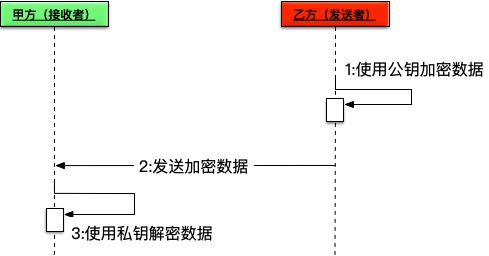 

当乙方向甲方发送加密数据时,可以使用密匙对中的公匙进行数据加密,甲方使用密匙对中的私钥进行数据解密操作。
1// 公匙加密数据
2byte[] encryptRes2 = RSAUtil.encryptByPublicKey(str.getBytes(), publicKey);
3System.out.println("模拟[乙方]公钥加密,结果是:" + encodeBase64(encryptRes2));
4// 私匙解密数据
5byte[] decryptRes2 = RSAUtil.decryptByPrivateKey(encryptRes2, privateKey);
6assert decryptRes2 != null;
7System.out.println("自己[甲方]私钥解密,结果是:" + new String(decryptRes2));
RSA —— 简述
RSA加密算法是一种非对称加密算法。在公开密钥加密和电子商业中RSA被广泛使用。RSA是1977年由罗纳德·李维斯特(Ron Rivest)、阿迪·萨莫尔(Adi Shamir)和伦纳德·阿德曼(Leonard Adleman)一起提出的。当时他们三人都在麻省理工学院工作。RSA就是他们三人姓氏开头字母拼在一起组成的。
RSA底层的单向函数就死整数因式分解的问题:两个大素数相乘在计算是非常简单的,但是对其乘积结果做因式分解确实非常难的。
**所以:**对极大整数做因数分解的难度决定了RSA算法的可靠性,假如有人找到一种快速因数分解的算法的话,那么用RSA加密的信息的可靠性就肯定会极度下降。
但找到这样的算法的可能性是非常小的。今天只有短的RSA钥匙才可能被强力方式解破。到目前为止,世界上还没有任何可靠的攻击RSA算法的方式。只要其钥匙的长度足够长,用RSA加密的信息实际上是不能被解破的。
已公开的或已知的攻击方法编辑
- 针对RSA最流行的攻击一般是基于大数因数分解。1999年,RSA-155 (512 bits)被成功分解,花了五个月时间(约8000 MIPS年)和224 CPU hours在一台有3.2G中央内存的Cray C916计算机上完成。
RSA-158表示如下:
39505874583265144526419767800614481996020776460304936454139376051579355626529450683609727842468219535093544305870490251995655335710209799226484977949442955603= 3388495837466721394368393204672181522815830368604993048084925840555281177× 11658823406671259903148376558383270818131012258146392600439520994131344334162924536139
- 2009年12月12日,编号为RSA-768(768 bits, 232 digits)数也被成功分解。这一事件威胁了现通行的1024-bit密钥的安全性,普遍认为用户应尽快升级到2048-bit或以上。
RSA-768表示如下:
1230186684530117755130494958384962720772853569595334792197322452151726400507263657518745202199786469389956474942774063845925192557326303453731548268507917026122142913461670429214311602221240479274737794080665351419597459856902143413= 3347807169895689878604416984821269081770479498371376856891 2431388982883793878002287614711652531743087737814467999489× 3674604366679959042824463379962795263227915816434308764267 6032283815739666511279233373417143396810270092798736308917
- 秀尔算法
量子计算里的秀尔算法能使穷举的效率大大的提高。由于RSA算法是基于大数分解(无法抵抗穷举攻击),因此在未来量子计算能对RSA算法构成较大的威胁。一个拥有N量子比特的量子计算机,每次可进行2^N次运算,理论上讲,密钥为1024位长的RSA算法,用一台512量子比特位的量子计算机在1秒内即可破解。
RSA —— 数学公式
密匙对生成
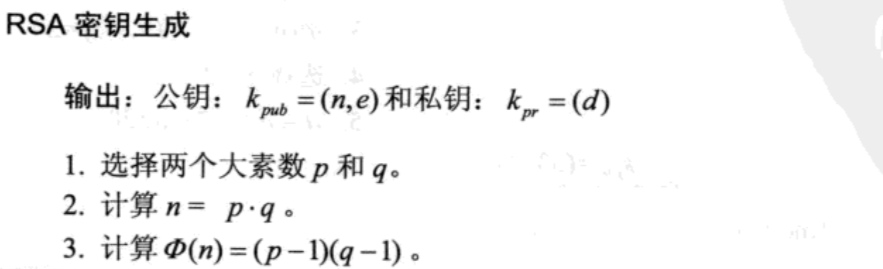 


加密与解密
 

 

参考文献
- 《深入浅出密码学》
- 《JAVA加密与解密的艺术--第2版》
--Posted from Rpc