
Android 代码动态修改RelativeLayout布局
前言
有时我们会遇到在xml布局文件中设置好界面后,但是又需要从代码中进行动态布局修改。
之前从网上寻找了好多资料,看到的都是新建一个布局文件
但是我的需求又是从当前布局文件的基础上进行修改。
下面用一个示例大家介绍一个比较简单的办法。
演示
该例子主要是使用RelativeLayout布局,放置两个TextView,点击切换按钮进行切换,永远有一个TextView保持屏幕中间。
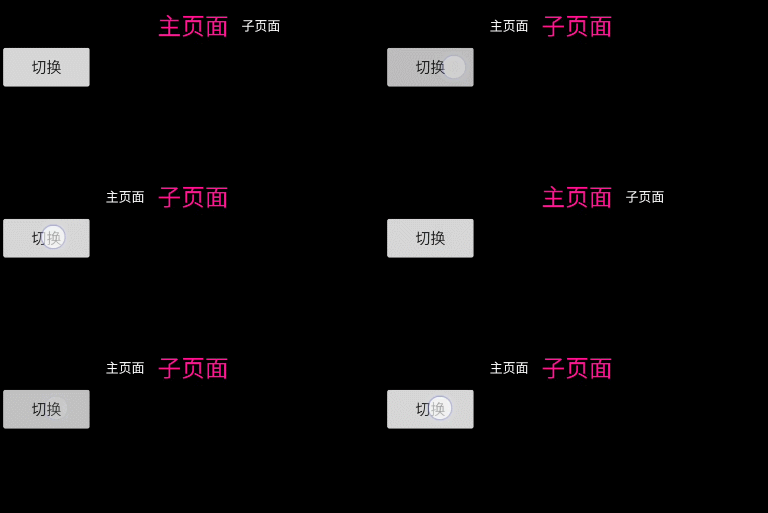
例子.gif
activity_main.xml
1<?xml version="1.0" encoding="utf-8"?>
2<LinearLayout xmlns:android="http://schemas.android.com/apk/res/android"
3    xmlns:tools="http://schemas.android.com/tools"
4    android:layout_width="match_parent"
5    android:layout_height="match_parent"
6    android:background="@android:color/background_dark"
7    android:orientation="vertical"
8    tools:context=".MainActivity">
9    <RelativeLayout
10        android:id="@+id/relativeLayout"
11        android:layout_width="match_parent"
12        android:layout_height="wrap_content">
13        <TextView
14            android:id="@+id/text_small"
15            android:layout_width="wrap_content"
16            android:layout_height="wrap_content"
17            android:layout_centerHorizontal="true"
18            android:layout_centerVertical="true"
19            android:layout_marginEnd="6dp"
20            android:text="主页面"
21            android:textColor="@color/deeppink"
22            android:textSize="22sp" />
23        <TextView
24            android:id="@+id/text_big"
25            android:layout_width="wrap_content"
26            android:layout_height="wrap_content"
27            android:layout_centerVertical="true"
28            android:layout_marginStart="6dp"
29            android:layout_toEndOf="@id/text_small"
30            android:text="子页面"
31            android:textColor="@color/white"
32            android:textSize="12sp" />
33    </RelativeLayout>
34    <Button
35        android:id="@+id/btn"
36        android:layout_width="wrap_content"
37        android:layout_height="wrap_content"
38        android:text="切换" />
39</LinearLayout>
MainActivity.java
1 public class MainActivity extends AppCompatActivity {
2    //    TextView
3    private TextView text_small;
4    private TextView text_big;
5    //    布局参数
6    private RelativeLayout.LayoutParams params_small;
7    private RelativeLayout.LayoutParams params_big;
8    //    切换按钮
9    private Button btn;
10    //    切换标识
11    private boolean check = false;
12
13    @Override
14    protected void onCreate(Bundle savedInstanceState) {
15        super.onCreate(savedInstanceState);
16        setContentView(R.layout.activity_main);
17        text_small = findViewById(R.id.text_small);
18        text_big = findViewById(R.id.text_big);
19        btn = findViewById(R.id.btn);
20//        获取TextView的布局参数
21        params_small = (RelativeLayout.LayoutParams) text_small.getLayoutParams();
22        params_big = (RelativeLayout.LayoutParams) text_big.getLayoutParams();
23//          按钮切换
24        btn.setOnClickListener(new View.OnClickListener() {
25            @Override
26            public void onClick(View v) {
27                if (check) {
28//                    切换子页面
29                    smallModeSwitch();
30                    check = false;
31                } else {
32//                    切换主页面
33                    bigModeSwitch();
34                    check = true;
35                }
36            }
37        });
38    }
39
40    /**
41     * 修改布局
42     *
43     * @date: 2021/1/28 16:07
44     * @author: SiYuan Jiao
45     */
46    private void bigModeSwitch() {
47//        设置字体及颜色
48        text_big.setTextSize(22);
49        text_big.setTextColor(Color.parseColor("#ff1493"));
50        text_small.setTextSize(12);
51        text_small.setTextColor(Color.WHITE);
52//        删除主页面居中效果
53        params_small.removeRule(RelativeLayout.CENTER_HORIZONTAL);
54//        添加主页面对于子页面的相对位置
55        params_small.addRule(RelativeLayout.START_OF, R.id.text_big);
56//        设置主页面应用此效果
57        text_small.setLayoutParams(params_small);
58//        添加子页面居中效果
59        params_big.addRule(RelativeLayout.CENTER_HORIZONTAL);
60//        删除原有相对主页面的位置
61        params_big.removeRule(RelativeLayout.END_OF);
62//        子页面应用此效果
63        text_big.setLayoutParams(params_big);
64    }
65
66    private void smallModeSwitch() {
67        text_small.setTextSize(22);
68        text_small.setTextColor(Color.parseColor("#ff1493"));
69        text_big.setTextSize(12);
70        text_big.setTextColor(Color.WHITE);
71
72
73        params_big.removeRule(RelativeLayout.CENTER_HORIZONTAL);
74        params_big.addRule(RelativeLayout.END_OF, R.id.text_small);
75        text_big.setLayoutParams(params_big);
76        params_small.addRule(RelativeLayout.CENTER_HORIZONTAL);
77        params_small.removeRule(RelativeLayout.START_OF);
78        text_small.setLayoutParams(params_small);
79    }
80
81}
结束
其中主要是通过getLayoutParams()方法获取当前布局信息,使用removeRule()删除不要的属性,使用addRule()添加需要的属性值,最后使用setLayoutParams进行应用配置。
通过以上的例子,应该能解决动态代码修改RelativeLayout布局的问题。