
1.通过Resource接口获取资源
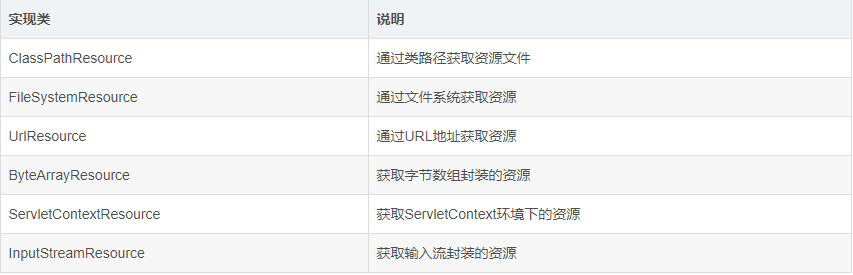
Resource接口的实现类有:
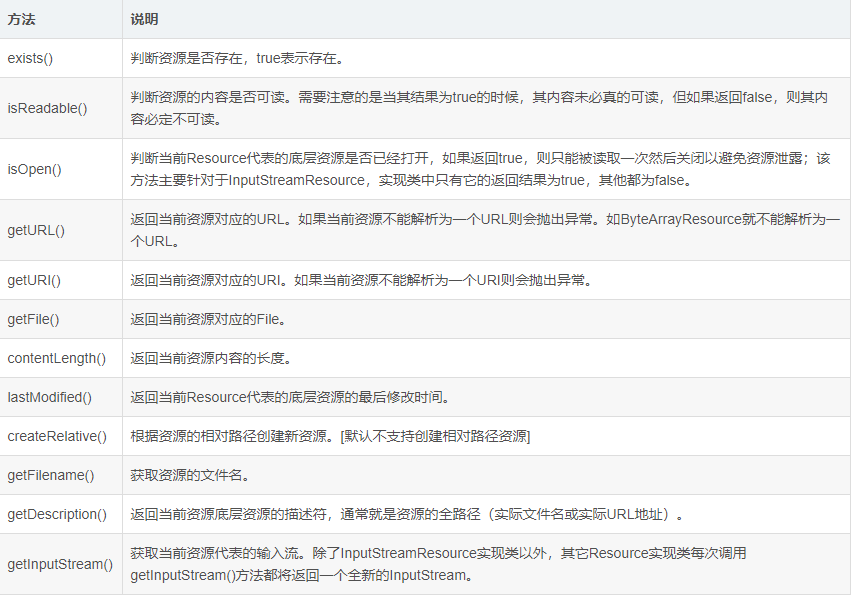
Resource接口继承了InputStreamSource 接口,InputStreamSource 接口中有一个方法:getInputStream(),所以汇总起来,Resource接口中共有以下方法:
1public class ResourceTest {
2
3    /**使用ClassPathResource获取资源**/
4    @Test
5    public void TestClassPath() throws IOException{
6        Resource resource = new ClassPathResource("test.txt");
7
8        //判断文件是否存在:
9        if (resource.exists()) {
10            System.out.println("文件存在");
11        }
12
13        //判断资源文件是否可读
14        if (resource.isReadable()) {
15            System.out.println("文件可读");
16        }
17
18        //判断当前Resource代表的底层资源是否已经打开
19        if (resource.isOpen()) {
20            System.out.println("资源文件已打开");
21        }
22
23        System.out.println(resource.getURL());//获取资源所在的URL
24        System.out.println(resource.getURI());//获取资源所在的URI
25        resource.getFile();//返回当前资源对应的File。
26        System.out.println(resource.contentLength());//输出内容长度
27        System.out.println(resource.lastModified());//返回当前Resource代表的底层资源的最后修改时间。
28        resource.createRelative("MyFile");//根据资源的相对路径创建新资源。[默认不支持创建相对路径资源]
29        System.out.println(resource.getFilename());//获取资源文件名
30        System.out.println(resource.getDescription());
31
32
33        //获取当前资源代表的输入流
34        if (resource.isReadable()) {
35            InputStream is = resource.getInputStream();
36            System.out.println(is);
37            is.close();
38        }
39
40    }
41
42    /**使用FileSystemResource获取资源**/
43    @Test
44    public void TestFileSystem() throws IOException {
45        Resource resource = new FileSystemResource("D:\\test.txt");
46        System.out.println(resource.getFilename());
47    }
48
49    /**使用UrlResource获取资源**/
50    @Test
51    public void TestUrl() throws MalformedURLException{
52        Resource resource = new UrlResource("http://docs.spring.io/spring/docs/4.0.0.M1/spring-framework-reference/pdf/spring-framework-reference.pdf");
53        System.out.println(resource.getFilename());
54    }
55
56    /**使用ByteArrayResource获取字节数组封装的资源**/
57    @Test
58    public void testByteArray() throws IOException {
59        ByteArrayResource resource = new ByteArrayResource("Hello".getBytes());
60        System.out.println(resource.getInputStream());
61
62    }
63
64
65    /**使用InputStreamResource获取输入流封装的资源。针对于输入流的Resource,其getInputStream()方法只能被调用一次。**/
66       @Test
67       public void testInputStream() throws Exception {
68          InputStream is = new FileInputStream("D\\test.txt");
69          InputStreamResource resource = new InputStreamResource(is);
70          //对于InputStreamResource而言,其getInputStream()方法只能调用一次,继续调用将抛出异常。
71          InputStream is2 = resource.getInputStream();   //返回的就是构件时的那个InputStream
72          System.out.println(is2);
73          is.close();
74       }
75}
2.通过ResourceLoader接口获取资源
Spring框架为了更方便的获取资源,尽量弱化程序员对各个Resource接口的实现类的感知,定义了另一个ResourceLoader接口。该接口的getResource(String location)方法可以用来获取资源。它的DefaultResourceLoader实现类可以适用于所有的环境,可以返回ClassPathResource、UrlResource等。
ResourceLoader在进行加载资源时需要使用前缀来指定需要加载:“classpath:path”表示返回ClasspathResource,“http://path”和“file:path”表示返回UrlResource资源,如果不加前缀则需要根据当前上下文来决定,DefaultResourceLoader默认实现是加载classpath资源。
1       @Test
2       public void testResourceLoader() {
3
4              ResourceLoader loader = new DefaultResourceLoader();
5              Resource resource = loader.getResource("http://www.baidu.com");
6              System.out.println(resource instanceof UrlResource); //true
7              resource = loader.getResource("classpath:test.txt");
8              System.out.println(resource instanceof ClassPathResource); //true
9              resource = loader.getResource("test.txt");
10              System.out.println(resource instanceof ClassPathResource); //true
11
12       }
3.通过ApplicationContext获取资源
所有ApplicationContext实例都实现了ResourceLoader接口,因此我们在使用Spring容器时,可以不去过于计较底层Resource的实现,也不需要自己创建Resource实现类,而是直接使用applicationContext.getResource(),获取到bean容器本身的Resource,进而取到相关的资源信息。
1public class MyResource implements ApplicationContextAware {
2        private ApplicationContext applicationContext;
3
4    public void setApplicationContext(ApplicationContext applicationContext) throws BeansException {
5        this.applicationContext = applicationContext;
6    }
7
8    public void resource() throws IOException {
9        Resource resource = applicationContext.getResource("file:D:\\test.txt");
10        System.out.println(resource.getFilename());
11        System.out.println(resource.contentLength());
12
13    }
14
15}
配置xml文件:
<bean id="myResource" class="com.spring.test.MyResource"></bean>
测试类:
1public class App {
2    public static void main(String[] args) {
3        @SuppressWarnings("resource")
4        ApplicationContext context = new ClassPathXmlApplicationContext("classpath:spring-resource.xml");
5        MyResource myResource = (MyResource) context.getBean("myResource");
6        try {
7            myResource.resource();
8        } catch (IOException e) {
9            e.printStackTrace();
10        }
11
12    }
13}