Large XBRL documents, such as the such as the International Financial Reporting Standards – General Purpose taxonomy (IFRS-GP), require a large heap size, which may need to be configured to optimize the available memory in your environment.
UBmatrix recommends that sufficient memory is reserved on the installed JVM to avoid running out of memory (or receiving out-of-memory errors) when loading or editing XBRL documents. The heap size does not represent the residual memory required to keep the document in memory; rather, it represents spikes in memory growth during the loading of large documents which require the JVM to allocate a heap size larger than the default.
UBmatrix recommends setting the JVM heap size to 512MB. The following procedures show how to configure the minimum and maximum JVM memory settings for Windows and Unix/Linux environments. For additional information, see your JVM provider.
Windows
To set Java heap size options with Sun Java (JAVA_OPTS environment variable) on Windows
-
On the taskabar, click Start, and then point to Settings, Control Panel, and System.
-
In the System Properties dialog box Advanced tab, click Environment Variables.
-
In the Environment Variables dialog box, under System variables, click New.
-
In the New System Variable dialog box, enter:
-
Variable name: JAVA_OPTS.
-
Variable value -Xms256m -Xmx512m
-
-
Click OK.
-
Verify that the Environment Variables dialog box displays the following system variable name value pair:
JAVA_OPTS="-Xms256m -Xmx512m "
-
Click OK, OK to close the System Properties dialog box.
Unix/Linux
To set Java heap size options with Sun Java (JAVA_OPTS environment variable) on Unix/Linux
-
Start a terminal session.
-
At the command prompt type:
export set JAVA_OPTS=”-Xms256m -Xmx512m”
-
Close the terminal session.
Java Edition Installation
For the installed Java Edition, a UBmatrix Processing Engine - Java Edition.lax file is automatically generated in the root folder (C:/Program Files/UBmatrix/UBmatrix_Processing_Engine_Java_Edition/UBmatrix Processing Engine - Java Edition.lax).
The heap size appears at lines 67-71:
# LAX.NL.JAVA.OPTION.JAVA.HEAP.SIZE.MAX
# -------------------------------------
# maximum heap size to 512m
lax.nl.java.option.java.heap.size.max=786432000
The above configuration sets maximum heap size to approximately 786 KB.
Command Line Settings
The maximum heap size can be set as a parameter in the XbrlCalculate.cmd:
set JAVA_OPTS=-Xms768m -Xmx1g -XX:PermSize=128m -XX:MaxPermSize=256m
java %JAVA_OPTS% -cp "%CLASSPATH%" ubmatrix.xbrl.tools.xbrlCalculate.src.XbrlCalculate %*
or in the XbrlCalculate.sh:
JAVA_OPTS="-Xms768m -Xmx1g -XX:PermSize=128m -XX:MaxPermSize=256m"
java ${JAVA_OPTS} -cp "${CLASSPATH}" ubmatrix.xbrl.tools.xbrlCalculate.src.XbrlCalculate $@
JAVA_OPTS is an ENV variable that has local scope to the script file. The maximum heap size in the above configuration is set to 1g (1 gigabyte).
The shell configuration adjustments apply to all script files shipped with XPE 3.5.
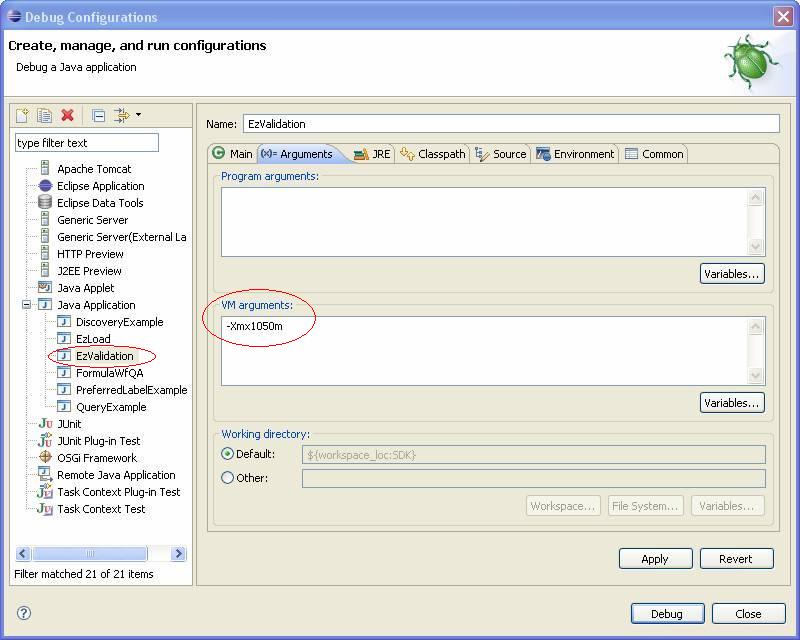
From within an Eclipse project
The maximum heap size can be set as a JVM setting in the run dialog box to adjust the Eclipse configuraiton, as shown for the EzValidation.java Code Sample. This configuration change would apply to all code samples.