
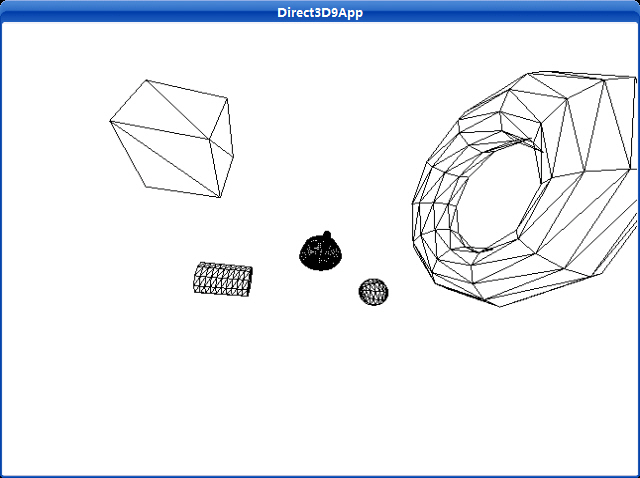
这个程序创建并渲染几种不同的能够使用D3DXCreate*函数创建的3D物体。
Uses a left-handed coordinate system to create a mesh containing an axis-aligned box.
HRESULT D3DXCreateBox( LPDIRECT3DDEVICE9 pDevice, FLOAT Width, FLOAT Height, FLOAT Depth, LPD3DXMESH * ppMesh, LPD3DXBUFFER * ppAdjacency);
Parameters
pDevice
[in] Pointer to an IDirect3DDevice9 interface, representing the device associated with the created box mesh.
Width
[in] Width of the box, along the x-axis.
Height
[in] Height of the box, along the y-axis.
Depth
[in] Depth of the box, along the z-axis.
ppMesh
[out] Address of a pointer to the output shape, an ID3DXMesh interface.
ppAdjacency
[out] Address of a pointer to an ID3DXBuffer interface. When the method returns, this parameter is filled with an array of three DWORDs per face that specify the three neighbors for each face in the mesh. NULL can be specified.
Return Values
If the function succeeds, the return value is D3D_OK. If the function fails, the return value can be one of the following: D3DERR_INVALIDCALL, D3DXERR_INVALIDDATA, E_OUTOFMEMORY.
Remarks
The created box is centered at the origin.
This function creates a mesh with the D3DXMESH_MANAGED creation option and D3DFVF_XYZ | D3DFVF_NORMAL flexible vertex format (FVF).
Uses a left-handed coordinate system to create a mesh containing a cylinder.
HRESULT D3DXCreateCylinder( LPDIRECT3DDEVICE9 pDevice, FLOAT Radius1, FLOAT Radius2, FLOAT Length, UINT Slices, UINT Stacks, LPD3DXMESH * ppMesh, LPD3DXBUFFER * ppAdjacency);
Parameters
pDevice
[in] Pointer to an IDirect3DDevice9 interface, representing the device associated with the created cylinder mesh.
Radius1
[in] Radius at the negative Z end. Value should be greater than or equal to 0.0f.
Radius2
[in] Radius at the positive Z end. Value should be greater than or equal to 0.0f.
Length
[in] Length of the cylinder along the z-axis.
Slices
[in] Number of slices about the main axis.
Stacks
[in] Number of stacks along the main axis.
ppMesh
[out] Address of a pointer to the output shape, an ID3DXMesh interface.
ppAdjacency
[out] Address of a pointer to an ID3DXBuffer interface. When the method returns, this parameter is filled with an array of three DWORDs per face that specify the three neighbors for each face in the mesh. NULL can be specified.
Return Values
If the function succeeds, the return value is D3D_OK. If the function fails, the return value can be one of the following: D3DERR_INVALIDCALL, D3DXERR_INVALIDDATA, E_OUTOFMEMORY.
Remarks
The created cylinder is centered at the origin, and its axis is aligned with the z-axis.
This function creates a mesh with the D3DXMESH_MANAGED creation option and D3DFVF_XYZ | D3DFVF_NORMAL flexible vertex format (FVF).
Uses a left-handed coordinate system to create a mesh containing a torus.
HRESULT D3DXCreateTorus( LPDIRECT3DDEVICE9 pDevice, FLOAT InnerRadius, FLOAT OuterRadius, UINT Sides, UINT Rings, LPD3DXMESH * ppMesh, LPD3DXBUFFER * ppAdjacency);
Parameters
pDevice
[in] Pointer to an IDirect3DDevice9 interface, representing the device associated with the created torus mesh.
InnerRadius
[in] Inner-radius of the torus. Value should be greater than or equal to 0.0f.
OuterRadius
[in] Outer-radius of the torus. Value should be greater than or equal to 0.0f.
Sides
[in] Number of sides in a cross-section. Value must be greater than or equal to 3.
Rings
[in] Number of rings making up the torus. Value must be greater than or equal to 3.
ppMesh
[out] Address of a pointer to the output shape, an ID3DXMesh interface.
ppAdjacency
[out] Address of a pointer to an ID3DXBuffer interface. When the method returns, this parameter is filled with an array of three DWORDs per face that specify the three neighbors for each face in the mesh. NULL can be specified.
Return Values
If the function succeeds, the return value is D3D_OK. If the function fails, the return value can be one of the following: D3DERR_INVALIDCALL, D3DXERR_INVALIDDATA, E_OUTOFMEMORY.
Remarks
The created torus is centered at the origin, and its axis is aligned with the z-axis. The inner radius of the torus is the radius of the cross-section (the minor radius), and the outer radius of the torus is the radius of the central hole.
This function returns a mesh that can be used later for drawing or manipulation by the application.
This function creates a mesh with the D3DXMESH_MANAGED creation option and D3DFVF_XYZ | D3DFVF_NORMAL flexible vertex format (FVF).
Uses a left-handed coordinate system to create a mesh containing a sphere.
HRESULT D3DXCreateSphere( LPDIRECT3DDEVICE9 pDevice, FLOAT Radius, UINT Slices, UINT Stacks, LPD3DXMESH * ppMesh, LPD3DXBUFFER * ppAdjacency);
Parameters
pDevice
[in] Pointer to an IDirect3DDevice9 interface, representing the device associated with the created sphere mesh.
Radius
[in] Radius of the sphere. This value should be greater than or equal to 0.0f.
Slices
[in] Number of slices about the main axis.
Stacks
[in] Number of stacks along the main axis.
ppMesh
[out] Address of a pointer to the output shape, an ID3DXMesh interface.
ppAdjacency
[out] Address of a pointer to an ID3DXBuffer interface. When the method returns, this parameter is filled with an array of three DWORDs per face that specify the three neighbors for each face in the mesh. NULL can be specified.
Return Values
If the function succeeds, the return value is D3D_OK. If the function fails, the return value can be one of the following: D3DERR_INVALIDCALL, D3DXERR_INVALIDDATA, E_OUTOFMEMORY.
Remarks
The created sphere is centered at the origin, and its axis is aligned with the z-axis.
This function creates a mesh with the D3DXMESH_MANAGED creation option and D3DFVF_XYZ | D3DFVF_NORMAL flexible vertex format (FVF).
Builds a matrix using the specified offsets.
D3DXMATRIX * D3DXMatrixTranslation( D3DXMATRIX * pOut, FLOAT x, FLOAT y, FLOAT z);
Parameters
pOut
[in, out] Pointer to the D3DXMATRIX structure that is the result of the operation.
x
[in] X-coordinate offset.
y
[in] Y-coordinate offset.
z
[in] Z-coordinate offset.
Return Values
Pointer to a D3DXMATRIX structure that contains a translated transformation matrix.
Remarks
The return value for this function is the same value returned in the pOut parameter. In this way, the D3DXMATRIXTranslation can be used as a parameter for another function.
运行截图:
源程序:
/**************************************************************************************
Renders several D3DX shapes in wireframe mode and has the camera fly around the scene.
Demonstrates the D3DXCreate* functions, and demonstrates more complex transformations
used to position the objects in the world and move the camera around the world.
**************************************************************************************/
#include "d3dUtility.h"
#pragma warning(disable : 4100)
#define TEAPOT_MESH 0
#define BOX_MESH 1
#define CYLINDER_MESH 2
#define TORUS_MESH 3
#define SPHERE_MESH 4
#define NUM_MESH 5
const int WIDTH = 640;
const int HEIGHT = 480;
IDirect3DDevice9* g_d3d_device = NULL;
ID3DXMesh* g_object_meshes[NUM_MESH];
// world matrices for each object.
// these matrices specify the location of the objects in the world.
D3DXMATRIX g_object_world_matrices[NUM_MESH];
////////////////////////////////////////////////////////////////////////////////////////////////////
bool setup()
{
// create the teapot geometry
D3DXCreateTeapot(g_d3d_device, &g_object_meshes[TEAPOT_MESH], NULL);
D3DXCreateBox(g_d3d_device, 2.0f, 2.0f, 2.0f, &g_object_meshes[BOX_MESH], NULL);
D3DXCreateCylinder(g_d3d_device, 1.0f, 1.0f, 3.0f, 10, 10, &g_object_meshes[CYLINDER_MESH], NULL);
D3DXCreateTorus(g_d3d_device, 1.0f, 3.0f, 10, 10, &g_object_meshes[TORUS_MESH], NULL);
D3DXCreateSphere(g_d3d_device, 1.0f, 10, 10, &g_object_meshes[SPHERE_MESH], NULL);
// Build world matrices - position the objects in world space.
// For example, g_object_world_matrices[1] will position g_object_meshes[1] at (-5, 0, 5).
// Likewise, g_object_world_matrices[2] will position g_object_meshes[2] at (5, 0, -5).
D3DXMatrixTranslation(&g_object_world_matrices[TEAPOT_MESH], 0.0f, 0.0f, 0.0f);
D3DXMatrixTranslation(&g_object_world_matrices[BOX_MESH], -5.0f, 0.0f, 5.0f);
D3DXMatrixTranslation(&g_object_world_matrices[CYLINDER_MESH], 5.0f, 0.0f, 5.0f);
D3DXMatrixTranslation(&g_object_world_matrices[TORUS_MESH], -5.0f, 0.0f, -5.0f);
D3DXMatrixTranslation(&g_object_world_matrices[SPHERE_MESH], 5.0f, 0.0f, -5.0f);
// set the projection matrix
D3DXMATRIX proj;
D3DXMatrixPerspectiveFovLH(&proj, D3DX_PI * 0.5f, (float)WIDTH/HEIGHT, 1.0f, 1000.0f);
g_d3d_device->SetTransform(D3DTS_PROJECTION, &proj);
// set wireframe mode render state
g_d3d_device->SetRenderState(D3DRS_FILLMODE, D3DFILL_WIREFRAME);
return true;
}
void cleanup()
{
for(int i = 0; i < NUM_MESH; i++)
safe_release<ID3DXMesh*>(g_object_meshes[i]);
}
bool display(float time_delta)
{
// Animate the camera:
//
// The camera will circle around the center of the scene. We use the sin and cos functions
// to generate points on the circle, then scale them by 10 to further the radius.
// In addition the camera will move up and down as it circles about the scene.
static float angle = (3.0f * D3DX_PI) / 2.0f;
static float camera_height = 0.0f;
static float camera_height_dir = 10.0f;
D3DXVECTOR3 position(cosf(angle) * 10.0f, camera_height, sinf(angle) * 10.0f);
// the camera is targetted at the origin of the world
D3DXVECTOR3 target(0.0f, 0.0f, 0.0f);
// the worlds up vector
D3DXVECTOR3 up(0.0f, 1.0f, 0.0f);
D3DXMATRIX view_matrix;
D3DXMatrixLookAtLH(&view_matrix, &position, &target, &up);
g_d3d_device->SetTransform(D3DTS_VIEW, &view_matrix);
// compute the position for the next frame
angle += time_delta;
if(angle >= 6.28f)
angle = 0.0f;
// compute the height of the camera for the next frame
camera_height += camera_height_dir * time_delta;
if(camera_height >= 20.0f || camera_height <= -20.0f)
camera_height_dir = -camera_height_dir;
// draw the scene
g_d3d_device->Clear(0, NULL, D3DCLEAR_TARGET | D3DCLEAR_ZBUFFER, 0xffffffff, 1.0f, 0);
g_d3d_device->BeginScene();
for(int i = 0; i < NUM_MESH; i++)
{
// set the world matrix that positions the object
g_d3d_device->SetTransform(D3DTS_WORLD, &g_object_world_matrices[i]);
// draw the object using the previously set world matrix
g_object_meshes[i]->DrawSubset(0);
}
g_d3d_device->EndScene();
g_d3d_device->Present(NULL, NULL, NULL, NULL);
return true;
}
LRESULT CALLBACK wnd_proc(HWND hwnd, UINT msg, WPARAM word_param, LPARAM long_param)
{
switch(msg)
{
case WM_DESTROY:
PostQuitMessage(0);
break;
case WM_KEYDOWN:
if(word_param == VK_ESCAPE)
DestroyWindow(hwnd);
break;
}
return DefWindowProc(hwnd, msg, word_param, long_param);
}
int WINAPI WinMain(HINSTANCE inst, HINSTANCE, PSTR cmd_line, int cmd_show)
{
if(! init_d3d(inst, WIDTH, HEIGHT, true, D3DDEVTYPE_HAL, &g_d3d_device))
{
MessageBox(NULL, "init_d3d() - failed.", 0, MB_OK);
return 0;
}
if(! setup())
{
MessageBox(NULL, "Steup() - failed.", 0, MB_OK);
return 0;
}
enter_msg_loop(display);
cleanup();
g_d3d_device->Release();
return 0;
}