
为了自己以后方便会看记录一下整个过程,Hadoop集群之前已经搭建好,这部分工作以后再补写。
环境:win10 Eclipse4.4.2 JDK1.7 Hadoop2.7.1
相关安装文件可在文末的链接下载
1.加载eclipse插件
(1)下载hadoop-eclipse-plugin插件,此处下载了hadoop-eclipse-plugin-2.7.1。将hadoop-eclipse-plugin-2.7.1.jar拷贝到 eclipse的plugins目录。重启eclipse。
(2)下载Hadoop,解压到自己想要的路径,如D:\Java\hadoop-2.7.1
(3)打开 window-->preferences ,配置Hadoop MapReduce的安装路径,即(2)中的路径,如下图示
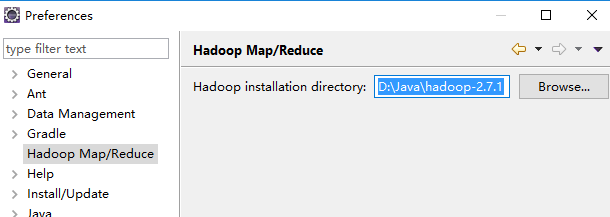
配置HADOOP_HOME环境变量,指向D:\Java\hadoop-2.7.1路径
2.配置MapReduce
(4)打开MapReduce视图。Window-->Show View-->Other 窗口,选择 MapReducer Locations,视图如下图所示

(5)点击蓝色小象新增按钮,提示输入MapReduce和HDFS Master相关信息
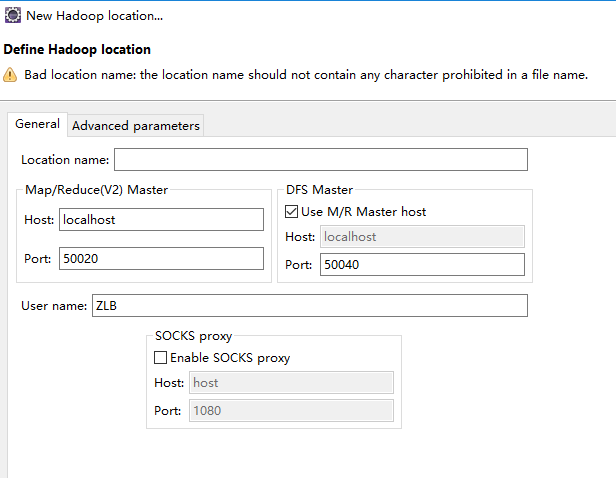
(6)配置完成后左侧project Explorer中会出现DFS Location
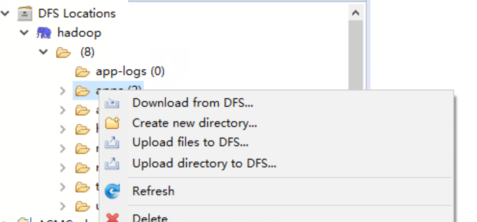 该目录为HDFS目录,可以右击向HDFS传文件。
在user文件中建立input output两个文件夹,并往input文件夹中上传wordCountInput.txt 内容为
c++ java hello
world java hello
you me too
若出现权限问题考虑是否对文件有写的权限,实在不行文件权限改为777。可以ssh连接到hadoop的master服务器 hadoop fs -ls /user 查看目录 hadoop fs -cat /user/aa.txt查看文件
3.创建MapReduce Project
(7)file->new->other 选择Map/Reduce Project 命名为MyHadoop
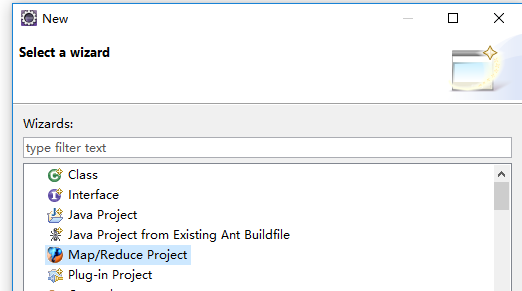
(8)在项目中建包,并建一个类名为WordCount.java的类。具体源码如下,来自于官方WordCount源码
1//package org.apache.hadoop.examples;
2
3import java.io.IOException;
4import java.util.StringTokenizer;
5
6import org.apache.hadoop.conf.Configuration;
7import org.apache.hadoop.fs.Path;
8import org.apache.hadoop.io.IntWritable;
9import org.apache.hadoop.io.Text;
10import org.apache.hadoop.mapreduce.Job;
11import org.apache.hadoop.mapreduce.Mapper;
12import org.apache.hadoop.mapreduce.Reducer;
13import org.apache.hadoop.mapreduce.lib.input.FileInputFormat;
14import org.apache.hadoop.mapreduce.lib.output.FileOutputFormat;
15import org.apache.hadoop.util.GenericOptionsParser;
16
17public class WordCount {
18
19	/*
20	 * 通过扩展Mapper实现内部类TokenizerMapper
21	 */
22	public static class TokenizerMapper extends
23			Mapper<Object, Text, Text, IntWritable> {
24
25		private final static IntWritable one = new IntWritable(1);
26		private Text word = new Text();
27
28		/*
29		 * 重载map方法(non-Javadoc)
30		 *
31		 * @see org.apache.hadoop.mapreduce.Mapper#map(KEYIN, VALUEIN,
32		 * org.apache.hadoop.mapreduce.Mapper.Context)
33		 */
34		public void map(Object key, Text value, Context context)
35				throws IOException, InterruptedException {
36			StringTokenizer itr = new StringTokenizer(value.toString());
37			while (itr.hasMoreTokens()) {
38				word.set(itr.nextToken());
39				context.write(word, one);// 写入处理的中间结果<key,value>
40			}
41		}
42	}
43
44	/*
45	 * 通过扩展Reducer实现内部类IntSumReducer
46	 */
47	public static class IntSumReducer extends
48			Reducer<Text, IntWritable, Text, IntWritable> {
49		private IntWritable result = new IntWritable();
50
51		/*
52		 * 重载reduce方法(non-Javadoc)
53		 *
54		 * @see org.apache.hadoop.mapreduce.Reducer#reduce(KEYIN,
55		 * java.lang.Iterable, org.apache.hadoop.mapreduce.Reducer.Context)
56		 */
57		public void reduce(Text key, Iterable<IntWritable> values,
58				Context context) throws IOException, InterruptedException {
59			int sum = 0;
60			for (IntWritable val : values) {
61				sum += val.get(); // 计数
62			}
63			result.set(sum);
64			context.write(key, result); // 写回结果
65		}
66	}
67
68	public static void main(String[] args) throws Exception {
69		Configuration conf = new Configuration(); // 启用默认配置
70		String[] otherArgs = new GenericOptionsParser(conf, args)
71				.getRemainingArgs();
72		if (otherArgs.length != 2) {
73			System.err.println("Usage: wordcount <in> <out>");
74			System.exit(2);
75		}
76		Job job = new Job(conf, "word count");// 定义一个job
77		job.setJarByClass(WordCount.class);// 设定执行类
78		job.setMapperClass(TokenizerMapper.class);// 设定Mapper实现类
79		job.setCombinerClass(IntSumReducer.class);// 设定Combiner实现类
80		job.setReducerClass(IntSumReducer.class);// 设定Reducer实现类
81		job.setOutputKeyClass(Text.class);// 设定OutputKey实现类,Text.class是默认实现
82		job.setOutputValueClass(IntWritable.class);// 设定OutputValue实现类
83		FileInputFormat.addInputPath(job, new Path(otherArgs[0]));// 设定job输入文件夹
84		FileOutputFormat.setOutputPath(job, new Path(otherArgs[1]));// 设定job输出文件夹
85		System.exit(job.waitForCompletion(true) ? 0 : 1);
86	}
87}
(9)加载hadoop运行参数。即加载输入输出文件,右键->run as->run configuration 设置Arguments
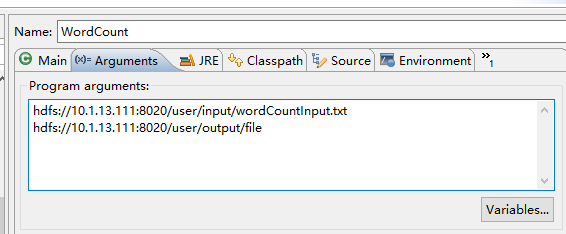 ,点击Apply并退出。右击 run as ->Run on Hadoop。
(10)错误及解决方法
可能会出现 log4j:WARN No appenders could be found for logger错误:
解决方法:
在src下面新建file名为log4j.properties内容如下:
# Configure logging for testing: optionally with log file
log4j.rootLogger=WARN, stdout
# log4j.rootLogger=WARN, stdout, logfile
log4j.appender.stdout=org.apache.log4j.ConsoleAppender
log4j.appender.stdout.layout=org.apache.log4j.PatternLayout
log4j.appender.stdout.layout.ConversionPattern=%d %p [%c] - %m%n
log4j.appender.logfile=org.apache.log4j.FileAppender
log4j.appender.logfile.File=target/spring.log
log4j.appender.logfile.layout=org.apache.log4j.PatternLayout
log4j.appender.logfile.layout.ConversionPattern=%d %p [%c] - %m%n
windows可能会出现 hadoop2.7.1运行Wordcount错误
at java.lang.ProcessBuilder.start(ProcessBuilder.java:1012)
Exception in thread "main" Java.lang.UnsatisfiedLinkError
解决方法:
1:将Wordcount.jar文件解压到hadoop的bin目录下,文件可在文末的链接下载
2:将hadoop.dll复制到C:\Window\System32下
3:添加环境变量HADOOP_HOME,指向Hadoop目录
4:将%HADOOP_HOME%\bin加入到path里面
5:重启myeclipse或者eclipse
(11)运行正常之后会在刚刚传入的Hadoop输出文件中输出
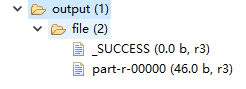 part-r-00000为结果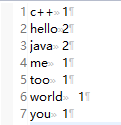
(12)用到的文件 http://pan.baidu.com/s/1pLk7UQ3
(13)最后感谢千面人对我的帮助,https://my.oschina.net/amhuman/blog/845826 这篇博文对读者帮助很大,欢迎大家阅读。