
在springboot中使用dubbo,本来是件挺简单的事情,但现实的世界就是如此的复杂,今天我用一个亲身经历的跳坑和填坑的事来讲在spring boot中使用高版本dubbo(当当的魔改版)的三重境界。
1、看山是山,使用官方starter
简单的使用dubbo starter集成进spring boot还是非常简单的。
在springboot2的pom.xml中引入dubbo的starter
1    <dependency>
2        <groupId>com.alibaba.spring.boot</groupId>
3        <artifactId>dubbo-spring-boot-starter</artifactId>
4        <version>2.0.0</version>
5    </dependency>
在启动类里面加上注解@EnableDubboConfiguration
1@EnableDubboConfiguration
2@SpringBootApplication
3public class DubbodemoApplication {
4
5	public static void main(String[] args) {
6		SpringApplication.run(DubbodemoApplication.class, args);
7	}
8
9}
在application.properties里面写dubbo的相关配置
1spring.dubbo.application.name=mydubbostarterdemo
2spring.dubbo.server=true
3spring.dubbo.protocol.name=dubbo
4spring.dubbo.registry.address=zookeeper://127.0.0.1:2181
作为服务的提供者,我们发布一个服务
1public interface IHelloService {
2	public String hello(String str);
3}
4
5import com.alibaba.dubbo.config.annotation.Service;
6//这个service的注解是dubbo的service,不是spring的service注解
7@Service(interfaceClass = IHelloService.class)
8@Component
9public class HelloServiceImpl implements IHelloService {
10
11	@Override
12	public String hello(String str) {
13		String returnStr = "Hello "+str;
14		return returnStr;
15	}
16
17}
然后运行DubbodemoApplication就能发布这个服务了。

同样的,在消费者那边,我们直接用@Reference注解来引用这个服务即可
1    @Reference
2	private IHelloService helloService;
3	@GetMapping("/hello/{name}")
4    public String hello(@PathVariable("name") String name) {
5       String str = helloService.hello(name);
6       System.out.println(str);
7       return str;
8    }
记得在消费者的工程里面要加上IHelloService的接口类。
这样就能愉快的调用了
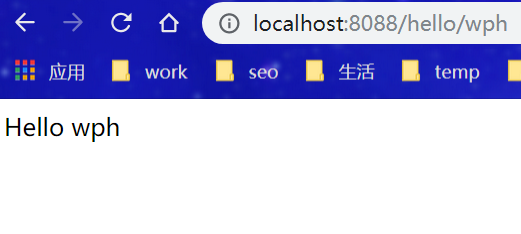
是不是很简单,是不是很容易。但是这个世界是复杂的,我们看下pom文件可以看到,里面引用的dubbo版本是2.6.0

但现在很多地方用的并不是dubbo,而是当当改过的dubbo,最新的版本已经到了2.8.4,如果服务提供者用这个版本,那么消费者还用这种方法调用,就会报错
12019-12-05 11:51:28.094 ERROR 17808 --- [nio-8088-exec-1] o.a.c.c.C.[.[.[/].[dispatcherServlet] : Servlet.service() for servlet [dispatcherServlet] in context with path [] threw exception [Request processing failed; nested exception is com.alibaba.dubbo.rpc.RpcException: Failed to invoke the method hello in the service com.skyblue.dubbodemo.service.IHelloService. Tried 3 times of the providers [192.168.1.103:20880] (1/1) from the registry 115.29.199.6:2181 on the consumer 192.168.1.103 using the dubbo version 2.6.0. Last error is: Failed to invoke remote method: hello, provider: dubbo://192.168.1.103:20880/com.skyblue.dubbodemo.service.IHelloService?anyhost=true&application=mydubbostarterdemo&check=false&dubbo=2.8.4a&generic=false&interface=com.skyblue.dubbodemo.service.IHelloService&methods=hello&pid=17808®ister.ip=192.168.1.103&remote.timestamp=1575517827193&side=consumer×tamp=1575517879746, cause: Fail to decode request due to: RpcInvocation [methodName=hello, parameterTypes=null, arguments=null, attachments={path=com.skyblue.dubbodemo.service.IHelloService, input=223, dubbo=2.6.0, version=0.0.0}]] with root cause 2 3com.alibaba.dubbo.remoting.RemotingException: Fail to decode request due to: RpcInvocation [methodName=hello, parameterTypes=null, arguments=null, attachments={path=com.skyblue.dubbodemo.service.IHelloService, input=223, dubbo=2.6.0, version=0.0.0}] 4 at com.alibaba.dubbo.remoting.exchange.support.DefaultFuture.returnFromResponse(DefaultFuture.java:218) ~[dubbo-2.6.0.jar:2.6.0] 5 at com.alibaba.dubbo.remoting.exchange.support.DefaultFuture.get(DefaultFuture.java:137) ~[dubbo-2.6.0.jar:2.6.0] 6 at com.alibaba.dubbo.remoting.exchange.support.DefaultFuture.get(DefaultFuture.java:111) ~[dubbo-2.6.0.jar:2.6.0] 7 at com.alibaba.dubbo.rpc.protocol.dubbo.DubboInvoker.doInvoke(DubboInvoker.java:95) ~[dubbo-2.6.0.jar:2.6.0] 8 at com.alibaba.dubbo.rpc.protocol.AbstractInvoker.invoke(AbstractInvoker.java:142) ~[dubbo-2.6.0.jar:2.6.0] 9 ......
同样,提供服务端也是报错
12019-12-05 12:00:55.144  WARN 7412 --- [w I/O worker #7] c.a.d.r.p.dubbo.DecodeableRpcInvocation  :  [DUBBO] Decode rpc invocation failed: expected integer at 0x12 java.lang.String (Ljava/lang/String;), dubbo version: 2.8.4a, current host: 192.168.1.103
2
3com.alibaba.com.caucho.hessian.io.HessianProtocolException: expected integer at 0x12 java.lang.String (Ljava/lang/String;)
4	at com.alibaba.com.caucho.hessian.io.Hessian2Input.error(Hessian2Input.java:2720) ~[dubbo-2.8.4a.jar:2.8.4a]
5	at com.alibaba.com.caucho.hessian.io.Hessian2Input.expect(Hessian2Input.java:2691) ~[dubbo-2.8.4a.jar:2.8.4a]
6	at com.alibaba.com.caucho.hessian.io.Hessian2Input.readInt(Hessian2Input.java:773) ~[dubbo-2.8.4a.jar:2.8.4a]
7	at com.alibaba.dubbo.common.serialize.support.hessian.Hessian2ObjectInput.readInt(Hessian2ObjectInput.java:58) ~[dubbo-2.8.4a.jar:2.8.4a]
8	at com.alibaba.dubbo.rpc.protocol.dubbo.DecodeableRpcInvocation.decode(DecodeableRpcInvocation.java:106) ~[dubbo-2.8.4a.jar:2.8.4a]
显然,因为版本差异造成了向下兼容有问题,那怎么办呢,我首先想到的是把消费端的dubbo starter也升级到2.8.4,但这个版本不是阿里做的,所以阿里官方的starter还是稳稳的停留在2.0.0的最新版本,只支持dubbo 2.6.0的版本,那怎么办呢?
2、看山不是山,回归传统,不用starter
我其实首先尝试的是starter直接强行引用2.8.4的版本
1       <dependency>
2			<groupId>com.alibaba.spring.boot</groupId>
3			<artifactId>dubbo-spring-boot-starter</artifactId>
4			<version>2.0.0</version>
5			<exclusions>
6				<exclusion>
7					<groupId>com.alibaba</groupId>
8					<artifactId>dubbo</artifactId>
9				</exclusion>
10			</exclusions>
11		</dependency>
12		<dependency>
13			<groupId>com.alibaba</groupId>
14			<artifactId>dubbo</artifactId>
15			<version>2.8.4</version>
16		</dependency>
可惜可耻的失败了,启动消费端的时候就报错了
112:12:01.733 [main] ERROR org.springframework.boot.SpringApplication - Application run failed
2java.lang.NoClassDefFoundError: com/alibaba/dubbo/qos/server/DubboLogo
3	at com.alibaba.dubbo.spring.boot.context.event.DubboBannerApplicationListener.buildBannerText(DubboBannerApplicationListener.java:49)
4	at com.alibaba.dubbo.spring.boot.context.event.DubboBannerApplicationListener.onApplicationEvent(DubboBannerApplicationListener.java:39)
5	at com.alibaba.dubbo.spring.boot.context.event.DubboBannerApplicationListener.onApplicationEvent(DubboBannerApplicationListener.java:23)
6	at org.springframework.context.event.SimpleApplicationEventMulticaster.doInvokeListener(SimpleApplicationEventMulticaster.java:172)
7	at org.springframework.context.event.SimpleApplicationEventMulticaster.invokeListener(SimpleApplicationEventMulticaster.java:165)
8	at org.springframework.context.event.SimpleApplicationEventMulticaster.multicastEvent(SimpleApplicationEventMulticaster.java:139)
9	at org.springframework.context.event.SimpleApplicationEventMulticaster.multicastEvent(SimpleApplicationEventMulticaster.java:127)
10	at org.springframework.boot.context.event.EventPublishingRunListener.environmentPrepared(EventPublishingRunListener.java:76)
11	at org.springframework.boot.SpringApplicationRunListeners.environmentPrepared(SpringApplicationRunListeners.java:53)
12	at org.springframework.boot.SpringApplication.prepareEnvironment(SpringApplication.java:345)
13	at org.springframework.boot.SpringApplication.run(SpringApplication.java:308)
14	at org.springframework.boot.SpringApplication.run(SpringApplication.java:1226)
15	at org.springframework.boot.SpringApplication.run(SpringApplication.java:1215)
16	at com.skyblue.dubbodemo.DubbodemoClientApplication.main(DubbodemoClientApplication.java:13)
这里有一个DubboLogo的报错,后面我们会讲到。显然,starter里面用到的dubbo2.6.0的代码在dubbo2.8.4里面做了改动,已经调不了了,怎么办,只能抛弃starter,使用传统的dubbo调用方法了。
1        //不使用starter
2        <dependency>
3			<groupId>com.alibaba</groupId>
4			<artifactId>dubbo</artifactId>
5			<version>2.8.4</version>
6		</dependency>
在resources/spring目录下添加一个dubbo-consumer.xml文件

1<?xml version="1.0" encoding="UTF-8"?>
2<beans xmlns="http://www.springframework.org/schema/beans"
3       xmlns:xsi="http://www.w3.org/2001/XMLSchema-instance"
4       xmlns:dubbo="http://code.alibabatech.com/schema/dubbo"
5       xsi:schemaLocation="http://www.springframework.org/schema/beans http://www.springframework.org/schema/beans/spring-beans.xsd http://code.alibabatech.com/schema/dubbo
6http://code.alibabatech.com/schema/dubbo/dubbo.xsd">
7
8    <dubbo:application name="mydubbodemo"/>
9
10    <!-- 注册中心配置,使用zookeeper注册中心暴露服务地址 -->
11    <dubbo:registry id="registry1" address="zookeeper://127.0.0.1:2181" timeout="60000" />
12
13    <dubbo:consumer timeout="120000" retries="0" check="false"/>
14    <dubbo:reference interface="com.skyblue.dubbodemo.service.IHelloService" registry="registry1" id="helloService"/>
15</beans>
然后在消费端的启动文件里面加上这个xml文件
1@SpringBootApplication
2@ImportResource("classpath:spring/dubbo-consumer.xml")
3class DubbodemoClientApplication{
4
5    public static void main(String[] args) {
6        SpringApplication.run(DubbodemoClientApplication.class, args);
7    }
8
9}
调用服务的类改成传统的引入方式
1   @Autowired
2    private IHelloService helloService;
这样就能使用2.8.4版本的dubbo了。
但是,这种方法需要在xml里面显式的申明我需要调用的服务,和直接用注解@Reference就调用服务比方便性差太多了,虽然现在可以使用了,但我还是深深的想念starter...
3、看山还是山,就要用starter
看过我之前文章的朋友应该清楚,其实starter是一个很简单的规范,可以让开发人员来自定义自己的starter,既然官方不支持,那我们就自己改一个starter不就行了,我就是拿2.0.0版本的官方dubbo starter改的。先clone一份官方的版本,这里。
首先要改的就是把pom.xml的dubbo版本升级到2.8.4,但改完后就会看到有报错。报错就是这个类DubboBannerApplicationListener
1bannerTextBuilder.append(DubboSpringBootStarterConstants.LINE_SEPARATOR).append(DubboLogo.dubbo)
2        .append(" :: Dubbo ::        (v").append(Version.getVersion()).append(")")
3        .append(DubboSpringBootStarterConstants.LINE_SEPARATOR);
里面的DubboLogo这个类在dubbo后面版本里面被去掉了,所以报错,但这个其实是在后台的console 出现一个dubbo的标志,不要也无所谓,去掉就好了。上面我们在消费端强行升级dubbo版本,启动时报的其实也是这个错。
然后我们再次改pom.xml文件,把spring boot和jdk的版本也升一下
1<properties>
2...
3        <java.version>1.8</java.version>
4		<spring-boot.version>2.2.1.RELEASE</spring-boot.version>
5		<dubbo.version>2.8.4a</dubbo.version>
6...
7</properties>
这样,一个可以在2.8.4a版本下使用的dubbo starter就改造完成了。
4、用起来
虽然改完了,但怎么用却还是一个问题,第一种方法是直接用mvn package生成dubbo-spring-boot-starter-2.8.4a.jar,然后copy到项目中去。但这种方法在现在的软件开发中已经不常用了,大部分用的方法是发布到maven的nexus私服。首先要把pom.xml改一下
1<distributionManagement>
2        <snapshotRepository>
3            <id>snapshots</id>
4            <url>http://私服ip:port/nexus/content/repositories/snapshots</url>
5        </snapshotRepository>
6        <repository>
7            <id>releases</id>
8            <url>http://私服ip:port/nexus/content/repositories/releases</url>
9        </repository>
10    </distributionManagement>
另外本地maven软件的setting.xml文件也要配置一下:
1<servers>
2  	<server>
3			<id>releases</id>
4			<username>账号</username>
5			<password>密码</password>
6		</server>
7		<server>
8			<id>snapshots</id>
9			<username>admin</username>
10			<password>admin123</password>
11		</server>
12</servers>
然后执行 mvn deploy就能发布到私服上去了。如果deploy有报这个错
[ERROR] Failed to execute goal org.apache.maven.plugins:maven-gpg-plugin:1.6:sign (sign-artifacts) on project dubbo-spring-boot-starter: Unable to execute gpg command: Error while executing process. Cannot run program "gpg.exe": CreateProcess error=2, 系统找不到指定的文件。 -> [Help 1]
是因为deploy的时候调用了gpg的签名,我们私服不见得需要,我直接把它从pom.xml里面去掉了
1<plugin>
2				<artifactId>maven-gpg-plugin</artifactId>
3				<version>${maven-gpg-plugin.version}</version>
4				<configuration>
5					<skip>false</skip>
6				</configuration>
7				<executions>
8					<execution>
9						<id>sign-artifacts</id>
10						<phase>verify</phase>
11						<goals>
12							<goal>sign</goal>
13						</goals>
14					</execution>
15				</executions>
16			</plugin>
就是这段,去掉后,发布成功就能够直接在项目的pom.xml中引用了。
修改后的starter源代码