
在使用Python的过程中,我最喜欢的就是Python的各种第三方库,能够完成很多操作。
下面就给大家介绍22个通过Python构建的项目,以此来学习Python编程。
大家也可根据项目的目的及提示,自己构建解决方法,提高编程水平。
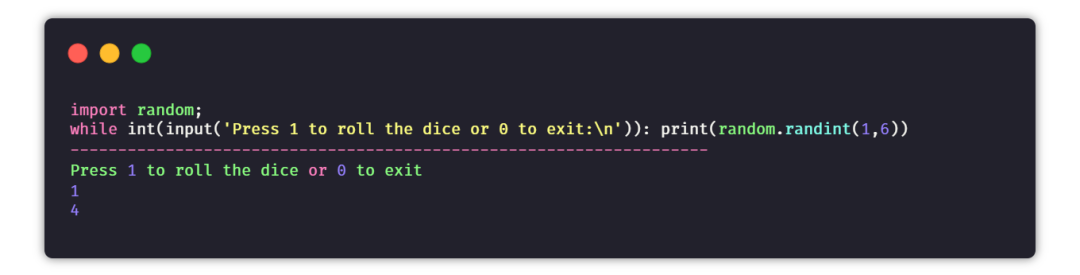
① 骰子模拟器
目的:创建一个程序来模拟掷骰子。
提示:当用户询问时,使用random模块生成一个1到6之间的数字。
② 石头剪刀布游戏
目标:创建一个命令行游戏,游戏者可以在石头、剪刀和布之间进行选择,与计算机PK。如果游戏者赢了,得分就会添加,直到结束游戏时,最终的分数会展示给游戏者。
提示:接收游戏者的选择,并且与计算机的选择进行比较。计算机的选择是从选择列表中随机选取的。如果游戏者获胜,则增加1分。
1import random
2choices = ["Rock", "Paper", "Scissors"]
3computer = random.choice(choices)
4player = False
5cpu_score = 0
6player_score = 0
7while True:
8    player = input("Rock, Paper or  Scissors?").capitalize()
9    # 判断游戏者和电脑的选择
10    if player == computer:
11        print("Tie!")
12    elif player == "Rock":
13        if computer == "Paper":
14            print("You lose!", computer, "covers", player)
15            cpu_score+=1
16        else:
17            print("You win!", player, "smashes", computer)
18            player_score+=1
19    elif player == "Paper":
20        if computer == "Scissors":
21            print("You lose!", computer, "cut", player)
22            cpu_score+=1
23        else:
24            print("You win!", player, "covers", computer)
25            player_score+=1
26    elif player == "Scissors":
27        if computer == "Rock":
28            print("You lose...", computer, "smashes", player)
29            cpu_score+=1
30        else:
31            print("You win!", player, "cut", computer)
32            player_score+=1
33    elif player=='E':
34        print("Final Scores:")
35        print(f"CPU:{cpu_score}")
36        print(f"Plaer:{player_score}")
37        break
38    else:
39        print("That's not a valid play. Check your spelling!")
40    computer = random.choice(choices)
41
42
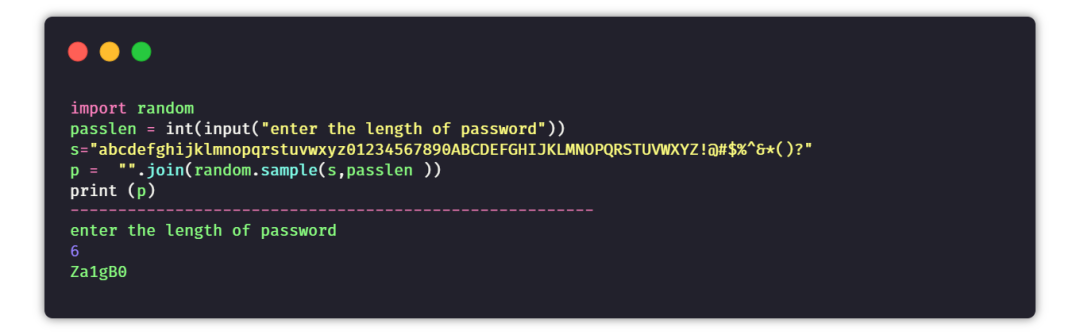
③ 随机密码生成器
目标:创建一个程序,可指定密码长度,生成一串随机密码。
提示:创建一个数字+大写字母+小写字母+特殊字符的字符串。根据设定的密码长度随机生成一串密码。
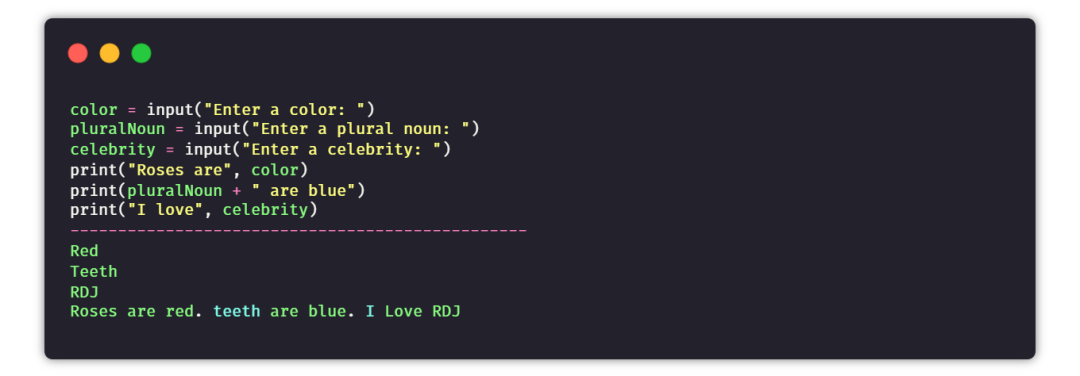
④ 句子生成器
目的:通过用户提供的输入,来生成随机且唯一的句子。
提示:以用户输入的名词、代词、形容词等作为输入,然后将所有数据添加到句子中,并将其组合返回。
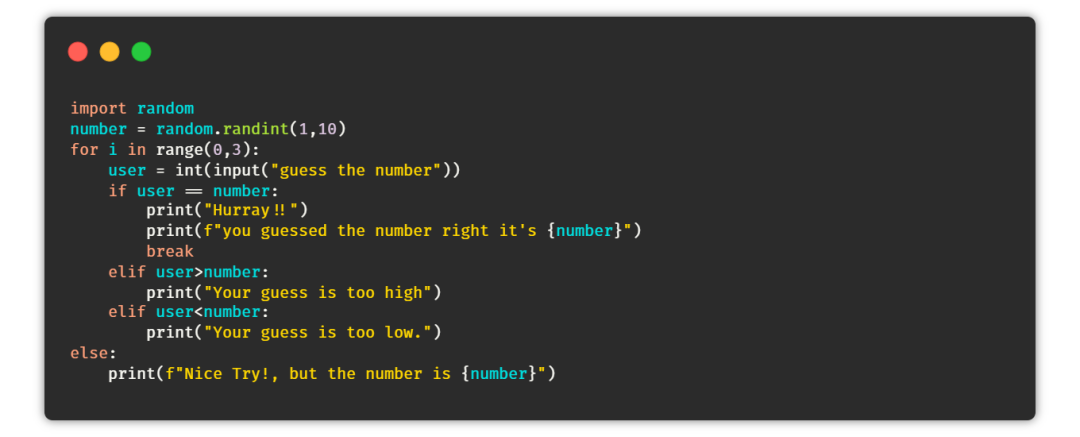
⑤ 猜数字游戏
目的:在这个游戏中,任务是创建一个脚本,能够在一个范围内生成一个随机数。如果用户在三次机会中猜对了数字,那么用户赢得游戏,否则用户输。
提示:生成一个随机数,然后使用循环给用户三次猜测机会,根据用户的猜测打印最终的结果。
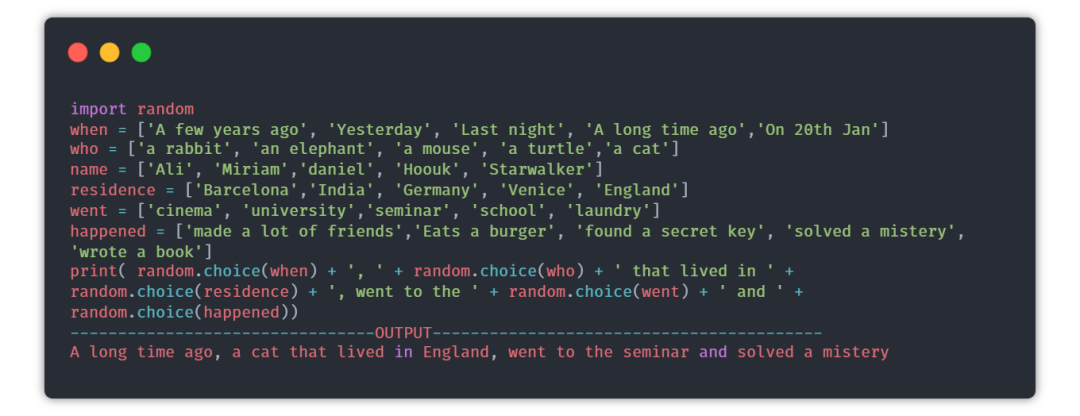
⑥ 故事生成器
目的:每次用户运行程序时,都会生成一个随机的故事。
提示:random模块可以用来选择故事的随机部分,内容来自每个列表里。
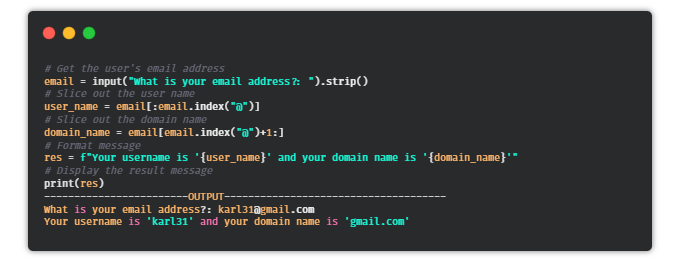
⑦ 邮件地址切片器
目的:编写一个Python脚本,可以从邮件地址中获取用户名和域名。
提示:使用@作为分隔符,将地址分为分为两个字符串。
⑧ 自动发送邮件
目的:编写一个Python脚本,可以使用这个脚本发送电子邮件。
提示:email库可用于发送电子邮件。
1import smtplib
2from email.message import EmailMessage
3email = EmailMessage() ## Creating a object for EmailMessage
4email['from'] = 'xyz name'   ## Person who is sending
5email['to'] = 'xyz id'       ## Whom we are sending
6email['subject'] = 'xyz subject'  ## Subject of email
7email.set_content("Xyz content of email") ## content of email
8with smtlib.SMTP(host='smtp.gmail.com',port=587)as smtp:
9## sending request to server
10    smtp.ehlo()          ## server object
11smtp.starttls()      ## used to send data between server and client
12smtp.login("email_id","Password") ## login id and password of gmail
13smtp.send_message(email)   ## Sending email
14print("email send")    ## Printing success message
⑨ 缩写词
目的:编写一个Python脚本,从给定的句子生成一个缩写词。
提示:你可以通过拆分和索引来获取第一个单词,然后将其组合。
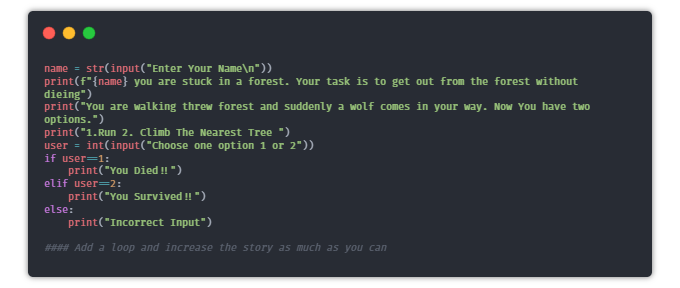
⑩ 文字冒险游戏
目的:编写一个有趣的Python脚本,通过为路径选择不同的选项让用户进行有趣的冒险。
⑪ Hangman
目的:创建一个简单的命令行hangman游戏。
提示:创建一个密码词的列表并随机选择一个单词。现在将每个单词用下划线“_”表示,给用户提供猜单词的机会,如果用户猜对了单词,则将“_”用单词替换。
1import time
2import random
3name = input("What is your name? ")
4print ("Hello, " + name, "Time to play hangman!")
5time.sleep(1)
6print ("Start guessing...\n")
7time.sleep(0.5)
8## A List Of Secret Words
9words = ['python','programming','treasure','creative','medium','horror']
10word = random.choice(words)
11guesses = ''
12turns = 5
13while turns > 0:
14    failed = 0
15    for char in word:
16        if char in guesses:
17            print (char,end="")
18        else:
19            print ("_",end=""),
20            failed += 1
21    if failed == 0:
22        print ("\nYou won")
23        break
24    guess = input("\nguess a character:")
25    guesses += guess
26    if guess not in word:
27        turns -= 1
28        print("\nWrong")
29        print("\nYou have", + turns, 'more guesses')
30        if turns == 0:
31            print ("\nYou Lose")
32
⑫ 闹钟
目的:编写一个创建闹钟的Python脚本。
提示:你可以使用date-time模块创建闹钟,以及playsound库播放声音。
1from datetime import datetime
2from playsound import playsound
3alarm_time = input("Enter the time of alarm to be set:HH:MM:SS\n")
4alarm_hour=alarm_time[0:2]
5alarm_minute=alarm_time[3:5]
6alarm_seconds=alarm_time[6:8]
7alarm_period = alarm_time[9:11].upper()
8print("Setting up alarm..")
9while True:
10    now = datetime.now()
11    current_hour = now.strftime("%I")
12    current_minute = now.strftime("%M")
13    current_seconds = now.strftime("%S")
14    current_period = now.strftime("%p")
15    if(alarm_period==current_period):
16        if(alarm_hour==current_hour):
17            if(alarm_minute==current_minute):
18                if(alarm_seconds==current_seconds):
19                    print("Wake Up!")
20                    playsound('audio.mp3') ## download the alarm sound from link
21                    break
22
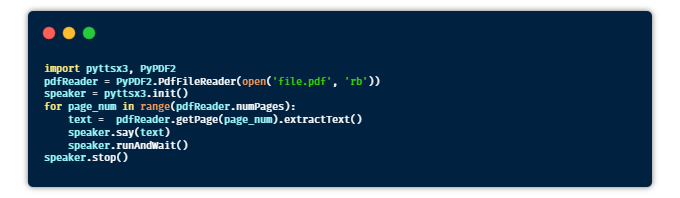
⑬ 有声读物
目的:编写一个Python脚本,用于将Pdf文件转换为有声读物。
提示:借助pyttsx3库将文本转换为语音。
安装:pyttsx3,PyPDF2
⑭ 天气应用
目的:编写一个Python脚本,接收城市名称并使用爬虫获取该城市的天气信息。
提示:你可以使用Beautifulsoup和requests库直接从谷歌主页爬取数据。
安装:requests,BeautifulSoup
1from bs4 import BeautifulSoup
2import requests
3headers = {'User-Agent': 'Mozilla/5.0 (Windows NT 10.0; Win64; x64) AppleWebKit/537.36 (KHTML, like Gecko) Chrome/58.0.3029.110 Safari/537.3'}
4
5def weather(city):
6    city=city.replace(" ","+")
7    res = requests.get(f'https://www.google.com/search?q={city}&oq={city}&aqs=chrome.0.35i39l2j0l4j46j69i60.6128j1j7&sourceid=chrome&ie=UTF-8',headers=headers)
8    print("Searching in google......\n")
9    soup = BeautifulSoup(res.text,'html.parser')
10    location = soup.select('#wob_loc')[0].getText().strip()
11    time = soup.select('#wob_dts')[0].getText().strip()
12    info = soup.select('#wob_dc')[0].getText().strip()
13    weather = soup.select('#wob_tm')[0].getText().strip()
14    print(location)
15    print(time)
16    print(info)
17    print(weather+"°C")
18
19print("enter the city name")
20city=input()
21city=city+" weather"
22weather(city)
⑮ 人脸检测
目的:编写一个Python脚本,可以检测图像中的人脸,并将所有的人脸保存在一个文件夹中。
提示:可以使用haar级联分类器对人脸进行检测。它返回的人脸坐标信息,可以保存在一个文件中。
安装:OpenCV。
下载:haarcascade_frontalface_default.xml
1import cv2
2# Load the cascade
3face_cascade = cv2.CascadeClassifier('haarcascade_frontalface_default.xml')
4# Read the input image
5img = cv2.imread('images/img0.jpg')
6# Convert into grayscale
7gray = cv2.cvtColor(img, cv2.COLOR_BGR2GRAY)
8# Detect faces
9faces = face_cascade.detectMultiScale(gray, 1.3, 4)
10# Draw rectangle around the faces
11for (x, y, w, h) in faces:
12    cv2.rectangle(img, (x, y), (x+w, y+h), (255, 0, 0), 2)
13    crop_face = img[y:y + h, x:x + w]
14    cv2.imwrite(str(w) + str(h) + '_faces.jpg', crop_face)
15# Display the output
16cv2.imshow('img', img)
17cv2.imshow("imgcropped",crop_face)
18cv2.waitKey()
19
20
21
⑯ 提醒应用
目的:创建一个提醒应用程序,在特定的时间提醒你做一些事情(桌面通知)。
提示:Time模块可以用来跟踪提醒时间,toastnotifier库可以用来显示桌面通知。
安装:win10toast
1from win10toast import ToastNotifier
2import time
3toaster = ToastNotifier()
4try:
5    print("Title of reminder")
6    header = input()
7    print("Message of reminder")
8    text = input()
9    print("In how many minutes?")
10    time_min = input()
11    time_min=float(time_min)
12except:
13    header = input("Title of reminder\n")
14    text = input("Message of remindar\n")
15    time_min=float(input("In how many minutes?\n"))
16time_min = time_min * 60
17print("Setting up reminder..")
18time.sleep(2)
19print("all set!")
20time.sleep(time_min)
21toaster.show_toast(f"{header}",
22f"{text}",
23duration=10,
24threaded=True)
25while toaster.notification_active(): time.sleep(0.005)
⑰ 维基百科文章摘要
目的:使用一种简单的方法从用户提供的文章链接中生成摘要。
提示:你可以使用爬虫获取文章数据,通过提取生成摘要。
1from bs4 import BeautifulSoup
2import re
3import requests
4import heapq
5from nltk.tokenize import sent_tokenize,word_tokenize
6from nltk.corpus import stopwords
7
8url = str(input("Paste the url"\n"))
9num = int(input("Enter the Number of Sentence you want in the summary"))
10num = int(num)
11headers = {'User-Agent': 'Mozilla/5.0 (Windows NT 10.0; Win64; x64) AppleWebKit/537.36 (KHTML, like Gecko) Chrome/58.0.3029.110 Safari/537.3'}
12#url = str(input("Paste the url......."))
13res = requests.get(url,headers=headers)
14summary = ""
15soup = BeautifulSoup(res.text,'html.parser')
16content = soup.findAll("p")
17for text in content:
18    summary +=text.text
19def clean(text):
20    text = re.sub(r"\[[0-9]*\]"," ",text)
21    text = text.lower()
22    text = re.sub(r'\s+'," ",text)
23    text = re.sub(r","," ",text)
24    return text
25summary = clean(summary)
26
27print("Getting the data......\n")
28
29
30##Tokenixing
31sent_tokens = sent_tokenize(summary)
32
33summary = re.sub(r"[^a-zA-z]"," ",summary)
34word_tokens = word_tokenize(summary)
35## Removing Stop words
36
37word_frequency = {}
38stopwords =  set(stopwords.words("english"))
39
40for word in word_tokens:
41    if word not in stopwords:
42        if word not in word_frequency.keys():
43            word_frequency[word]=1
44        else:
45            word_frequency[word] +=1
46maximum_frequency = max(word_frequency.values())
47print(maximum_frequency)
48for word in word_frequency.keys():
49    word_frequency[word] = (word_frequency[word]/maximum_frequency)
50print(word_frequency)
51sentences_score = {}
52for sentence in sent_tokens:
53    for word in word_tokenize(sentence):
54        if word in word_frequency.keys():
55            if (len(sentence.split(" "))) <30:
56                if sentence not in sentences_score.keys():
57                    sentences_score[sentence] = word_frequency[word]
58                else:
59                    sentences_score[sentence] += word_frequency[word]
60
61print(max(sentences_score.values()))
62def get_key(val):
63    for key, value in sentences_score.items():
64        if val == value:
65            return key
66key = get_key(max(sentences_score.values()))
67print(key+"\n")
68print(sentences_score)
69summary = heapq.nlargest(num,sentences_score,key=sentences_score.get)
70print(" ".join(summary))
71summary = " ".join(summary)
⑱ 获取谷歌搜索结果
目的:创建一个脚本,可以根据查询条件从谷歌搜索获取数据。
1from bs4 import BeautifulSoup
2import requests
3
4headers = {'User-Agent': 'Mozilla/5.0 (Windows NT 10.0; Win64; x64) AppleWebKit/537.36 (KHTML, like Gecko) Chrome/58.0.3029.110 Safari/537.3'}
5def google(query):
6    query = query.replace(" ","+")
7    try:
8        url = f'https://www.google.com/search?q={query}&oq={query}&aqs=chrome..69i57j46j69i59j35i39j0j46j0l2.4948j0j7&sourceid=chrome&ie=UTF-8'
9        res = requests.get(url,headers=headers)
10        soup = BeautifulSoup(res.text,'html.parser')
11    except:
12        print("Make sure you have a internet connection")
13    try:
14        try:
15            ans = soup.select('.RqBzHd')[0].getText().strip()
16
17        except:
18            try:
19                title=soup.select('.AZCkJd')[0].getText().strip()
20                try:
21                    ans=soup.select('.e24Kjd')[0].getText().strip()
22                except:
23                    ans=""
24                ans=f'{title}\n{ans}'
25
26            except:
27                try:
28                    ans=soup.select('.hgKElc')[0].getText().strip()
29                except:
30                    ans=soup.select('.kno-rdesc span')[0].getText().strip()
31
32    except:
33        ans = "can't find on google"
34    return ans
35
36result = google(str(input("Query\n")))
37print(result)
38
39
获取结果如下。

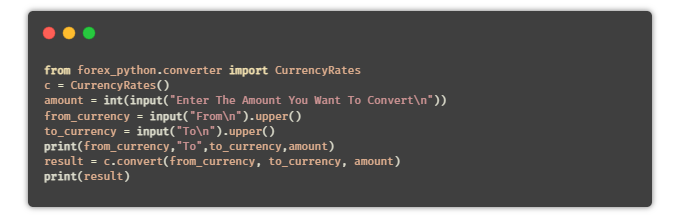
⑲ 货币换算器
目的:编写一个Python脚本,可以将一种货币转换为其他用户选择的货币。
提示:使用Python中的API,或者通过forex-python模块来获取实时的货币汇率。
安装:forex-python
⑳ 键盘记录器
目的:编写一个Python脚本,将用户按下的所有键保存在一个文本文件中。
提示:pynput是Python中的一个库,用于控制键盘和鼠标的移动,它也可以用于制作键盘记录器。简单地读取用户按下的键,并在一定数量的键后将它们保存在一个文本文件中。
1from pynput.keyboard import Key, Controller,Listener
2import time
3keyboard = Controller()
4
5
6keys=[]
7def on_press(key):
8    global keys
9    #keys.append(str(key).replace("'",""))
10    string = str(key).replace("'","")
11    keys.append(string)
12    main_string = "".join(keys)
13    print(main_string)
14    if len(main_string)>15:
15      with open('keys.txt', 'a') as f:
16          f.write(main_string)
17          keys= []
18def on_release(key):
19    if key == Key.esc:
20        return False
21
22with listener(on_press=on_press,on_release=on_release) as listener:
23    listener.join()
㉑ 文章朗读器
目的:编写一个Python脚本,自动从提供的链接读取文章。
1import pyttsx3
2import requests
3from bs4 import BeautifulSoup
4url = str(input("Paste article url\n"))
5
6def content(url):
7  res = requests.get(url)
8  soup = BeautifulSoup(res.text,'html.parser')
9  articles = []
10  for i in range(len(soup.select('.p'))):
11    article = soup.select('.p')[i].getText().strip()
12    articles.append(article)
13    contents = " ".join(articles)
14  return contents
15engine = pyttsx3.init('sapi5')
16voices = engine.getProperty('voices')
17engine.setProperty('voice', voices[0].id)
18
19def speak(audio):
20  engine.say(audio)
21  engine.runAndWait()
22
23contents = content(url)
24## print(contents)      ## In case you want to see the content
25
26#engine.save_to_file
27#engine.runAndWait() ## In case if you want to save the article as a audio file
㉒ 短网址生成器
目的:编写一个Python脚本,使用API缩短给定的URL。
1from __future__ import with_statement
2import contextlib
3try:
4    from urllib.parse import urlencode
5except ImportError:
6    from urllib import urlencode
7try:
8    from urllib.request import urlopen
9except ImportError:
10    from urllib2 import urlopen
11import sys
12
13def make_tiny(url):
14    request_url = ('http://tinyurl.com/api-create.php?' +
15    urlencode({'url':url}))
16    with contextlib.closing(urlopen(request_url)) as response:
17        return response.read().decode('utf-8')
18
19def main():
20    for tinyurl in map(make_tiny, sys.argv[1:]):
21        print(tinyurl)
22
23if __name__ == '__main__':
24    main()
25-----------------------------OUTPUT------------------------
26python url_shortener.py https://www.wikipedia.org/
27https://tinyurl.com/buf3qt3
28
以上就是今天分享的内容,针对上面这些项目,有的可以适当调整。
比如自动发送邮件,可以选择使用自己的QQ邮箱。
天气信息也可使用国内一些免费的API,维基百科可以对应百度百科,谷歌搜索可以对应百度搜索等等。
这些都是大伙可以思考的~
万水千山总是情,点个 👍 行不行。
-------------------********************************** End **********-------------**-----********-**********************************
往期精彩文章推荐:

欢迎各位大佬点击链接加入群聊【helloworld开发者社区】:https://jq.qq.com/?_wv=1027&k=mBlk6nzX进群交流IT技术热点。
本文转自 https://mp.weixin.qq.com/s/l2_UvJTPsyOadBGYjIaq_g,如有侵权,请联系删除。