
背景描述
碰到一个需求,需要起一个定时任务,由于最近在熟悉go语言,所以想用go来实现这个需求。
搜索go定时任务框架,官方推荐的框架是cron,文档地址是https://godoc.org/github.com/robfig/cron
官方示例如下
Usage Callers may register Funcs to be invoked on a given schedule. Cron will run them in their own goroutines.
1c := cron.New()
2c.AddFunc("30 * * * *", func() { fmt.Println("Every hour on the half hour") })
3c.AddFunc("30 3-6,20-23 * * *", func() { fmt.Println(".. in the range 3-6am, 8-11pm") })
4c.AddFunc("CRON_TZ=Asia/Tokyo 30 04 * * *", func() { fmt.Println("Runs at 04:30 Tokyo time every day") })
5c.AddFunc("@hourly",      func() { fmt.Println("Every hour, starting an hour from now") })
6c.AddFunc("@every 1h30m", func() { fmt.Println("Every hour thirty, starting an hour thirty from now") })
7c.Start()
8..
9// Funcs are invoked in their own goroutine, asynchronously.
10...
11// Funcs may also be added to a running Cron
12c.AddFunc("@daily", func() { fmt.Println("Every day") })
13..
14// Inspect the cron job entries' next and previous run times.
15inspect(c.Entries())
16..
17c.Stop()  // Stop the scheduler (does not stop any jobs already running).
18
问题描述
按照官方示例,写了以下demo,测试定时任务是否可以运行成功
1package main
2
3import (
4	"fmt"
5
6	"github.com/robfig/cron/v3"
7)
8
9func main() {
10	// 每隔3秒执行一次:*/3 * * * * *
11	spec := "*/3 * * * * *"
12	c := cron.New()
13	c.AddFunc(spec, func() {
14		fmt.Println("每隔3秒执行一次")
15	})
16	go c.Start()
17	defer c.Stop()
18	select {}
19}
20
释: select 是 Go 中的一个控制结构,类似于用于通信的 switch 语句。每个 case 必须是一个通信操作,要么是发送要么是接收。 select 随机执行一个可运行的 case。如果没有 case 可运行,它将阻塞,直到有 case 可运行。一个默认的子句应该总是可运行的。
运行上述代码,发现定时任务并没有每隔3s打印输出一次
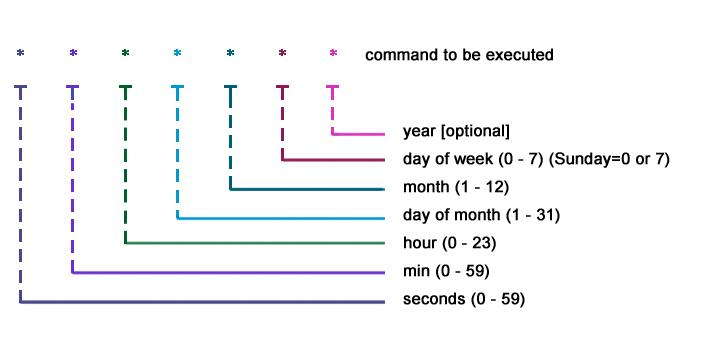
crond 表达式解释,如下图
解决方案
这是因为"github.com/robfig/cron/v3"与"github.com/robfig/cron"包的差异造成的,实际上在v3的文档中有以下描述
Since adding Seconds is the most common modification to the standard cron spec, cron provides a builtin function to do that, which is equivalent to the custom parser you saw earlier, except that its seconds field is REQUIRED:
cron.New(cron.WithSeconds())
说明cron v3版本默认已经不再是支持到秒级别的定时了。
解决方案一:
使用老版本的cron包
1package main
2
3import (
4	"fmt"
5
6	"github.com/robfig/cron"
7)
8
9func main() {
10	// 每隔3秒执行一次:*/3 * * * * *
11	spec := "*/3 * * * * *"
12	c := cron.New()
13	c.AddFunc(spec, func() {
14		fmt.Println("每隔3秒执行一次")
15	})
16	go c.Start()
17	defer c.Stop()
18	select {}
19}
20
21
解决方案二:
使用新版本的cron包,但是要cron.New(cron.WithSeconds())方法
1package main
2
3import (
4	"fmt"
5
6	"github.com/robfig/cron/v3"
7)
8
9func main() {
10	// 每天凌晨0点执行一次:0 0 0 * * ?
11	// 每隔3秒执行一次:*/3 * * * * *
12	// spec := "*/3 * * * * *"
13
14	spec := "* * * * *"
15	c := cron.New(cron.WithSeconds())
16	c.AddFunc(spec, func() {
17		fmt.Println("execute")
18	})
19	go c.Start()
20	defer c.Stop()
21	select {}
22}
23