一、Config简介
在微服务系统中,服务较多,相同的配置:如数据库信息、缓存、参数等,会出现在不同的服务上,如果一个配置发生变化,需要修改很多的服务配置。spring cloud提供配置中心,来解决这个场景问题。 系统中的通用配置存储在相同的地址:GitHub,Gitee,本地配置服务等,然后配置中心读取配置以restful发布出来,其它服务可以调用接口获取配置信息。
二、配置服务端
1、项目结构
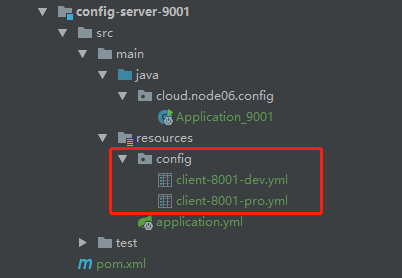
- 核心注解:@EnableConfigServer
2、核心依赖
1<dependency>
2    <groupId>org.springframework.cloud</groupId>
3    <artifactId>spring-cloud-config-server</artifactId>
4</dependency>
3、核心配置文件
这里注意读取文件的配置
-
active :native,读取本地配置;
-
active :git,读网络仓库配置;
server: port: 9001 spring: application: name: config-server-9001 profiles: # 读取本地 # active: native # 读取Git active: git cloud: config: server: native: search-locations: classpath:/config git: # 读取的仓库地址 uri: https://gitee.com/cicadasmile/spring-cloud-config.git # 读取仓库指定文件夹下 search-paths: /cloudbaseconfig # 非公开需要的登录账号 username: password: label: master
4、读取配置内容
不同的环境读取的结果不同。
1info:
2  date: 20190814
3  author: cicada
4  sign: develop
5  version: V1.0
三、配置客户端
1、核心依赖
1<dependency>
2    <groupId>org.springframework.cloud</groupId>
3    <artifactId>spring-cloud-starter-config</artifactId>
4</dependency>
2、核心配置文件
在上面的配置中心,配置读取Git资源,所以这里的配置也就是读取Git资源。
1server:
2  port: 8001
3spring:
4  application:
5    name: config-client-8001
6  profiles:
7    active: dev
8  cloud:
9    config:
10      # 读取本地配置 ---------------------------
11      #uri: http://localhost:9001
12      ## 读取策略:快速失败
13      #fail-fast: true
14      ## 读取的文件名:无后缀
15      #name: client-8001
16      ## 读取的配置环境
17      #profile: dev  # client-8001-dev.yml
18      # ----------------------------------------
19
20      # github上的资源名称 -----------------------
21      name: client-8001
22      # 读取的配置环境
23      profile: dev
24      label: master
25      # 本微服务启动后,通过配置中心6001服务,获取GitHub的配置文件
26      uri: http://localhost:9001
27      # ----------------------------------------
3、测试接口
1@RestController
2public class ClientController {
3    @Value("${info.date}")
4    private String date ;
5    @Value("${info.author}")
6    private String author ;
7    @Value("${info.sign}")
8    private String sign ;
9    @Value("${info.version}")
10    private String version ;
11    /**
12     * 获取配置信息
13     */
14    @RequestMapping("/getConfigInfo")
15    public String getConfigInfo (){
16        return date+"-"+author+"-"+sign+"-"+version ;
17    }
18}
四、基于Eureka配置
上面的模式,通过服务中心,直接获取配置。下面把注册中心Eureka加进来。
1、项目结构
启动顺序也是如下:
1node06-eureka-7001
2config-server-9001
3config-client-8001
2、修改配置项
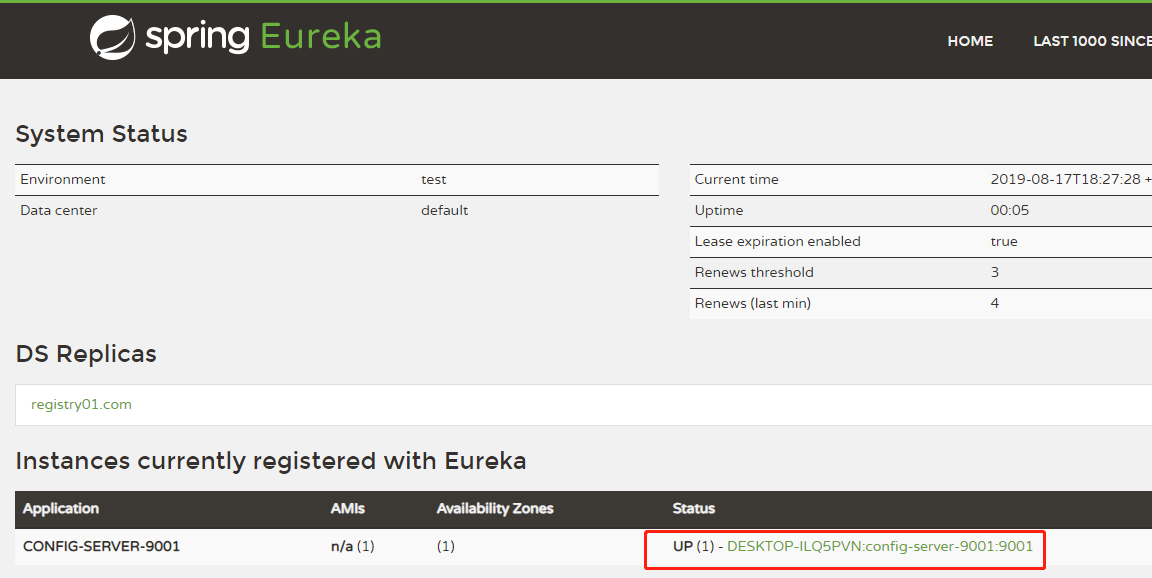
- 将config-server-9001添加到注册中心;
- 配置config-client-8001读取注册中心;
完成后Eureka注册中心效果图,启动顺序如下:
3、修改客户端配置
通过注册中心获取服务,避免使用URI地址。
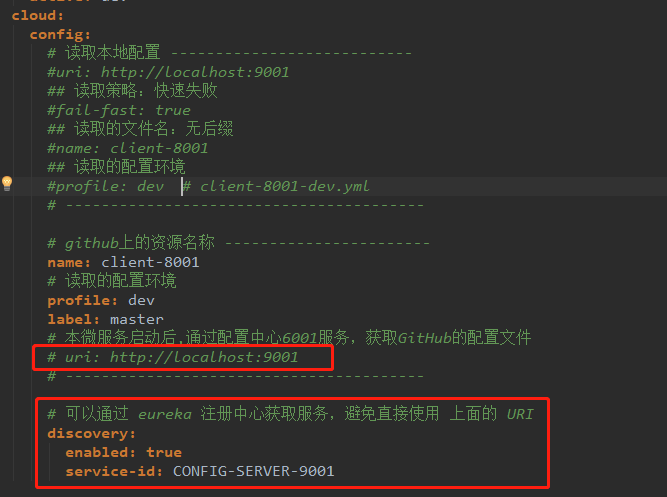
经过测试后,正确无误。
- 提醒:国内如果读取git的配置,可能经常出去无法加载的问题,该案例使用的是Gitee的地址。
五、源代码地址
1GitHub地址:知了一笑
2https://github.com/cicadasmile/spring-cloud-base
3码云地址:知了一笑
4https://gitee.com/cicadasmile/spring-cloud-base