
MemFire Cloud是一款提供云数据库,用户可以创建云数据库,并对数据库进行管理,还可以对数据库进行备份操作。它还提供后端即服务,用户可以在1分钟内新建一个应用,使用自动生成的API和SDK,访问云数据库、对象存储、用户认证与授权等功能,可专注于编写前端应用程序代码,加速WEB或APP应用开发。
此示例提供了使用 MemFire Cloud 和 Vue3 构建简单用户管理应用程序(从头开始)的步骤。这包括:
-
MemFire Cloud云数据库:用于存储用户数据的 MemFireDB数据库。
-
MemFire Cloud用户验证:用户可以使用魔法链接登录(只需要电子邮件,不需要密码)。
-
MemFire Cloud存储:用户可以上传照片。
-
行级安全策略:数据受到保护,因此个人只能访问自己的数据。
-
即时API:创建数据库表时会自动生成 API。
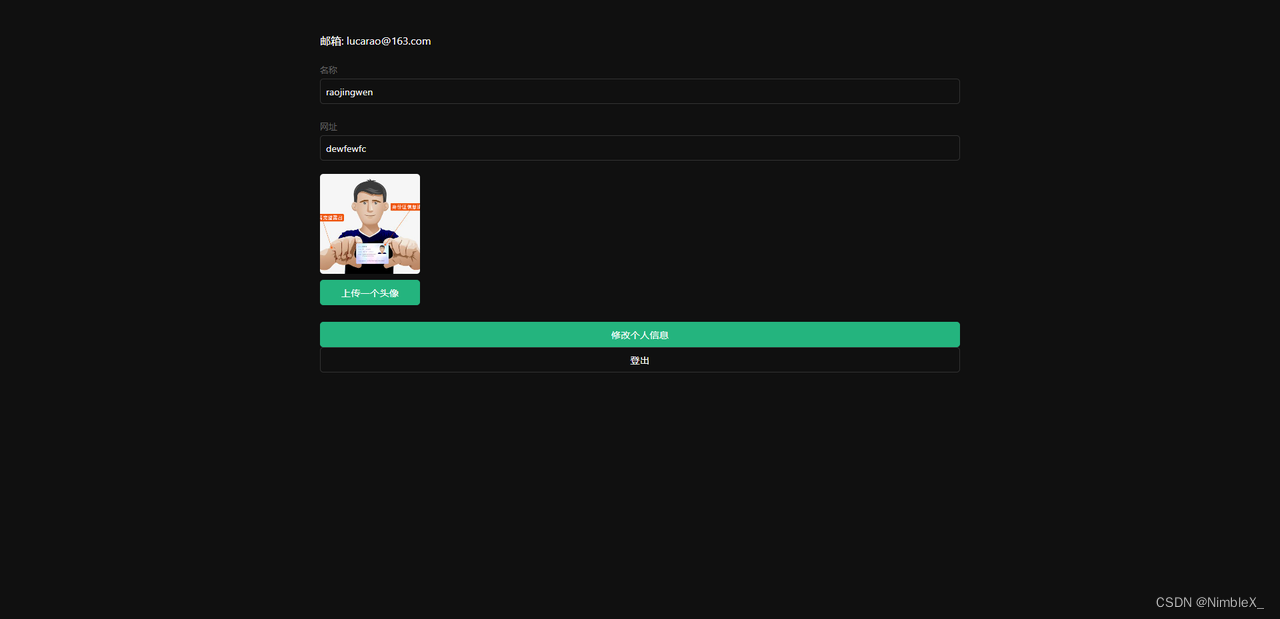
在本指南结束时,您将拥有一个允许用户登录和更新一些基本个人资料详细信息的应用程序:
创建应用
目的:我们的应用就是通过在这里创建的应用来获得数据库、云存储等一系列资源,并将获得该应用专属的API访问链接和访问密钥,用户可以轻松的与以上资源进行交互。
登录https://cloud.memfiredb.com/auth/login创建应用
![[外链图片转存失败,源站可能有防盗链机制,建议将图片保存下来直接上传(img-44KaEAKR-1663723902919)(https://g8nb5c2xl3.feishu.cn/space/api/box/stream/download/asynccode/?code=N2I3ZmRjMDRjOTVjMzk3NTg3MWVjNTcxNTdiZmNhZjdfVFFERDZGMWZaanBwUFc4ckdvY1JyVTRRQXBFMzBHWXNfVG9rZW46Ym94Y24yMzJuYWN2YTF4SjRITUlrYVluQWplXzE2NjM3MjM4ODE6MTY2MzcyNzQ4MV9WNA)]](https://img-hello-world.oss-cn-beijing.aliyuncs.com/5f28c6a6040500175f83eece0825bb73.png)
创建数据表
点击应用,视图化创建数据表
- 创建profiles表;
在数据表页面,点击“新建数据表”,页面配置如下:
![[外链图片转存失败,源站可能有防盗链机制,建议将图片保存下来直接上传(img-qQ3sQCXy-1663723902919)(https://g8nb5c2xl3.feishu.cn/space/api/box/stream/download/asynccode/?code=NTA2NmQyOTkwZmY0NDQ3MjNjNmU4OGY4OWRmY2JjZDFfTlJlSVAyRG9RZkV3UGpUTWRPN0lVNG1nT1VrWWRJSnVfVG9rZW46Ym94Y25jTEVUQ0NuODNDWnFUMFpGRHJUZFBlXzE2NjM3MjM4ODE6MTY2MzcyNzQ4MV9WNA)]](https://img-hello-world.oss-cn-beijing.aliyuncs.com/3a77b6c6a3cf325fa15c6fa0dec5eacd.png)
其中profiles表字段id和auth.users表中的id字段(uuid类型)外键关联。
- 开启Profiles的RLS数据安全访问规则;
选中创建的Profiles表,点击表权限栏,如下图所示,点击"启用RLS"按钮
![[外链图片转存失败,源站可能有防盗链机制,建议将图片保存下来直接上传(img-kV37ml76-1663723902919)(https://g8nb5c2xl3.feishu.cn/space/api/box/stream/download/asynccode/?code=OWMxMWMzZDE1Yzk4MDc2ODg1M2VmMzE4NDU0OTdmNDZfZWJwWW5tb2ZJZTJHUk5xcVpTaGIwcU1vZjEyWE9sMzFfVG9rZW46Ym94Y25oeWtyQmdZYllidWUwTHVXcU9vYTllXzE2NjM3MjM4ODE6MTY2MzcyNzQ4MV9WNA)]](https://img-hello-world.oss-cn-beijing.aliyuncs.com/ef2a4b863086ac3c7d7d79cd0c84a79a.png)
- 允许每个用户可以查看公共的个人信息资料;
点击"新规则"按钮,在弹出弹框中,选择"为所有用户启用访问权限",输入策略名称,选择"SELECT(查询)"操作,点击“创建策略”按钮,如下图。
![[外链图片转存失败,源站可能有防盗链机制,建议将图片保存下来直接上传(img-2l1hVXUA-1663723902920)(https://g8nb5c2xl3.feishu.cn/space/api/box/stream/download/asynccode/?code=ZDI3NjMxNzZhNGU4YzU3MDNiNDJiZGYxZjNkNDc0NzBfaW9TeU1ZbTVHV2pBOXhYVnphbDZRaGtOM1RoZVMyYkFfVG9rZW46Ym94Y25aWXBsbnRNSkpPYWdHeUlmMzJlM0xjXzE2NjM3MjM4ODE6MTY2MzcyNzQ4MV9WNA)]](https://img-hello-world.oss-cn-beijing.aliyuncs.com/d45f53f1beac72902d947cffa7042b22.png)
- 仅允许用户增删改查本人的个人资料信息;
点击"新规则"按钮,在弹出弹框中,选择"根据用户ID为用户启用访问权限",输入策略名称,选择"ALL(所有)"操作,点击“创建策略”按钮,如下图。
![[外链图片转存失败,源站可能有防盗链机制,建议将图片保存下来直接上传(img-HbIoZJgF-1663723902925)(https://g8nb5c2xl3.feishu.cn/space/api/box/stream/download/asynccode/?code=YzIwNDhiNTJlNDA2M2QzZTViMGVlODc4ZDYwOWMxNTBfUmpPd2JsbGR2dk85ZTh3SXlYcjFnZVpGNmxndXE1b0ZfVG9rZW46Ym94Y25mRGkwSUtCYXM3RG5BNWh2UUR5MkpnXzE2NjM3MjM4ODE6MTY2MzcyNzQ4MV9WNA)]](https://img-hello-world.oss-cn-beijing.aliyuncs.com/132bc098111ff5fd4ed5c5414bad0c80.png)
创建avatars存储桶
创建云存储的存储桶,用来存储用户的头像图片,涉及操作包括:
- 创建一个存储桶avatars
在该应用的云存储导航栏,点击“新建Bucket”按钮,创建存储桶avatars。
![[外链图片转存失败,源站可能有防盗链机制,建议将图片保存下来直接上传(img-crdjl4dB-1663723902926)(https://g8nb5c2xl3.feishu.cn/space/api/box/stream/download/asynccode/?code=MWYxMDM5Y2YyMThlMDJkZDhjYWZhM2ZkY2JjMDE3NDRfR3FOVHVDQ0ptSVRWV0RoTVpPVW52ZFdLbGx5RUdQTVpfVG9rZW46Ym94Y25SSDV0Mlh6bVp6aVRIZWdBQmtLYU44XzE2NjM3MjM4ODE6MTY2MzcyNzQ4MV9WNA)]](https://img-hello-world.oss-cn-beijing.aliyuncs.com/f04d4b67e54dbf74d8b5956019e68e8c.png)
- 允许每个用户可以查看存储桶avatars
选中存储桶avatars,切换到权限设置栏,点击“新规则”按钮,弹出策略编辑弹框,选择“自定义”,如下图所示:
![[外链图片转存失败,源站可能有防盗链机制,建议将图片保存下来直接上传(img-puWZV2DP-1663723902927)(https://g8nb5c2xl3.feishu.cn/space/api/box/stream/download/asynccode/?code=NjNmMmU4OTlkNWIzYjk1NDM5MDUxM2UxZjlkODZkMGNfV29IUU90dEEyQlRBVzNaaXhyNFVtQ0l6ZE4zOUxXcGlfVG9rZW46Ym94Y25jUnVkbEVFVWV4VDdHNFdHTklDdXhkXzE2NjM3MjM4ODE6MTY2MzcyNzQ4MV9WNA)]](https://img-hello-world.oss-cn-beijing.aliyuncs.com/52197d1aa8d3766f8974b5bda43036ed.png)
选择SELECT操作,输入策略名称,点击“生成策略”按钮,如下图所示。
![[外链图片转存失败,源站可能有防盗链机制,建议将图片保存下来直接上传(img-xd2SHI8A-1663723902927)(https://g8nb5c2xl3.feishu.cn/space/api/box/stream/download/asynccode/?code=MTBiNWQ4MTU4NTRhOTFmNjBiMWZkZjdhYTkzNzllZWRfa20yTjBUZmFsZThFd1hQamNaZXpUYnMwbldTUmIwVFZfVG9rZW46Ym94Y25JRkdXTHg1bDk0WGdxVlA5WGRIMkxiXzE2NjM3MjM4ODE6MTY2MzcyNzQ4MV9WNA)]](https://img-hello-world.oss-cn-beijing.aliyuncs.com/eb3097cafd5d7e52af52dcc4466978c1.png)
- 允许用户上传存储桶avatars;
选中存储桶avatars,切换到权限设置栏,点击“新规则”按钮,弹出策略编辑弹框,选择“自定义”,如下图所示:
![[外链图片转存失败,源站可能有防盗链机制,建议将图片保存下来直接上传(img-2X3SUcGT-1663723902928)(https://g8nb5c2xl3.feishu.cn/space/api/box/stream/download/asynccode/?code=Y2MwNTYwNDE5ZjU2M2U2NzgyNzAwNzkzYWNmNmQyMjVfZjZtTkI3M0pDdVV0ZURCaUw4ZEZzMzE2RExacjZ0a0VfVG9rZW46Ym94Y25lTzBYR29LcU9kUXlkbGdYN0hpSU9kXzE2NjM3MjM4ODE6MTY2MzcyNzQ4MV9WNA)]](https://img-hello-world.oss-cn-beijing.aliyuncs.com/1af4341750792f90d8486c9430a8184b.png)
选择INSERT操作,输入策略名称,点击“生成策略”按钮,如下图所示。
![[外链图片转存失败,源站可能有防盗链机制,建议将图片保存下来直接上传(img-bwStQMiv-1663723902929)(https://g8nb5c2xl3.feishu.cn/space/api/box/stream/download/asynccode/?code=MjljYjViYjM0NDJmMGVjZGY0YjFmYjIwYTQzMjVhMDVfM0N1ZWcyTnl0Znh1S242TWRUa3RyN25nRXZrN0VhTEtfVG9rZW46Ym94Y25vT2tDV0YzMUc4elhydnBxeWMxb29kXzE2NjM3MjM4ODE6MTY2MzcyNzQ4MV9WNA)]](https://img-hello-world.oss-cn-beijing.aliyuncs.com/e9494adb626e349fbc2eaccd2c701b99.png)
查看结果
![[外链图片转存失败,源站可能有防盗链机制,建议将图片保存下来直接上传(img-7gmJKS6u-1663723902929)(https://g8nb5c2xl3.feishu.cn/space/api/box/stream/download/asynccode/?code=MzJiY2YzMzU4MTNkYjg1M2MxNzgyNzdiZjEzNjU2NDNfS1o1NUprY2l0eWtJVXM0b0Myc0NzOElBSHNQd0dtZjBfVG9rZW46Ym94Y25rcDVubkpGM1c1aG9CaDN6RDhUODJmXzE2NjM3MjM4ODE6MTY2MzcyNzQ4MV9WNA)]](https://img-hello-world.oss-cn-beijing.aliyuncs.com/3a270f2f78ffa44f272911011af82d15.png)
所有数据表及RLS的sql(策略名称用英文代替)
1-- Create a table for public "profiles"
2create table profiles (
3  id uuid references auth.users not null,
4  updated_at timestamp with time zone,
5  username text unique,
6  avatar_url text,
7  website text,
8
9  primary key (id),
10  unique(username),
11);
12
13alter table profiles enable row level security;
14
15create policy "Public profiles are viewable by everyone."
16  on profiles for select
17  using ( true );
18
19create policy "Users can insert their own profile."
20  on profiles for insert
21  with check ( auth.uid() = id );
22
23create policy "Users can update own profile."
24  on profiles for update
25  using ( auth.uid() = id );
26-- Set up Storage!
27insert into storage.buckets (id, name)
28values ('avatars', 'avatars');
29
30create policy "Avatar images are publicly accessible."
31  on storage.objects for select
32  using ( bucket_id = 'avatars' );
33
34create policy "Anyone can upload an avatar."
35  on storage.objects for insert
36  with check ( bucket_id = 'avatars' );
获取 API密钥
现在您已经创建了一些数据库表,您可以使用自动生成的 API 插入数据。我们只需要从API设置中获取您在上面复制的URL和anon的密钥。
在应用->概括页面,获取服务地址以及token信息。
![[外链图片转存失败,源站可能有防盗链机制,建议将图片保存下来直接上传(img-p172GkuF-1663723902929)(https://g8nb5c2xl3.feishu.cn/space/api/box/stream/download/asynccode/?code=OTI0OGNkODdkMmQxZWE4ZTZkZDJmNTA1Y2JhMDFhZjVfU3VzY2tMTVlTVmZOR0REN2x1QnBWWHZ2N1lzY0s3TlJfVG9rZW46Ym94Y25neVZSYlQ5MVRrd0p6VVVsS3JKVGZjXzE2NjM3MjM4ODE6MTY2MzcyNzQ4MV9WNA)]](https://img-hello-world.oss-cn-beijing.aliyuncs.com/e3ea8a046498b988377c304af36f354b.png)
Anon(公开)密钥是客户端API密钥。它允许“匿名访问”您的数据库,直到用户登录。登录后,密钥将切换到用户自己的登录令牌。这将为数据启用行级安全性。
注意:service_role(秘密)密钥可以绕过任何安全策略完全访问您的数据。这些密钥必须保密,并且要在服务器环境中使用,绝不能在客户端或浏览器上使用。 在后续示例代码中,需要提供supabaseUrl和supabaseKey。
认证设置
当用户点击邮件内魔法链接进行登录时,是需要跳转到我们应用的登录界面的。这里需要在认证设置中进行相关URL重定向的配置。
因为我们最终的应用会在本地的3000端口启动(亦或者其他端口),所以这里我们暂时将url设置为http://localhost:3000/
除此之外,在此界面也可以自定义使用我们自己的smtp服务器。
![[外链图片转存失败,源站可能有防盗链机制,建议将图片保存下来直接上传(img-gNdiMOe8-1663723902929)(https://g8nb5c2xl3.feishu.cn/space/api/box/stream/download/asynccode/?code=MDY2NmZkNWEyZjJiZDY2YWU3MTcwM2Y1MTk1ODY3NjZfbXBRekllUWZzMEkzNk9RUVdOc2o5WGoyMmFVd0E4THVfVG9rZW46Ym94Y240eVZQREM4M3lzbEw3YW0wY0Z3TTVnXzE2NjM3MjM4ODE6MTY2MzcyNzQ4MV9WNA)]](https://img-hello-world.oss-cn-beijing.aliyuncs.com/dfcdc5ce356b5b6799144c9eab3bd18e.png)
构建应用程序
让我们从头开始构建 Vue3应用程序。
初始化一个 Vue3应用程序
需要 Node.js (>=14.15 <=16.10) 。
我们可以快速使用Vite 和 Vue 3 模板来初始化一个名为memfiredb-vue-3:
1npm init vite memfiredb-vue-3 --template vue
2cd memfiredb-vue-3
然后让我们安装唯一的附加依赖项:supabase-js
1npm install @supabase/supabase-js
接下来我们需要创建一个可以访问我们应用程序数据的客户端,我们使用了Supabase 客户端,使用他生态里提供的功能(登录、注册、增删改查等)去进行交互。创建一个可以访问我们应用程序数据的客户端需要接口的地址(URL)和一个数据权限的令牌(ANON_KEY),我们需要去应用的概览里面去获取这两个参数然后配置到supabaseClient.js里面去。
src/supabaseClient.js
1import { createClient } from '@supabase/supabase-js'
2
3const url = URL
4const key = ANON_KEY
5
6export const supabase = createClient(url,key)
更新样式
可以看到界面实在是不怎么优雅,更新下样式,让它好看一些。 修改src/style.css文件。
1html,
2body {
3  --custom-font-family: -apple-system, BlinkMacSystemFont, Segoe UI, Roboto, Oxygen, Ubuntu,
4    Cantarell, Fira Sans, Droid Sans, Helvetica Neue, sans-serif;
5  --custom-bg-color: #101010;
6  --custom-panel-color: #222;
7  --custom-box-shadow: 0 2px 8px 0 rgba(0, 0, 0, 0.8);
8  --custom-color: #fff;
9  --custom-color-brand: #24b47e;
10  --custom-color-secondary: #666;
11  --custom-border: 1px solid #333;
12  --custom-border-radius: 5px;
13  --custom-spacing: 5px;
14
15  padding: 0;
16  margin: 0;
17  font-family: var(--custom-font-family);
18  background-color: var(--custom-bg-color);
19}
20
21* {
22  color: var(--custom-color);
23  font-family: var(--custom-font-family);
24  box-sizing: border-box;
25}
26
27html,
28body,
29#__next {
30  height: 100vh;
31  width: 100vw;
32  overflow-x: hidden;
33}
34
35/* Grid */
36
37.container {
38  width: 90%;
39  margin-left: auto;
40  margin-right: auto;
41}
42.row {
43  position: relative;
44  width: 100%;
45}
46.row [class^='col'] {
47  float: left;
48  margin: 0.5rem 2%;
49  min-height: 0.125rem;
50}
51.col-1,
52.col-2,
53.col-3,
54.col-4,
55.col-5,
56.col-6,
57.col-7,
58.col-8,
59.col-9,
60.col-10,
61.col-11,
62.col-12 {
63  width: 96%;
64}
65.col-1-sm {
66  width: 4.33%;
67}
68.col-2-sm {
69  width: 12.66%;
70}
71.col-3-sm {
72  width: 21%;
73}
74.col-4-sm {
75  width: 29.33%;
76}
77.col-5-sm {
78  width: 37.66%;
79}
80.col-6-sm {
81  width: 46%;
82}
83.col-7-sm {
84  width: 54.33%;
85}
86.col-8-sm {
87  width: 62.66%;
88}
89.col-9-sm {
90  width: 71%;
91}
92.col-10-sm {
93  width: 79.33%;
94}
95.col-11-sm {
96  width: 87.66%;
97}
98.col-12-sm {
99  width: 96%;
100}
101.row::after {
102  content: '';
103  display: table;
104  clear: both;
105}
106.hidden-sm {
107  display: none;
108}
109
110@media only screen and (min-width: 33.75em) {
111  /* 540px */
112  .container {
113    width: 80%;
114  }
115}
116
117@media only screen and (min-width: 45em) {
118  /* 720px */
119  .col-1 {
120    width: 4.33%;
121  }
122  .col-2 {
123    width: 12.66%;
124  }
125  .col-3 {
126    width: 21%;
127  }
128  .col-4 {
129    width: 29.33%;
130  }
131  .col-5 {
132    width: 37.66%;
133  }
134  .col-6 {
135    width: 46%;
136  }
137  .col-7 {
138    width: 54.33%;
139  }
140  .col-8 {
141    width: 62.66%;
142  }
143  .col-9 {
144    width: 71%;
145  }
146  .col-10 {
147    width: 79.33%;
148  }
149  .col-11 {
150    width: 87.66%;
151  }
152  .col-12 {
153    width: 96%;
154  }
155  .hidden-sm {
156    display: block;
157  }
158}
159
160@media only screen and (min-width: 60em) {
161  /* 960px */
162  .container {
163    width: 75%;
164    max-width: 60rem;
165  }
166}
167
168/* Forms */
169
170label {
171  display: block;
172  margin: 5px 0;
173  color: var(--custom-color-secondary);
174  font-size: 0.8rem;
175  text-transform: uppercase;
176}
177
178input {
179  width: 100%;
180  border-radius: 5px;
181  border: var(--custom-border);
182  padding: 8px;
183  font-size: 0.9rem;
184  background-color: var(--custom-bg-color);
185  color: var(--custom-color);
186}
187
188input[disabled] {
189  color: var(--custom-color-secondary);
190}
191
192/* Utils */
193
194.block {
195  display: block;
196  width: 100%;
197}
198.inline-block {
199  display: inline-block;
200  width: 100%;
201}
202.flex {
203  display: flex;
204}
205.flex.column {
206  flex-direction: column;
207}
208.flex.row {
209  flex-direction: row;
210}
211.flex.flex-1 {
212  flex: 1 1 0;
213}
214.flex-end {
215  justify-content: flex-end;
216}
217.flex-center {
218  justify-content: center;
219}
220.items-center {
221  align-items: center;
222}
223.text-sm {
224  font-size: 0.8rem;
225  font-weight: 300;
226}
227.text-right {
228  text-align: right;
229}
230.font-light {
231  font-weight: 300;
232}
233.opacity-half {
234  opacity: 50%;
235}
236
237/* Button */
238
239button,
240.button {
241  color: var(--custom-color);
242  border: var(--custom-border);
243  background-color: var(--custom-bg-color);
244  display: inline-block;
245  text-align: center;
246  border-radius: var(--custom-border-radius);
247  padding: 0.5rem 1rem;
248  cursor: pointer;
249  text-align: center;
250  font-size: 0.9rem;
251  text-transform: uppercase;
252}
253
254button.primary,
255.button.primary {
256  background-color: var(--custom-color-brand);
257  border: 1px solid var(--custom-color-brand);
258}
259
260/* Widgets */
261
262.card {
263  width: 100%;
264  display: block;
265  border: var(--custom-border);
266  border-radius: var(--custom-border-radius);
267  padding: var(--custom-spacing);
268}
269
270.avatar {
271  border-radius: var(--custom-border-radius);
272  overflow: hidden;
273  max-width: 100%;
274}
275.avatar.image {
276  object-fit: cover;
277}
278.avatar.no-image {
279  background-color: #333;
280  border: 1px solid rgb(200, 200, 200);
281  border-radius: 5px;
282}
283
284.footer {
285  position: absolute;
286  max-width: 100%;
287  bottom: 0;
288  left: 0;
289  right: 0;
290  display: flex;
291  flex-flow: row;
292  border-top: var(--custom-border);
293  background-color: var(--custom-bg-color);
294}
295.footer div {
296  padding: var(--custom-spacing);
297  display: flex;
298  align-items: center;
299  width: 100%;
300}
301.footer div > img {
302  height: 20px;
303  margin-left: 10px;
304}
305.footer > div:first-child {
306  display: none;
307}
308.footer > div:nth-child(2) {
309  justify-content: left;
310}
311
312@media only screen and (min-width: 60em) {
313  /* 960px */
314  .footer > div:first-child {
315    display: flex;
316  }
317  .footer > div:nth-child(2) {
318    justify-content: center;
319  }
320}
321
322@keyframes spin {
323  from {
324    transform: rotate(0deg);
325  }
326  to {
327    transform: rotate(360deg);
328  }
329}
330
331.mainHeader {
332  width: 100%;
333  font-size: 1.3rem;
334  margin-bottom: 20px;
335}
336
337.avatarPlaceholder {
338  border: var(--custom-border);
339  border-radius: var(--custom-border-radius);
340  width: 35px;
341  height: 35px;
342  background-color: rgba(255, 255, 255, 0.2);
343  display: flex;
344  align-items: center;
345  justify-content: center;
346}
347
348/* Auth */
349
350.auth-widget {
351  display: flex;
352  flex-direction: column;
353  gap: 20px;
354}
355
356.auth-widget > .button {
357  display: flex;
358  align-items: center;
359  justify-content: center;
360  border: none;
361  background-color: #444444;
362  text-transform: none !important;
363  transition: all 0.2s ease;
364}
365
366.auth-widget .button:hover {
367  background-color: #2a2a2a;
368}
369
370.auth-widget .button > .loader {
371  width: 17px;
372  animation: spin 1s linear infinite;
373  filter: invert(1);
374}
375
376/* Account */
377
378.account {
379  display: flex;
380  flex-direction: column;
381  gap: 20px;
382}
383
384.account > * > .avatarField {
385  display: flex;
386  align-items: center;
387  margin-bottom: 30px;
388}
389
390.account > * > .avatarField > .avatarContainer {
391  margin-right: 20px;
392}
393
394/* Profile Card */
395
396.profileCard {
397  border-radius: 5px;
398  display: flex;
399  border: var(--custom-border);
400  background-color: var(--custom-panel-color);
401  padding: 20px 20px;
402  margin-bottom: 20px;
403}
404
405.profileCard:last-child {
406  margin-bottom: 0px;
407}
408
409.profileCard > .userInfo {
410  margin-left: 20px;
411  font-weight: 300;
412  display: flex;
413  flex-direction: column;
414  justify-content: center;
415}
416
417.profileCard > .userInfo > p {
418  margin: 0;
419}
420
421.profileCard > .userInfo > .username {
422  font-size: 1.3rem;
423  font-weight: 500;
424  margin-bottom: 5px;
425}
426
427.profileCard > .userInfo > .website {
428  font-size: 0.9rem;
429  color: var(--custom-color-brand);
430  margin-bottom: 10px;
431  text-decoration: none;
432}
设置登录组件
让我们新建一个组件来管理登录和注册。我们将使用 Magic Links,因此用户无需使用密码即可使用电子邮件登录。
/src/components/Auth.vue
1<template>
2  <form class="row flex flex-center" @submit.prevent="handleLogin">
3    <div class="col-6 form-widget">
4      <h1 class="header">MemFire Cloud + Vue 3</h1>
5      <p class="description">使用下面的电子邮件通过魔法链接登录</p>
6      <div>
7        <input
8          class="inputField"
9          type="email"
10          placeholder="邮箱"
11          v-model="email"
12        />
13      </div>
14      <div>
15        <input
16          type="submit"
17          class="button block"
18          :value="loading ? 'Loading' : '发送魔法链接'"
19          :disabled="loading"
20        />
21      </div>
22    </div>
23  </form>
24</template>
25
26<script>
27import { ref } from "vue";
28import { supabase } from "../supabaseClient";
29
30export default {
31  setup() {
32    const loading = ref(false);
33    const email = ref("");
34
35    const handleLogin = async () => {
36      try {
37        loading.value = true;
38        const { error } = await supabase.auth.signIn({ email: email.value });
39        if (error) throw error;
40        alert("请检查您的电子邮件以获取登录链接!");
41      } catch (error) {
42        alert(error.error_description || error.message);
43      } finally {
44        loading.value = false;
45      }
46    };
47
48    return {
49      loading,
50      email,
51      handleLogin,
52    };
53  },
54};
55</script>
获取用户个人信息
为了访问其他地方的用户信息,我们使用了响应式存储。创建一个名为store.js并利用 Vue 3reactive功能的新文件。
src/store.js
1import { reactive } from "vue"
2
3export const store = reactive({
4  user: {},
5})
用户信息页面
用户登录后,我们可以允许他们编辑他们的个人资料详细信息并管理他们的帐户。让我们为它创建一个名为Profile.vue的组件.
src/components/Profile.vue
1<template>
2  <form class="form-widget" @submit.prevent="updateProfile">
3    <div>
4      <label for="email">Email</label>
5      <input id="email" type="text" :value="store.user.email" disabled />
6    </div>
7    <div>
8      <label for="username">名称</label>
9      <input id="username" type="text" v-model="username" />
10    </div>
11    <div>
12      <label for="website">网址</label>
13      <input id="website" type="website" v-model="website" />
14    </div>
15
16    <div>
17      <input
18        type="submit"
19        class="button block primary"
20        :value="loading ? 'Loading ...' : '修改'"
21        :disabled="loading"
22      />
23    </div>
24
25    <div>
26      <button class="button block" @click="signOut" :disabled="loading">
27        登出
28      </button>
29    </div>
30  </form>
31</template>
32
33<script>
34import { supabase } from "../supabaseClient"
35import { store } from "../store"
36import { onMounted, ref } from "vue"
37
38export default {
39  setup() {
40    const loading = ref(true)
41    const username = ref("")
42    const website = ref("")
43    const avatar_url = ref("")
44
45    async function getProfile() {
46      try {
47        loading.value = true
48        store.user = supabase.auth.user()
49
50        let { data, error, status } = await supabase
51          .from("profiles")
52          .select(`username, website, avatar_url`)
53          .eq("id", store.user.id)
54          .single()
55
56        if (error && status !== 406) throw error
57
58        if (data) {
59          username.value = data.username
60          website.value = data.website
61          avatar_url.value = data.avatar_url
62        }
63      } catch (error) {
64        alert(error.message)
65      } finally {
66        loading.value = false
67      }
68    }
69
70    async function updateProfile() {
71      try {
72        loading.value = true
73        store.user = supabase.auth.user()
74
75        const updates = {
76          id: store.user.id,
77          username: username.value,
78          website: website.value,
79          avatar_url: avatar_url.value,
80          updated_at: new Date(),
81        }
82
83        let { error } = await supabase.from("profiles").upsert(updates, {
84          returning: "minimal", // Don't return the value after inserting
85        })
86        alert('修改成功!')
87        if (error) throw error
88      } catch (error) {
89        alert(error.message)
90      } finally {
91        loading.value = false
92      }
93    }
94
95    async function signOut() {
96      try {
97        loading.value = true
98        let { error } = await supabase.auth.signOut()
99        if (error) throw error
100      } catch (error) {
101        alert(error.message)
102      } finally {
103        loading.value = false
104      }
105    }
106
107    onMounted(() => {
108      getProfile()
109    })
110
111    return {
112      store,
113      loading,
114      username,
115      website,
116      avatar_url,
117
118      updateProfile,
119      signOut,
120    }
121  },
122}
123</script>
修改项目入口文件
现在我们已经准备好所有组件,让我们更新App.vue:
src/App.vue
1<template>
2  <div class="container" style="padding: 50px 0 100px 0">
3    <Profile v-if="store.user" />
4    <Auth v-else />
5  </div>
6</template>
7
8<script>
9import { store } from "./store"
10import { supabase } from "./supabaseClient"
11import Auth from "./components/Auth.vue"
12import Profile from "./components/Profile.vue"
13
14export default {
15  components: {
16    Auth,
17    Profile,
18  },
19
20  setup() {
21    store.user = supabase.auth.user()
22    supabase.auth.onAuthStateChange((_, session) => {
23      store.user = session.user
24    })
25
26    return {
27      store,
28    }
29  },
30}
31</script>
你可以通过 --port 参数来配置服务的运行端口。
package.json
1{
2  "scripts": {
3    "preview": "vite preview --port 3000"
4  }
5}
完成后,在终端窗口中运行它:
1npm run build
2npm run preview
然后打开终端提示的端口链接,你应该会看到完整的应用程序。
![[外链图片转存失败,源站可能有防盗链机制,建议将图片保存下来直接上传(img-nGZAzeYI-1663835242160)(https://g8nb5c2xl3.feishu.cn/space/api/box/stream/download/asynccode/?code=NmIzZTc2MWNmNzczYTFhNzkzNjE0Yjg2NDAxOTVjMjhfaXJ1VUhkdnJGY0xxY2kySWZIeGhMV2NDZ21FekpyTkNfVG9rZW46Ym94Y241SDdNMGl2bXBIdWo4V3BhWW1FNzBlXzE2NjM4MzUyMjk6MTY2MzgzODgyOV9WNA)]](https://img-hello-world.oss-cn-beijing.aliyuncs.com/be1d10e909b8a38e64c0873a0b8ab831.png)
实现:上传头像及更新用户信息
每个 MemFire Cloud 项目都配置了存储,用于管理照片和视频等大文件。
创建上传小组件
让我们为用户创建一个头像,以便他们可以上传个人资料照片。我们可以从创建一个新组件开始:
src/Avatar.vue
1<template>
2  <div>
3    <img
4      v-if="src"
5      :src="src"
6      alt="Avatar"
7      class="avatar image"
8      :style="{ height: size, width: size }"
9    />
10    <div
11      v-else
12      class="avatar no-image"
13      :style="{ height: size, width: size }"
14    />
15
16    <div :style="{ width: size }">
17      <label class="button primary block" for="single">
18        {{ uploading ? "Uploading ..." : "Upload" }}
19      </label>
20      <input
21        style="visibility: hidden; position: absolute"
22        type="file"
23        id="single"
24        accept="image/*"
25        @change="uploadAvatar"
26        :disabled="uploading"
27      />
28    </div>
29  </div>
30</template>
31
32<script>
33import { ref, toRefs, watch } from "vue"
34import { supabase } from "./supabaseClient"
35
36export default {
37  props: {
38    path: String,
39  },
40  emits: ["upload", "update:path"],
41  setup(prop, { emit }) {
42    const { path } = toRefs(prop)
43    const size = ref("10em")
44    const uploading = ref(false)
45    const src = ref("")
46    const files = ref()
47
48    const downloadImage = async () => {
49      try {
50        const { data, error } = await supabase.storage
51          .from("avatars")
52          .download(path.value)
53        if (error) throw error
54        src.value = URL.createObjectURL(data)
55      } catch (error) {
56        console.error("Error downloading image: ", error.message)
57      }
58    }
59
60    const uploadAvatar = async (evt) => {
61      files.value = evt.target.files
62      try {
63        uploading.value = true
64        if (!files.value || files.value.length === 0) {
65          throw new Error("请选择一个图片上传")
66        }
67
68        const file = files.value[0]
69        const fileExt = file.name.split(".").pop()
70        const fileName = `${Math.random()}.${fileExt}`
71        const filePath = `${fileName}`
72
73        let { error: uploadError } = await supabase.storage
74          .from("avatars")
75          .upload(filePath, file)
76
77        if (uploadError) throw uploadError
78        emit("update:path", filePath)
79        emit("upload")
80      } catch (error) {
81        alert(error.message)
82      } finally {
83        uploading.value = false
84      }
85    }
86
87    watch(path, () => {
88      if (path.value) downloadImage()
89    })
90
91    return {
92      size,
93      uploading,
94      src,
95      files,
96
97      uploadAvatar,
98    }
99  },
100}
101</script>
将组建引入到Profile.vue页面
src/components/Profile.vue
1<template>
2  <form class="form-widget" @submit.prevent="updateProfile">
3    <div>
4      <label for="email">Email</label>
5      <input id="email" type="text" :value="store.user.email" disabled />
6    </div>
7    <div>
8      <label for="username">名称</label>
9      <input id="username" type="text" v-model="username" />
10    </div>
11    <div>
12      <label for="website">网址</label>
13      <input id="website" type="website" v-model="website" />
14    </div>
15    <Avatar v-model:path="avatar_url" @upload="updateProfile" />
16
17    <div>
18      <input
19        type="submit"
20        class="button block primary"
21        :value="loading ? 'Loading ...' : '修改'"
22        :disabled="loading"
23      />
24    </div>
25
26    <div>
27      <button class="button block" @click="signOut" :disabled="loading">
28        登出
29      </button>
30    </div>
31  </form>
32</template>
33
34<script>
35import { supabase } from "../supabaseClient"
36import { store } from "../store"
37import { onMounted, ref } from "vue"
38import Avatar from './Avatar.vue'
39
40export default {
41components: {
42    Avatar,
43  },
44  setup() {
45    const loading = ref(true)
46    const username = ref("")
47    const website = ref("")
48    const avatar_url = ref("")
49
50    async function getProfile() {
51      try {
52        loading.value = true
53        store.user = supabase.auth.user()
54
55        let { data, error, status } = await supabase
56          .from("profiles")
57          .select(`username, website, avatar_url`)
58          .eq("id", store.user.id)
59          .single()
60
61        if (error && status !== 406) throw error
62
63        if (data) {
64          username.value = data.username
65          website.value = data.website
66          avatar_url.value = data.avatar_url
67        }
68      } catch (error) {
69        alert(error.message)
70      } finally {
71        loading.value = false
72      }
73    }
74
75    async function updateProfile() {
76      try {
77        loading.value = true
78        store.user = supabase.auth.user()
79
80        const updates = {
81          id: store.user.id,
82          username: username.value,
83          website: website.value,
84          avatar_url: avatar_url.value,
85          updated_at: new Date(),
86        }
87
88        let { error } = await supabase.from("profiles").upsert(updates, {
89          returning: "minimal", // Don't return the value after inserting
90        })
91        alert('修改成功!')
92        if (error) throw error
93      } catch (error) {
94        alert(error.message)
95      } finally {
96        loading.value = false
97      }
98    }
99
100    async function signOut() {
101      try {
102        loading.value = true
103        let { error } = await supabase.auth.signOut()
104        if (error) throw error
105      } catch (error) {
106        alert(error.message)
107      } finally {
108        loading.value = false
109      }
110    }
111
112    onMounted(() => {
113      getProfile()
114    })
115
116    return {
117      store,
118      loading,
119      username,
120      website,
121      avatar_url,
122
123      updateProfile,
124      signOut,
125    }
126  },
127}
128</script>
恭喜!在这个阶段,您拥有一个功能齐全的应用程序!