目前市面上 Excel 转 PDF 的组件较多:
- 收费:aspose、GcExcel、spire
- 开源:jacob、itextpdf
其中收费的组件封装得比较好,代码简洁,转换的效果也很好,但收费也高得离谱:
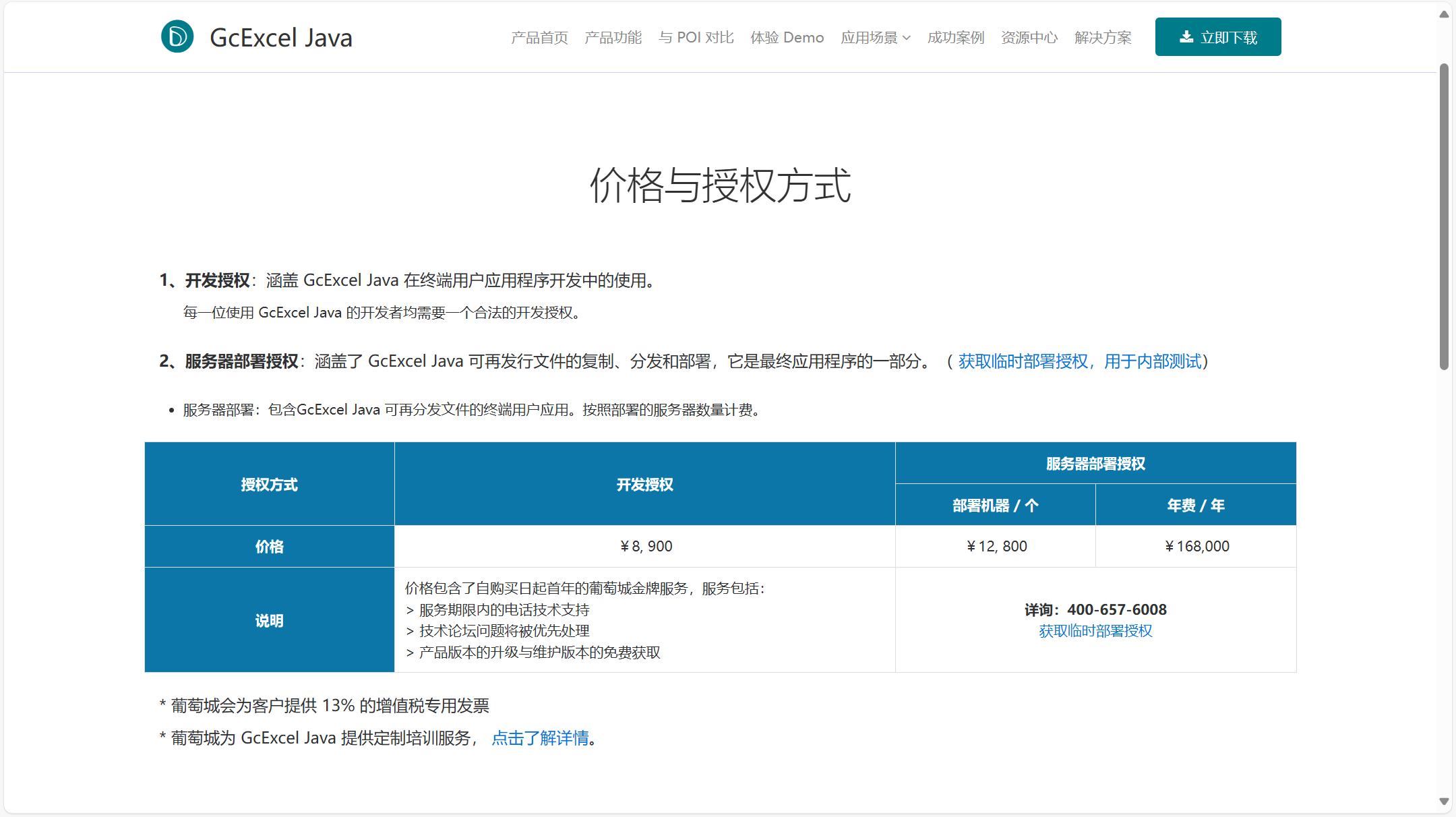 为了成本考虑,就需要考虑开源的组件了,因为它们都是免费的:
- jacob:目前没有探索出很好的导出效果。
- itextpdf:已探索出很好的导出效果,达到了与收费组件一致的效果(推荐)。
以下是 itextpdf 的使用步骤:
-
引入依赖
1<!-- POI Excel--> 2<dependency> 3 <groupId>org.apache.poi</groupId> 4 <artifactId>poi</artifactId> 5 <version>4.1.1</version> 6</dependency> 7 8<!-- iText PDF --> 9<dependency> 10 <groupId>com.itextpdf</groupId> 11 <artifactId>itextpdf</artifactId> 12 <version>5.5.13.2</version> 13</dependency> -
定义图片信息
1import java.io.Serializable; 2 3/** 4 * 图片信息 5 */ 6public class PicturesInfo implements Serializable { 7 8 private static final long serialVersionUID = 1L; 9 10 /** 11 * 最小行 12 */ 13 private int minRow; 14 15 /** 16 * 最大行 17 */ 18 private int maxRow; 19 20 /** 21 * 最小列 22 */ 23 private int minCol; 24 25 /** 26 * 最大列 27 */ 28 private int maxCol; 29 30 /** 31 * 扩展 32 */ 33 private String ext; 34 35 /** 36 * 图片数据 37 */ 38 private byte[] pictureData; 39 40 public int getMinRow() { 41 return minRow; 42 } 43 44 public PicturesInfo setMinRow(int minRow) { 45 this.minRow = minRow; 46 return this; 47 } 48 49 public int getMaxRow() { 50 return maxRow; 51 } 52 53 public PicturesInfo setMaxRow(int maxRow) { 54 this.maxRow = maxRow; 55 return this; 56 } 57 58 public int getMinCol() { 59 return minCol; 60 } 61 62 public PicturesInfo setMinCol(int minCol) { 63 this.minCol = minCol; 64 return this; 65 } 66 67 public int getMaxCol() { 68 return maxCol; 69 } 70 71 public PicturesInfo setMaxCol(int maxCol) { 72 this.maxCol = maxCol; 73 return this; 74 } 75 76 public String getExt() { 77 return ext; 78 } 79 80 public PicturesInfo setExt(String ext) { 81 this.ext = ext; 82 return this; 83 } 84 85 public byte[] getPictureData() { 86 return pictureData; 87 } 88 89 public PicturesInfo setPictureData(byte[] pictureData) { 90 this.pictureData = pictureData; 91 return this; 92 } 93} -
定义工具类
1import cn.hutool.core.collection.CollUtil; 2import cn.hutool.core.util.StrUtil; 3import com.itextpdf.text.BaseColor; 4import com.itextpdf.text.Document; 5import com.itextpdf.text.DocumentException; 6import com.itextpdf.text.Image; 7import com.itextpdf.text.PageSize; 8import com.itextpdf.text.Phrase; 9import com.itextpdf.text.pdf.BaseFont; 10import com.itextpdf.text.pdf.PdfPCell; 11import com.itextpdf.text.pdf.PdfPTable; 12import com.itextpdf.text.pdf.PdfWriter; 13import lombok.experimental.UtilityClass; 14import org.apache.log4j.Logger; 15import org.apache.poi.hssf.usermodel.HSSFCell; 16import org.apache.poi.hssf.usermodel.HSSFClientAnchor; 17import org.apache.poi.hssf.usermodel.HSSFPicture; 18import org.apache.poi.hssf.usermodel.HSSFPictureData; 19import org.apache.poi.hssf.usermodel.HSSFShape; 20import org.apache.poi.hssf.usermodel.HSSFShapeContainer; 21import org.apache.poi.hssf.usermodel.HSSFSheet; 22import org.apache.poi.hssf.usermodel.HSSFWorkbook; 23import org.apache.poi.ooxml.POIXMLDocumentPart; 24import org.apache.poi.ss.usermodel.Cell; 25import org.apache.poi.ss.usermodel.CellType; 26import org.apache.poi.ss.usermodel.DataFormatter; 27import org.apache.poi.ss.usermodel.DateUtil; 28import org.apache.poi.ss.usermodel.Font; 29import org.apache.poi.ss.usermodel.Row; 30import org.apache.poi.ss.usermodel.Sheet; 31import org.apache.poi.ss.usermodel.Workbook; 32import org.apache.poi.ss.util.CellRangeAddress; 33import org.apache.poi.xssf.usermodel.XSSFCell; 34import org.apache.poi.xssf.usermodel.XSSFClientAnchor; 35import org.apache.poi.xssf.usermodel.XSSFDrawing; 36import org.apache.poi.xssf.usermodel.XSSFPicture; 37import org.apache.poi.xssf.usermodel.XSSFPictureData; 38import org.apache.poi.xssf.usermodel.XSSFShape; 39import org.apache.poi.xssf.usermodel.XSSFSheet; 40import org.apache.poi.xssf.usermodel.XSSFWorkbook; 41import java.io.IOException; 42import java.io.InputStream; 43import java.io.OutputStream; 44import java.nio.file.Files; 45import java.nio.file.Paths; 46import java.text.SimpleDateFormat; 47import java.util.ArrayList; 48import java.util.Date; 49import java.util.HashSet; 50import java.util.List; 51import java.util.Objects; 52import java.util.Set; 53 54/** 55 * Excel转PDF 56 * @author 廖航 57 * @date 2024-08-29 10:52 58 */ 59@UtilityClass 60public class ExcelToPdfUtil { 61 62 /** 63 * 日志输出 64 */ 65 private static final Logger logger = Logger.getLogger(ExcelToPdfUtil.class); 66 67 /** 68 * 单元格队列 69 */ 70 Set<String> cellSet = new HashSet<>(); 71 72 /** 73 * Excel转PDF 74 * 75 * @param excelPath Excel文件路径 76 * @param pdfPath PDF文件路径 77 * @param excelSuffix Excel文件后缀 78 */ 79 public static void excelToPdf(String excelPath, String pdfPath, String excelSuffix) { 80 try (InputStream in = Files.newInputStream(Paths.get(excelPath)); 81 OutputStream out = Files.newOutputStream(Paths.get(pdfPath))) { 82 ExcelToPdfUtil.excelToPdf(in, out, excelSuffix); 83 } catch (Exception e) { 84 logger.error(e.getMessage()); 85 } 86 } 87 88 /** 89 * Excel转PDF并写入输出流 90 * 91 * @param inStream Excel输入流 92 * @param outStream PDF输出流 93 * @param excelSuffix Excel类型 .xls 和 .xlsx 94 * @throws Exception 异常信息 95 */ 96 public static void excelToPdf(InputStream inStream, OutputStream outStream, String excelSuffix) throws Exception { 97 // 输入流转workbook,获取sheet 98 Sheet sheet = getPoiSheetByFileStream(inStream, 0, excelSuffix); 99 // 获取列宽度占比 100 float[] widths = getColWidth(sheet); 101 PdfPTable table = new PdfPTable(widths); 102 table.setWidthPercentage(100); 103 int colCount = widths.length; 104 //设置基本字体 105 BaseFont baseFont = BaseFont.createFont("C:\\Windows\\Fonts\\simsun.ttc,0", BaseFont.IDENTITY_H, BaseFont.EMBEDDED); 106 // 遍历行 107 for (int rowIndex = sheet.getFirstRowNum(); rowIndex <= sheet.getLastRowNum(); rowIndex++) { 108 Row row = sheet.getRow(rowIndex); 109 if (Objects.isNull(row)) { 110 // 插入空对象 111 for (int i = 0; i < colCount; i++) { 112 table.addCell(createPdfPCell(null, 0, 13f, null)); 113 } 114 } else { 115 // 遍历单元格 116 for (int columnIndex = 0; (columnIndex < row.getLastCellNum() || columnIndex < colCount) && columnIndex > -1; columnIndex++) { 117 PdfPCell pCell = excelCellToPdfCell(sheet, row.getCell(columnIndex), baseFont); 118 // 是否合并单元格 119 if (isMergedRegion(sheet, rowIndex, columnIndex)) { 120 int[] span = getMergedSpan(sheet, rowIndex, columnIndex); 121 //忽略合并过的单元格 122 boolean mergedCell = span[0] == 1 && span[1] == 1; 123 if (mergedCell) { 124 continue; 125 } 126 pCell.setRowspan(span[0]); 127 pCell.setColspan(span[1]); 128 } 129 table.addCell(pCell); 130 } 131 } 132 } 133 // 初始化PDF文档对象 134 createPdfTableAndWriteDocument(outStream, table); 135 } 136 137 /** 138 * 单元格转换,poi cell 转换为 itext cell 139 * 140 * @param sheet poi sheet页 141 * @param excelCell poi 单元格 142 * @param baseFont 基础字体 143 * @return PDF单元格 144 */ 145 private static PdfPCell excelCellToPdfCell(Sheet sheet, Cell excelCell, BaseFont baseFont) throws Exception { 146 if (Objects.isNull(excelCell)) { 147 return createPdfPCell(null, 0, 13f, null); 148 } 149 int rowIndex = excelCell.getRowIndex(); 150 int columnIndex = excelCell.getColumnIndex(); 151 // 图片信息 152 List<PicturesInfo> infos = getAllPictureInfos(sheet, rowIndex, rowIndex, columnIndex, columnIndex, false); 153 PdfPCell pCell; 154 if (CollUtil.isNotEmpty(infos)) { 155 Image image = Image.getInstance(infos.get(0).getPictureData()); 156 // 调整图片大小 157 image.scaleAbsolute(527, 215); 158 pCell = new PdfPCell(image); 159 } else { 160 Font excelFont = getExcelFont(sheet, excelCell); 161 //设置单元格字体 162 com.itextpdf.text.Font pdFont = new com.itextpdf.text.Font(baseFont, excelFont.getFontHeightInPoints(), excelFont.getBold() ? 1 : 0, BaseColor.BLACK); 163 Integer border = hasBorder(excelCell) ? null : 0; 164 String excelCellValue = getExcelCellValue(excelCell); 165 pCell = createPdfPCell(excelCellValue, border, excelCell.getRow().getHeightInPoints(), pdFont); 166 } 167 // 水平居中 168 pCell.setHorizontalAlignment(getHorAlign(excelCell.getCellStyle().getAlignment().getCode())); 169 // 垂直对齐 170 pCell.setVerticalAlignment(getVerAlign(excelCell.getCellStyle().getVerticalAlignment().getCode())); 171 return pCell; 172 } 173 174 /** 175 * 创建pdf文档,并添加表格 176 * 177 * @param outStream 输出流,目标文档 178 * @param table 表格 179 * @throws DocumentException 异常信息 180 */ 181 private static void createPdfTableAndWriteDocument(OutputStream outStream, PdfPTable table) throws DocumentException { 182 //设置pdf纸张大小 PageSize.A4 A4横向 183 Document document = new Document(PageSize.B0); 184 PdfWriter.getInstance(document, outStream); 185 //设置页边距 宽 186 document.setMargins(10, 10, 10, 10); 187 document.open(); 188 document.add(table); 189 document.close(); 190 } 191 192 /** 193 * Excel文档输入流转换为对应的workbook及获取对应的sheet 194 * 195 * @param inputStream Excel文档输入流 196 * @param sheetNo sheet编号,默认0 第一个sheet 197 * @param excelSuffix 文件类型 .xls和.xlsx 198 * @return poi sheet 199 * @throws IOException 异常 200 */ 201 public static Sheet getPoiSheetByFileStream(InputStream inputStream, int sheetNo, String excelSuffix) throws IOException { 202 Workbook workbook; 203 if (excelSuffix.endsWith(".xlsx")) { 204 workbook = new XSSFWorkbook(inputStream); 205 } else { 206 workbook = new HSSFWorkbook(inputStream); 207 } 208 return workbook.getSheetAt(sheetNo); 209 } 210 211 /** 212 * 创建itext pdf 单元格 213 * 214 * @param content 单元格内容 215 * @param border 边框 216 * @param minimumHeight 高度 217 * @param pdFont 字体 218 * @return pdf cell 219 */ 220 private static PdfPCell createPdfPCell(String content, Integer border, Float minimumHeight, com.itextpdf.text.Font pdFont) { 221 String contentValue = content == null ? "" : content; 222 com.itextpdf.text.Font pdFontNew = pdFont == null ? new com.itextpdf.text.Font() : pdFont; 223 PdfPCell pCell = new PdfPCell(new Phrase(contentValue, pdFontNew)); 224 if (Objects.nonNull(border)) { 225 pCell.setBorder(border); 226 } 227 if (Objects.nonNull(minimumHeight)) { 228 pCell.setMinimumHeight(minimumHeight); 229 } 230 231 return pCell; 232 } 233 234 /** 235 * excel垂直对齐方式映射到pdf对齐方式 236 * 237 * @param align 对齐 238 * @return 结果 239 */ 240 private static int getVerAlign(int align) { 241 switch (align) { 242 case 2: 243 return com.itextpdf.text.Element.ALIGN_BOTTOM; 244 case 3: 245 return com.itextpdf.text.Element.ALIGN_TOP; 246 default: 247 return com.itextpdf.text.Element.ALIGN_MIDDLE; 248 } 249 } 250 251 /** 252 * excel水平对齐方式映射到pdf水平对齐方式 253 * 254 * @param align 对齐 255 * @return 结果 256 */ 257 private static int getHorAlign(int align) { 258 switch (align) { 259 case 1: 260 return com.itextpdf.text.Element.ALIGN_LEFT; 261 case 3: 262 return com.itextpdf.text.Element.ALIGN_RIGHT; 263 default: 264 return com.itextpdf.text.Element.ALIGN_CENTER; 265 } 266 } 267 268 /*============================================== POI获取图片及文本内容工具方法 ==============================================*/ 269 270 /** 271 * 获取字体 272 * 273 * @param sheet excel 转换的sheet页 274 * @param cell 单元格 275 * @return 字体 276 */ 277 private static Font getExcelFont(Sheet sheet, Cell cell) { 278 // xls 279 if (sheet instanceof HSSFSheet) { 280 Workbook workbook = sheet.getWorkbook(); 281 return ((HSSFCell) cell).getCellStyle().getFont(workbook); 282 } 283 // xlsx 284 return ((XSSFCell) cell).getCellStyle().getFont(); 285 } 286 287 /** 288 * 判断excel单元格是否有边框 289 * 290 * @param excelCell 单元格 291 * @return 结果 292 */ 293 private static boolean hasBorder(Cell excelCell) { 294 short top = excelCell.getCellStyle().getBorderTop().getCode(); 295 short bottom = excelCell.getCellStyle().getBorderBottom().getCode(); 296 short left = excelCell.getCellStyle().getBorderLeft().getCode(); 297 short right = excelCell.getCellStyle().getBorderRight().getCode(); 298 return top + bottom + left + right > 2; 299 } 300 301 /** 302 * 判断单元格是否是合并单元格 303 * 304 * @param sheet 表 305 * @param row 行 306 * @param column 列 307 * @return 结果 308 */ 309 private static boolean isMergedRegion(Sheet sheet, int row, int column) { 310 int sheetMergeCount = sheet.getNumMergedRegions(); 311 for (int i = 0; i < sheetMergeCount; i++) { 312 CellRangeAddress range = sheet.getMergedRegion(i); 313 int firstColumn = range.getFirstColumn(); 314 int lastColumn = range.getLastColumn(); 315 int firstRow = range.getFirstRow(); 316 int lastRow = range.getLastRow(); 317 if (row >= firstRow && row <= lastRow) { 318 if (column >= firstColumn && column <= lastColumn) { 319 return true; 320 } 321 } 322 } 323 return false; 324 } 325 326 /** 327 * 计算合并单元格合并的跨行跨列数 328 * 329 * @param sheet 表 330 * @param row 行 331 * @param column 列 332 * @return 结果 333 */ 334 private static int[] getMergedSpan(Sheet sheet, int row, int column) { 335 int sheetMergeCount = sheet.getNumMergedRegions(); 336 int[] span = {1, 1}; 337 for (int i = 0; i < sheetMergeCount; i++) { 338 CellRangeAddress range = sheet.getMergedRegion(i); 339 int firstColumn = range.getFirstColumn(); 340 int lastColumn = range.getLastColumn(); 341 int firstRow = range.getFirstRow(); 342 int lastRow = range.getLastRow(); 343 if (firstColumn == column && firstRow == row) { 344 span[0] = lastRow - firstRow + 1; 345 span[1] = lastColumn - firstColumn + 1; 346 break; 347 } 348 } 349 return span; 350 } 351 352 /** 353 * 获取excel中每列宽度的占比 354 * 355 * @param sheet 表 356 * @return 结果 357 */ 358 private static float[] getColWidth(Sheet sheet) { 359 int rowNum = getMaxColRowNum(sheet); 360 Row row = sheet.getRow(rowNum); 361 int cellCount = row.getPhysicalNumberOfCells(); 362 int[] colWidths = new int[cellCount]; 363 int sum = 0; 364 365 for (int i = row.getFirstCellNum(); i < cellCount; i++) { 366 Cell cell = row.getCell(i); 367 if (cell != null) { 368 colWidths[i] = sheet.getColumnWidth(i); 369 sum += sheet.getColumnWidth(i); 370 } 371 } 372 373 float[] colWidthPer = new float[cellCount]; 374 for (int i = row.getFirstCellNum(); i < cellCount; i++) { 375 colWidthPer[i] = (float) colWidths[i] / sum * 100; 376 } 377 return colWidthPer; 378 } 379 380 /** 381 * 获取excel中列数最多的行号 382 * 383 * @param sheet 表 384 * @return 结果 385 */ 386 private static int getMaxColRowNum(Sheet sheet) { 387 int rowNum = 0; 388 int maxCol = 0; 389 for (int r = sheet.getFirstRowNum(); r < sheet.getPhysicalNumberOfRows(); r++) { 390 Row row = sheet.getRow(r); 391 if (row != null && maxCol < row.getPhysicalNumberOfCells()) { 392 maxCol = row.getPhysicalNumberOfCells(); 393 rowNum = r; 394 } 395 } 396 return rowNum; 397 } 398 399 /** 400 * poi 根据单元格类型获取单元格内容 401 * 402 * @param excelCell poi单元格 403 * @return 单元格内容文本 404 */ 405 public static String getExcelCellValue(Cell excelCell) { 406 if (excelCell == null) { 407 return ""; 408 } 409 // 判断数据的类型 410 CellType cellType = excelCell.getCellType(); 411 412 if (cellType == CellType.STRING) { 413 return excelCell.getStringCellValue(); 414 } 415 if (cellType == CellType.BOOLEAN) { 416 return String.valueOf(excelCell.getBooleanCellValue()); 417 } 418 if (cellType == CellType.FORMULA) { 419 return excelCell.getCellFormula(); 420 } 421 if (cellType == CellType.NUMERIC) { 422 // 处理日期格式、时间格式 423 if (DateUtil.isCellDateFormatted(excelCell)) { 424 SimpleDateFormat sdf; 425 // 验证short值 426 if (excelCell.getCellStyle().getDataFormat() == 14) { 427 sdf = new SimpleDateFormat("yyyy/MM/dd"); 428 } else if (excelCell.getCellStyle().getDataFormat() == 21) { 429 sdf = new SimpleDateFormat("HH:mm:ss"); 430 } else if (excelCell.getCellStyle().getDataFormat() == 22) { 431 sdf = new SimpleDateFormat("yyyy/MM/dd HH:mm:ss"); 432 } else { 433 throw new RuntimeException("日期格式错误!!!"); 434 } 435 Date date = excelCell.getDateCellValue(); 436 return sdf.format(date); 437 } else if (excelCell.getCellStyle().getDataFormat() == 0) { 438 //处理数值格式 439 DataFormatter formatter = new DataFormatter(); 440 return formatter.formatCellValue(excelCell); 441 } 442 } 443 if (cellType == CellType.ERROR) { 444 return "非法字符"; 445 } 446 return ""; 447 } 448 449 /** 450 * 获取sheet内的所有图片信息 451 * 452 * @param sheet sheet表 453 * @param onlyInternal 单元格内部 454 * @return 照片集合 455 * @throws Exception 异常 456 */ 457 public static List<PicturesInfo> getAllPictureInfos(Sheet sheet, boolean onlyInternal) throws Exception { 458 return getAllPictureInfos(sheet, null, null, null, null, onlyInternal); 459 } 460 461 /** 462 * 根据sheet和单元格信息获取图片 463 * 464 * @param sheet sheet表 465 * @param minRow 最小行 466 * @param maxRow 最大行 467 * @param minCol 最小列 468 * @param maxCol 最大列 469 * @param onlyInternal 是否内部 470 * @return 图片集合 471 * @throws Exception 异常 472 */ 473 public static List<PicturesInfo> getAllPictureInfos(Sheet sheet, Integer minRow, Integer maxRow, Integer minCol, 474 Integer maxCol, boolean onlyInternal) throws Exception { 475 if (sheet instanceof HSSFSheet) { 476 return getXLSAllPictureInfos((HSSFSheet) sheet, minRow, maxRow, minCol, maxCol, onlyInternal); 477 } else if (sheet instanceof XSSFSheet) { 478 return getXLSXAllPictureInfos((XSSFSheet) sheet, minRow, maxRow, minCol, maxCol, onlyInternal); 479 } else { 480 throw new Exception("未处理类型,没有为该类型添加:GetAllPicturesInfos()扩展方法!"); 481 } 482 } 483 484 /** 485 * 获取XLS图片信息 486 * 487 * @param sheet 表 488 * @param minRow 最小行 489 * @param maxRow 最大行 490 * @param minCol 最小列 491 * @param maxCol 最大列 492 * @param onlyInternal 只在内部 493 * @return 图片信息列表 494 */ 495 private static List<PicturesInfo> getXLSAllPictureInfos(HSSFSheet sheet, Integer minRow, Integer maxRow, 496 Integer minCol, Integer maxCol, Boolean onlyInternal) { 497 List<PicturesInfo> picturesInfoList = new ArrayList<>(); 498 HSSFShapeContainer shapeContainer = sheet.getDrawingPatriarch(); 499 if (shapeContainer == null) { 500 return picturesInfoList; 501 } 502 List<HSSFShape> shapeList = shapeContainer.getChildren(); 503 for (HSSFShape shape : shapeList) { 504 if (shape instanceof HSSFPicture && shape.getAnchor() instanceof HSSFClientAnchor) { 505 HSSFPicture picture = (HSSFPicture) shape; 506 HSSFClientAnchor anchor = (HSSFClientAnchor) shape.getAnchor(); 507 508 if (isInternalOrIntersect(minRow, maxRow, minCol, maxCol, anchor.getRow1(), anchor.getRow2(), 509 anchor.getCol1(), anchor.getCol2(), onlyInternal)) { 510 String item = StrUtil.format("{},{},{},{}", anchor.getRow1(), anchor.getRow2(), anchor.getCol1(), anchor.getCol2()); 511 if (cellSet.contains(item)) { 512 continue; 513 } 514 cellSet.add(item); 515 HSSFPictureData pictureData = picture.getPictureData(); 516 picturesInfoList.add(new PicturesInfo() 517 .setMinRow(anchor.getRow1()) 518 .setMaxRow(anchor.getRow2()) 519 .setMinCol(anchor.getCol1()) 520 .setMaxCol(anchor.getCol2()) 521 .setPictureData(pictureData.getData()) 522 .setExt(pictureData.getMimeType())); 523 } 524 } 525 } 526 return picturesInfoList; 527 } 528 529 /** 530 * 获取XLSX图片信息 531 * 532 * @param sheet 表 533 * @param minRow 最小行 534 * @param maxRow 最大行 535 * @param minCol 最小列 536 * @param maxCol 最大列 537 * @param onlyInternal 只在内部 538 * @return 图片信息列表 539 */ 540 private static List<PicturesInfo> getXLSXAllPictureInfos(XSSFSheet sheet, Integer minRow, Integer maxRow, 541 Integer minCol, Integer maxCol, Boolean onlyInternal) { 542 List<PicturesInfo> picturesInfoList = new ArrayList<>(); 543 544 List<POIXMLDocumentPart> documentPartList = sheet.getRelations(); 545 for (POIXMLDocumentPart documentPart : documentPartList) { 546 if (documentPart instanceof XSSFDrawing) { 547 XSSFDrawing drawing = (XSSFDrawing) documentPart; 548 List<XSSFShape> shapes = drawing.getShapes(); 549 for (XSSFShape shape : shapes) { 550 if (shape instanceof XSSFPicture) { 551 XSSFPicture picture = (XSSFPicture) shape; 552 XSSFClientAnchor anchor = picture.getPreferredSize(); 553 554 if (isInternalOrIntersect(minRow, maxRow, minCol, maxCol, anchor.getRow1(), anchor.getRow2(), 555 anchor.getCol1(), anchor.getCol2(), onlyInternal)) { 556 String item = StrUtil.format("{},{},{},{}", anchor.getRow1(), anchor.getRow2(), anchor.getCol1(), anchor.getCol2()); 557 if (cellSet.contains(item)) { 558 continue; 559 } 560 cellSet.add(item); 561 XSSFPictureData pictureData = picture.getPictureData(); 562 picturesInfoList.add(new PicturesInfo() 563 .setMinRow(anchor.getRow1()) 564 .setMaxRow(anchor.getRow2()) 565 .setMinCol(anchor.getCol1()) 566 .setMaxCol(anchor.getCol2()) 567 .setPictureData(pictureData.getData()) 568 .setExt(pictureData.getMimeType())); 569 } 570 } 571 } 572 } 573 } 574 575 return picturesInfoList; 576 } 577 578 /** 579 * 是内部的或相交的 580 * 581 * @param rangeMinRow 最小行范围 582 * @param rangeMaxRow 最大行范围 583 * @param rangeMinCol 最小列范围 584 * @param rangeMaxCol 最大列范围 585 * @param pictureMinRow 图片最小行 586 * @param pictureMaxRow 图片最大行 587 * @param pictureMinCol 图片最小列 588 * @param pictureMaxCol 图片最大列 589 * @param onlyInternal 只在内部 590 * @return 结果 591 */ 592 private static boolean isInternalOrIntersect(Integer rangeMinRow, Integer rangeMaxRow, Integer rangeMinCol, 593 Integer rangeMaxCol, int pictureMinRow, int pictureMaxRow, int pictureMinCol, int pictureMaxCol, 594 Boolean onlyInternal) { 595 int _rangeMinRow = rangeMinRow == null ? pictureMinRow : rangeMinRow; 596 int _rangeMaxRow = rangeMaxRow == null ? pictureMaxRow : rangeMaxRow; 597 int _rangeMinCol = rangeMinCol == null ? pictureMinCol : rangeMinCol; 598 int _rangeMaxCol = rangeMaxCol == null ? pictureMaxCol : rangeMaxCol; 599 600 if (onlyInternal) { 601 return (_rangeMinRow <= pictureMinRow && _rangeMaxRow >= pictureMaxRow && _rangeMinCol <= pictureMinCol 602 && _rangeMaxCol >= pictureMaxCol); 603 } else { 604 return ((Math.abs(_rangeMaxRow - _rangeMinRow) + Math.abs(pictureMaxRow - pictureMinRow) >= Math 605 .abs(_rangeMaxRow + _rangeMinRow - pictureMaxRow - pictureMinRow)) 606 && (Math.abs(_rangeMaxCol - _rangeMinCol) + Math.abs(pictureMaxCol - pictureMinCol) >= Math 607 .abs(_rangeMaxCol + _rangeMinCol - pictureMaxCol - pictureMinCol))); 608 } 609 } 610} -
调用工具类
1ExcelToPdfUtil.excelToPdf("原始的Excel文件", "要导出的PDF文件", ".xlsx");
如此,即可很好的实现 Excel 转 PDF。