
1.创建springboot项目
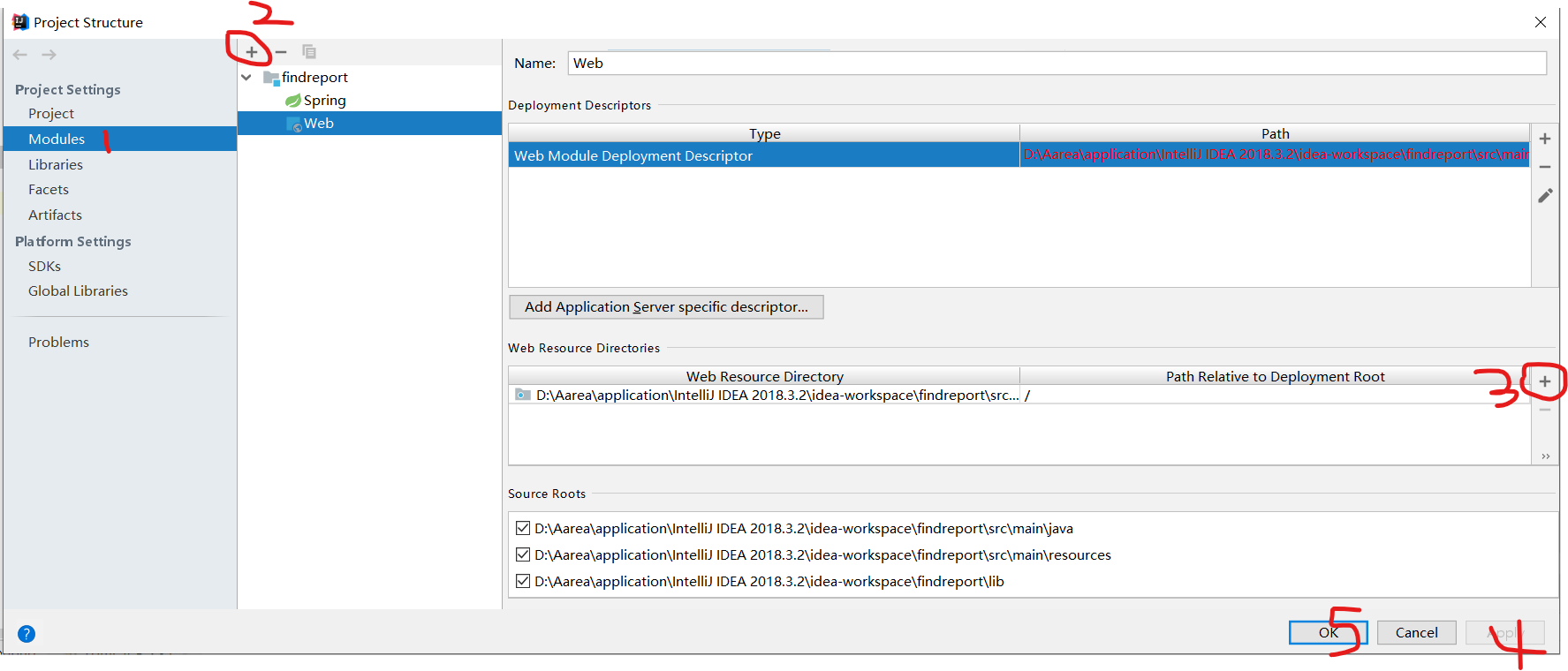
2.生成webapp目录
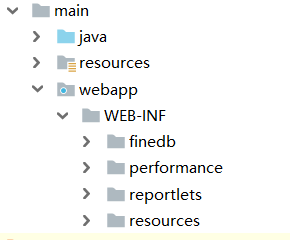
3.复制FindReport WebRoor/WEN-INF 下如文件到项目webapp/WEN-INF中
**4. ** **安装FineReport包到本地仓库。注:**自行修改-Dfile=后面的路径
1call mvn install:install-file  -Dfile=D:\Aarea\Java\workJar\findreport_jar\fr-core-8.0.jar  -DgroupId=com.fr  -DartifactId=fr-core -Dversion=8.0 -Dpackaging=jar
2
3call mvn install:install-file  -Dfile=D:\Aarea\Java\workJar\findreport_jar\fr-report-8.0.jar  -DgroupId=com.fr  -DartifactId=fr-report -Dversion=8.0 -Dpackaging=jar
4
5call mvn install:install-file  -Dfile=D:\Aarea\Java\workJar\findreport_jar\fr-third-8.0.jar  -DgroupId=com.fr  -DartifactId=fr-third -Dversion=8.0 -Dpackaging=jar
6
7call mvn install:install-file  -Dfile=D:\Aarea\Java\workJar\findreport_jar\fr-performance-8.0.jar  -DgroupId=com.fr  -DartifactId=fr-performance -Dversion=8.0 -Dpackaging=jar
8
9call mvn install:install-file  -Dfile=D:\Aarea\Java\workJar\findreport_jar\fr-platform-8.0.jar  -DgroupId=com.fr  -DartifactId=fr-platform -Dversion=8.0 -Dpackaging=jar
10
11call mvn install:install-file  -Dfile=D:\Aarea\Java\workJar\findreport_jar\fr-chart-8.0.jar  -DgroupId=com.fr  -DartifactId=fr-chart -Dversion=8.0 -Dpackaging=jar
4.修改pom.xml,移除springboot嵌入式tomcat插件
1<dependency>
2	<groupId>org.springframework.boot</groupId>
3	<artifactId>spring-boot-starter-web</artifactId>
4	<exclusions>
5		<exclusion>
6			<groupId>org.springframework.boot</groupId>
7			<artifactId>spring-boot-starter-tomcat</artifactId>
8		</exclusion>
9	</exclusions>
10</dependency>
11
12<dependency>
13	<groupId>javax.servlet</groupId>
14	<artifactId>javax.servlet-api</artifactId>
15	<version>3.1.0</version>
16	<scope>provided</scope>
17</dependency>
5. 添加FineReport依赖
1<!-- findReport-->
2<dependency>
3	<groupId>com.fr</groupId>
4	<artifactId>fr-report</artifactId>
5	<version>${fr.version}</version>
6</dependency>
7
8<dependency>
9	<groupId>com.fr</groupId>
10	<artifactId>fr-core</artifactId>
11	<version>${fr.version}</version>
12</dependency>
13
14<dependency>
15	<groupId>com.fr</groupId>
16	<artifactId>fr-third</artifactId>
17	<version>${fr.version}</version>
18</dependency>
19
20<dependency>
21	<groupId>com.fr</groupId>
22	<artifactId>fr-performance</artifactId>
23	<version>${fr.version}</version>
24</dependency>
25
26<dependency>
27	<groupId>com.fr</groupId>
28	<artifactId>fr-platform</artifactId>
29	<version>${fr.version}</version>
30</dependency>
31
32<dependency>
33	<groupId>com.fr</groupId>
34	<artifactId>fr-chart</artifactId>
35	<version>${fr.version}</version>
36</dependency>
6. 新建 SpringbootStartApplication 继承 SpringBootServletInitializer 重写 configure 方法,让bulider指向原本main方法的类,这样就会在tomcat启动的时候启动spring-boot相关配置
1public class SpringBootStartApplication extends SpringBootServletInitializer {
2    @Override
3    protected SpringApplicationBuilder configure(SpringApplicationBuilder builder) {
4        return builder.sources(FindReportApplication.class);
5    }
6}
7. 在原来的main方法中注入自己的Servlet,也就是ReportServlet
1@SpringBootApplication
2public class FindReportApplication {
3
4    public static void main(String[] args) {
5        SpringApplication.run(FindReportApplication.class, args);
6    }
7
8    @Bean
9    public ServletRegistrationBean servletRegistrationBean() {
10        return new ServletRegistrationBean(new ReportServlet(), "/ReportServer");
11    }
12
13}
8.配置tomcat启动项目
进入数据决策系统:http://localhost:8080/ReportServer
查看指定报表数据: http://localhost:8080/ReportServer?reportlet=xxx.cpt
注意事项:
1.报表存放目录
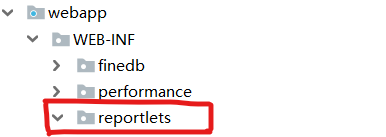
2. 项目打包时:pom修改spring-boot打包方式为war