
以下所有内容翻译至: https://xlsxwriter.readthedocs.io/
#-------------------------------------------------------------------------------------------------------------------------------
XlsxWriter 是一个用来创建Excel XLSX 文件的Python 模块。
demo:
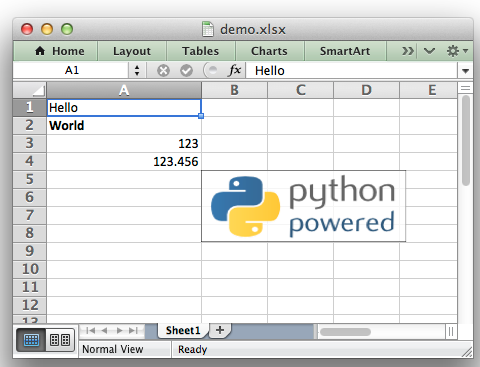
demo 代码:
###################################################################################
1##############################################################################
2#
3# A simple example of some of the features of the XlsxWriter Python module.
4#
5# Copyright 2013-2018, John McNamara, jmcnamara@cpan.org # import xlsxwriter #导入xlsxwriter模块 # Create an new Excel file and add a worksheet. #创建一个新的工作簿和工作表 workbook = xlsxwriter.Workbook('demo.xlsx') worksheet = workbook.add_worksheet() # Widen the first column to make the text clearer. #设置第一列的宽度 worksheet.set_column('A:A', 20) # Add a bold format to use to highlight cells. #定义加粗的格式 bold = workbook.add_format({'bold': True}) # Write some simple text. #用‘A1’等表达方式在单元格中写入简单的文本 worksheet.write('A1', 'Hello') # Text with formatting. #在单元格中写入文本的同时设置格式 worksheet.write('A2', 'World', bold) # Write some numbers, with row/column notation. #用行列号的表达方式(从00开始)在单元格写入数值 worksheet.write(2, 0, 123) worksheet.write(3, 0, 123.456) # Insert an image. #在单元格中插入图片 worksheet.insert_image('B5', 'logo.png') workbook.close() #关闭工作簿,只有关闭工作簿,文档才会最终显示;
#################################################################################################################
XlsxWriter
XlsxWriter 是一个Python模块,用这个模块可以实现在2007以上版本的exel格式为xlsx的文件中添加多个工作表并且可以插入文本,数字,公式,超链接等。它支持例如格式等很多功能,包含如下:
100% 和excel xlsx 文件兼容;
支持所有格式;
支持合并单元格;
定义名字;
图表;
筛选;
数据验证和下拉列表;
条件格式;
工作表插入PNG/JPEG/GMP/WMF/WMF 图片;
富文本格式字符串;
单元格注释;
文本框组件;
联合Pndas模块;
写入大文件时支持记忆优化模式;
它支持Python 2.5,2.6,2.7,3.1,3.2,3.3,3.4,3.5,3.6等版本,Jython和PyPy 只使用标准库。
这个文件解释了怎么使用xlsxwrite 模块,阅读下面的章节来了解更多内容,或者直接跳到 Introduction。
- Content
- Introduction
- Getting Started with XlsxWriter
- ---------------------------------------------------------------------------------
- Tutorial 1: Create a simple XLSX file
- Tutorial 2: Adding formatting to the XLSX file
- Tutorial 3:Writting different types of data to the XLSX file
- --------------------------------------------------------------------------------
- The Workbook Class
- The Worksheet Class
- The Worbook Class(Page Setup)
- The Format Class
- The Chart Class
- The Chartsheet Class
- The Exceptions Class
- ------------------------------------------------------------------------------
- Working with Cell Notation
- Working with Formulas
- Working with Dates and Times
- Working with Colors
- Working with Charts
- Working with Autofilters
- Working with Data Validation
- Working with Conditional Formatting
- Working with Worksheet Tables
- Working with Textboxes
- Working with Sparklines
- Working with Cell Comments
- Working with Outlines and Grouping
- Working with Memory and Performance
- Working with VBA Macros
- Working with Python Pandas and XlsxWriter
- ----------------------------------------------------------------------------------
- Examples
- ----------------------------------------------------------------------------------
- Chart Examples
- ----------------------------------------------------------------------------------
- Pandas with XlsxWriter Examples
- ----------------------------------------------------------------------------------
- Alternative modules for handing Excel files
- Libraries that use or enhance XlsxWriter
- Known Issues and Bugs
- Reporting Bugs
- Frequently Asked Questions
- Changes in XlsxWriter
- Author
- License