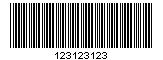
准备:jbarcode-0.2.8.jar,下载地址:jbarcode-0.2.8.zip
jsp:
<img src="<%=basePath%>barcode/showBarCode" alt="" style="width: 200px; height: 150px;">
controller


1import java.io.BufferedOutputStream;
2import java.io.ByteArrayInputStream;
3import java.io.InputStream;
4
5import javax.servlet.http.HttpServletRequest;
6import javax.servlet.http.HttpServletResponse;
7
8import org.springframework.stereotype.Controller;
9import org.springframework.web.bind.annotation.RequestMapping;
10
11import util.OneBarcodeUtil;
12
13@Controller
14@RequestMapping("/barcode")
15public class BarcodeController {
16    @RequestMapping("/")
17    public String index(){
18        return "barcode";
19    }
20    @RequestMapping("/showBarCode")
21    public void showIMG(HttpServletRequest req,HttpServletResponse resp) throws Exception{
22        OneBarcodeUtil obu = new OneBarcodeUtil();
23        byte[] bs = obu.createBarcodeDefault("123123123");//这里是条码号
24         InputStream in = new ByteArrayInputStream(bs);// 业务逻辑取得图片的byte[]
25         BufferedOutputStream bout = new BufferedOutputStream(resp.getOutputStream());
26         //从输入流到输出流
27        try {
28          //  byte b[] = new byte[1024];
29            int len = in.read(bs);
30            while (len > 0) {
31                bout.write(bs, 0, len);
32                len = in.read(bs);
33            }
34        } catch (Exception e) {
35            throw e;
36        } finally {
37            bout.close();
38            in.close();
39        }
40    }
41}
View Code
工具类


1import java.awt.image.BufferedImage;
2import java.io.IOException;
3import java.lang.reflect.Constructor;
4
5import org.jbarcode.JBarcode;
6import org.jbarcode.encode.BarcodeEncoder;
7import org.jbarcode.encode.Code39Encoder;
8import org.jbarcode.paint.BaseLineTextPainter;
9import org.jbarcode.paint.EAN13TextPainter;
10import org.jbarcode.paint.WideRatioCodedPainter;
11import org.jbarcode.paint.WidthCodedPainter;
12import org.jbarcode.util.ImageUtil;
13
14public class OneBarcodeUtil {
15
16
17
18    /**
19     * 生成一维码
20     * @param value 值
21     * @return
22     */
23    public static byte[] createBarcodeDefault(String value){
24        return createBarcode(Code39Encoder.class,value,false);
25    }
26
27
28  //产生一维码图片
29    public static byte[] createBarcode(Class<?> clazz,String value,boolean checkDigit){
30          try{
31              JBarcode localJBarcode = new JBarcode(getInstance(clazz),WidthCodedPainter.getInstance(),EAN13TextPainter.getInstance());
32              localJBarcode.setPainter(WideRatioCodedPainter.getInstance());
33              localJBarcode.setTextPainter(BaseLineTextPainter.getInstance());
34              localJBarcode.setCheckDigit(checkDigit);
35              localJBarcode.setShowCheckDigit(checkDigit);
36              return getBytes(localJBarcode.createBarcode(value));
37          }catch (Exception e) {
38            e.printStackTrace();
39            return null;
40        }
41    }
42
43
44    //获取单例的对象
45    private static BarcodeEncoder getInstance(Class<?> clazz) throws Exception{
46        Constructor<?>[] constructors=clazz.getDeclaredConstructors();
47        Constructor<?> privateConstructor = constructors[0];
48        privateConstructor.setAccessible(true);
49        return (BarcodeEncoder)privateConstructor.newInstance();
50
51    }
52
53    //获取图片字节码数组
54    private static byte[] getBytes(BufferedImage paramBufferedImage) throws IOException{
55          return ImageUtil.encode(paramBufferedImage,"jpeg", 96, 96);
56    }
57
58
59}
View Code
启动项目访问:http://localhost:8080/wxPublic/barcode/
生产条形码: