
一、块级作用域绑定
-
回顾:使用var关键字定义变量
定义 = 声明 + 赋值;
1. 可以一次定义多个变量
2. 定义时可以只声明不赋值
3. 定义之后可以随时修改变量的值
4. 变量声明会被提升
5. 可重复定义变量
6. 全局定义的变量会被作为全局对象(global/window)的属性
7. 在代码块中使用 var 关键字声明的变量不会被束缚在代码块中
11  if (true) {
22
33             var foo, bar = 'abc';
44         }
55
66         console.log(foo, bar)
1.1 使用let关键字定义变量
-
- 可以一次定义多个变量
- 定义时可以只声明不赋值
- 定义之后可以随时修改变量的值
- 使用 let 关键字定义的变量,变量声明不会被提升,因此我们需要先定义,后使用
- 在同一作用域下,不能重复定义同名变量
- 全局定义的变量会被作为全局对象(global/window)的属性
- 在代码块中使用 let 关键字声明的变量会被束缚在代码块中
1 // 0. 可以一次定义多个变量 2 // let foo = 123, bar = 'abc'; 3
4 // 1. 定义时可以只声明不赋值 5 // let foo, bar; 6
7
8 // 2. 定义之后可以随时修改变量的值 9 // let foo = 123, bar = 'abc'; 10 // foo = 'abc'; 11 // bar = 123; 12 // console.log(foo, bar); // 'abc' 123 13 14 // 3. 使用 let 关键字定义的变量,变量声明不会被提升,因此我们需要先定义,后使用 15 // console.log(foo); // foo is not undefined 16 // let foo = 123; 17 18 19 // 4. 在同一作用域下,不能重复定义同名变量 20 // let foo = 123; 21 // let foo = 'abc'; // Identifier 'foo' has already been declared 22 // console.log(foo) 23 24 // 5. 全局定义的变量会被作为全局对象(global/window)的属性 25 26 // 6. 在代码块中使用 let 关键字声明的变量会被束缚在代码块中
1.2 使用const关键字定义常量
11. 在使用 const 关键字声明常量时,必须要进行赋值(初始化)。
2
32. 常量一旦初始化后,就不能被修改。
4
53. 在同一作用域下,不能重复定义同名的常量。
6
74. 常量的声明不会被提升
8
95. 所有常量只在当前代码块内有效,一旦执行流到了代码块外,这些常量就会被立即销毁。6.不在Windows下
10
11 1 <script>
12 2
13 3         // 1. 在使用 const 关键字声明常量时,必须要进行赋值(初始化)。
14 4         // const foo = 123, bar = 'abc';
15 5         // const bar;  // 抛出错误:Missing initializer in const declaration
16 6
17 7         // 2. 常量一旦初始化后,就不能被修改。
18 8         // const foo = 123;
19 9         // foo = 'abc';  // 抛出错误:Assignment to constant variable.
2010
2111         // 3. 在同一作用域下,不能重复定义同名的常量
2212         // const foo = 123;
2313         // const foo = 'abc';  // 抛出错误:Identifier 'foo' has already been declared
2414
2515         // 4. 常量的声明不会被提升
2616         // console.log(foo)  // 抛出错误:foo is not defined
2717         // const foo = 123;
2818
2919         // 5. 所有常量只在当前代码块内有效,一旦执行流到了代码块外,这些常量就会被立即销毁。
3020         // if (true) {
3121         //     const foo = 123;
3222         //     console.log(foo)
3323         // }
3424         // console.log(foo)  // 抛出错误:foo is not defined
3525
3626     </script>
1.3 模块字面量
-
插入数据
1 <script> 2
3 let str1 = '你好,世界!'; 4 let str2 =Hello 5 World!; // 可以直接换行 6 let str3 =Hello ${str1} World!; // 向模板中插入数据 7 console.log(str3) 8 // 使用场景: 9 10 let students = [ 11 { 12 name: '黄聪聪', 13 age: 20, 14 gender: '男' 15 }, 16 { 17 name: '赵志刚', 18 age: 20, 19 gender: '男' 20 }, 21 { 22 name: '江芦贵', 23 age: 20, 24 gender: '男' 25 } 26 ]; 27 28 let htmls = ''; 29 30 students.forEach(function(student) { 31 htmls +=<tr> 32 <td>${student.name }</td> 33 <td>${student.age }</td> 34 <td>${student.gender}</td> 35 </tr>; 36 }); 37 38 console.log(htmls) 39
40 41 </script>
1.4 展开操作符 (...)
-
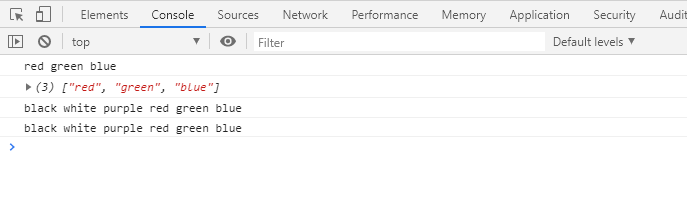
给变量前面加三个点(...),就不再打印出数组格式了,(如控制台打印的一二行,第一行是使用展开操作符,第二行是没有使用展开操作符的)
-
使用场景:a.合并数组 b.复制数组
1 <script> 2 3 let colors1 = ['red', 'green', 'blue']; 4 5 // 使用展开操作符输出数组中的元素,类似于:console.log('red', 'green', 'blue') 6 console.log(...colors1) 7 console.log(colors1) //对象 8 9 // 使用场景一:合并数组,将 colors1 中的元素合并到 colors2 中 10 let colors2 = ['black', 'white', 'purple', ...colors1]; 11 console.log(...colors2) 12 // 使用场景二:复制数组 13 let colors3 = [...colors2] 14 console.log(...colors3) 15 </script>
1.5 剩余操作符(又名不定参数)
不定参数:顾名思义,不知道还有多少个参数,剩余的统统接收,用来代替arguments;
-
函数中剩余操作符只能是函数中最后的一个形参,格式:...bar;
-
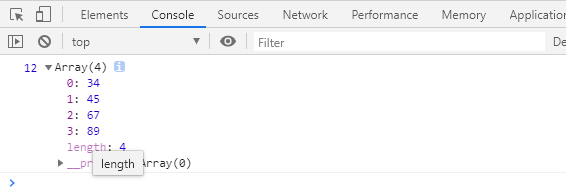
第一个实参会被赋值给第一个形参,剩余所有的实参都会被交给形参 bar,bar会自动变成一个数组;
1 <script> 2 // 实参 12 会被赋值给形参 a,剩余的所有实参都会被交给形参 bar,bar 会自动变成一个数组。 3 function foo (a, ...bar) { 4 console.log(a, bar) 5 } 6 7 foo(12, 34, 45, 67, 89) 8 // 注意,剩余操作符只能应用到最后一个形参上,否则会抛出错误:Rest parameter must be last formal parameter 9 // 下面的写法是错误的: 10 // function foo (a, ...bar, b) { 11 // console.log(a, bar, b) 12 // } 13 14 // foo(12, 34, 45, 67, 89) 15 </script>
二、解构
2.1解构的实用性
在 ECMAScript 5 或更早的版本中,从对象或数组中获取特定的数据并赋值给本地变量需要书写很多并且相似的代码。例如:
11 let options = {
22         repeat: true,
33         save: false
44    };
55
66 // 从对象中提取数据
77
88 let repeat = options.repeat,
99     save = options.save;
这段代码反复地提取在 options 上存储地属性值并将它们传递给同名的本地变量。虽然这些看起来不是那么复杂,不过想象一下如果你的一大批变量有着相同的需求,你就只能一个一个地赋值。而且,如果你需要从对象内部嵌套的结构来查找想要的数据,你极有可能为了一小块数据而访问了整个数据结构。
这也是 ECMAScript 6 给对象和数组添加解构的原因。当你想要把数据结构分解为更小的部分时,从这些部分中提取数据会更容易些。很多语言都能使用精简的语法来实现解构操作
2.2 对象解构 -解构赋值 ( { } 花括号)
-
声明的变量是同名变量,写在{}里即可,变量之间用“,”隔开就行;
-
声明的变量是非同名变量,在{}里写上" “:”+ “变量名” " ,变量之间用“,”隔开 例如:
let { firstName: first_name, lastName: last_name } = obj; -
为变量指定默认值,当对象中没有某个属性时,直接写上变量的名字加“=”即可, 例如:
1let { firstName, lastName, myAge = 20 } = obj; 2 3let { firstName: first_name, lastName: last_name, myAge: my_age = 20} = obj; -
为已有变量重新赋值,({}=obj),因为JS解析引擎不允许操作赋值符(=)左边出现花括号所以使用 "()"将整个赋值语句包起来,使他成为一个表达式
-
嵌套对象解构,(俄罗斯套娃,哈哈~~)例如:obj里面的phone里面的number赋值给同名变量number
let { phone: { number, brand } } = obj;1 <script> 2 3 const obj = { 4 firstName: '张康', 5 lastName: '尼古拉斯', 6 myAge: 30, 7 phone: { 8 number: 110, 9 brand: '魅族', 10 color: '黑色' 11 } 12 }; 13 14 // 1. 使用对象解构初始化同名变量 15 // 告诉 obj 对象,把 firstName 属性的值赋值给同名变量 firstName,把 lastName 属性的值赋值给同名变量 lastName 16 // let { firstName, lastName } = obj; 17 // console.log(firstName, lastName) // '张康' '尼古拉斯' 18 19 // 2. 使用对象解构初始化非同名变量 20 // 告诉 obj 对象,把 firstName 属性的值赋值给变量 first_name,把 lastName 属性的值赋值给变量 last_name 21 22 // let { firstName: first_name, lastName: last_name } = obj; 23 // console.log(first_name, last_name) // '张康' '尼古拉斯' 24 25 // 3. 为变量指定默认值 26 // 当 obj 对象中没有 myAge 属性时,变量 myAge 默认会被赋值为 20 27 // let { firstName, lastName, myAge = 20 } = obj; 28 // console.log(firstName, lastName, myAge) // '张康' '尼古拉斯' 20 29 30 // 当 obj 对象中没有 myAge 属性时,变量 my_age 默认会被赋值为 20 31 // let { firstName: first_name, lastName: last_name, myAge: my_age = 20} = obj; 32 // console.log(first_name, last_name, my_age) // '张康' '尼古拉斯' 20 33 34 // 4. 使用对象解构为已有变量重新赋值 35 // let first_name = '郭帅', last_name = '莱昂纳多'; 已有变量 36 37 // JS 解析引擎不允许赋值操作符(=)左边出现花括号,但是可以使用小括号将整个赋值语句包裹起来,这样一来,整个赋值语句就变成了一个表达式。 38 // ({ firstName: first_name, lastName: last_name } = obj); 重新赋值 39 // console.log(first_name, last_name) // '张康' '尼古拉斯' 40 41 // 5. 嵌套对象解构 42 // 告诉 obj 对象,把 phone 对象中的 number 属性的值赋值给变量 number,把 phone 对象中的 brand 属性的值赋值给变量 brand 43 // let { phone: { number, brand } } = obj; 44 // console.log(number, brand) 45
46 </script>
2.3 数组解构([ ]中括号)
-
数组解构初始化变量:数组中的元素会按照顺序赋值给变量
-
使用数组解构为变量重新赋值,[ ]=colors,
[ firstColor, secondColor ] = colors;我们 -
为变量指定默认值,当数组中没有第四个元素。而我们又需要第四个元素时,我们可以给变量赋值,但是当元素中有第四个元素,我们再给第四个元素赋值是无效的;
-
跳过数组中的指定元素,当我们不需要第二,三个元素,又需要第四个元素,中间可以用“ ,”隔开,
-
嵌套解构前面不需要的数据用 “ ,”隔开,嵌套的用“ [ ]”l来表示
1 <script> 2 3 const colors = ['red', 'green', 'blue', 'orange', [ 'black', 'white' ] ]; 4 5 // 1. 使用数组解构初始化变量 6 // 数组中的元素会按照顺序赋值给这 3 个变量 7 // let [ firstColor, secondColor, thirdColor ] = colors; 8 // console.log(firstColor, secondColor, thirdColor) 9
10 // 2. 使用数组解构为变量重新赋值 11 // let firstColor = 'black', secondColor = 'white'; 12 // 数组中的元素会按照顺序赋值给这 2 个变量 13 // [ firstColor, secondColor ] = colors; 14 // console.log(firstColor, secondColor) 15 16 // 3. 为变量指定默认值 17 // 当数组中没有第 4 个元素时,变量 fourthColor 会被赋值成默认值 'pi但是nk' 18 // let [ firstColor, secondColor, thirdColor, fourthColor = 'pink' ] = colors; 19 // console.log(firstColor, secondColor, thirdColor, fourthColor) 20 21 // 4. 跳过数组中的指定元素 22 // let [ firstColor, , ,fourthColor ] = colors; 23 // console.log(firstColor, fourthColor) 24
25 // 5. 嵌套数组解构 26 let [,,,,[nestedFirstColor, nestedSecondColor]] = colors; 27 console.log(nestedFirstColor, nestedSecondColor) 28 29 30 </script>
2.4 混合解构
1 1    <script>
2 2
3 3         let node = {
4 4             type: 'Identifier',
5 5             name: 'foo',
6 6             loc: {
7 7                 start: {
8 8                     line: 1,
9 9                     column: 1
1010                 },
1111                 end: {
1212                     line: 4,
1313                     column: 4
1414                 }
1515             },
1616             range: [0, 3]
1717         };
1818
1919         // 把 node 对象中 loc 对象的 start 属性的值赋值给变量 start,把 range 数组中第 2 个元素赋值给变量 endIndex
2020         let { loc: { start }, range: [, endIndex] } = node;
2121
2222         console.log(start, endIndex)
2323
2424     </script>
2.5 参数解构
1 1 <script>
2 2         // 1. 以普通方式传参时,相当于把 obj 对象赋值给形参 student
3 3         // student = obj
4 4
5 5         // function getFullName (student) {
6 6         //     return student.firstName + ' · ' + student.lastName;
7 7         // }
8 8
9 9         // let obj = {
1010         //     firstName: '刘旭凯',
1111         //     lastName: '约翰尼'
1212         // };
1313
1414         // console.log(getFullName(obj))
1515
1616
1717         // 2. 以对象解构的方式传参
1818         // 把 obj 对象中的 firstName 属性的值传递给形参 firstName,把 lastName 属性的值传递给形参 lastName
1919         // { firstName, lastName } = obj;
2020
2121         // function getFullName ({ firstName, lastName }) {
2222         //     return firstName + ' · ' + lastName;
2323         // }
2424
2525         // let obj = {
2626         //     firstName: '刘旭凯',
2727         //     lastName: '约翰尼'
2828         // };
2929
3030         // console.log(getFullName(obj))
3131
3232         // 3. 为形参指定默认值
3333         // 当 obj 对象没有 lastName 属性时,形参 lastName 就会使用默认值 '尼古拉斯'
3434         function getFullName ({ firstName, lastName = '尼古拉斯' }) {
3535             return firstName + ' · ' + lastName;
3636         }
3737
3838         let obj = {
3939             firstName: '刘旭凯',
4040             lastName: '克里斯蒂安'
4141         };
4242
4343         console.log(getFullName(obj))
4444
4545
4646     </script>
三、函数
3.1 默认参数
ES5 语法中,为函数形参指定的默认值写法
1 1 <script>
2 2    // 1. 在 ES5 语法中,为函数形参指定默认值的写法:
3 3         // 写法一:
4 4         function foo (bar) {
5 5             bar = bar || 'abc';
6 6             console.log(bar)
7 7         }
8 8         foo('xyz')
9 9
1010         // 写法二:
1111         function foo (bar) {
1212             if (typeof bar === 'undefined') {
1313                 bar = 'abc';
1414             }
1515             console.log(bar)
1616         }
1717
1818         foo('xyz');
1919
2020
2121
2222 </script>
ES6中为函数形参指定默认值
a.除了为形参直接指定默认值以外,形参的默认值还可以是表达式,例如,timeout = 5 * 1000
b.在预编译阶段,形参表达式不会执行,只有在调函函数,并且没有为形参传递实参的情况下才执行
1 1  <script>
2 2      // 2. 使用 ES6 的语法为函数形参指定默认值
3 3          function post (url, data = {}, timeout = foo * 1000) {
4 4              console.log(arguments)
5 5             console.log(url, data, timeout)
6 6          }
7 7
8 8          // post('xyz', {uname: 'zhangsan', upass: '123'}, 3000);
9 9         post('xyz', null, 3000);
1010
1111          // 注意事项:
1212       // 1> 除了为形参直接指定默认值以外,形参的默认值还可以是表达式,例如,timeout = 5 * 1000
1313         // 2> 在预编译阶段,形参表达式不会执行,只有在调函函数,并且没有为形参传递实参的情况下才执行。
1414
1515  </script>
3.2 不定参数
1 1  <script>
2 2
3 3         // 不定参数,使用剩余操作符接收剩余的实参,这些实参会被保存到一个不定参数(args)中
4 4         function foo (...args) {
5 5             return args.reduce(function (previousValue, currentValue) {
6 6                 console.log(previousValue, currentValue)
7 7                 return previousValue += currentValue;
8 8             })
9 9         }
1010
1111         // 将上面的函数改成箭头函数的形式
1212         var foo = (...args) => args.reduce((a, b) =>a += b)
1313
1414
1515         console.log(foo(1, 32, 34, 5, 6))
1616
1717     </script>
18
19previousValue:上一个值
20
21currentValue:当前的值
reduce()方法:
1.接收一个函数作为累加器,将数组元素计算为一个值(从左到右),
2.需要接收四个参数( 必需:1.acc 累加器 2.cur 当前值 ;可选:1.idx 当前索引 2 .src 源数组)
3.3 箭头函数
凡是以后遇到匿名函数都可以使用箭头函数
省略等号和function
-
如果形参数量为 0,则必须加上小括号。箭头后面的表达式的结果会被作为函数的返回值。
-
如果形参的数量为 1,则可以省略小括号。 -
如果形参数量大于 1,则不能省略小括号。 -
如果函数的执行体比较简单(直接量或表达式),可以省略大括号,箭头后面的直接量或表达式会被自动作为返回值 -
如果函数的执行体比较复杂,则不能省略大括号。1 <script> 2 // 1. 形式一: 3 // var foo = function () { 4 // return 'Hello World!'; 5 // }; 6 7 // 如果形参数量为 0,则必须加上小括号。箭头后面的表达式的结果会被作为函数的返回值。 8 // var foo = () => { 9 // return 'Hello World!'; 10 // } 11 12 // 2. 形式二: 13 // var foo = function (greeting) { 14 // return greeting; 15 // } 16 17 // 如果形参的数量为 1,则可以省略小括号。 18 // var foo = greeting => { 19 // return greeting; 20 // } 21 22 // 3. 形式三: 23 // var foo = function (firstName, lastName) { 24 // return firstName + ' · ' + lastName; 25 // } 26 27 // 如果形参数量大于 1,则不能省略小括号。 28 // var foo = (firstName, lastName) => { 29 // return firstName + ' · ' + lastName; 30 // } 31 32 // 4. 形式四: 33 // var foo = function (a, b) { 34 // return a > b ? a : b; 35 // } 36 37 // 如果函数的执行体比较简单(直接量或表达式),可以省略大括号,箭头后面的直接量或表达式会被自动作为返回值。 38 // var foo = (a, b) => a > b ? a : b; 39 40 // 5. 形式五: 41 // var foo = function (a, b) { 42 // let max = a; 43 // if (b > a) { 44 // max = b; 45 // } 46 // return max; 47 // } 48 49 // 如果函数的执行体比较复杂,则不能省略大括号。 50 // var foo = (a, b) => { 51 // let max = a; 52 // if (b > a) { 53 // max = b; 54 // } 55 // return max; 56 // } 57 // console.log(foo('贾树华', '尼古拉斯')) 58 59 60 61 </script>
3.4 箭头函数没有this绑定
-
普通函数作用域中的 this 已经被绑定成 window 对象,因此当我们放问 this 时,直接在当前作用域下就能访问的到。 -
箭头函数的作用域中没有绑定 this,因此,当我们访问 this 时,会去上一层作用域中查找 this。1 <script> 2 3 // 普通函数作用域中的 this 已经被绑定成 window 对象,因此当我们放问 this 时,直接在当前作用域下就能访问的到。 4 // var foo = function () { 5 // console.log(this) 6 // return 'Hello World!'; 7 // }; 8
9 // 箭头函数的作用域中没有绑定 this,因此,当我们访问 this 时,会去上一层作用域中查找 this。 10 // var bar = () => { 11 // console.log(this) 12 // return 'Hello World!'; 13 // }; 14 15 16 // 示例,由于 sayName 箭头函数中没有绑定 this,因此我们访问 this 时,会去全局作用域中查找。 17 // 查找的结果是 this 指向 window,因此输出的 name 的值是 '常军辉' 18 19 // var name = '常军辉'; 20 // var obj = { 21 // name: '吕鑫洋', 22 // sayName: function () { 23 // // this = obj 24 // return this.name; 25 // } 26 // }; 27 28 // console.log(obj.sayName()) 29 30 31 32 </script>
3.5 箭头函数没有arguments绑定
1 1  <script>
2 2
3 3         // 普通函数
4 4         var foo = function (greeting) {
5 5             console.log(arguments)
6 6             return greeting;
7 7         };
8 8
9 9         // 箭头函数中没有绑定 arguments 对象,因此下面的输入语句会报错:arguments is not defined
1010         var bar = (greeting) => {
1111             console.log(arguments)
1212             return greeting;0
1313         };
1414
1515         console.log(foo('Hello World!'))
1616         console.log(bar('你好世界!'))
1717
1818     </script>
3.6 箭头函数中不能手动绑定this
1 1   <script>
2 2
3 3         // this 指向的对象
4 4         var obj = {
5 5             fullName: '谭文华'
6 6         };
7 7
8 8         // 1. 普通函数,可以使用 call() 方法改变函数中 this 的绑定
9 9         // var foo = function (greeting) {
1010         //     return this.fullName + '说:' + greeting;
1111         // };
1212         // console.log(foo.call(obj, 'Hello World!'))
1313
1414
1515         // 2. 箭头函数,不能使用 call() 方法改变函数中 this 的绑定,箭头函数中不能绑定 this。
1616         var bar = (greeting) => {
1717             return this.fullName + '说:' + greeting;
1818         };
1919
2020         // 下面的代码不会报错,但是也不起作用
2121         console.log(bar.call(obj, '你好世界!'))
2222
2323     </script>
3.7 new.target
1 1     <script>
2 2         // 1. ECMAScript 5 中判断构造函数是否通过 new 关键字调用的写法
3 3         // function Person (fullName) {
4 4         //     if (this instanceof Person) {
5 5         //         this.fullName = fullName;
6 6         //     } else {
7 7         //         return new Person(fullName);
8 8         //     }
9 9         // }
1010
1111         // let student = Person('孟天乐')
1212
1313         // 2. ECMASript 6 引入一个 new.target 属性,当我们使用 new 操作符调用构造函数时,new.target 属性的值为构造函数,否则为 undefined
1414         // function Person (fullName) {
1515         //     if (typeof new.target !== 'undefined') {
1616         //         this.fullName = fullName;
1717         //     } else {
1818         //         throw new Error('必须通过 new 关键字来调用 Person。');
1919         //     }
2020         // }
2121         // let student = new Person('孟天乐');
2222         // console.log(student)
2323
2424         // 3. 除此之外,还可以检查 new.target 是否被某个特定构造函数所有调用。
2525         // 例如,Person 构造函数中的 new.target 属性的值被限定为 Person
2626         // function Person (fullName, age) {
2727         //     if (typeof new.target === Person) {
2828         //         this.fullName = fullName;
2929         //         this.age = age;
3030         //     } else {
3131         //         throw new Error('必须通过 new 关键字来调用 Person。');
3232         //     }
3333         // }
3434
3535         // function Dog (fullName, age) {
3636         //     Person.call(this, fullName, age)
3737         // }
3838
3939         // let dog = new Dog('HeHe', 3)
4040
4141         // console.log(dog)
4242
4343         // 4. 不能在函数外部使用 new.target,否则会报错
4444         function Person () {
4545             console.log(new.target)
4646         }
4747
4848         // 下面代码会抛出错误:new.target expression is not allowed here
4949         // console.log(new.target)
5050
5151         let student = new Person('崔景龙')
5252
5353     </script>
四、对象
4.1 对象-属性初始值的简写
-
当一个对象的属性与本地变量同名时,不需要再写冒号和值,直接写属性名即可
1 <script> 2
3 let fullName = '杨柯', age = 19; 4 5 let obj = { 6 fullName: fullName, 7 age: age 8 }; 9 10 // 1. 当一个对象的属性与本地变量同名时,不需要再写冒号和值,直接写属性名即可。 11 let obj = { 12 fullName, 13 age 14 }; 15 16 17 </script>
4.2 对象方法的简写
1 1   <script>
2 2
3 3
4 4         // 在 ES 5 中,如果为对象添加方法,必须要通过指定名称并完整定义函数来实现。
5 5         let obj = {
6 6             fullName: '杨柯',
7 7             sayName: function () {
8 8                 return this.fullName;
9 9             }
1010         };
1111
1212         // 在 ES 6 中,语法更简洁,取消了冒号和 function 关键字。如下所示:
1313         let obj = {
1414             fullName: '杨柯',
1515             sayName () {
1616                 return this.fullName;
1717             }
1818         };
1919
2020
2121     </script>
4.3 可计算属性名
1 1 <script>
2 2
3 3         // 在对象字面量中使用方括号表示该属性名是可计算的,方括号中的内容会被计算求值,最终转化成一个字符串,该字符串就是最终的属性名。
4 4         let suffix = 'name';
5 5
6 6         let person = {
7 7             ['first' + suffix]: '杨帅',
8 8             ['last' + suffix]: '泰坦尼'
9 9         };
1010
1111         console.log(person)
1212
1313     </script>
4.4 对象 新增的两个方法
1 1   <script>
2 2
3 3
4 4         // 1. 在有些情况下,既是全等运算符比较出来的结果也是不正确的。例如,在下面两种情况下:
5 5
6 6         // +0 和 -0 在 JS 解析引擎中被表示为两个完全不同的实体,而如果使用全等运算符(===)对两者进行比较,得到的结果是两者相等。
7 7         console.log(+0 == -0);           // true
8 8         console.log(+0 === -0);          // true
9 9         console.log(Object.is(+0, -0));  // false
1010
1111         // NaN 和 NaN 在 JS 解析引擎中被表示为两个完全相同的实体,但是无论使用等于(==)还是全等(===),得到的结果都是 false。
1212         console.log(NaN == NaN);           // false
1313         console.log(NaN === NaN);          // false
1414         console.log(Object.is(NaN, NaN));  // true
1515
1616         // 在大多数情况下,Object.is() 方法的比较结果与全等运算符完全相同,唯一的区别在于 +0 和 -0 会被识别为不相等,NaN 和 NaN 会被识别为相等。
1717
1818         // 2. Object.assign() 方法可以接收任意数量的源对象(obj2,obj3),并按照指定的顺序将属性复制到接收对象(obj1)。
1919         //    如果多个源对象具有同名属性,则排位靠后的源对象会覆盖排外靠前的对象。
2020
2121         let obj1 = {
2222             fullName: '陈世壮',
2323             sayName () {
2424                 return this.fullName;
2525             }
2626         };
2727
2828         let obj2 = {
2929             fullName: '任俊玖',
3030             age: 20
3131         };
3232
3333         let obj3 = {
3434             fullName: '朱亚鹏',
3535             gender: '男'
3636         };
3737
3838         // 通过自定义方法实现了一个可以合并多个对象的方法,
3939         // function mixin(receiver, ...suppliers) {
4040         //     suppliers.forEach(supplier => {
4141         //         Object.keys(supplier).forEach(key => {
4242         //             receiver[key] = supplier[key]
4343         //         })
4444         //     })
4545         //     return receiver;
4646         // }
4747         // console.log(mixin(obj1, obj2, obj3))
4848
4949         // 使用 ES6 新增 Object.assgin() 方法将多个对象的属性合并到第一个对象中。
5050         // Object.assign(obj1, obj2, obj3);
5151
5252         // console.log(obj1)
5353         // console.log(obj2)
5454         // console.log(obj3)
5555
5656   浅拷贝:(拷贝的是地址)引用类型拷贝的都是地址
// 使用 ES6 新增 Object.assgin() 方法将多个对象的属性合并到第一个对象中。
let obj1={
hobby:['eat', 'sleep']
}
let obj2=Object.assign({},obj1);
obj2.hobby[0]='play'
console.log(obj2);
console.log(obj1);
57 58 </script>
4.5 重复的对象字面量属性
1 1 <script>
2 2
3 3         // 对于每一组重复属性,都会选取最后一个取值。
4 4         let obj = {
5 5             fullName: '陈世壮',
6 6             fullName: '李忠易',
7 7             age: 18,
8 8             age: 20
9 9         };
1010
1111         console.log(obj.fullName);   // '李忠易'
1212         console.log(obj.age);        // 20
1313
1414     </script>
4.6 自有属性枚举顺序
1 1    <script>
2 2
3 3         // ES 5 中并没有定义对象属性的枚举顺序,有 JavaScript 引擎厂商自行决定。
4 4         // ES 6 中明确规定了对象的自有属性被枚举时的返回顺序。
5 5         // 自有属性枚举顺序的基本规则:
6 6         // 1. 所有数字按升序
7 7         // 2. 所有字符串按照它们被加入对象时的顺序排序
8 8
9 9         let obj = {
1010             a: 1,
1111             0: 2,
1212             c: 3,
1313             2: 4,
1414             b: 5,
1515             1: 6
1616         };
1717
1818         console.log(Object.getOwnPropertyNames(obj));  // ["0", "1", "2", "a", "c", "b"]
1919
2020     </script>
4.7 改变对象的属性
1 1     <script>
2 2
3 3         let person = {
4 4             getGreeting () {
5 5                 return 'Hello';
6 6             }
7 7         };
8 8
9 9         let dog = {
1010             getGreeting () {
1111                 return 'woof';
1212             }
1313         };
1414
1515         // 使用 create() 方法将 person 对象作为原型对象
1616         let friend = Object.create(person);  // {}
1717         console.log(friend.getGreeting());  // 'Hello'
1818         console.log(Object.getPrototypeOf(friend) === person);  // true
1919
2020         // 使用 setPrototypeOf() 方法将 friend 对象的原型对象修改成 dog
2121         Object.setPrototypeOf(friend, dog);
2222         console.log(friend.getGreeting());  // 'Hello'
2323         console.log(Object.getPrototypeOf(friend) === dog);  // true
2424
2525     </script>
4.8 使用super关键字访问原型对象(构造函数类)
1 1     <script>
2 2
3 3         let person = {
4 4             getGreeting () {
5 5                 return 'Hello';
6 6             }
7 7         };
8 8
9 9         let dog = {
1010             getGreeting () {
1111                 return 'woof';
1212             }
1313         };
1414
1515         // let friend = {
1616         //     getGreeting () {
1717         //         return Object.getPrototypeOf(this).getGreeting.call(this) + ', hi';
1818         //     }
1919         // };
2020
2121         // ES 6 引入了 super 关键字,super 指向当前对象的原型对象,实际上也就是 Object.getPrototypeOf(this) 的值,于是,上面的代码可以简化成如下形式:
2222         let friend = {
2323             getGreeting () {
2424                 return super.getGreeting() + ', hi';
2525             }
2626         };
2727
2828         // 使用 setPrototypeOf() 方法将 friend 对象的原型对象修改成 person
2929         Object.setPrototypeOf(friend, person);
3030         console.log(friend.getGreeting());  // 'Hello'
3131         console.log(Object.getPrototypeOf(friend) === person);  // true
3232
3333         // 使用 setPrototypeOf() 方法将 friend 对象的原型对象修改成 dog
3434         Object.setPrototypeOf(friend, dog);
3535         console.log(friend.getGreeting());  // 'Hello'
3636         console.log(Object.getPrototypeOf(friend) === dog);  // true
3737
3838
3939
4040     </script>
五、类
5.1 ES5 中与类相似的结构
1 1    <script>
2 2
3 3         // 构造函数类似于面向对象编程语言中类(class)
4 4         function PersonType(fullName) {
5 5             this.fullName = fullName;
6 6         }
7 7
8 8         Object.defineProperty(PersonType.prototype, 'sayName', {
9 9             configurable: true,
1010             enumerable: false,
1111             writable: true,
1212             value: function () {
1313                 return this.fullName;
1414             }
1515         })
1616
1717         let student1 = new PersonType('苑文浩');
1818
1919         console.log(student1)
2020
2121
2222     </script>
5.2 ES6 中新增类的概念
1 1  <script>
2 2
3 3         // 使用 class 关键字定义 PersonClass 类
4 4         class PersonClass {
5 5             // PersonClass 类的构造函数,等价于构造函数 PersonType
6 6             // 当我们创建 PersonClass 的实例时,该方法会自动被调用。
7 7             constructor(fullName) {
8 8                 this.fullName = fullName;
9 9             }
1010
1111             // 为原型对象添加的方法,等于下面的代码:
1212             // Object.defineProperty(PersonType.prototype, 'sayName', {
1313             //         configurable: true,
1414             //         enumerable: false,
1515             //         writable: true,
1616             //         value: function () {
1717             //             return this.fullName;
1818             //         }
1919             // })
2020
2121             sayName() {
2222                 return this.fullName;
2323             }
2424         }
2525
2626         let student1 = new PersonClass('刘旭凯');
2727
2828         console.log(student1)
2929
3030         // 通过与之前的构造函数对比,类和构造函数的作用是一样的。
3131         // 其实类的语法只是一种语法糖,实质上等价于一个自定义类型的构造函数。
3232
3333     </script>
5.3 类和构造函数的区别
1. 类的声明不会被提升,而构造函数的声明会被提升。
2. 使用除 new 以外的方式调用类的构造函数(constructor)会导致程序抛出错误。
3. 在类中声明的方法都是不可枚举的。
5.4 类-构造函数的属性
1 1    <script>
2 2
3 3         function PersonType(fullName) {
4 4             this.fullName = fullName;
5 5             // 实例对象的方法
6 6             this.greeting = function () {
7 7                 return 'Hello World!';
8 8             };
9 9         }
1010
1111         // 构造函数的方法
1212         PersonType.create = function (fullName) {
1313             return new PersonType(fullName)
1414         };
1515
1616         // 原型对象的方法
1717         Object.defineProperty(PersonType.prototype, 'sayName', {
1818             configurable: true,
1919             enumerable: false,
2020             writable: true,
2121             value: function () {
2222                 return this.fullName;
2323             }
2424         });
2525
2626         // 构造函数的方法,可以在不创建实例的情况下直接使用。
2727         // PersonType.create('朱帅旗')
2828
2929         // 在使用实例对象的属性时,必须要先创建实例对象。
3030         // let student1 = new PersonType('苑文浩');
3131         // console.log(student1.fullName)
3232         // console.log(student1.sayName())
3333
3434     </script>
5.5 类-类的静态方法
1 1  <script>
2 2
3 3         // 类的语法
4 4         class PersonClass {
5 5
6 6             constructor(fullName) {
7 7                 this.fullName = fullName;
8 8                 // 实例对象的方法
9 9                 this.greeting = function () {
1010                     return '你好世界!';
1111                 };
1212             }
1313
1414             // PersonClass 类的静态方法,等价于构造函数的方法
1515             static create (fullName) {
1616                 return new PersonClass(fullName);
1717             }
1818
1919             // 原型对象的方法
2020             sayName () {
2121                 return this.fullName;
2222             }
2323
2424         }
2525
2626         // 类的静态方法,不用创建实例即可调用
2727         PersonClass.create('张尊娟')
2828
2929         // 在使用实例对象的属性时,必须要先创建实例对象。
3030         let student1 = new PersonClass('张康');
3131         console.log(student1.fullName)
3232         console.log(student1.sayName())
3333
3434     </script>
5.6 类-构造函数的继承
1 1   <script>
2 2
3 3         // 声明 Rectangle 构造函数
4 4         function Rectangle (width, height) {
5 5             this.width = width;
6 6             this.height = height;
7 7         }
8 8
9 9         Object.defineProperty(Rectangle.prototype, 'getArea', {
1010             enumerable: false,
1111             configurable: true,
1212             writable: true,
1313             value: function () {
1414                 return '矩形面积为:' + this.width * this.height;
1515             }
1616         });
1717
1818         // 声明 Square 构造函数
1919         function Square (size) {
2020             Rectangle.call(this, size, size);
2121         }
2222
2323         // 让 Square 构造函数继承 Rectangle 构造函数
2424         Square.prototype = Object.create(Rectangle.prototype, {
2525             constructor: {
2626                 configurable: true,
2727                 enumerable: false,
2828                 writable: true,
2929                 value: Square
3030             }
3131         });
3232
3333         let square = new Square(20);
3434
3535         console.log(square)
3636     </script>
5.7 类-类的继承
1 1    <script>
2 2
3 3         class Rectangle {
4 4
5 5             constructor(width, height) {
6 6                 this.width = width;
7 7                 this.height = height;
8 8             }
9 9
1010             getArea () {
1111                 return '矩形面积为:' + this.width * this.height;
1212             }
1313         }
1414
1515         // 让 Square 类继承 Rectangle 构类
1616         class Square extends Rectangle {
1717
1818             constructor (size) {
1919                 // 等价于 Rectangle.call(this, size, size)
2020                 super(size, size)
2121             }
2222         }
2323
2424         let square1 = new Square(20)
2525
2626         // square1.__proto__  --> obj.__proto__ --> Rectange.prototype.__proto__  --> Object.prototype
2727
2828         console.log(square1)
2929
3030     </script>
5.8 类-类的构造函数
1 1  <script>
2 2
3 3         // 1. 当我们创建某个类的实例时,类的构造函数(constructor)会自动被调用。
4 4         class Rectangle {
5 5
6 6             constructor(width, height) {
7 7                 this.width = width;
8 8                 this.height = height;
9 9             }
1010
1111             getArea() {
1212                 return '矩形面积为:' + this.width * this.height;
1313             }
1414         }
1515
1616         // 2. 如果子类中具有构造函数,则必须在构造函数中使用 super 方法调用父类的构造函数,并传入所需的参数。
1717         class Square extends Rectangle {
1818             constructor (size) {
1919                 super(size, size)
2020             }
2121         }
2222
2323
2424         // 3. 构造函数不是必需的,当我们不需要为实例对象初始化属性时,可以省略构造函数。
2525         // 当创建类的实例时,会自动地为类添加一个默认的 constructor 构造函数,并在构造函数中使用 super() 方法调用父类的构造函数,并传入所有参数。
2626         // class Square extends Rectangle {
2727
2828         // }
2929
3030         // JS 引擎在后台为我们做了哪些事情呢?下面的代码等价于上面的代码:
3131         // class Square extends Rectangle {
3232         //     constructor (...args) {
3333         //         super(...args)
3434         //     }
3535         // }
3636
3737         let square1 = new Square(20)
3838
3939         console.dir(Square)
4040         console.log(square1)
4141
4242     </script>
5.9 覆盖父类的方法
1 1   <script>
2 2
3 3         //
4 4         class Rectangle {
5 5
6 6             constructor(width, height) {
7 7                 this.width = width;
8 8                 this.height = height;
9 9             }
1010
1111             getArea () {
1212                 return '矩形面积为:' + this.width * this.height;
1313             }
1414         }
1515
1616         //
1717         class Square extends Rectangle {
1818             constructor (size) {
1919                 super(size, size)
2020             }
2121
2222             // 创建一个与父类同名的方法就可以覆盖父类的方法。
2323             // 在顺着原型对象链查找方法时,该方法会被优先找到。
2424             getArea () {
2525                 return '正方形的面积为:' + this.width * this.height;
2626             }
2727         }
2828
2929         let square1 = new Square(20)
3030
3131         console.log(square1)
3232         console.log(square1.getArea())
3333
3434     </script>
5.10 调用父类的方法
1 1   <script>
2 2
3 3         //
4 4         class Rectangle {
5 5
6 6             constructor(width, height) {
7 7                 this.width = width;
8 8                 this.height = height;
9 9             }
1010
1111             getArea () {
1212                 return '矩形面积为:' + this.width * this.height;
1313             }
1414         }
1515
1616         //
1717         class Square extends Rectangle {
1818             constructor (size) {
1919                 super(size, size)
2020             }
2121
2222             // 在子类中使用 super 关键字就可以调用父类的方法
2323             // Rectangle.prototype.getArea.call(this).replace('矩形', '正方形');
2424             getArea () {
2525                 return super.getArea().replace('矩形', '正方形');
2626             }
2727
2828         }
2929
3030         let square1 = new Square(20)
3131
3232         console.log(square1)
3333         console.log(square1.getArea())
3434
3535     </script>
5.11 继承类的静态方法
1 1     <script>
2 2
3 3         class Animal {
4 4             constructor(name) {
5 5                 this.name = name;
6 6             }
7 7
8 8             static greeting () {
9 9                 return 'Hello';
1010             };
1111         }
1212
1313         class Dog extends Animal {
1414             constructor (name) {
1515                 super(name)
1616             }
1717         }
1818
1919         console.log(Animal.greeting());
2020
2121         // 父类的静态方法也会被子类继承,因此我们可以通过 Dog 调用父类的 greeting() 方法。
2222         console.log(Dog.greeting());
2323
2424     </script>
5.12 ES5中自己实现的模块
1 1   <script>
2 2
3 3         // 1、张三和李四在项目开发中遇到的问题如下:
4 4
5 5         // 张三创建了一个 index.js 文件,内容如下:
6 6         let foo = 123;
7 7
8 8         // 李四创建了一个 home.js 文件,内容如下:
9 9         let foo = 'abc';
1010
1111         // 当 index.js 和 home.js 文件同时引入到一个 index.html 文件中时,就会抛出错误。
1212
1313         // 2、ES 5 没有模块的概念,但是我们又需要类似于模块的功能,于是我们想了一系列的方式去自己实现模块的功能。
1414         // 最常用的一种方式就是利用立即执行的函数表达式及其作用域实现模块的功能。例如:
1515
1616         // 在 index.js 中创建模块 module1
1717         let module1 = (function() {
1818
1919             let foo = 123;
2020
2121             function greeting () {
2222                 return 'Hello';
2323             }
2424
2525             return {
2626                 foo,
2727                 greeting
2828             };
2929
3030         }())
3131
3232         // 在 home.js 中创建模块 module2
3333         let module2 = (function() {
3434
3535             let foo = 'abc';
3636
3737             function greeting () {
3838                 return 'Hello';
3939             }
4040
4141             return {
4242                 foo,
4343                 greeting
4444             };
4545
4646         }())
4747
4848         // 我们只需要保证两个模块的名称不同即可,在使用模块中的函数或变量时,只需要在前面加上模块名即可,如下所示:
4949         console.log(module1.foo)
5050         console.log(module2.foo)
5151
5252
5353
5454     </script>
5-13 ES6模块化规范
11 <body>
22
33     <!-- 要想让浏览器把 module1.js 和 module2.js 当成两个模块去解析,你要为 script 标签添加 type="module" 属性 -->
44     <!-- 要想然下面的代码正确执行,不能使用文件协议(file://),也就是说不能直接使用浏览器打开该页面,需要将其放入服务器中,然后再打开。 -->
55     <script src="./13-module1.js" type="module"></script>
66     <script src="./14-module2.js" type="module"></script>
77     <script src="./15-module3.js" type="module"></script>
88 </body>
-
module1.js
1 // 崔景龙 2 3 // 1. 模块私有的内容 4 // function multiply (x, y) { 5 // return x * y; 6 // } 7 8 9 // 2. 模块导出的内容 10 // export function sum (x, y) { 11 // return x + y; 12 // } 13 14 // export function substract (x, y) { 15 // return x - y; 16 // } 17 18 // 3. 一次导出多个模块成员 19 function divide (x, y) { 20 return x / y; 21 } 22 23 function remainder (x, y) { 24 return x % y; 25 } 26 27 export { divide, remainder }; 28 29 // 4. 为导出成员重命名 30 // export { divide as div, remainder as rem }; 31 32 33 // 5. 默认导出,模块默认导出成员,其他模块导入该成员时,名称不能写到大括号中,并且无需与导出时的名称一致。 34 // export default function max (x, y) { 35 // return x > y ? x : y; 36 // } 37 38 39 // 6. 每个模块只能有一个默认导出,因此下面的代码会抛出错误。 40 // export default function min (x, y) { 41 // return x < y ? x : y; 42 // }
-
module2.js
1 // 刘旭凯 2 3 // 1. 从 module1.js 中导入 sum() 和 substract() 方法 4 // import { sum, substract } from './13-module1.js'; 5 6 // 使用从 module1.js 中导入的方法 7 // console.log(sum(12, 48)) 8 // console.log(substract(12, 48)) 9 10 // 2. 导入重命名之后的模块成员 11 // 注意,必须要写成重命名之后的名称(div,rem),不能写成重命名之前的名称(divide,remainder) 12 // import { div, rem } from './13-module1.js'; 13 // console.log(div(48, 12)) 14 // console.log(rem(48, 12)) 15 16 // 3. 导入其他模块默认导出成员 17 // 注意,名称不能写到大括号中,并且无需与导出时的名称一致。 18 // import abc from './13-module1.js'; 19 // console.log(abc(12, 48)) 20 21 // 4. 同时导入其他模块的默认导出的成员和普通导出的成员 22 // import abc, {sum, div} from './13-module1.js' 23 // console.log(abc(12, 48)) 24 // console.log(sum(12, 48)) 25 // console.log(div(12, 48)) 26 27 // 5. 为导入的成员重命名 28 // 注意,重命名之后不能再使用之前的名称了,否则会抛出错误。 29 // import { substract as sub} from './13-module1.js'; 30 // console.log(sub(12, 48)) 31 // console.log(substract(12, 48)); // 抛出错误 32 33 // 6. 导入其他模块导出的所有成员 34 // import * as module1 from './13-module1.js' 35 // console.log(module1.sum(12, 34)) 36 // console.log(module1.default(12, 34)) 37 38 // 7. 导入没有导出任何成员的模块,目的是想让模块中的代码执行 39 // 注意,模块中的代码只在第一次被导入时执行。 40 // import './13-module1.js'; 41 42 // 下面是一个简单的使用场景: 43 44 // module1.js 文件中有如下代码: 45 // let age = 20; 46 47 // export function getAge () { 48 // return age; 49 // } 50 51 // export function setAge () { 52 // age++; 53 // } 54 55 // module2.js 文件中的代码如下: 56 // import { setAge } from './13-module1.js'; 57 // setAge(); 58 59 // module3.js 文件中的代码如下: 60 // import './module2.js'; 61 // import { getAge } from './module1.js'; 62 // console.log(getAge()); // 21 63 64 // 8. 将导入的成员重命名之后再次导出 65 export { divide as div, remainder as rem } from './13-module1.js';
-
module3.js
1 // 导入 module2.js 模块中导出的成员(对应 module2.js 文件中第8个示例) 2 import { div, rem } from './14-module2.js'; 3 console.log(div(48, 12)) 4 console.log(rem(48, 12))