在SpringMVC中,可以使用@RequestBody和@ResponseBody两个注解,分别完成请求报文到对象和对象到响应报文的转换,底层这种灵活的消息转换机制就是利用HttpMessageConverter来实现的,Spring内置了很多HttpMessageConverter,比如MappingJackson2HttpMessageConverter,StringHttpMessageConverter等,下面我们来自定义自己的消息转换器来满足自己特定的需求,有两种方式:1、使用spring或者第三方提供的现成的HttpMessageConverter,2、自己重写一个HttpMessageConverter。
配置使用FastJson插件返回json数据
在springboot项目里当我们在控制器类上加上@RestController注解或者其内的方法上加入@ResponseBody注解后,默认会使用jackson插件来返回json数据,下面我们利用fastjson为我们提供的FastJsonHttpMessageConverter来返回json数据。
首先要引入fastjson的依赖:
1     <dependency>
2            <groupId>com.alibaba</groupId>
3            <artifactId>fastjson</artifactId>
4            <version>1.2.31</version>
5        </dependency>
接下来通过实现WebMvcConfigurer接口来配置FastJsonHttpMessageConverter,springboot2.0版本以后推荐使用这种方式来进行web配置,这样不会覆盖掉springboot的一些默认配置。配置类如下:
1package com.example.demo;
2
3import java.util.List;
4
5import org.springframework.context.annotation.Bean;
6import org.springframework.context.annotation.Configuration;
7import org.springframework.http.converter.HttpMessageConverter;
8import org.springframework.web.servlet.config.annotation.WebMvcConfigurer;
9
10import com.alibaba.fastjson.serializer.SerializerFeature;
11import com.alibaba.fastjson.support.config.FastJsonConfig;
12import com.alibaba.fastjson.support.spring.FastJsonHttpMessageConverter;
13
14@Configuration
15public class MyWebmvcConfiguration implements WebMvcConfigurer{
16
17    @Override
18    public void extendMessageConverters(List<HttpMessageConverter<?>> converters) {
19        FastJsonHttpMessageConverter fjc = new FastJsonHttpMessageConverter();
20        FastJsonConfig fj = new FastJsonConfig();
21        fj.setSerializerFeatures(SerializerFeature.DisableCircularReferenceDetect);
22        fjc.setFastJsonConfig(fj);
23        converters.add(fjc);
24    }
25
26}
fastJson配置实体调用setSerializerFeatures方法可以配置多个过滤方式,常用的如下:
1、WriteNullListAsEmpty :List字段如果为null,输出为[],而非null
2、WriteNullStringAsEmpty : 字符类型字段如果为null,输出为"",而非null
3、DisableCircularReferenceDetect :消除对同一对象循环引用的问题,默认为false(如果不配置有可能会进入死循环)
4、WriteNullBooleanAsFalse:Boolean字段如果为null,输出为false,而非null
5、WriteMapNullValue:是否输出值为null的字段,默认为false。
其它的相关类,我们引入了lombok插件
1package com.example.demo;
2
3import java.util.ArrayList;
4import java.util.List;
5
6import org.springframework.web.bind.annotation.RequestBody;
7import org.springframework.web.bind.annotation.RequestMapping;
8import org.springframework.web.bind.annotation.RequestMethod;
9import org.springframework.web.bind.annotation.ResponseBody;
10import org.springframework.web.bind.annotation.RestController;
11
12@RestController
13public class UserController {
14
15    @RequestMapping(value="/get",method=RequestMethod.GET)
16    public Object getList(){
17        List<UserEntity> list= new ArrayList<UserEntity>();
18        UserEntity u1 = new UserEntity(null, "shanghai");
19        list.add(u1);
20        return list;
21    }
22
23}
24
25package com.example.demo;
26
27import lombok.AllArgsConstructor;
28import lombok.Data;
29
30@Data
31@AllArgsConstructor
32public class UserEntity {
33    private String name;
34    private String address;
35
36}
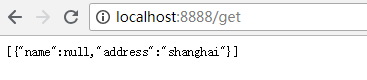
设置端口为8888,启动项目访问http://localhost:8888/get,我们代码中没有配置WriteMapNullValue,所以如果返回结果中有null值则不显示,结果如下:

我们注释掉fastjson配置,重新启动项目并访问,从结果可以看出我们配置的消息转换器起作用了。
重写HttpMessageConverter
接下来我们继承AbstractHttpMessageConverter来实现一个自己的消息转换器,示例如下:
1package com.example.demo;
2
3import org.springframework.http.HttpInputMessage;
4import org.springframework.http.HttpOutputMessage;
5import org.springframework.http.MediaType;
6import org.springframework.http.converter.AbstractHttpMessageConverter;
7import org.springframework.http.converter.HttpMessageNotReadableException;
8import org.springframework.http.converter.HttpMessageNotWritableException;
9import org.springframework.util.StreamUtils;
10
11import java.io.IOException;
12import java.nio.charset.Charset;
13
14public class MyMessageConverter extends AbstractHttpMessageConverter<UserEntity> {
15
16
17    public MyMessageConverter() {
18        // 新建一个我们自定义的媒体类型application/xxx-junlin
19        super(new MediaType("application", "xxx-junlin", Charset.forName("UTF-8")));
20    }
21
22    @Override
23    protected boolean supports(Class<?> clazz) {
24        // 表明只处理UserEntity类型的参数。
25        return UserEntity.class.isAssignableFrom(clazz);
26    }
27
28    /**
29     * 重写readlntenal 方法,处理请求的数据。代码表明我们处理由“-”隔开的数据,并转成 UserEntity类型的对象。
30     */
31    @Override
32    protected UserEntity readInternal(Class<? extends UserEntity> clazz,
33            HttpInputMessage inputMessage) throws IOException,
34            HttpMessageNotReadableException {
35        String temp = StreamUtils.copyToString(inputMessage.getBody(), Charset.forName("UTF-8"));
36        String[] tempArr = temp.split("-");
37
38        return new UserEntity(tempArr[0],tempArr[1]);
39    }
40
41    /**
42     * 重写writeInternal ,处理如何输出数据到response。
43     */
44    @Override
45    protected void writeInternal(UserEntity userEntity,
46            HttpOutputMessage outputMessage)
47            throws IOException, HttpMessageNotWritableException {
48        String out = "hello: " + userEntity.getName() + "-" + userEntity.getAddress();
49        outputMessage.getBody().write(out.getBytes());
50    }
51}
将自定义的消息转换器加入到springmvc容器中,以便被使用。
1package com.example.demo;
2
3import java.util.List;
4
5import org.springframework.context.annotation.Bean;
6import org.springframework.context.annotation.Configuration;
7import org.springframework.http.converter.HttpMessageConverter;
8import org.springframework.web.servlet.config.annotation.WebMvcConfigurer;
9
10import com.alibaba.fastjson.serializer.SerializerFeature;
11import com.alibaba.fastjson.support.config.FastJsonConfig;
12import com.alibaba.fastjson.support.spring.FastJsonHttpMessageConverter;
13
14@Configuration
15public class MyWebmvcConfiguration implements WebMvcConfigurer{
16
17    @Override
18    public void extendMessageConverters(List<HttpMessageConverter<?>> converters) {
19        FastJsonHttpMessageConverter fjc = new FastJsonHttpMessageConverter();
20        FastJsonConfig fj = new FastJsonConfig();
21        fj.setSerializerFeatures(SerializerFeature.DisableCircularReferenceDetect);
22        fjc.setFastJsonConfig(fj);
23        converters.add(fjc);
24        converters.add(converter());
25    }
26    @Bean
27    public MyMessageConverter converter() {
28        return new MyMessageConverter();
29    }
30
31}
UserController中加入测试的代码
1package com.example.demo;
2
3import java.util.ArrayList;
4import java.util.List;
5
6import org.springframework.web.bind.annotation.RequestBody;
7import org.springframework.web.bind.annotation.RequestMapping;
8import org.springframework.web.bind.annotation.RequestMethod;
9import org.springframework.web.bind.annotation.ResponseBody;
10import org.springframework.web.bind.annotation.RestController;
11
12@RestController
13public class UserController {
14
15    @RequestMapping(value="/get",method=RequestMethod.GET)
16    public Object getList(){
17        List<UserEntity> list= new ArrayList<UserEntity>();
18        UserEntity u1 = new UserEntity(null, "shanghai");
19        list.add(u1);
20        return list;
21    }
22
23    @RequestMapping(method = RequestMethod.POST, value = "/convert")
24    public @ResponseBody UserEntity converter(@RequestBody UserEntity user) {
25        return user;
26    }
27}
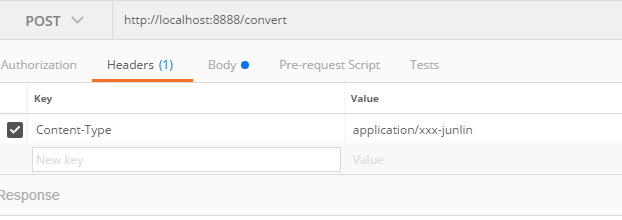
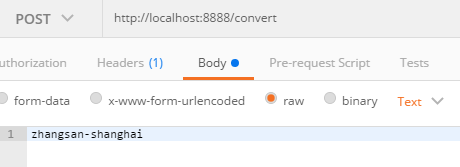
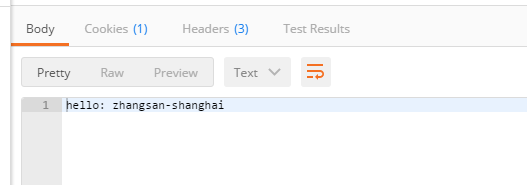
启动项目,使用postman来测试,从响应来看我们的消息转换器已经起作用了,如下: