转自:https://www.cnblogs.com/steven-yang/p/5852988.html
百度的结果表达太奇怪,简单记一笔。
1、下载一个scala的压缩包,https://www.scala-lang.org/download/
2、配置环境变量
3、新建一个文件夹作为工作区。
4、新建.vscode文件夹并保存一份tasks.json文件,内容如下:
1{
2    "version": "0.1.0",
3    "isShellCommand": true,
4    "args": [],
5    "showOutput": "always",
6    "echoCommand": true,
7    "suppressTaskName": true,
8    "windows": {
9        "command": "cmd",
10        "args": [
11            "/C",
12            "scala"
13        ]
14    },
15    "linux": {
16        "command": "sh",
17        "args": [
18            "scala"
19        ]
20    },
21    "osx": {
22        "command": "sh",
23        "args": [
24            "scala"
25        ]
26    },
27    "tasks": [
28        {
29            "taskName": "run script",
30            "isBuildCommand": true,
31            "args": [
32                "${file}"
33            ]
34        }
35    ]
36}
5、打开vs code,选择打开文件夹。
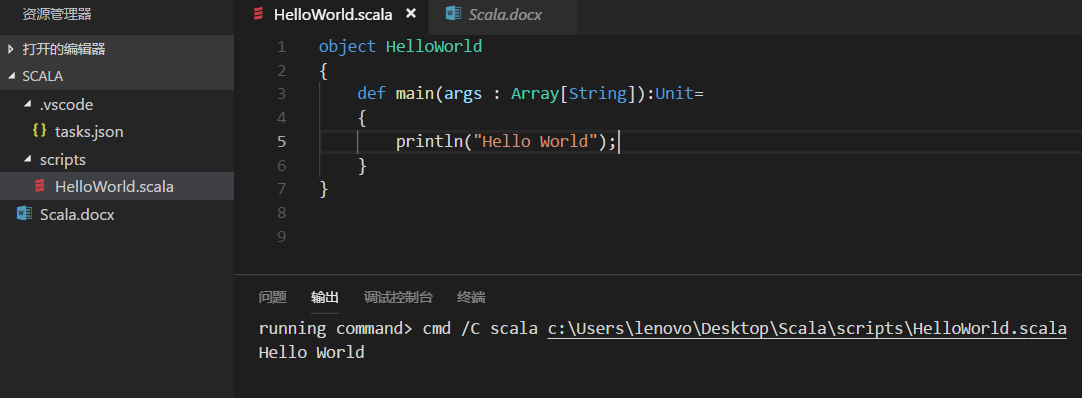
6、新建一个*.scala文件,Ctrl+Shift+B就能跑啦!
最终得到: