
MyBatis基本使用
声明:基于《基于Maven工程下的MyBatis框架+MySQL+连接池的数据查询操作》进一步拓展,相关配置文件、数据文件可阅上篇。
SQL传单/多参
1    在goods.xml新增两个<select>:
2
3    <!--单参数传参,使用paramterType指定的数据类型即可,SQL中#{value}提取参数-->
4    <select id="selectById" parameterType="Integer" resultType="com.imooc.mybatis.entity.Goods">
5        select * from t_goods where goods_id=#{value}
6    </select>
7    <!--多参数传参,使用paramterType指定Map接口,SQL中#{value}提取参数,这里的value为Map的key值-->
8    <select id="selectByPriceRange" parameterType="java.util.Map" resultType="com.imooc.mybatis.entity.Goods">
9        select * from t_goods where current_price between #{min} and #{max}
10        order by current_price limit 0,#{limit}
11    </select>
1在MyBatisTest.java测试类中新增两个方法:
2
3@Test
4    public void testSelectById(){
5        SqlSession sqlSession = null;
6        try {
7            sqlSession = MyBatisUtils.openSession();
8            // 进行查询,传入的参数取的是在goods.xml文件的namespace名称和select id
9            Goods goods=sqlSession.selectOne("goods.selectById",1602);
10            System.out.println(goods);
11
12        } catch (Exception e) {
13            throw e;
14        } finally {
15            MyBatisUtils.closeSession(sqlSession);
16        }
17    }
18    @Test
19    public void testSelectByPriceRange(){
20        SqlSession sqlSession = null;
21        try {
22            sqlSession = MyBatisUtils.openSession();
23            // 进行查询,传入的参数取的是在goods.xml文件的namespace名称和select id
24            Map param = new HashMap();
25            param.put("min",100);
26            param.put("max",500);
27            param.put("limit",10);
28
29            List<Goods> list=sqlSession.selectList("goods.selectByPriceRange",param);
30            for (Goods goods : list) {
31                System.out.println(goods.getTitle()+"--"+goods.getCurrentPrice());
32            }
33        } catch (Exception e) {
34            throw e;
35        } finally {
36            MyBatisUtils.closeSession(sqlSession);
37        }
38    }
多表关联查询【Map--KEY对应数据库中的字段名】
1新增t_category种类表
2
3create table t_category
4(
5    category_id    int auto_increment comment '产品分类'
6        primary key,
7    category_name  varchar(32) not null comment '分类名称',
8    parent_id      int         null comment '上级分类',
9    category_level int         not null comment '级别',
10    category_order int         not null comment '排序'
11)
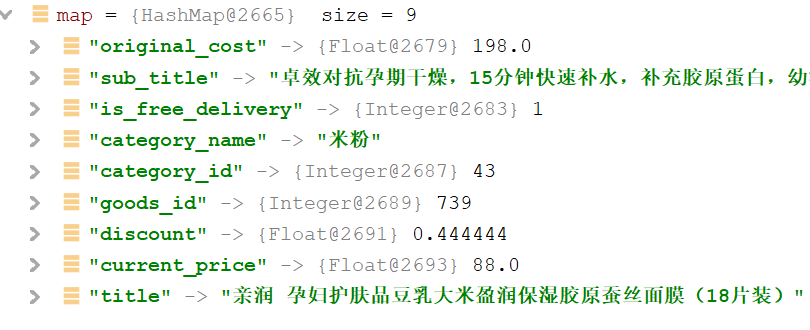
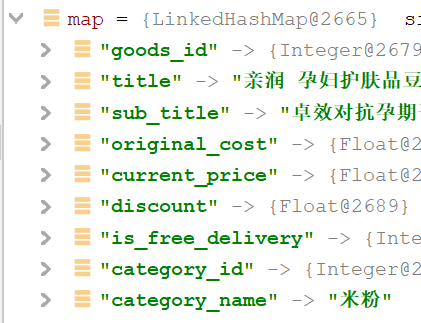
1 在goods.xml新增两个<select>,随用其一,两者区别是让返回的Map集合无序/有序
2
3<select id="selectGoodsMap" resultType="java.util.Map">
4        select g.*,c.category_name from t_goods g,t_category c
5        where g.category_id=c.category_id
6    </select>
7
8    <select id="selectGoodsLinkedHashMap" resultType="java.util.LinkedHashMap">
9        select g.*,c.category_name from t_goods g,t_category c
10        where g.category_id=c.category_id
11    </select>
1在MyBatisTest.java测试类中新增两个方法:
2
3//java.util.Map
4 @Test
5    public void testSelectGoodsMap(){
6        SqlSession sqlSession = null;
7        try {
8            sqlSession = MyBatisUtils.openSession();
9            // 进行查询,传入的参数取的是在goods.xml文件的namespace名称和select id
10            List<Map> list=sqlSession.selectList("goods.selectGoodsMap");
11            for (Map map : list) {
12                System.out.println(map);
13            }
14        } catch (Exception e) {
15            throw e;
16        } finally {
17            MyBatisUtils.closeSession(sqlSession);
18        }
19    }
20//java.util.LinkedHashMap
21    @Test
22    public void testSelectGoodsLinkedHashMap(){
23        SqlSession sqlSession = null;
24        try {
25            sqlSession = MyBatisUtils.openSession();
26            // 进行查询,传入的参数取的是在goods.xml文件的namespace名称和select id
27            List<Map> list=sqlSession.selectList("goods.selectGoodsLinkedHashMap");
28            for (Map map : list) {
29                System.out.println(map);
30            }
31        } catch (Exception e) {
32            throw e;
33        } finally {
34            MyBatisUtils.closeSession(sqlSession);
35        }
36    }
多表关联查询【Entity--KEY对应实体类中的字段名】
因为要用到实体类Goods,而多表查询的category_name属性值不被Goods包含,所以这里要对Goods进行扩展,但不在原有的实体类上修改,而是新建拓展类GoodsDTO.java,其中test属性是我测试属性,用AS命令添加的属性
1package com.imooc.mybatis.dto;
2
3import com.imooc.mybatis.entity.Goods;
4
5/**
6 * @Auther 徐士成
7 * @Date 2021-06-22 14:18
8 */
9public class GoodsDTO {
10    private Goods goods = new Goods();
11    private String categoryName;
12    private String test;
13
14
15
16    public Goods getGoods() {
17        return goods;
18    }
19
20    public void setGoods(Goods goods) {
21        this.goods = goods;
22    }
23
24    public String getCategoryName() {
25        return categoryName;
26    }
27
28    public void setCategoryName(String categoryName) {
29        this.categoryName = categoryName;
30    }
31
32    public String getTest() {
33        return test;
34    }
35
36    public void setTest(String test) {
37        this.test = test;
38    }
39
40    @Override
41    public String toString() {
42        return "GoodsDTO{" +
43                "goods=" + goods +
44                ", categoryName='" + categoryName + '\'' +
45                ", test='" + test + '\'' +
46                '}';
47    }
48}
49
这里借助resultMap结果集完成实体类映射: <resultMap id="唯一的标识" type="需要映射到JavaBean 名称"> <id column="表的主键字段" property="映射到JavaBean 的主键属性" /> <result column="数据表的列名或者标签别名。" property="需要映射到JavaBean 的属性名称。"/>
1<resultMap id="rmGoods" type="com.imooc.mybatis.dto.GoodsDTO">
2        <id column="goods_id" property="goods.goodsId"></id>
3        <result column="title" property="goods.title"></result>
4        <result column="original_cost" property="goods.originalCost"></result>
5        <result column="current_price" property="goods.currentPrice"></result>
6        <result column="discount" property="goods.discount"></result>
7        <result column="is_free_delivery" property="goods.isFreeDelivery"></result>
8        <result column="category_id" property="goods.categoryId"></result>
9        <result column="category_name" property="categoryName"></result>
10        <result column="test" property="test"></result>
11    </resultMap>
12    <select id="selectGoodsDTO" resultMap="rmGoods">
13        select g.*,c.category_name, '1' as test from t_goods g,t_category c
14        where g.category_id=c.category_id
15    </select>
1 @Test
2    public void testSelectGoodsDTO(){
3        SqlSession sqlSession = null;
4        try {
5            sqlSession = MyBatisUtils.openSession();
6            // 进行查询,传入的参数取的是在goods.xml文件的namespace名称和select id
7            List<GoodsDTO> list=sqlSession.selectList("goods.selectGoodsDTO");
8            for (GoodsDTO goodsDTO : list) {
9                System.out.println(goodsDTO);
10            }
11        } catch (Exception e) {
12            throw e;
13        } finally {
14            MyBatisUtils.closeSession(sqlSession);
15        }
16    }