
由于业务需要对python文件进行参数传递,通过下面两个java方法完美解决此问题,我的思路是:首先我要先把上次写的参数删除,第二我要新的参数写到python文件中。
第一个方法解决了删除上次传递的参数问题。
第二个方法解决了参数传递到python文件
1/**
2     * @param file python文件的路径
3     * @return
4     * @throws IOException
5     */
6    private List<String> readAndRemoveFirstLines(File file) throws IOException{     //删除第一行内容
7        int lineNum=1;
8        List<String> strList = new ArrayList<String>();
9        RandomAccessFile raf = null;
10        try {
11            raf = new RandomAccessFile(file, "rw");
12            //Initial write position
13            long writePosition = raf.getFilePointer();
14            for (int i = 0; i < lineNum; i++) {
15                String line = raf.readLine();
16                if (line == null) {
17                    break;
18                }
19                strList.add(line);
20            }
21
22            // Shift the next lines upwards.
23            long readPosition = raf.getFilePointer();
24            byte[] buff = new byte[1024];
25            int n;
26            while (-1 != (n = raf.read(buff))) {
27                raf.seek(writePosition);
28                raf.write(buff, 0, n);
29                readPosition += n;
30                writePosition += n;
31                raf.seek(readPosition);
32
33            }
34            raf.setLength(writePosition);
35
36        } catch(IOException e){
37            throw e;
38        } finally{
39            try{
40                if(raf != null){
41                    raf.close();
42                }
43            }catch(IOException e){
44                throw e;
45            }
46        }
47        return strList;
48    }
49    /**
50     * @param filePath  python文件的路径
51     * @param contents  传入python文件的变量,仅数值即可
52     * @throws IOException
53     */
54    public void addContainsToFile(String filePath, String contents) throws IOException {
55        //1、参数校验
56        int position =0;
57        File file = new File(filePath);
58        //定义python文件写入的内容
59        String content="dis = " + contents + " Meters"+"\n";
60        //判断文件是否存在
61        if (!(file.exists() && file.isFile())) {
62            System.out.println("文件不存在  ~ ");
63            return;
64        }
65        //判断position是否合法
66        if ((position < 0) || (position > file.length())) {
67            System.out.println("position不合法 ~ ");
68            return;
69        }
70        //2、创建临时文件
71        File tempFile = File.createTempFile("sss", ".temp", new File("D:/"));
72        //3、用文件输入流、文件输出流对文件进行操作
73        FileOutputStream outputStream = new FileOutputStream(tempFile);
74        FileInputStream inputStream = new FileInputStream(tempFile);
75        //在退出JVM退出时自动删除
76        tempFile.deleteOnExit();
77        //4、创建RandomAccessFile流
78        RandomAccessFile rw = new RandomAccessFile(file, "rw");
79        //文件指定位置到 position
80        rw.seek(position);
81        int tmp;
82        //5、将position位置后的内容写入临时文件
83        while ((tmp = rw.read()) != -1) {
84            outputStream.write(tmp);
85        }
86        //6、将追加内容 contents 写入 position 位置
87        rw.seek(position);
88        rw.write(content.getBytes());
89        //7、将临时文件写回文件,并将创建的流关闭
90        while ((tmp = inputStream.read()) != -1) {
91            rw.write(tmp);
92        }
93        rw.close();
94        outputStream.close();
95        inputStream.close();
96    }
测试方法我用的Junit进行测试:
1  @Test
2    public  void  testAddLine() throws IOException {
3        try {
4            //重点注意:1.以下三个方法的执行顺序不能改变;2.python文件文件的首行必须添加默认参数dis的数值;3.文件路径填写正确
5
6
7            //此方法用来移除python文件中首行内容,在python文件的首行必须添加默认参数dis的数值,如:dis = 200 +'meter'
8            readAndRemoveFirstLines(new File("E:\\demo\\pointbufferandpolygon.py"));//此方法用来给python文件首行添加dis的变量值,注意:变量名在此方法中已写死,如需修改变量名,参考此方法
9            addContainsToFile("E:\\demo\\pointbufferandpolygon.py", "90000");
10        } catch (IOException e) {
11            e.printStackTrace();
12        } catch (Exception e) {
13            e.printStackTrace();
14        }
15    }
效果图:
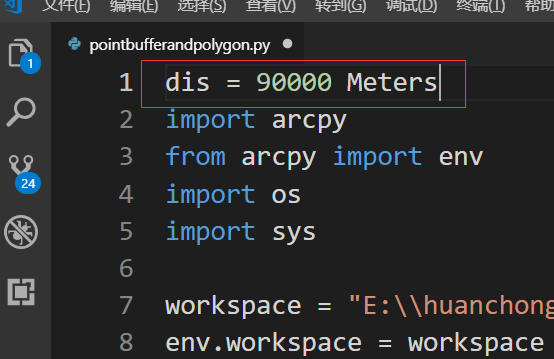

如果要传递多个参数呢?我这里已经实现了,也是通过以上代码进行了二次封装,如果需要可以留言进行探讨。