
前言
在日常开发中,一些不常用且又比较基础的知识,过了一段时间之后,总是容易忘记或者变得有点模棱两可。本篇主要记录一些关于MySQL数据库比较基础的知识,以便日后快速查看。
SQL命令
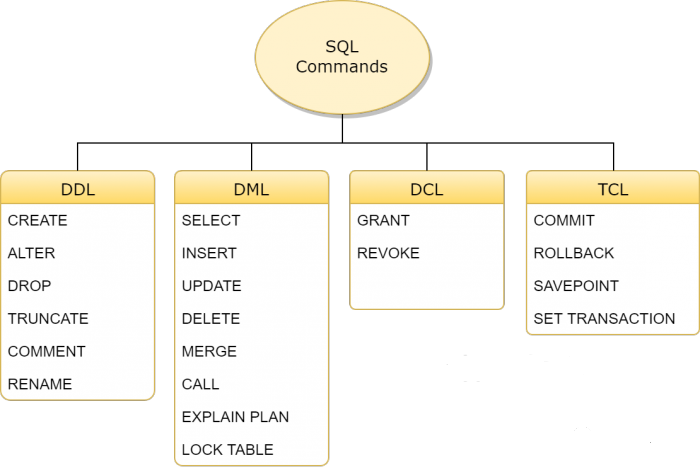
SQL命令分可以分为四组:DDL、DML、DCL和TCL。四组中包含的命令分别如下
DDL
DDL是数据定义语言(Data Definition Language)的简称,它处理数据库schemas和描述数据应如何驻留在数据库中。
-
CREATE:创建数据库及其对象(如表,索引,视图,存储过程,函数和触发器)
-
ALTER:改变现有数据库的结构
-
DROP:从数据库中删除对象
-
TRUNCATE:从表中删除所有记录,包括为记录分配的所有空间都将被删除
-
COMMENT:添加注释
-
RENAME:重命名对象
常用命令如下:
1# 建表
2CREATE TABLE sicimike (
3  id int(4) primary key auto_increment COMMENT '主键ID',
4  name varchar(10) unique,
5  age int(3) default 0,
6  identity_card varchar(18)
7  # PRIMARY KEY (id) // 也可以通过这种方式设置主键
8  # UNIQUE KEY (name) // 也可以通过这种方式设置唯一键
9  # key/index (identity_card, col1...) // 也可以通过这种方式创建索引
10) ENGINE = InnoDB;
11
12# 设置主键
13alter table sicimike add primary key(id);
14
15# 删除主键
16alter table sicimike drop primary key;
17
18# 设置唯一键
19alter table sicimike add unique key(column_name);
20
21# 删除唯一键
22alter table sicimike drop index column_name;
23
24# 创建索引
25alter table sicimike add [unique/fulltext/spatial] index/key index_name (identity_card[(len)] [asc/desc])[using btree/hash]
26create [unique/fulltext/spatial] index index_name on sicimike(identity_card[(len)] [asc/desc])[using btree/hash]
27example:alter table sicimike add index idx_na(name, age);
28
29# 删除索引
30alter table sicimike drop key/index identity_card;
31drop index index_name on sicimike;
32
33# 查看索引
34show index from sicimike;
35
36# 查看列
37desc sicimike;
38
39# 新增列
40alter table sicimike add column column_name varchar(30);
41
42# 删除列
43alter table sicimike drop column column_name;
44
45# 修改列名
46alter table sicimike change column_name new_name varchar(30);
47
48# 修改列属性
49alter table sicimike modify column_name varchar(22);
50
51# 查看建表信息
52show create table sicimike;
53
54# 添加表注释
55alter table sicimike comment '表注释';
56
57# 添加字段注释
58alter table sicimike modify column column_name varchar(10) comment '姓名';
DML
DML是数据操纵语言(Data Manipulation Language)的简称,包括最常见的SQL语句,例如SELECT,INSERT,UPDATE,DELETE等,它用于存储,修改,检索和删除数据库中的数据。
1
2分页
3
4-- 查询从第11条数据开始的连续5条数据
5select * from sicimike limit 10, 5
6group by
7默认情况下,MySQL中的分组(group by)语句,不要求select返回的列,必须是分组的列或者是一个聚合函数。
8如果select查询的列不是分组的列,也不是聚合函数,则会返回该分组中第一条记录的数据。对比下面两条SQL语句,第二条SQL语句中,cname既不是分组的列,也不是以聚合函数的形式出现。所以在liming这个分组中,cname取的是第一条数据。
9mysql> select * from c;
10+-----+-------+----------+
11| CNO | CNAME | CTEACHER |
12+-----+-------+----------+
13| 1 | 数学 | liming |
14| 2 | 语文 | liming |
15| 3 | 历史 | xueyou |
16| 4 | 物理 | guorong |
17| 5 | 化学 | liming |
18+-----+-------+----------+
195 rows in set (0.00 sec)
20
21mysql> select cteacher, count(cteacher), cname from c group by cteacher;
22+----------+-----------------+-------+
23| cteacher | count(cteacher) | cname |
24+----------+-----------------+-------+
25| guorong |               1 | 物理 |
26| liming |               3 | 数学 |
27| xueyou |               1 | 历史 |
28+----------+-----------------+-------+
293 rows in set (0.00 sec)
30
31having
32
33having关键字用于对分组后的数据进行筛选,功能相当于分组之前的where,不过要求更严格。过滤条件要么是一个聚合函数( ... having count(x) > 1),要么是出现在select后面的列(select col1, col2 ... group by x having col1 > 1)
34
35多表更新
36
37update tableA a inner join tableB b on a.xxx = b.xxx set a.col1 = xxx, b.col1 = xxx where ...
38
39多表删除
40
41delete a, b from tableA a inner join tableB b on a.xxx = b.xxx where a.col1 = xxx and b.col1 = xxx
DCL
DCL是数据控制语言(Data Control Language)的简称,它包含诸如GRANT之类的命令,并且主要涉及数据库系统的权限,权限和其他控件。
- GRANT :允许用户访问数据库的权限
- REVOKE:撤消用户使用GRANT命令赋予的访问权限
TCL
TCL是事务控制语言(Transaction Control Language)的简称,用于处理数据库中的事务
- COMMIT:提交事务
- ROLLBACK:在发生任何错误的情况下回滚事务
范式
数据库规范化,又称正规化、标准化,是数据库设计的一系列原理和技术,以减少数据库中数据冗余,增进数据的一致性。关系模型的发明者埃德加·科德最早提出这一概念,并于1970年代初定义了第一范式、第二范式和第三范式的概念,还与Raymond F. Boyce于1974年共同定义了第三范式的改进范式——BC范式。除外还包括针对多值依赖的第四范式,连接依赖的第五范式、DK范式和第六范式。
现在数据库设计最多满足3NF,普遍认为范式过高,虽然具有对数据关系更好的约束性,但也导致数据关系表增加而令数据库IO更易繁忙,原来交由数据库处理的关系约束现更多在数据库使用程序中完成。
横表纵表
SQL脚本
1 横表
2
3CREATE TABLE `table_h2z` (
4`name` varchar(32) DEFAULT NULL,
5`chinese` int(11) DEFAULT NULL,
6`math` int(11) DEFAULT NULL,
7`english` int(11) DEFAULT NULL
8) ENGINE=InnoDB AUTO_INCREMENT=4 DEFAULT CHARSET=utf8;
9
10/*Data for the table `table_h2z` */
11insert into `table_h2z`(`name`,`chinese`,`math`,`english`) values
12('mike',45,43,87),
13('lily',53,64,88),
14('lucy',57,75,75);
15
16  纵表
17
18CREATE TABLE `table_z2h` (
19  `name` varchar(32) DEFAULT NULL,
20  `subject` varchar(8) NOT NULL DEFAULT '',
21  `score` int(11) DEFAULT NULL
22) ENGINE=InnoDB DEFAULT CHARSET=utf8;
23
24/*Data for the table `table_z2h` */
25insert into `table_z2h`(`name`,`subject`,`score`) values
26('mike','chinese',45),
27('lily','chinese',53),
28('lucy','chinese',57),
29('mike','math',43),
30('lily','math',64),
31('lucy','math',75),
32('mike','english',87),
33('lily','english',88),
34('lucy','english',75);
横表转纵表
1SELECT NAME, 'chinese' AS `subject`, chinese AS `score` FROM table_h2z
2UNION ALL
3SELECT NAME, 'math' AS `subject`, math AS `score` FROM table_h2z
4UNION ALL
5SELECT NAME, 'english' AS `subject`, english AS `score` FROM table_h2z
6
7执行结果
8+------+---------+-------+
9| name | subject | score |
10+------+---------+-------+
11| mike | chinese | 45 |
12| lily | chinese | 53 |
13| lucy | chinese | 57 |
14| mike | math | 43 |
15| lily | math | 64 |
16| lucy | math | 75 |
17| mike | english | 87 |
18| lily | english | 88 |
19| lucy | english | 75 |
20+------+---------+-------+
219 rows in set (0.00 sec)
纵表转横表
1SELECT NAME,
2 SUM(CASE `subject` WHEN 'chinese' THEN score ELSE 0 END) AS chinese,
3 SUM(CASE `subject` WHEN 'math' THEN score ELSE 0 END) AS math,
4 SUM(CASE `subject` WHEN 'english' THEN score ELSE 0 END) AS english
5FROM table_z2h
6GROUP BY NAME
7
8执行结果
9+------+---------+------+---------+
10| name | chinese | math | english |
11+------+---------+------+---------+
12| lily | 53 |   64 | 88 |
13| lucy |      57 | 75 |      75 |
14| mike | 45 |   43 | 87 |
15+------+---------+------+---------+
163 rows in set (0.00 sec)