
Python微信机器人
本文目录
- 一 简介
- 二 登录微信
- 三 微信好友男女比例
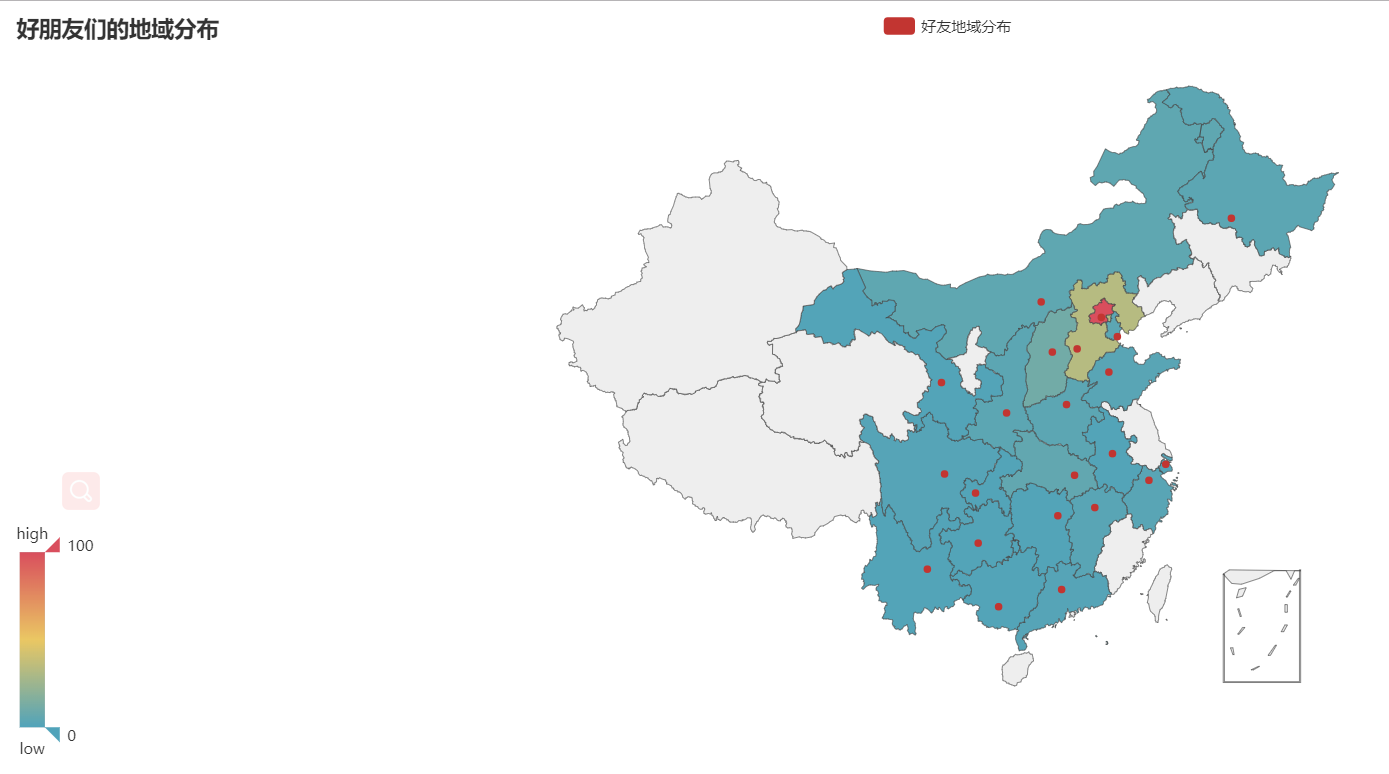
- 四 微信好友地域分布
- 五 微信聊天机器人
一 简介
wxpy基于itchat,使用了 Web 微信的通讯协议,,通过大量接口优化提升了模块的易用性,并进行丰富的功能扩展。实现了微信登录、收发消息、搜索好友、数据统计等功能。
总而言之,可用来实现各种微信个人号的自动化操作。
1安装:wxpy 支持 Python 3.4-3.6,以及 2.7 版本
2
3pip3 install  wxpy
4
5安装 pillow模块
6
7pip3 install pillow
8
9安装 pyecharts模块
10
11pip3 install pyecharts
二 登录微信
1 、 扫码登录微信
1from wxpy import *
2
3bot = Bot()
2、cache_path=True
运行上面的程序,会弹出二维码,用手机微信扫一扫即可实现登录。
但上面的程序有一个缺点,每次运行都要扫二维码。不过wxpy非常贴心地提供了缓存的选项,用于将登录信息保存下来,就不用每次都扫二维码,如下
bot = Bot(cache_path=True) # 必须先登录过一次以后才可以使用缓存
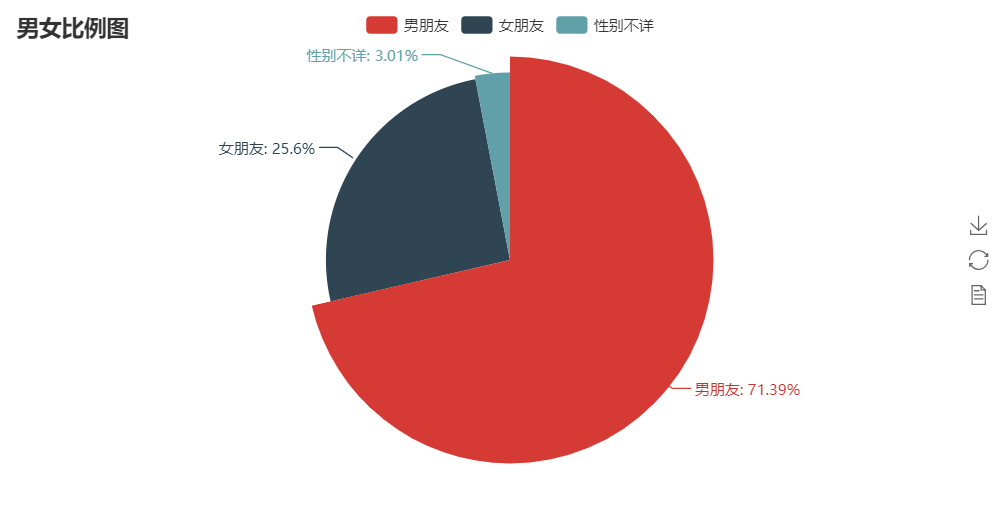
三 微信好友男女比例

1from wxpy import *
2from pyecharts import Pie
3import webbrowser
4bot=Bot(cache_path=True) #注意手机确认登录
5
6friends=bot.friends()
7#拿到所有朋友对象,放到列表里
8attr=['男朋友','女朋友','性别不详']
9value=[0,0,0]
10for friend in friends:
11    if friend.sex == 1: # 等于1代表男性
12        value[0]+=1
13    elif friend.sex == 2: #等于2代表女性
14        value[1]+=1
15    else:
16        value[2]+=1
17
18
19pie = Pie("朋友男女比例")
20pie.add("", attr, value, is_label_show=True)
21#图表名称str,属性名称list,属性所对应的值list,is_label_show是否显示标签
22pie.render('sex.html')#生成html页面
23# 打开浏览器
24webbrowser.open("sex.html")

四 微信好友地域分布
显示中国地图,需要装中国地图模块:
1全球国家地图: echarts-countries-pypkg (1.9MB): 世界地图和 213 个国家,包括中国地图
2中国省级地图: echarts-china-provinces-pypkg (730KB):23 个省,5 个自治区
3中国市级地图: echarts-china-cities-pypkg (3.8MB):370 个中国城市
4中国县区级地图: echarts-china-counties-pypkg (4.1MB):2882 个中国县·区
5中国区域地图: echarts-china-misc-pypkg (148KB):11 个中国区域地图,比如华南、华北。
6
7特别注明,中国地图在 echarts-countries-pypkg 里。需要这些地图的朋友,可以装 pip 命令行:
8
9pip3 install echarts-countries-pypkgpip3 install echarts-china-provinces-pypkgpip3 install echarts-china-cities-pypkgpip3 install echarts-china-counties-pypkgpip3 install echarts-china-misc-pypkg

1from wxpy import *
2from pyecharts import Map
3import webbrowser
4bot=Bot(cache_path=True)
5
6friends=bot.friends()
7
8
9area_dic={}#定义一个字典,用来存放省市以及省市人数
10for friend in friends:
11    if friend.province not in area_dic:
12        area_dic[friend.province]=1
13    else:
14        area_dic[friend.province]+=1
15
16attr = area_dic.keys()
17value = area_dic.values()
18
19
20
21map = Map("好朋友们的地域分布", width=1200, height=600)
22map.add(
23    "好友地域分布",
24    attr,
25    value,
26    maptype='china',
27    is_visualmap=True, #结合体VisualMap
28
29)
30#is_visualmap -> bool 是否使用视觉映射组件
31#
32map.render('area.html')
33
34
35webbrowser.open("area.html")
五 微信聊天机器人
1、为微信传输助手传送消息
这里的file_helper就是微信的文件传输助手,我们给文件传输助手发送一条消息,可以在手机端的文件传输助手中收到括号内的消息
bot.file_helper.send('lqz say hello')
2、收发消息@bot.register()

1from wxpy import *
2bot=Bot(cache_path=True)
3
4@bot.register()
5def recv_send_msg(recv_msg):
6    print('收到的消息:',recv_msg.text) # recv_msg.text取得文本
7    return '自动回复:%s' %recv_msg.text
8
9# 进入Python命令行,让程序保持运行
10embed()

3、自动给老婆回复信息
当你在网吧吃着鸡,操作骚出天际时,你老婆打电话让你回家吃饭,此时你怎么办。。。

1from wxpy import *
2bot=Bot(cache_path=True)
3
4girl_friend=bot.search('刘刘刘')[0]
5print(girl_friend)
6
7@bot.register() # 接收从指定好友发来的消息,发送者即recv_msg.sender为指定好友girl_friend
8def recv_send_msg(recv_msg):
9    print('收到的消息:',recv_msg.text) # recv_msg.text取得文本
10    if recv_msg.sender == girl_friend:
11        recv_msg.forward(bot.file_helper,prefix='老婆留言: ') #在文件传输助手里留一份,方便自己忙完了回头查看
12        ms='老婆最美丽,我对老婆的爱如滔滔江水,连绵不绝'
13        print('>>>给老婆回复的:', ms)
14        return  ms#给老婆回一份
15
16embed()

4、从微信群里定位好友之拍老板马屁

1from wxpy import *
2bot=Bot(cache_path=True)
3
4company_group=bot.groups().search('群名字')[0]
5
6boss=company_group.search('老板名字')[0]
7
8
9@bot.register(chats=company_group) #接收从指定群发来的消息,发送者即recv_msg.sender为组
10def recv_send_msg(recv_msg):
11    print('收到的消息:',recv_msg.text)
12    if recv_msg.member == boss:
13        #这里不用recv_msg.render 因为render是群的名字
14        recv_msg.forward(bot.file_helper,prefix='老板发言: ')
15        return '老板说的好有道理,深受启发'
16
17embed()

5、聊天机器人
给所有人自动回复

1import json
2import requests
3from wxpy import *
4bot = Bot(cache_path=True)
5
6# 调用图灵机器人API,发送消息并获得机器人的回复
7def auto_reply(text):
8    url = "http://www.tuling123.com/openapi/api"
9    api_key = "9df516a74fc443769b233b01e8536a42"
10    payload = {
11        "key": api_key,
12        "info": text,
13    }
14    r = requests.post(url, data=json.dumps(payload))
15    result = json.loads(r.content)
16    return "[来自智能机器人] " + result["text"]
17
18
19@bot.register()
20def forward_message(msg):
21    return auto_reply(msg.text)
22
23embed()

给指定的群回复

1import json
2import requests
3from wxpy import *
4bot = Bot(cache_path=False)
5
6group=bot.groups().search('群名字')[0]
7print(group)
8
9# 调用图灵机器人API,发送消息并获得机器人的回复
10def auto_reply(text):
11    url = "http://www.tuling123.com/openapi/api"
12    api_key = "9d602fe417464cd18beb2083d064bee6"
13    payload = {
14        "key": api_key,
15        "info": text,
16    }
17    r = requests.post(url, data=json.dumps(payload))
18    result = json.loads(r.content)
19    return "[来自智能机器人] " + result["text"]
20
21
22@bot.register(chats=group)
23def forward_message(msg):
24    return auto_reply(msg.text)
25
26embed()

给指定的人回复

1import requests
2from wxpy import *
3bot = Bot( cache_path=True)
4
5girl_friend=bot.search('名字r')[0]
6
7# 调用图灵机器人API,发送消息并获得机器人的回复
8def auto_reply(text):
9    url = "http://www.tuling123.com/openapi/api"
10    api_key = "申请图灵机器人获取key值放到这里"
11    payload = {
12        "key": api_key,
13        "info": text,
14    }
15    r = requests.post(url, data=json.dumps(payload))
16    result = json.loads(r.content)
17    return "[微信测试,请忽略] " + result["text"]
18
19
20@bot.register()
21def forward_message(msg):
22    if msg.sender == girl_friend:
23        return auto_reply(msg.text)
24
25embed()