
1.0 思路整理
转盘抽奖很常见,之前也没写过,现在有空来写写,分析如下:
1.1 转盘旋转 ? ----- 可以用 transform 的 rotate 来解决 1.2 旋转动画 ? ----- transition 过渡来处理 1.3 停留目标位置及中奖提示 ? ------ 通过控制旋转角度控制停留位置,中奖提示,考虑添加回调
1.1 开始行动
上面的思考,我们知道了大概要实现的步骤,首先我们搞张图片
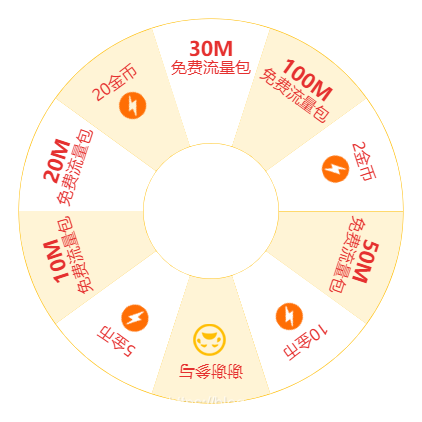 这个圆盘有 10 份,每一份 360/10 = 36deg,假设要停留在第二个---->20金币,顺时针(含初始位置并计为1),即 共需要旋转 (2 - 1)* 36 = 36,这样,我们可以得出,停留位置需要旋转的角度 = (target - 1)*36。
1.2 中奖回调
上面的步骤,我们知道了如何控制到目标位置,那接下来就是事件通知,起初想的是,固定转动时间,然后开启定时器计时,很显然不靠谱,有没有什么可以在动画结束后就通知呢?transitionend,我找到了这个事件,可以监听元素动画结束事件,只不过有些兼容 这个好办
1/**
2动画结束事件兼容
3**/
4whichTransitionEvent(){
5    let el = document.createElement('span'),
6    transitions = {
7        'transition':'transitionend',
8        'OTransition':'oTransitionEnd',
9        'MozTransition':'transitionend',
10        'WebkitTransition':'webkitTransitionEnd'
11    };
12    for(let t in transitions){
13        if( el.style[t] !== undefined ){
14            return transitions[t];
15        }
16    }
17    el = null;
18}
2.0 完整示例
控制转动位置和事件通知都找到方法了,接下来开干!
栗子:
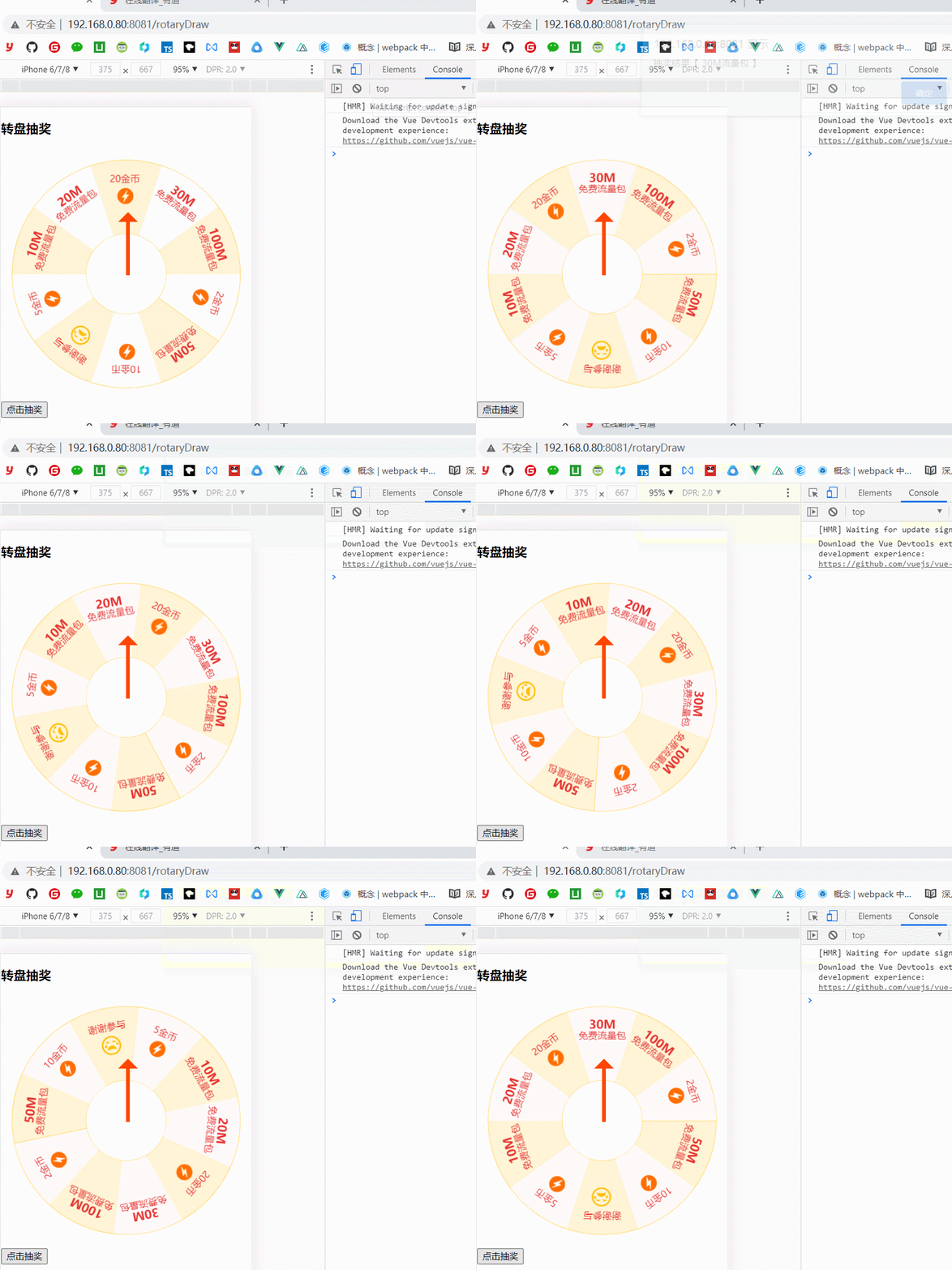
完整代码
1<template>
2  <div>
3      <h3>转盘抽奖</h3>
4      <div class="round_box" >
5          <img class="img_rotate"  ref="rotImg" src="../assets/zhuan.png" alt="">
6          <div class="center">
7              <div class="pointer" ></div>
8          </div>
9      </div>
10      <button @click="toDraw" >点击抽奖</button>
11  </div>
12</template>
13
14<script>
15export default {
16    name:'rotaryDraw',
17    data() {
18        return {
19            rotate: 0,
20            resetRotate: 0,
21            hitId: 1,// 1-10
22            drawStatus: false
23        }
24    },
25    async mounted() {
26        await this.$nextTick();
27        let evenTransition = this.whichTransitionEvent();
28        let img = this.$refs.rotImg;
29        let that = this;
30        const hitAre = [ '30M流量包','20金币','20M流量包','10M流量包','5金币',
31                         '谢谢参与','10金币','50M流量包','2金币','100M流量包'
32                        ];
33        // 监听 动画结束
34        img.addEventListener(evenTransition,tranHand,false);
35
36        function tranHand() {
37            // 复位
38            that.resetRotate = that.rotate > 360 ? that.rotate % 360 : 0;
39            img.style.transition = "none 0s ease 0s";
40            img.style.transform = `rotate(${that.resetRotate}deg)`;
41            alert(`抽奖结果【 ${hitAre[that.hitId - 1]} 】`);
42            that.drawStatus = false
43        }
44    },
45    methods: {
46        start() {
47            this.$refs.rotImg.style.transition = "all 3s ease 0s";
48            this.$refs.rotImg.style.transform = `rotate(${this.rotate}deg)`;
49        },
50        toDraw() {
51            if(this.drawStatus){
52                console.log('正在抽奖中');
53                return
54            }
55            // 标记状态
56            this.drawStatus = true
57            /**
58             * 圆盘共 10 份 每份 36度, 停位置(id)度数 (id - 1)*36
59             * 基数 3圈 360*4
60             * this.rotate 当前角度
61             * **/
62            let reset = 360 * 4;
63            let idx = this.getRandomInt(1,11);
64            // 设置命中
65            this.hitId = idx;
66            // 需要多转角度
67            let addRotate = this.resetRotate > 0 ? 360 - this.resetRotate : 0;
68            // 总共角度
69            let allRotate = this.rotate + (idx - 1) * 36 + reset + addRotate;
70            // 角度限制
71            this.rotate = this.setRotate(allRotate);
72
73            this.start()
74        },
75        // 递归计算角度 不超过 360*6
76        setRotate(deg) {
77            let rest = deg - 360;
78            return  rest > 360*6 ? this.setRotate(rest) : deg;
79        },
80        getRandomInt(min, max) {
81            // 向上收
82            min = Math.ceil(min);
83            // 向下收
84            max = Math.floor(max);
85            return Math.floor(Math.random() * (max - min)) + min; //不含最大值,含最小值
86        },
87        // 动画兼容
88        whichTransitionEvent(){
89            let el = document.createElement('span'),
90            transitions = {
91                'transition':'transitionend',
92                'OTransition':'oTransitionEnd',
93                'MozTransition':'transitionend',
94                'WebkitTransition':'webkitTransitionEnd'
95            };
96            for(let t in transitions){
97                if( el.style[t] !== undefined ){
98                    return transitions[t];
99                }
100            }
101            el = null;
102        }
103    }
104
105}
106</script>
107
108<style lang="scss" >
109.img_rotate{
110    transform: rotate(0deg);
111}
112.round_box{
113    width: 100%;
114    max-width: 375px;
115    position: relative;
116    overflow: hidden;
117    img{
118        width: 100%;
119    }
120    .center{
121        position: absolute;
122        top: 50%;
123        left: 50%;
124        transform: translate(-50%,-50%);
125        .pointer{
126            width: 5px;
127            height: 90px;
128            background-color: #f40;
129            position: absolute;
130            top: -90px;
131        }
132        .pointer::before{
133            content:'';
134            width: 0;
135            height: 0;
136            border-top: 15px solid transparent;
137            border-right: 15px solid transparent;
138            border-bottom: 15px solid #f40;
139            border-left: 15px solid transparent;
140            position: absolute;
141            top: -20px;
142            left: 50%;
143            transform: translateX(-50%);
144        }
145    }
146}
147
148</style>
3.0 tips
总体来说有几个点需要注意 1、动画开始前上锁 2、动画结束后通知,状态复位
1/**
2比如:
3基数3圈 reset 360*3
4停留位置 第二个 (2 - 1)* 36 = 36
5总共角度 360*3 + 36
6动画停止后,因为还要继续旋转,所以不可能把角度一直增加,因此需要复位
7360*3 + 36 其实可以考虑 就转了 36度,然后再增加需要转的角度
8**/
3、继续旋转,因为我们计算是以 30M流量 为初始值的,所以在此旋转 仍然需要以 30M为起点,此时假设 现在停留位置是 300度,也就是说 再转 60度,也就回到了初始位置,本人也是按照这个思路进行复位的。