
上传
在Swoft下通过
\Swoft\Http\Message\Server\Request -> getUploadedFiles()['image']
方法可以获取到一个 Swoft\Http\Message\Upload\UploadedFile 对象或者对象数组(取决于上传时字段是image还是image[])
打印改对象输出:
1object(Swoft\Http\Message\Upload\UploadedFile)#1813 (6) {
2  ["clientFilename":"Swoft\Http\Message\Upload\UploadedFile":private]=>
3  string(25) "蒙太奇配置接口.txt"
4  ["clientMediaType":"Swoft\Http\Message\Upload\UploadedFile":private]=>
5  string(10) "text/plain"
6  ["error":"Swoft\Http\Message\Upload\UploadedFile":private]=>
7  int(0)
8  ["tmpFile":"Swoft\Http\Message\Upload\UploadedFile":private]=>
9  string(55) "/var/www/swoft/runtime/uploadfiles/swoole.upfile.xZyq0d"
10  ["moved":"Swoft\Http\Message\Upload\UploadedFile":private]=>
11  bool(false)
12  ["size":"Swoft\Http\Message\Upload\UploadedFile":private]=>
13  int(710)
14}
都是私用属性,无法访问,但是可以通过对应方法访问到
1getClientFilename()      //得到文件原名称
2getClientMediaType()     //得到文件类型
3getSize()        //获取到文件大小
通过方法
moveTo() //将文件从临时位置转移到目录
上面方法返回为NULL,在移动文件到指定位置时最好判断一下文件夹是否存在,不存在创建
图片处理
借助 ImageMagick 工具完成
ubuntu下一键安装
1I. 安装ImageMagick
2sudo apt-get install imagemagick
3
4II. 安装imagemagick 的lib 供php调用
5sudo apt-get install libmagick++-dev
6
7III. 调用当前的pecl安装imagick
8pecl install imagick
9
10IV. 修改php.ini.重启nginx服务器
11在php.ini中添加: extension = imagick.so
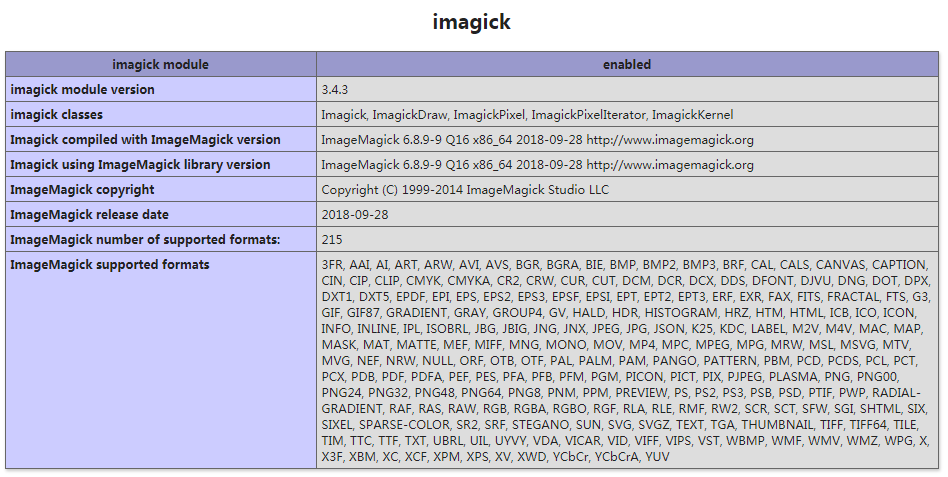
在安装完成后修改完 /etc/php/7.0/cli/php.ini 后发现 phpinfo 页面打印出来没有出现下面信息,于是又修改了/etc/php/7.0/fpm/php.ini 才出现下面信息
安装 Intervention Image
composer require intervention/image
安装完成后可以直接在页面use
1use Intervention\Image\ImageManager;
2
3$manager = new ImageManager(array('driver' => 'imagick'));
4//宽缩小到300px,高自适应
5$thumb = $manager->make($path)->resize(300, null, function ($constraint) {
6                $constraint->aspectRatio();
7});
8$thumb->save($path);
完整代码
1namespace App\Controllers\Api;
2
3use Intervention\Image\ImageManager;
4use Swoft\Http\Message\Server\Request;
5use Swoft\Http\Message\Upload\UploadedFile;
6use Swoft\Http\Server\Exception\NotAcceptableException;
7use Swoft\Http\Server\Bean\Annotation\Controller;
8use Swoft\Http\Server\Bean\Annotation\RequestMapping;
9use Swoft\Http\Server\Bean\Annotation\RequestMethod;
10
11
12class FileController
13{
14    //图片可接受的mime类型
15    private static $img_mime = ['image/jpeg','image/jpg','image/png','image/gif'];
16
17    /**
18     * 文件上传
19     * @RequestMapping(route="image",method=RequestMethod::POST)
20     */
21    public static function imgUpload(Request $request){
22        $files = $request->getUploadedFiles()['image'];
23        if(!$files){
24           throw new NotAcceptableException('image字段为空');
25        }
26
27        if(is_array($files)){
28            $result = array();
29            foreach ($files as $file){
30                self::checkImgFile($file);
31                $result[] = self::saveImg($file);
32            }
33        }else{
34            self::checkImgFile($files);
35            return self::saveImg($files);
36        }
37
38    }
39
40    /**
41     * 保存图片
42     * @param UploadedFile $file
43     */
44    protected static function saveImg(UploadedFile $file){
45        $dir = alias('@upload') . '/' . date('Ymd');
46        if(!is_dir($dir)){
47            @mkdir($dir,0777,true);
48        }
49        $ext_name = substr($file->getClientFilename(), strrpos($file->getClientFilename(),'.'));
50        $file_name = time().rand(1,999999);
51        $path = $dir . '/' . $file_name . $ext_name;
52        $file->moveTo($path);
53        //修改移动后文件访问权限,文件默认没有访问权限
54        @chmod($path,0775);
55        //生成缩略图
56        $manager = new ImageManager(array('driver' => 'imagick'));
57        $thumb = $manager->make($path)->resize(300, null, function ($constraint) {
58            $constraint->aspectRatio();
59        });
60        $thumb_path = $dir. '/' . $file_name . '_thumb' .$ext_name;
61        $thumb->save($dir. '/' . $file_name . '_thumb' .$ext_name);
62        @chmod($thumb_path,0775);
63        return [
64            'url' => explode(alias('@public'),$path)[1],
65            'thumb_url' => explode(alias('@public'),$thumb_path)[1]
66        ];
67    }
68
69    /**
70     * 图片文件校验
71     * @param UploadedFile $file
72     * @return bool
73     */
74    protected static function checkImgFile(UploadedFile $file){
75        if($file->getSize() > 1024*1000*2){
76            throw new NotAcceptableException($file->getClientFilename().'文件大小超过2M');
77        }
78        if(!in_array($file->getClientMediaType(), self::$img_mime)){
79            throw new NotAcceptableException($file->getClientFilename().'类型不符');
80        }
81        return true;
82    }
83
84}
使用
FileController::imgUpload($request);
说明
当前保存文件路径为 alias("@upload"),需要在 /config/define.php 手动填上该路径
1$aliases = [
2    '@root'       => BASE_PATH,
3    '@env'        => '@root',
4    '@app'        => '@root/app',
5    '@res'        => '@root/resources',
6    '@runtime'    => '@root/runtime',
7    '@configs'    => '@root/config',
8    '@resources'  => '@root/resources',
9    '@beans'      => '@configs/beans',
10    '@properties' => '@configs/properties',
11    '@console'    => '@beans/console.php',
12    '@commands'   => '@app/command',
13    '@vendor'     => '@root/vendor',
14    '@public'     => '@root/public',     //public目录,也是nginx设置站点根目录
15    '@upload'     => '@public/upload'    //上传目录
16];
Swoft 不提供静态资源访问,可以使用nginx托管
配置nginx
1vim /etc/nginx/sites-avaiable/default
2
3server {
4        listen 80 default_server;
5        listen [::]:80 default_server;
6
7        # 域名设置
8        server_name eko.xiao.com;
9        #设置nginx根目录
10        root /var/www/html/swoft/public;
11
12        # 将所有非静态请求转发给 Swoft 处理
13        location / {
14            proxy_set_header X-Real-IP $remote_addr;
15            proxy_set_header Host $host;
16            proxy_set_header X-Forwarded-For $proxy_add_x_forwarded_for;
17            proxy_set_header Connection "keep-alive";
18            proxy_pass http://127.0.0.1:9501;
19        }
20
21        location ~ \.php$ {
22                proxy_pass http://127.0.0.1:9501;
23        }
24        # 静态资源使用nginx托管
25        location ~* \.(js|map|css|png|jpg|jpeg|gif|ico|ttf|woff2|woff)$ {
26            expires max;
27        }
28}