
1、新建项目-->其他项目--->Empty qmake project:只有一个pro程序
1、新建项目-->其他项目--->code snapped--->Gui application
2、修改main.cpp:在主窗口上显示一个按钮:也就是将按钮的父窗口设置为widget[因为QPushButton 继承QWidget],这样widget就和button关联起来了,当widget的show时候会调用button的show。
1#include <QApplication>
2#include <QWidget>
3#include <QPushButton>
4int main(int argc, char *argv[])
5{
6    QApplication app(argc, argv);
7
8    QWidget w;
9
10    QPushButton button;   /*按钮是窗口*/
11    button.setText("Button");
12    button.setParent(&w);   //窗口对象的父子关系:设置父窗口是button
13
14    w.show();
15    w.setWindowTitle("Hello world");
16    w.show();
17    return app.exec();
18}
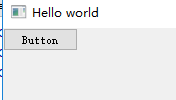
如果没有设置父子关系,那么这个程序就有两个主窗口,按钮窗口和widget窗口没有关系,单独显示:
1#include <QApplication>
2#include <QWidget>
3#include <QPushButton>
4int main(int argc, char *argv[])
5{
6    QApplication app(argc, argv);
7
8    QWidget w;
9
10    QPushButton button;   /*按钮是窗口*/
11    button.setText("Button");
12  //  button.setParent(&w);   //窗口对象的父子关系:设置父窗口是button
13    button.show();  //必须
14    w.show();
15    w.setWindowTitle("Hello world");
16    w.show();
17    return app.exec();
18}
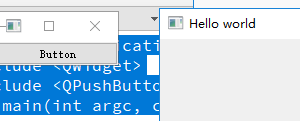
3、添加信号与槽机制
1#include <QApplication>
2#include <QWidget>
3#include <QPushButton>
4int main(int argc, char *argv[])
5{
6    QApplication app(argc, argv);
7
8    QWidget w;
9
10    QPushButton button;   /*按钮是窗口*/
11    button.setText("Button");
12    button.setParent(&w);   //窗口对象的父子关系:设置父窗口是button
13    //添加信号与槽:当clicked()函数被调用,close()也被调用
14    QObject::connect(&button, SIGNAL(clicked()), &w, SLOT(close()));
15    w.show();
16    w.setWindowTitle("Hello world");
17    w.show();
18    return app.exec();
19}
效果是当按钮被点击了,窗口就会退出。
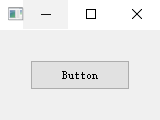
4、设置button的位置
1#include <QApplication>
2#include <QWidget>
3#include <QPushButton>
4int main(int argc, char *argv[])
5{
6    QApplication app(argc, argv);
7
8    QWidget w;
9
10    QPushButton button;   /*按钮是窗口*/
11    button.setText("Button");
12    button.setParent(&w);   //窗口对象的父子关系:设置父窗口是button
13    button.setGeometry(30, 30, 100, 30);   //坐标原点在窗口的左上角[不包括工具栏]
14    //添加信号与槽:当clicked()函数被调用,close()也被调用
15    QObject::connect(&button, SIGNAL(clicked()), &w, SLOT(close()));
16    w.show();
17    w.setWindowTitle("Hello world");
18    w.show();
19    return app.exec();
20}
--