
点击上方“ 杰哥的IT之旅 ”,选择“ 星标 ”公众号
重磅干货,第一时间送达
作者:派森学python
01 俄罗斯方块 Tetris
俄罗斯方块游戏是世界上最流行的游戏之一。是由一名叫Alexey Pajitnov的俄罗斯程序员在1985年制作的,从那时起,这个游戏就风靡了各个游戏平台。
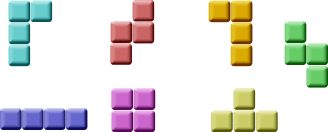
俄罗斯方块归类为下落块迷宫游戏。游戏有7个基本形状:S、Z、T、L、反向L、直线、方块,每个形状都由4个方块组成,方块最终都会落到屏幕底部。所以玩家通过控制形状的左右位置和旋转,让每个形状都以合适的位置落下,如果有一行全部被方块填充,这行就会消失,并且得分。游戏结束的条件是有形状接触到了屏幕顶部。
方块展示:
PyQt5是专门为创建图形界面产生的,里面一些专门为制作游戏而开发的组件,所以PyQt5是能制作小游戏的。
制作电脑游戏也是提高自己编程能力的一种很好的方式。
02 开发
没有图片,所以就自己用绘画画出来几个图形。每个游戏里都有数学模型的,这个也是。
开工之前:
-
用
QtCore.QBasicTimer()QtCore.QBasicTimer()创建一个游戏循环 -
模型是一直下落的
-
模型的运动是以小块为基础单位的,不是按像素
-
从数学意义上来说,模型就是就是一串数字而已
代码由四个类组成:Tetris, Board, Tetrominoe和Shape。Tetris类创建游戏,Board是游戏主要逻辑。Tetrominoe包含了所有的砖块,Shape是所有砖块的代码。
1#!/usr/bin/python3 2# -*- coding: utf-8 -*- 3 4""" 5ZetCode PyQt5 tutorial 6This is a Tetris game clone. 7 8Author: Jan Bodnar 9Website: zetcode.com 10Last edited: August 2017 11""" 12 13from PyQt5.QtWidgets import QMainWindow, QFrame, QDesktopWidget, QApplication 14from PyQt5.QtCore import Qt, QBasicTimer, pyqtSignal 15from PyQt5.QtGui import QPainter, QColor 16import sys, random 17 18class Tetris(QMainWindow): 19 20 def __init__(self): 21 super().__init__() 22 23 self.initUI() 24 25 26 def initUI(self): 27 '''initiates application UI''' 28 29 self.tboard = Board(self) 30 self.setCentralWidget(self.tboard) 31 32 self.statusbar = self.statusBar() 33 self.tboard.msg2Statusbar[str].connect(self.statusbar.showMessage) 34 35 self.tboard.start() 36 37 self.resize(180, 380) 38 self.center() 39 self.setWindowTitle('Tetris') 40 self.show() 41 42 43 def center(self): 44 '''centers the window on the screen''' 45 46 screen = QDesktopWidget().screenGeometry() 47 size = self.geometry() 48 self.move((screen.width()-size.width())/2, 49 (screen.height()-size.height())/2) 50 51 52class Board(QFrame): 53 54 msg2Statusbar = pyqtSignal(str) 55 56 BoardWidth = 10 57 BoardHeight = 22 58 Speed = 300 59 60 def __init__(self, parent): 61 super().__init__(parent) 62 63 self.initBoard() 64 65 66 def initBoard(self): 67 '''initiates board''' 68 69 self.timer = QBasicTimer() 70 self.isWaitingAfterLine = False 71 72 self.curX = 0 73 self.curY = 0 74 self.numLinesRemoved = 0 75 self.board = [] 76 77 self.setFocusPolicy(Qt.StrongFocus) 78 self.isStarted = False 79 self.isPaused = False 80 self.clearBoard() 81 82 83 def shapeAt(self, x, y): 84 '''determines shape at the board position''' 85 86 return self.board[(y * Board.BoardWidth) + x] 87 88 89 def setShapeAt(self, x, y, shape): 90 '''sets a shape at the board''' 91 92 self.board[(y * Board.BoardWidth) + x] = shape 93 94 95 def squareWidth(self): 96 '''returns the width of one square''' 97 98 return self.contentsRect().width() // Board.BoardWidth 99100101 def squareHeight(self):102 '''returns the height of one square'''103104 return self.contentsRect().height() // Board.BoardHeight105106107 def start(self):108 '''starts game'''109110 if self.isPaused:111 return112113 self.isStarted = True114 self.isWaitingAfterLine = False115 self.numLinesRemoved = 0116 self.clearBoard()117118 self.msg2Statusbar.emit(str(self.numLinesRemoved))119120 self.newPiece()121 self.timer.start(Board.Speed, self)122123124 def pause(self):125 '''pauses game'''126127 if not self.isStarted:128 return129130 self.isPaused = not self.isPaused131132 if self.isPaused:133 self.timer.stop()134 self.msg2Statusbar.emit("paused")135136 else:137 self.timer.start(Board.Speed, self)138 self.msg2Statusbar.emit(str(self.numLinesRemoved))139140 self.update()141142143 def paintEvent(self, event):144 '''paints all shapes of the game'''145146 painter = QPainter(self)147 rect = self.contentsRect()148149 boardTop = rect.bottom() - Board.BoardHeight * self.squareHeight()150151 for i in range(Board.BoardHeight):152 for j in range(Board.BoardWidth):153 shape = self.shapeAt(j, Board.BoardHeight - i - 1)154155 if shape != Tetrominoe.NoShape:156 self.drawSquare(painter,157 rect.left() + j * self.squareWidth(),158 boardTop + i * self.squareHeight(), shape)159160 if self.curPiece.shape() != Tetrominoe.NoShape:161162 for i in range(4):163164 x = self.curX + self.curPiece.x(i)165 y = self.curY - self.curPiece.y(i)166 self.drawSquare(painter, rect.left() + x * self.squareWidth(),167 boardTop + (Board.BoardHeight - y - 1) * self.squareHeight(),168 self.curPiece.shape())169170171 def keyPressEvent(self, event):172 '''processes key press events'''173174 if not self.isStarted or self.curPiece.shape() == Tetrominoe.NoShape:175 super(Board, self).keyPressEvent(event)176 return177178 key = event.key()179180 if key == Qt.Key_P:181 self.pause()182 return183184 if self.isPaused:185 return186187 elif key == Qt.Key_Left:188 self.tryMove(self.curPiece, self.curX - 1, self.curY)189190 elif key == Qt.Key_Right:191 self.tryMove(self.curPiece, self.curX + 1, self.curY)192193 elif key == Qt.Key_Down:194 self.tryMove(self.curPiece.rotateRight(), self.curX, self.curY)195196 elif key == Qt.Key_Up:197 self.tryMove(self.curPiece.rotateLeft(), self.curX, self.curY)198199 elif key == Qt.Key_Space:200 self.dropDown()201202 elif key == Qt.Key_D:203 self.oneLineDown()204205 else:206 super(Board, self).keyPressEvent(event)207208209 def timerEvent(self, event):210 '''handles timer event'''211212 if event.timerId() == self.timer.timerId():213214 if self.isWaitingAfterLine:215 self.isWaitingAfterLine = False216 self.newPiece()217 else:218 self.oneLineDown()219220 else:221 super(Board, self).timerEvent(event)222223224 def clearBoard(self):225 '''clears shapes from the board'''226227 for i in range(Board.BoardHeight * Board.BoardWidth):228 self.board.append(Tetrominoe.NoShape)229230231 def dropDown(self):232 '''drops down a shape'''233234 newY = self.curY235236 while newY > 0:237238 if not self.tryMove(self.curPiece, self.curX, newY - 1):239 break240241 newY -= 1242243 self.pieceDropped()244245246 def oneLineDown(self):247 '''goes one line down with a shape'''248249 if not self.tryMove(self.curPiece, self.curX, self.curY - 1):250 self.pieceDropped()251252253 def pieceDropped(self):254 '''after dropping shape, remove full lines and create new shape'''255256 for i in range(4):257258 x = self.curX + self.curPiece.x(i)259 y = self.curY - self.curPiece.y(i)260 self.setShapeAt(x, y, self.curPiece.shape())261262 self.removeFullLines()263264 if not self.isWaitingAfterLine:265 self.newPiece()266267268 def removeFullLines(self):269 '''removes all full lines from the board'''270271 numFullLines = 0272 rowsToRemove = []273274 for i in range(Board.BoardHeight):275276 n = 0277 for j in range(Board.BoardWidth):278 if not self.shapeAt(j, i) == Tetrominoe.NoShape:279 n = n + 1280281 if n == 10:282 rowsToRemove.append(i)283284 rowsToRemove.reverse()285286287 for m in rowsToRemove:288289 for k in range(m, Board.BoardHeight):290 for l in range(Board.BoardWidth):291 self.setShapeAt(l, k, self.shapeAt(l, k + 1))292293 numFullLines = numFullLines + len(rowsToRemove)294295 if numFullLines > 0:296297 self.numLinesRemoved = self.numLinesRemoved + numFullLines298 self.msg2Statusbar.emit(str(self.numLinesRemoved))299300 self.isWaitingAfterLine = True301 self.curPiece.setShape(Tetrominoe.NoShape)302 self.update()303304305 def newPiece(self):306 '''creates a new shape'''307308 self.curPiece = Shape()309 self.curPiece.setRandomShape()310 self.curX = Board.BoardWidth // 2 + 1311 self.curY = Board.BoardHeight - 1 + self.curPiece.minY()312313 if not self.tryMove(self.curPiece, self.curX, self.curY):314315 self.curPiece.setShape(Tetrominoe.NoShape)316 self.timer.stop()317 self.isStarted = False318 self.msg2Statusbar.emit("Game over")319320321322 def tryMove(self, newPiece, newX, newY):323 '''tries to move a shape'''324325 for i in range(4):326327 x = newX + newPiece.x(i)328 y = newY - newPiece.y(i)329330 if x < 0 or x >= Board.BoardWidth or y < 0 or y >= Board.BoardHeight:331 return False332333 if self.shapeAt(x, y) != Tetrominoe.NoShape:334 return False335336 self.curPiece = newPiece337 self.curX = newX338 self.curY = newY339 self.update()340341 return True342343344 def drawSquare(self, painter, x, y, shape):345 '''draws a square of a shape'''346347 colorTable = [0x000000, 0xCC6666, 0x66CC66, 0x6666CC,348 0xCCCC66, 0xCC66CC, 0x66CCCC, 0xDAAA00]349350 color = QColor(colorTable[shape])351 painter.fillRect(x + 1, y + 1, self.squareWidth() - 2,352 self.squareHeight() - 2, color)353354 painter.setPen(color.lighter())355 painter.drawLine(x, y + self.squareHeight() - 1, x, y)356 painter.drawLine(x, y, x + self.squareWidth() - 1, y)357358 painter.setPen(color.darker())359 painter.drawLine(x + 1, y + self.squareHeight() - 1,360 x + self.squareWidth() - 1, y + self.squareHeight() - 1)361 painter.drawLine(x + self.squareWidth() - 1,362 y + self.squareHeight() - 1, x + self.squareWidth() - 1, y + 1)363364365class Tetrominoe(object):366367 NoShape = 0368 ZShape = 1369 SShape = 2370 LineShape = 3371 TShape = 4372 SquareShape = 5373 LShape = 6374 MirroredLShape = 7375376377class Shape(object):378379 coordsTable = (380 ((0, 0), (0, 0), (0, 0), (0, 0)),381 ((0, -1), (0, 0), (-1, 0), (-1, 1)),382 ((0, -1), (0, 0), (1, 0), (1, 1)),383 ((0, -1), (0, 0), (0, 1), (0, 2)),384 ((-1, 0), (0, 0), (1, 0), (0, 1)),385 ((0, 0), (1, 0), (0, 1), (1, 1)),386 ((-1, -1), (0, -1), (0, 0), (0, 1)),387 ((1, -1), (0, -1), (0, 0), (0, 1))388 )389390 def __init__(self):391392 self.coords = [[0,0] for i in range(4)]393 self.pieceShape = Tetrominoe.NoShape394395 self.setShape(Tetrominoe.NoShape)396397398 def shape(self):399 '''returns shape'''400401 return self.pieceShape402403404 def setShape(self, shape):405 '''sets a shape'''406407 table = Shape.coordsTable[shape]408409 for i in range(4):410 for j in range(2):411 self.coords[i][j] = table[i][j]412413 self.pieceShape = shape414415416 def setRandomShape(self):417 '''chooses a random shape'''418419 self.setShape(random.randint(1, 7))420421422 def x(self, index):423 '''returns x coordinate'''424425 return self.coords[index][0]426427428 def y(self, index):429 '''returns y coordinate'''430431 return self.coords[index][1]432433434 def setX(self, index, x):435 '''sets x coordinate'''436437 self.coords[index][0] = x438439440 def setY(self, index, y):441 '''sets y coordinate'''442443 self.coords[index][1] = y444445446 def minX(self):447 '''returns min x value'''448449 m = self.coords[0][0]450 for i in range(4):451 m = min(m, self.coords[i][0])452453 return m454455456 def maxX(self):457 '''returns max x value'''458459 m = self.coords[0][0]460 for i in range(4):461 m = max(m, self.coords[i][0])462463 return m464465466 def minY(self):467 '''returns min y value'''468469 m = self.coords[0][1]470 for i in range(4):471 m = min(m, self.coords[i][1])472473 return m474475476 def maxY(self):477 '''returns max y value'''478479 m = self.coords[0][1]480 for i in range(4):481 m = max(m, self.coords[i][1])482483 return m484485486 def rotateLeft(self):487 '''rotates shape to the left'''488489 if self.pieceShape == Tetrominoe.SquareShape:490 return self491492 result = Shape()493 result.pieceShape = self.pieceShape494495 for i in range(4):496497 result.setX(i, self.y(i))498 result.setY(i, -self.x(i))499500 return result501502503 def rotateRight(self):504 '''rotates shape to the right'''505506 if self.pieceShape == Tetrominoe.SquareShape:507 return self508509 result = Shape()510 result.pieceShape = self.pieceShape511512 for i in range(4):513514 result.setX(i, -self.y(i))515 result.setY(i, self.x(i))516517 return result518519520if __name__ == '__main__':521522 app = QApplication([])523 tetris = Tetris()524 sys.exit(app.exec_())
(代码可以左右滑动)
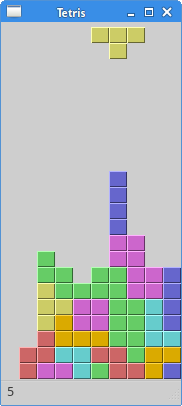
游戏很简单,所以也就很好理解。程序加载之后游戏也就直接开始了,可以用P键暂停游戏,空格键让方块直接落到最下面。游戏的速度是固定的,并没有实现加速的功能。分数就是游戏中消除的行数。
self.tboard = Board(self)self.setCentralWidget(self.tboard)
创建了一个Board类的实例,并设置为应用的中心组件。
self.statusbar = self.statusBar()self.tboard.msg2Statusbar[str].connect(self.statusbar.showMessage)
创建一个statusbar来显示三种信息:消除的行数,游戏暂停状态或者游戏结束状态。msg2Statusbar是一个自定义的信号,用在(和)Board类(交互),showMessage()方法是一个内建的,用来在statusbar上显示信息的方法。
self.tboard.start()
初始化游戏:
class Board(QFrame): msg2Statusbar = pyqtSignal(str)...
创建了一个自定义信号msg2Statusbar,当我们想往statusbar里显示信息的时候,发出这个信号就行了。
BoardWidth = 10BoardHeight = 22Speed = 300
这些是Board类的变量。BoardWidth和BoardHeight分别是board的宽度和高度。Speed是游戏的速度,每300ms出现一个新的方块。
...self.curX = 0self.curY = 0self.numLinesRemoved = 0self.board = []...
在initBoard()里初始化了一些重要的变量。self.board定义了方块的形状和位置,取值范围是0-7。
def shapeAt(self, x, y): return self.board[(y * Board.BoardWidth) + x]
shapeAt()决定了board里方块的的种类。
def squareWidth(self): return self.contentsRect().width() // Board.BoardWidth
board的大小可以动态的改变。所以方格的大小也应该随之变化。squareWidth()计算并返回每个块应该占用多少像素--也即Board.BoardWidth。
def pause(self): '''pauses game''' if not self.isStarted: return self.isPaused = not self.isPaused if self.isPaused: self.timer.stop() self.msg2Statusbar.emit("paused") else: self.timer.start(Board.Speed, self) self.msg2Statusbar.emit(str(self.numLinesRemoved)) self.update()
pause()方法用来暂停游戏,停止计时并在statusbar上显示一条信息。
def paintEvent(self, event): '''paints all shapes of the game''' painter = QPainter(self) rect = self.contentsRect()...
渲染是在paintEvent()方法里发生的QPainter负责PyQt5里所有低级绘画操作。
for i in range(Board.BoardHeight): for j in range(Board.BoardWidth): shape = self.shapeAt(j, Board.BoardHeight - i - 1) if shape != Tetrominoe.NoShape: self.drawSquare(painter, rect.left() + j * self.squareWidth(), boardTop + i * self.squareHeight(), shape)
渲染游戏分为两步。第一步是先画出所有已经落在最下面的的图,这些保存在self.board里。可以使用shapeAt()查看这个这个变量。
if self.curPiece.shape() != Tetrominoe.NoShape: for i in range(4): x = self.curX + self.curPiece.x(i) y = self.curY - self.curPiece.y(i) self.drawSquare(painter, rect.left() + x * self.squareWidth(), boardTop + (Board.BoardHeight - y - 1) * self.squareHeight(), self.curPiece.shape())
第二步是画出更在下落的方块。
elif key == Qt.Key_Right: self.tryMove(self.curPiece, self.curX + 1, self.curY)
在keyPressEvent()方法获得用户按下的按键。如果按下的是右方向键,就尝试把方块向右移动,说尝试是因为有可能到边界不能移动了。
elif key == Qt.Key_Up: self.tryMove(self.curPiece.rotateLeft(), self.curX, self.curY)
上方向键是把方块向左旋转一下
elif key == Qt.Key_Space: self.dropDown()
空格键会直接把方块放到底部
elif key == Qt.Key_D: self.oneLineDown()
D键是加速一次下落速度。
def tryMove(self, newPiece, newX, newY): for i in range(4): x = newX + newPiece.x(i) y = newY - newPiece.y(i) if x < 0 or x >= Board.BoardWidth or y < 0 or y >= Board.BoardHeight: return False if self.shapeAt(x, y) != Tetrominoe.NoShape: return False self.curPiece = newPiece self.curX = newX self.curY = newY self.update() return True
tryMove()是尝试移动方块的方法。如果方块已经到达board的边缘或者遇到了其他方块,就返回False。否则就把方块下落到想要
def timerEvent(self, event): if event.timerId() == self.timer.timerId(): if self.isWaitingAfterLine: self.isWaitingAfterLine = False self.newPiece() else: self.oneLineDown() else: super(Board, self).timerEvent(event)
在计时器事件里,要么是等一个方块下落完之后创建一个新的方块,要么是让一个方块直接落到底(move a falling piece one line down)。
def clearBoard(self): for i in range(Board.BoardHeight * Board.BoardWidth): self.board.append(Tetrominoe.NoShape)
clearBoard()方法通过Tetrominoe.NoShape清空broad。
def removeFullLines(self): numFullLines = 0 rowsToRemove = [] for i in range(Board.BoardHeight): n = 0 for j in range(Board.BoardWidth): if not self.shapeAt(j, i) == Tetrominoe.NoShape: n = n + 1 if n == 10: rowsToRemove.append(i) rowsToRemove.reverse() for m in rowsToRemove: for k in range(m, Board.BoardHeight): for l in range(Board.BoardWidth): self.setShapeAt(l, k, self.shapeAt(l, k + 1)) numFullLines = numFullLines + len(rowsToRemove)...
如果方块碰到了底部,就调用removeFullLines()方法,找到所有能消除的行消除它们。消除的具体动作就是把符合条件的行消除掉之后,再把它上面的行下降一行。注意移除满行的动作是倒着来的,因为我们是按照重力来表现游戏的,如果不这样就有可能出现有些方块浮在空中的现象。
def newPiece(self): self.curPiece = Shape() self.curPiece.setRandomShape() self.curX = Board.BoardWidth // 2 + 1 self.curY = Board.BoardHeight - 1 + self.curPiece.minY() if not self.tryMove(self.curPiece, self.curX, self.curY): self.curPiece.setShape(Tetrominoe.NoShape) self.timer.stop() self.isStarted = False self.msg2Statusbar.emit("Game over")
newPiece()方法是用来创建形状随机的方块。如果随机的方块不能正确的出现在预设的位置,游戏结束。
class Tetrominoe(object): NoShape = 0 ZShape = 1 SShape = 2 LineShape = 3 TShape = 4 SquareShape = 5 LShape = 6 MirroredLShape = 7
Tetrominoe类保存了所有方块的形状。我们还定义了一个NoShape的空形状。
Shape类保存类方块内部的信息。
class Shape(object): coordsTable = ( ((0, 0), (0, 0), (0, 0), (0, 0)), ((0, -1), (0, 0), (-1, 0), (-1, 1)), ... )...
coordsTable元组保存了所有的方块形状的组成。是一个构成方块的坐标模版。
self.coords = [[0,0] for i in range(4)]
上面创建了一个新的空坐标数组,这个数组将用来保存方块的坐标。
坐标系示意图:
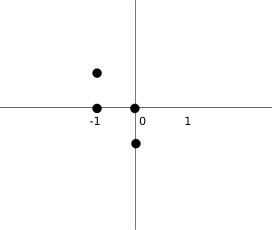
上面的图片可以帮助我们更好的理解坐标值的意义。比如元组(0, -1), (0, 0), (-1, 0), (-1, -1)代表了一个Z形状的方块。这个图表就描绘了这个形状。
def rotateLeft(self): if self.pieceShape == Tetrominoe.SquareShape: return self result = Shape() result.pieceShape = self.pieceShape for i in range(4): result.setX(i, self.y(i)) result.setY(i, -self.x(i)) return result
rotateLeft()方法向右旋转一个方块。正方形的方块就没必要旋转,就直接返回了。其他的是返回一个新的,能表示这个形状旋转了的坐标。
程序展示:
回复下方 「关键词」,获取优质资源
回复关键词 「CDN」,即可获取 89 页 CDN 排坑指南手册
回复关键词 「ECS」,即可获取 96 页 ECS 运维 Linux 系统诊断手册
回复关键词 「linux」,即可获取 185 页 Linux 工具快速教程手册
回复关键词 「Python进阶」,即可获取 106 页 Python 进阶文档 PDF
回复关键词 「Python自动化」,即可获取 97 页自动化文档 PDF
回复关键词 「Excel数据透视表」,即可获取 136 页 Excel数据透视表 PDF
回复关键词 「Python最强基础学习文档」,即可获取 68 页 Python 最强基础学习文档 PDF
回复关键词 「wx」,即可加入杰哥的IT之旅读者交流群
1 **\- End -**
2
3
4
5
6
7
8
9
10
11
12
13
14
15
16
17
18
19
20
21
22
23
24
25
26
27
28
29
30
31 本公众号全部博文已整理成一个目录,请在公众号后台回复「
32
33
34 `m`
35
36
37 」获取!
38
39
40
41
42
43
44
45
46
47
48
49
50
51
52
53
54
55
56
57
58
59
60
61
62
63
64
65
66**推荐阅读:**
67
68
69
70
71
72
73
74
75
76
77
78
79
80
81
82
83
84
85
86
87
88
89
90
91
92
93
94
95
96
97
98
99
100
101
102
103
104
105
106
107
108
109
110
111
112
113
114
115
116
117
118
119
120
121
122
123
124
125
126
127
128
129
130
131
132
133
134
135
136
137
138
139
140
141
142
143
144
145
146
147
148
149                        1、
150                       [这样理解 HTTP,面试再也不用慌了~](https://www.oschina.net/action/GoToLink?url=https%3A%2F%2Fmp.weixin.qq.com%2Fs%3F__biz%3DMzAwMjg1NjY3Nw%3D%3D%26mid%3D2247496973%26idx%3D1%26sn%3D78e6d173e44a2efeabceddbcca38b5d8%26scene%3D21%23wechat_redirect)
151
2、 20大数据可视化工具测评,一定有你不知道的「宝藏」工具!
3、 阿里云网盘,内测资格,开放申请了!非会员下载 10MB/s!有图有真相!
6、 GitHub 标星 1.4k,斯坦福校友出品的这本 Git 魔法书火了!
1  2 3 4 5 6 7 8 9 10 11 12 13 14 15 16 17 18 19 20 21 22 23 24 25 26 27 28 29 30 31 32 33 34 35 36 37 38 39 40 41 点个[在看],是对杰哥最大的支持! 42 43 44 45 46 47 48 49 50 51 52 53 54 55 56 57 58 59 60 61 62 63 64 65 66 67 68 69 70 71 72 73 74 75 76 77 78 79 80 81 82 83 84 85 86 87 88 89 90 91 92 93 94 95 96 97 98 99 100 101 102 103 104 105 106 107 108 109 110 111 112 113 114 115 116 117 118 119 120 121 122 123 124 125 126 127 128 129 130
本文分享自微信公众号 - 杰哥的IT之旅(Jake_Internet)。
如有侵权,请联系 support@oschina.cn 删除。
本文参与“OSC源创计划”,欢迎正在阅读的你也加入,一起分享。