
1import datetime
2import time
3
4print(time.strftime('%y/%m/%d %X'))
5  输出结果:18/06/05 20:40:46
6
7
8print(time.strftime('%Y/%m/%d %X'))
9   输出结果:2018/06/05 20:43:20
10
11注意:区分大小写带来结果的不同
12
13print(time.localtime())
14
15输出结果:
16time.struct_time(tm_year=2018, tm_mon=6, tm_mday=5, tm_hour=20, tm_min=46, tm_sec=9, tm_wday=1, tm_yday=156, tm_isdst=0)注意输出结果是一个元组,所以我们可以通过索引取我们需要的特定值
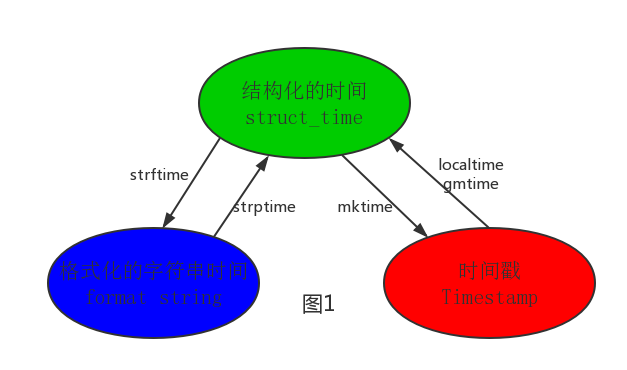
注意:计算机认识的时间只能是'时间戳'格式
1import datetime
2
3# print(datetime.datetime.now()) #返回 2016-08-19 12:47:03.941925
4#print(datetime.date.fromtimestamp(time.time()) )  # 时间戳直接转成日期格式 2016-08-19
5# print(datetime.datetime.now() )
6# print(datetime.datetime.now() + datetime.timedelta(3)) #当前时间+3天
7# print(datetime.datetime.now() + datetime.timedelta(-3)) #当前时间-3天
8# print(datetime.datetime.now() + datetime.timedelta(hours=3)) #当前时间+3小时
9# print(datetime.datetime.now() + datetime.timedelta(minutes=30)) #当前时间+30分
10
11
12#
13# c_time  = datetime.datetime.now()
14# print(c_time.replace(minute=3,hour=2)) #时间替换输出结果:
2018-06-05 21:30:59.150399
2018-06-05 02:03:59.150399