
C语言基础学习PYTHON——基础学习D02
20180801内容纲要:
1 字符串的系列操作
2 集合
3 文件的读写
4 字符编码转换
5 小结
6 练习:三级菜单(有彩蛋)
1 字符串的系列操作
特性:不可修改。('str' object does not support item assignment)
支持运算:切片、索引、min()、max()、len()等
关于字符串的操作:


1#关于字符串的一些操作
2'''
3name = "zhang\tkanghui"
4
5print(name.capitalize())                       #capitalize首字母大写
6print(name.count("a"))                        #count计数
7print(name.center(50,"-"))                    #center(50,“-”)表示总共50个字符,输出占中间位置
8print(name.encode())
9print(name.endswith("ui"))                    #判断是不是以ui结尾
10print(name.expandtabs(tabsize=30))            #将tab在输出时转成相应数量的空格
11print(name.find("kang"))                     #找到字符开头的索引
12'''
13
14name ="my name is {name} and i am {year} old"
15print(name.format(name='zhangkanghui',year=23))                     #格式化输出
16print(name.format_map(  {'name':'zhangkagnhui','year':23}  ))     #以字典形式格式化输出
17print(name.isdigit())                                               #判断是否为数字
18print(name.isalnum())                                               #判段是否为阿拉伯
19print('abc12/'.isalnum())
20print(name.isalpha())                                               #判断是否为纯英语字母
21print('Aa'.isalpha())
22print(name.isdecimal())                                             #判断是否为十进制
23print(name.isidentifier())                                          #判断是否为合法标识符
24print(' ab'.isidentifier())
25print(name.islower())
26print(name.isnumeric())
27print('1.2'.isnumeric())                                            #判断是否为纯数字,小数点也不行
28print(name.isspace())                                               #判断是否为空格
29print(name.istitle())                                               #判断是否为标题,即每个都是首字母大写开头
30print(name.isprintable())                                           #判断是否可打印,tty file,drive file
31print(name.isupper())                                               #判断是否全部为大写
32print('+'.join(['1','2','3']))
33print(name.ljust(50,'*'))                                           #总长为50,左侧开始
34print(name.rjust(50,'-'))                                           #总长为50,右侧开始
35print(name.lower())                                                 #把大写变成小写
36print(name.upper())                                                 #把小写变成大写
37print(name.lstrip())
38print(name.strip())                                                 #去掉两头的空格和回车
39print(name.rstrip())
40p =str.maketrans('abc','123')
41print("alex li".translate(p))
42print("alex li".replace('l','L',1))
43print("alex li".rfind('l'))                                         #查找右侧的
44print("alex li".split())                                            #把字符串以空格分离,以列表输出
45print("alex li".split('l'))                                         #把字符串以l分
46print("1+\n2+3".splitlines())                                       #去除换行符
47print("alex Li".swapcase())                                         #小写换大写,大写换小写
48print("alex li".title())                                            #变成标题,即每个首字母大写
49print(name.zfill(50))
View Code
2 集合(set)
集合是一个无序、不可重复的数据组合。(字符和元组属于不可变序列,而列表支持插入、删除和替换元素;所有的序列都支持迭代;字典dict是无序的,且key必须是唯一的)
用途:
(1)去重:把一个列表变成一个集合。


1list_1 = [1,2,4,5,6,2,1,]
2list_1 =set(list_1)
3print(list_1,type(list_1))          #集合无序、不重复
View Code
(2)关系测试:交集、并集、差集、子集、父集、对称差集
运算符:
&交集
|并集
-差集 例:t-a 在t中不在a中
^对称差集(除去交集对称的部分)
<=子集 例:a<=t测试是否a中的每一个元素都在t中
>=父集


1list_2 =set([0,66,222,4,6])
2print(list_1,list_2)
3#交集intersection
4print(list_1.intersection(list_2))
5#并集union
6print(list_1.union(list_2))
7#差集differeence    in list_1 but not in list_2
8print(list_1.difference(list_2))
9print(list_2.difference(list_1))
10#子集issubset
11print(list_1.issubset(list_2))
12#父集isupperset
13print(list_1.issubset(list_2))
14#对称差集
15print(list_1.symmetric_difference(list_2))
16
17list_3 =set([1,2,3])
18list_4 =set([4,5,6])
19print(list_3.isdisjoint(list_4))    #没有交集返回True
View Code
集合的基本操作:


1#基本操作
2list_3.add(999)
3print(list_3)
4list_3.update([777,888,999])
5print(list_3)
6print(list_3.pop())
7print(list_3.pop())
8print(list_3.pop())
9print(list_3.pop())
View Code
还有一些不常用的,比如:
.remove Remove and return an arbitrary set element.
.discard Remove an element from a set if it is a menber. If the element is not a menber, do nothing.
3 文件(file)
现有如下文件(热爱生命——汪国真):


1 1 我不去想是否能够成功
2 2 既然选择了远方
3 3 便只顾风雨兼程
4 4 我不去想能否赢得爱情 既然钟情于玫瑰
5 5 就勇敢地吐露真诚
6 6 我不去想身后会不会袭来寒风冷雨
7 7 既然目标是地平线
8 8 留给世界的只能是背影
9 9 我不去想未来是平坦还是泥泞
1010 只要热爱生命 一切,都在意料之中
View Code
(1)文件的打开模式
- r,只读模式(默认)
- w,只写模式。【不可读;不存在则创建;存在则删除内容;】
- a,追加模式。【可读; 不存在则创建;存在则只追加内容;】


1 1 '''
2 2 data =open("yesterday",encoding="utf-8").read()
3 3 #1encoding:windows默认GBK
4 4 #2'r'只能读;'w'只能写,且是创建一个新的文件,如果文件名已存在,则会覆盖;'a'只能写,append追加补充不会覆盖源文件
5 5 print(data)
6 6 '''
7 7 #f =open("yesterday",'r',encoding="utf-8")
8 8 #f =open("yesterday",'w',encoding="utf-8")
9 9 #f =open("yesterday",'a',encoding="utf-8")
1010 '''
1111 f =open("yesterday",encoding="utf-8")  #赋给f一个内存对象,又叫文件件句柄
1212 data =f.read()
1313 print(data)
1414 '''
View Code
- r+,可读写文件。【可读;可写;可追加】
- w+,写读


1 1 #读写'r+'读和追加,能读能写,但是写只能在尾部追加无论读取光标的位置在哪
2 2 f =open("yesterday2",'r+',encoding="utf-8")
3 3 print(f.readline())
4 4 print(f.readline())
5 5 print(f.readline())
6 6 print(f.tell())
7 7 f.write("-------NB--------")
8 8
9 9 #写读'w+'能写能读,创建新文件写,读仍然是在为不追加,无论读取光标位置
1010 f =open("yesterday2",'w+',encoding="utf-8")
1111 f.write("-------NB--------\n")
1212 f.write("-------NB--------\n")
1313 f.write("-------NB--------\n")
1414 print(f.tell())
1515 f.seek(10)
1616 print(f.readline())
1717 f.write("should be at the begining of the second line")
1818 f.close()
1919 '''
2020 #追加读写'a+'
View Code
"U"表示在读取时,可以将 \r \n \r\n自动转换成 \n (与 r 或 r+ 模式同使用)
- rU
- r+U
"b"表示处理二进制文件
- rb
- wb
- ab
二进制文件的读取:


11 #Author:ZhangKanghui
22
33 '''
44 #'rb'二进制。视频以二进制读取。
55 f =open("yesterday2",'rb')
66 print(f.readline())
77 '''
88 f =open("yesterday2",'wb')
99 f.write("Hello world\n".encode())     #二进制便把文件str转换成byte用encode()
View Code
等等,还有~with语句
为了避免打开文件后忘记关闭,可以通过管理上下文,即:
1with open('log','r') as f:
2....
如此方式,当with代码块执行完毕时,内部会自动关闭并释放文件资源。
(2)文件的读取
读取前五行:


1 1 #读取前五行
2 2 '''
3 3 f =open("yesterday",encoding="utf-8")
4 4
5 5 for i in range(5):
6 6     print(f.readline())
7 7
8 8 print(f.readline())
9 9 print(f.readline())
1010 print(f.readline())
1111 print(f.readline())
1212 print(f.readline())
View Code
不读取第十行:


1 1 #不读取第十行
2 2 #f =open("yesterday",encoding="utf-8")
3 3 #low bige loop
4 4 '''
5 5 #print(f.readlines())                       #把文件读取成一个列表,但这种方法只适合小文件读取
6 6 #for line in f.readlines():
7 7 for index,line in enumerate(f.readlines()):
8 8     if index == 9:
9 9         print("-----我是分割线-----")
1010         continue
1111     print(line.strip())                             #若不换行,    .strip去除换行符
1212 '''
1313 #high bige loop
1414 '''
1515 count = 0
1616 for line in f:
1717     if count ==9:
1818         print("------我是分割线-------")
1919         count += 1
2020         continue
2121     print(line)                                 #这种文件的读取方式效率最高,一行一行的读,内存对象一直都只有一行
2222     count +=1
View Code
重新读取文件:
f.read()读取文件时,从头到尾。再次读取文件时需要先将读取位置光标调到开头。
f.tell() 文件读取位置,打印当前读取光标位置
f.seek() 寻找当前读取光标位置


1 1 #重新读取文件
2 2 print(f.tell())             #文件读取光标位置
3 3 #print(f.read(50))
4 4 #print(f.tell())
5 5 print(f.readline())
6 6 print(f.readline())
7 7 print(f.readline())
8 8 print(f.tell())
9 9 f.seek(0)                   #文件读取光标移到0,经常与.tell联合使用,以便再次读取文件
1010
1111 print(f.encoding)              #数据编码
View Code
(3)文件的操作
a 截取
11 #截取truncate
22 f =open("yesterday",'a',encoding="utf-8")
33 f.truncate(10)                                  #无论读取光标在哪都是从头开始截取
b 修改


1 1 #Author:ZhangKanghui
2 2
3 3 f =open("热爱生命",'r',encoding="utf-8")
4 4 f_new =open("热爱生命.bak",'w',encoding="utf-8")
5 5
6 6 for line in f:
7 7     if "我不去想能否赢得爱情" in line:
8 8         line =line.replace("我","你")
9 9     f_new.write(line)
1010 f.close()
1111 f_new.close()
View Code
(4)文件关闭
f.close()
4 字符编码的转换
核心:Unicode,默认中英文都是2个字节16位
Utf-8可变长的字符编码,所有英文字符按ASCII码1个字节8位,中文3个字节。中国有钱~
详细文章:
http://www.cnblogs.com/yuanchenqi/articles/5956943.html
http://www.diveintopython3.net/strings.html
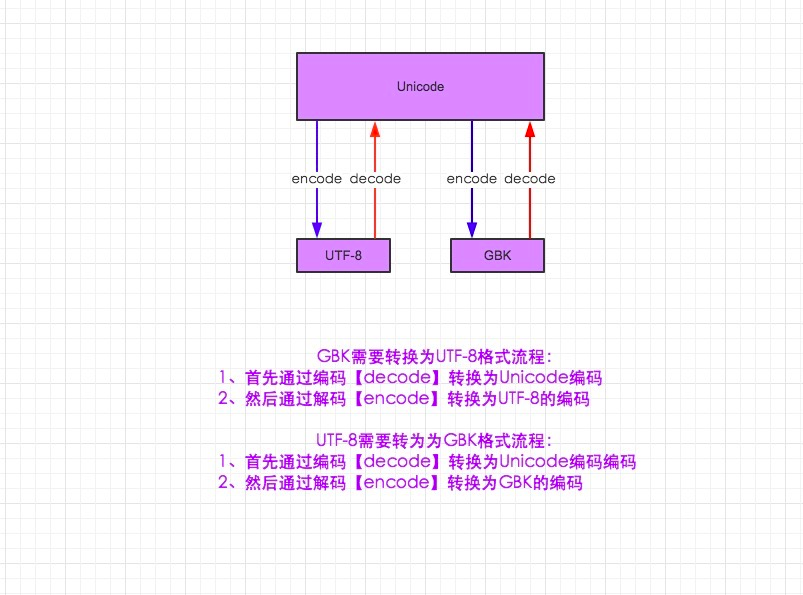
再来说说Python3中字符编码
1 python3默认文件编码是utf-8
2 声明变量默认编码是unicode
3 str和bytes做了明确的区分。bytes就是2进制流,因为python对数据进行操作做了一层封装,否则让你直接看到一堆2进制,你能看出哪个字符对应哪段2进制么?
5 小结
字符编码的理解很关键~
发现插入代码折叠功能~
编程真的是和很难!
6 练习
多级菜单
要求:
- 三级菜单
- 可依次进入各子菜单
- 所需知识点:列表、字典
两种答案:


1 1 #Author:ZhangKanghui
2 2
3 3 data ={
4 4     '北京':{
5 5         "朝阳":{
6 6             "望京":["奔驰","陌陌"],
7 7             "国贸":["CICC","HP"],
8 8             "东直门":["Advent","飞信"],
9 9         },
1010         "昌平":{
1111             "沙河":["old boy","test"],
1212             "天通苑":["链家地产","我爱我家"],
1313         },
1414         "海淀": {},
1515     },
1616     '山东':{
1717         "德州":{},
1818         "青岛":{},
1919         "济南":{},
2020     },
2121     '广东':{
2222         "常熟":{},
2323         "东莞":{},
2424         "惠州":{},
2525     },
2626 }
2727
2828 '''
2929 while True:
3030     for i1 in data:
3131         print(i1)
3232     choice =input("选择进入1>>:")
3333     if choice in data:
3434         while True:
3535             for i2 in data[choice]:
3636                 print("\t\t",i2)
3737             choice2 =input("选择进入2>>:")
3838             if choice2 in data[choice]:
3939                 while True:
4040                     for i3 in data[choice][choice2]:
4141                         print("\t\t\t\t",i3)
4242                     choice3 =input("选择进入3>>:")
4343                     if choice3 in data[choice][choice2]:
4444                         for i4 in data[choice][choice2][choice3]:
4545                              print("\t\t\t\t\t\t",i4)
4646                         choice4 =input("最后一层,按b返回>>:")
4747                         if choice4 =='b':
4848                              pass
4949                     if choice3 == 'b':
5050                         break
5151             if choice2 == 'b':
5252                 break
5353 '''
5454 #为了实现在每一级都能退出  将True换掉
5555 exit_tag = False
5656
5757 while not exit_tag:
5858     for i1 in data:
5959         print(i1)
6060     choice =input("选择进入1>>:")
6161     if choice in data:
6262         while not exit_tag:
6363             for i2 in data[choice]:
6464                 print("\t\t",i2)
6565             choice2 =input("选择进入2>>:")
6666             if choice2 in data[choice]:
6767                 while not exit_tag:
6868                     for i3 in data[choice][choice2]:
6969                         print("\t\t\t\t",i3)
7070                     choice3 =input("选择进入3>>:")
7171                     if choice3 in data[choice][choice2]:
7272                         for i4 in data[choice][choice2][choice3]:
7373                              print("\t\t\t\t\t\t",i4)
7474                         choice4 =input("最后一层,按b返回>>:")
7575                         if choice4 =='b':
7676                              pass
7777                         elif choice4 =='q':
7878                             exit_tag =True
7979                     if choice3 == 'b':
8080                         break
8181                     elif choice3 == 'q':
8282                         exit_tag = True
8383             if choice2 == 'b':
8484                 break
8585             elif choice2 == 'q':
8686                 exit_tag = True
View Code


1 1 #Author:ZhangKanghui
2 2
3 3 data ={
4 4     '北京':{
5 5         "朝阳":{
6 6             "望京":["奔驰","陌陌"],
7 7             "国贸":["CICC","HP"],
8 8             "东直门":["Advent","飞信"],
9 9         },
1010         "昌平":{
1111             "沙河":["old boy","test"],
1212             "天通苑":["链家地产","我爱我家"],
1313         },
1414         "海淀": {},
1515     },
1616     '山东':{
1717         "德州":{},
1818         "青岛":{},
1919         "济南":{},
2020     },
2121     '广东':{
2222         "常熟":{},
2323         "东莞":{},
2424         "惠州":{},
2525     },
2626 }
2727
2828 while True:
2929     for i1 in data:
3030         print(i1)
3131     choice =input("选择进入1>>:")
3232     if choice in data:
3333         while True:
3434             for i2 in data[choice]:
3535                 print("\t\t",i2)
3636             choice2 =input("选择进入2>>:")
3737             if choice2 == 'b':
3838                 break
3939             if choice2 in data[choice]:
4040                 while True:
4141                     for i3 in data[choice][choice2]:
4242                         print("\t\t\t\t",i3)
4343                     choice3 =input("选择进入3>>:")
4444                     if choice3 == 'b':
4545                         break
4646                     if i3 in data[choice][choice2]:
4747                         while True:
4848                             for i4 in data[choice][choice2][choice3]:
4949                                 print("\t\t\t\t\t\t",i4)
5050                             choice4 =input("最后一层,按b返回>>:")
5151                             if choice4 =='b':
5252                                 break
View Code
这是尾巴:
最后推荐一个链接:我要自学网,不让打广告只能植入图片了。点击进入学习可以给我加V币。

内容丰富免费
这是随笔~