
使用H2的优点,不需要装有服务端和客户端,在项目中包含一个jar即可,加上初始化的SQL就可以使用数据库了
在springboot中引入,我的版本是2.1.4,里面就包含有h2的版本控制
1<!-- 集成h2数据库 -->
2        <dependency>
3           <groupId>com.h2database</groupId>
4           <artifactId>h2</artifactId>
5           <scope>runtime</scope>
6        </dependency>
在pom文件中,一般我都包含了下面一段
1<build>
2        <plugins>
3            <plugin>
4                <groupId>org.springframework.boot</groupId>
5                <artifactId>spring-boot-maven-plugin</artifactId>
6                <configuration>
7                    <fork>true</fork>
8                </configuration>
9            </plugin>
10        </plugins>
11
12        <resources>
13            <resource>
14                <directory>src/main/resources</directory>
15                <includes>
16                    <include>**/**</include>
17                </includes>
18                <filtering>false</filtering>
19            </resource>
20            <resource>
21                <directory>src/main/java</directory>
22                <includes>
23                    <include>**/*.properties</include>
24                    <include>**/*.xml</include>
25                    <include>**/*.tld</include>
26                </includes>
27                <filtering>false</filtering>
28            </resource>
29        </resources>
30    </build>
截图:
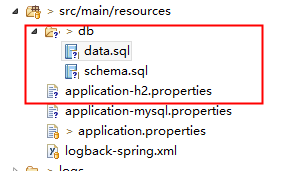
h2数据库的配置:application-h2.properties
1#spring.datasource.url = jdbc:h2:file:~/.h2/testdb
2spring.datasource.url=jdbc:h2:mem:activiti;DB_CLOSE_DELAY=1000
3spring.datasource.driverClassName=org.h2.Driver
4spring.datasource.username=sa
5spring.datasource.password=
6spring.datasource.schema=classpath:db/schema.sql
7spring.datasource.data=classpath:db/data.sql
db/data.sql内容:
insert into mytest(name) values('TheoryDance');
schema.sql内容:
create table mytest(id int primary key auto_increment, name varchar(20) not null);
在测试类中添加一个测试方法
1package com.grand.mysql_handler;
2
3import java.util.List;
4import java.util.Map;
5
6import javax.annotation.Resource;
7
8import org.junit.Test;
9import org.junit.runner.RunWith;
10import org.springframework.boot.test.context.SpringBootTest;
11import org.springframework.test.context.junit4.SpringRunner;
12
13import com.grand.mysql_handler.mapper.SystemMapper;
14
15@SpringBootTest
16@RunWith(SpringRunner.class)
17public class MyRestTest2 {
18
19    @Resource
20    private SystemMapper systemMapper;
21
22    @Test
23    public void testH2() {
24        List<Map<String,Object>> list = systemMapper.selectBySql("select * from mytest");
25        System.out.println(list);
26    }
27
28}
其中SysMapper.java内容如下(使用的Mybatis连接数据库):
1package com.grand.mysql_handler.mapper;
2
3import java.util.List;
4import java.util.Map;
5
6import org.apache.ibatis.annotations.Delete;
7import org.apache.ibatis.annotations.Insert;
8import org.apache.ibatis.annotations.Mapper;
9import org.apache.ibatis.annotations.Param;
10import org.apache.ibatis.annotations.Select;
11import org.apache.ibatis.annotations.Update;
12
13@Mapper
14public interface SystemMapper {
15
16    @Insert("${sql}")
17    int insertBySql(@Param("sql")String sql);
18    @Delete("${sql}")
19    int deleteBySql(@Param("sql")String sql);
20    @Update("${sql}")
21    int updateBySql(@Param("sql")String sql);
22    @Select("${sql}")
23    List<Map<String,Object>> selectBySql(@Param("sql")String sql);
24    @Select("${sql}")
25    Map<String,Object> selectOneBySql(@Param("sql")String sql);
26
27}
测试结果:
