
通过console可以实现类似远程桌面的功能,但它的实现方式和远程桌面不同,一般来说远程桌面必须要有网络支持,在机器关闭或者启动过程中无法连接。而console是通过esx的虚拟化组件实现远程桌面。在其sample代码中有一个用html+js编写ActiveX插件的示例。
下方是一个用winform写的console远程截图。
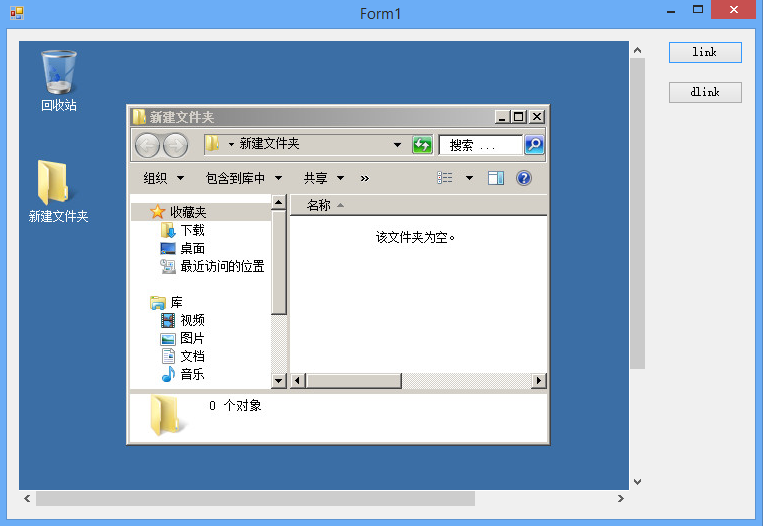
在vmware的developer center中https://developercenter.vmware.com/sdks,下载vmrc sdk,它会以com组件的形式安装,你可以在vs工具箱中找到。
下面上一段sample代码

11 using System;
2 2 using System.Linq;
3 3 using System.Windows.Forms;
4 4
5 5 using Vim25Api;
6 6 using AppUtil;
7 7
8 8 namespace WindowsFormsApplication1
9 9 {
1010     public partial class Form1 : Form
1111     {
1212         public AppUtil.AppUtil util = null;
1313
1414         public Form1()
1515         {
1616             InitializeComponent();
1717         }
1818
1919         private void button1_Click(object sender, EventArgs e)
2020         {
2121             String[] arguments = new string[] {
2222                 "--url", "https://192.168.0.161/sdk",
2323                 "--username","root",
2424                 "--password","P@ssw0rd",
2525                 "--disablesso", "true",
2626                 "--ignorecert", "true"};
2727             try
2828             {
2929                 this.axVMwareEmbeddedRemoteConsole1.startup(2, VMwareRemoteConsoleTypeLib.VMRC_MessageMode.VMRC_DIALOG_MESSAGES, null);
3030
3131                 util = AppUtil.AppUtil.initialize("Connect", constructOptions(), arguments.ToArray());
3232                 util.connect();
3333
3434                 ManagedObjectReference mor = util.getConnection().ServiceRef;
3535                 ManagedObjectReference sessionMor = util._connection.Service.RetrieveServiceContent(mor).sessionManager;
3636                 string ticket = util._connection.Service.AcquireCloneTicket(sessionMor);
3737                 ManagedObjectReference vmMor = util.getServiceUtil().GetDecendentMoRef(null, "VirtualMachine", "test");
3838
3939                 axVMwareEmbeddedRemoteConsole1.connect("192.168.0.161", null, true, ticket, null, null, vmMor.Value, null, null);
4040             }
4141             catch(Exception ex)
4242             {
4343                 MessageBox.Show(ex.ToString());
4444
4545                 this.axVMwareEmbeddedRemoteConsole1.disconnect();
4646                 util.disConnect();
4747             }
4848         }
4949         private static OptionSpec[] constructOptions()
5050         {
5151             OptionSpec[] useroptions = new OptionSpec[5];
5252             useroptions[0] = new OptionSpec("url", "String", 1, "ser url", null);
5353             useroptions[1] = new OptionSpec("username", "String", 1, "user name", null);
5454             useroptions[2] = new OptionSpec("password", "String", 1, "password", null);
5555             useroptions[3] = new OptionSpec("disablesso", "bool", 0, "disablesso", null);
5656             useroptions[4] = new OptionSpec("ignorecert", "bool", 1, "ignorecert", null);
5757             return useroptions;
5858         }
5959
6060         private void button2_Click(object sender, EventArgs e)
6161         {
6262             axVMwareEmbeddedRemoteConsole1.disconnect();
6363             util.disConnect();
6464         }
6565     }
6666 }

在建立connect连接时,有几个重要的参数
url为https://主机ip/sdk,登录帐号也是主机esx的帐号。
disablesso表示禁用sso单点登录验证,这个要加上,因为在我们远程登录验证不会使用sso。
ignorecert这个参数也要加上,不然会证书验证导致The underlying connection was closed: Could not establish trust relationship for the SSL/TLS secure channel.
这些参数如何运作可以到vsphere sdk中的apputil项目下找到。