
平衡二叉搜索树
平衡二叉搜索树(Balanced Binary Search Tree)的每个节点的左右子树高度差不超过 1,它可以在 O(logn) 时间复杂度内完成插入、查找和删除操作,最早被提出的自平衡二叉搜索树是 AVL 树。
AVL 树在执行插入或删除操作后,会根据节点的平衡因子来判断是否平衡,若非平衡则执行旋转操作来维持树的平衡,本文主要是对红黑树相关的讲解,如果大家感兴趣可以去了解一下 AVL 树相关的知识,在这里不做赘述。
2-3 搜索树
标准二叉树中的节点称为 2-节点(含有一个键和两个指针),为了保证二叉搜索树的平衡性,需要增加一些灵活性,增加 3-节点(含有两个键和三个指针)。2-节点的指针和 3-节点的指针对应的区间大小关系如下:
-
2-节点:left 指针指向的左子树中所有的键值均小于当前节点键值,right 指针指向的右子树中所有的键值均大于当前节点键值
-
3-节点:left 指针指向的左子树中所有的键值均小于当前节点键值,mid 指针指向的中子树中所有的键值在当前节点的两个键值之间,right 指针指向的右子树中所有的键值均大于当前节点的键值
我们先来看一下一棵2-3搜索树的样例:
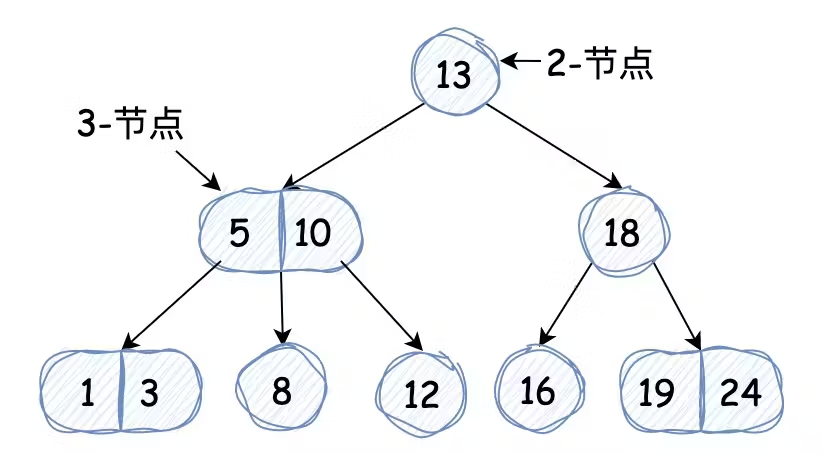
这里需要注意:2-3搜索树无论如何增删节点,它始终都能维持完美的平衡性,看下文时要牢记这一点。
3-节点的引入是如何保证树平衡的?
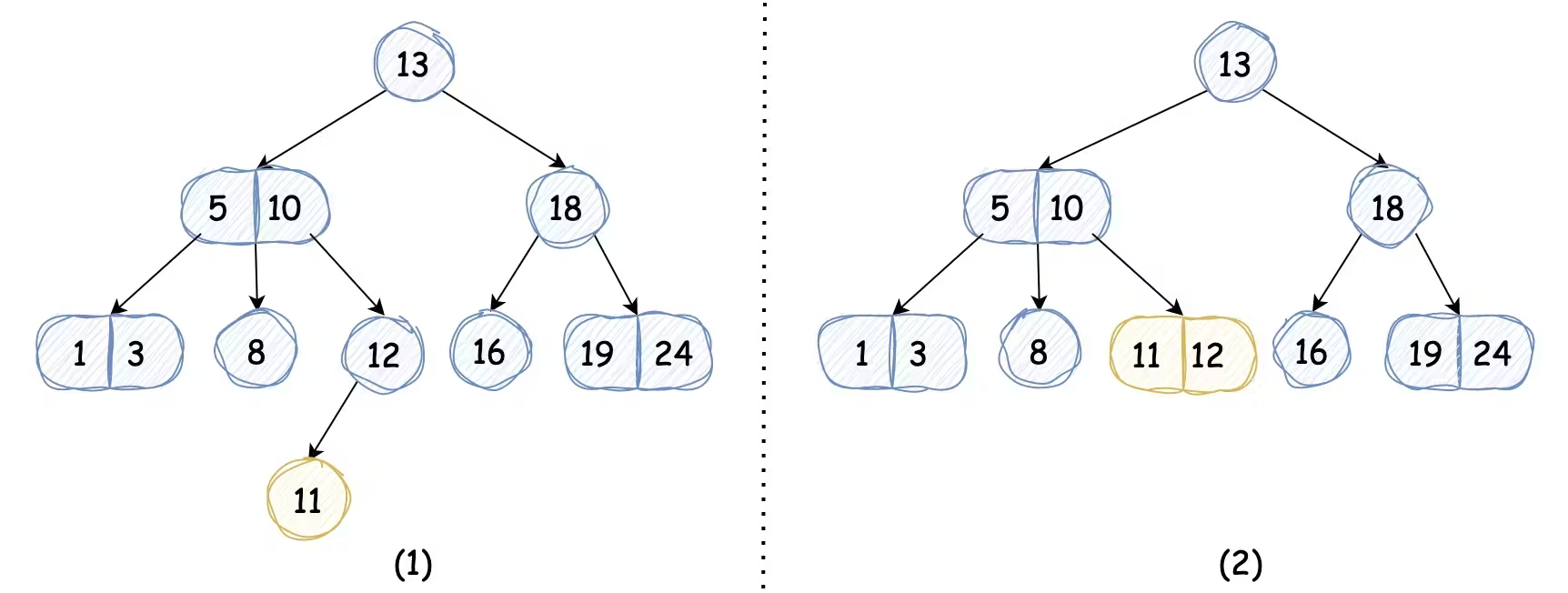
我们以插入键值 11 的节点为例,它会查找到该键对应的位置为 12 节点的左子树,如果我们未引入3-节点,那么树高会增加,如下图中(1)所示,而我们引入3-节点后,我们只需将2-节点替换为3-节点,而不会导致树高的增加,2-3搜索树依然完美平衡,如下图中(2)所示:
我们接着看,如果我们插入的键值为 26,它会查找到该键的位置为 19 和 24 这个3-节点,因为这个节点中已经没有多余的键的位置了,所以26键只能放在右子树的位置,使得树高加一。不过我们可以通过巧妙的方法,先将该节点转换为4-节点,一个4-节点又能转换成 3 个 2-节点, 我们将这 3 个2-节点的根节点(4-节点的中键值)插入到原来的父节点中,那么树高仍能保持不变(完美平衡),如下图所示:
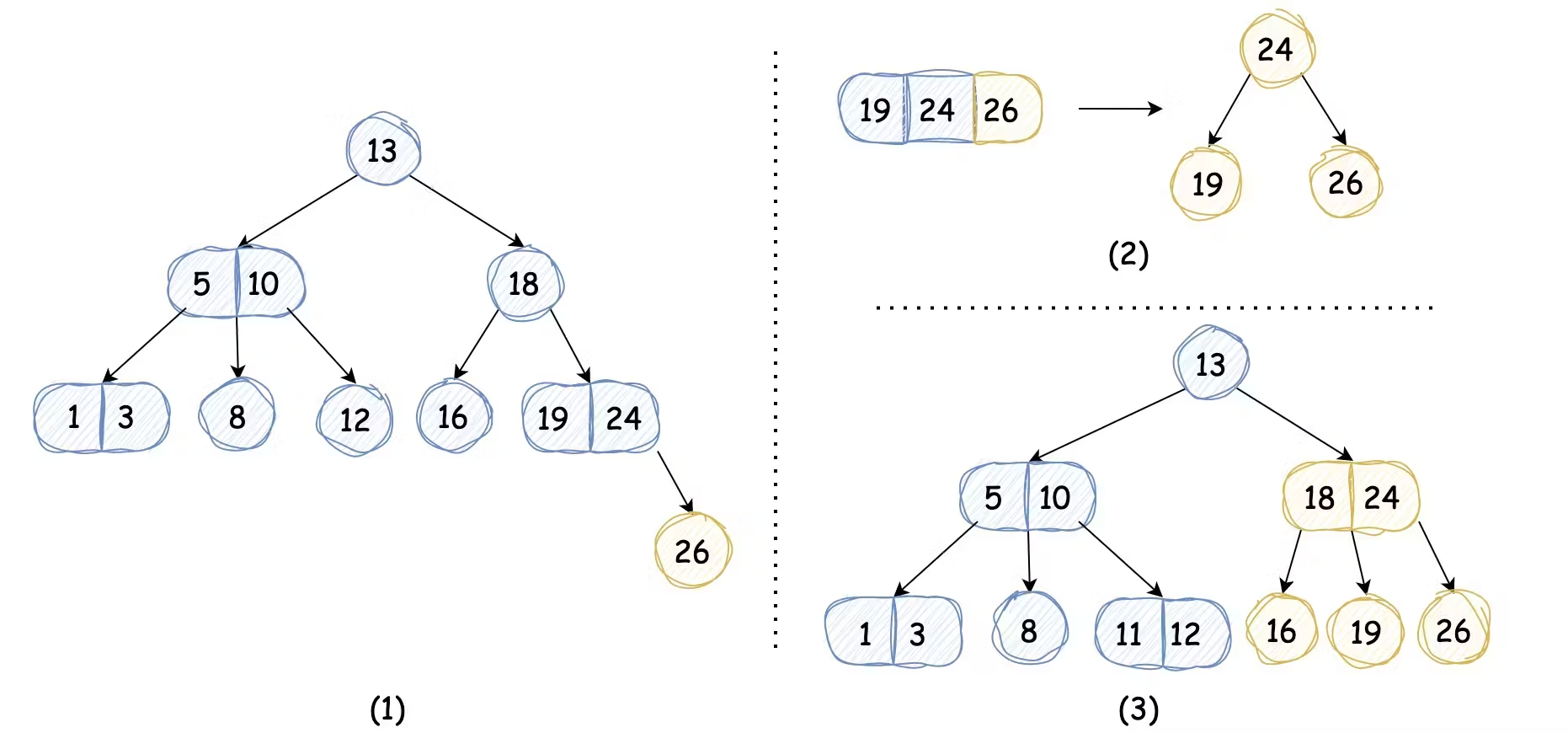
虽然我们临时借助了4-节点,但是最终变换完毕后,整棵树还是依然是由2-节点和3-节点组成的。
我们再插入键值为4的节点会如何呢?它会查找到1和3这个3-节点的位置,还是采用相同的办法,将其转换成4-节点,但是转换完后准备将它插入到原来的父节点时,会发现父节点也是3-节点,这就导致我们不得不再次使用同样的方法,这样推广到一般情况,需要不断地分解临时的4-节点并将其中键插入到更高的父节点中,直到遇到一个2-节点并将其转换成不需要分解的3-节点或者到达为2-节点的根节点,如下图所示:
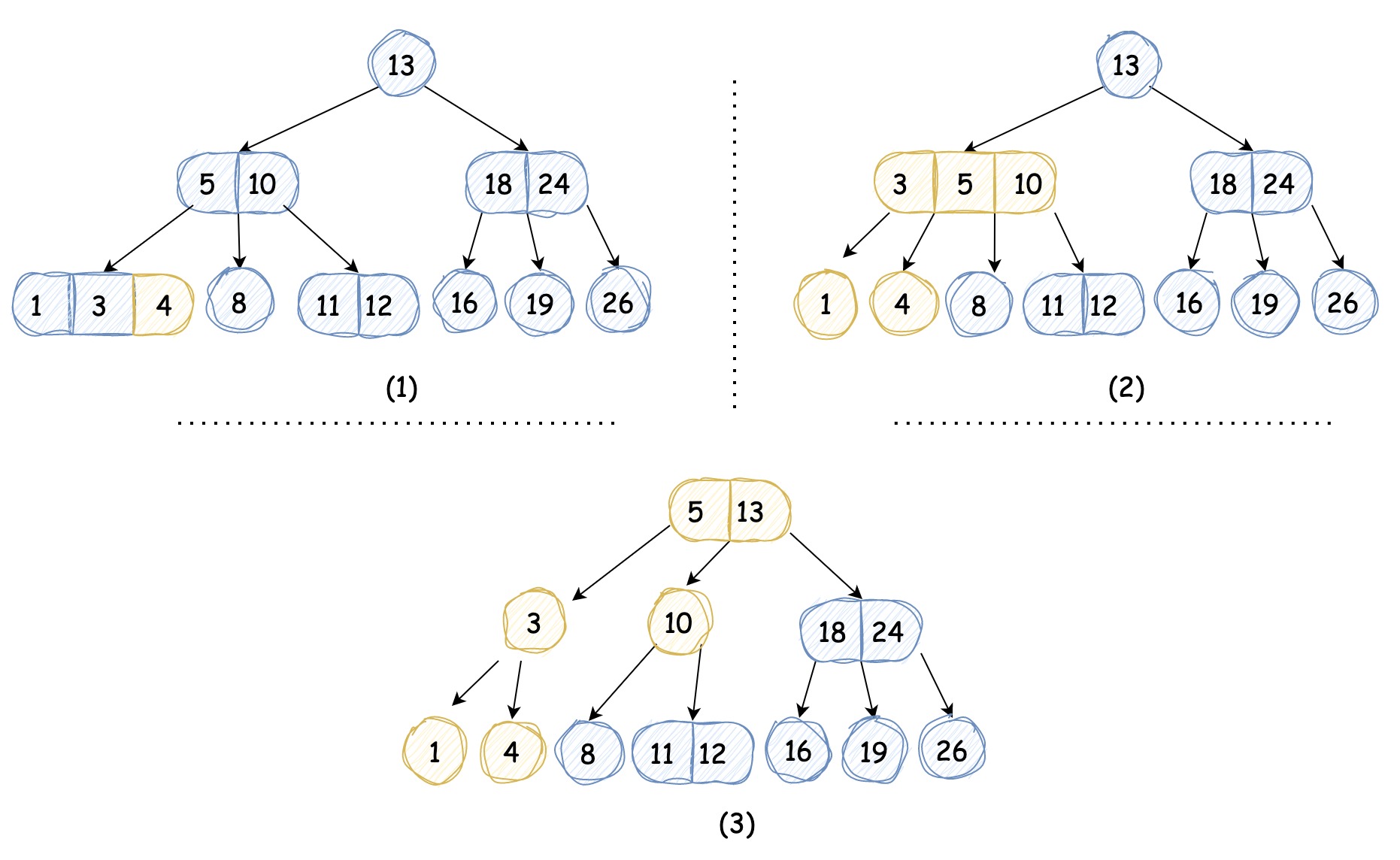
那如果处理到根节点时,根节点仍然为3-节点呢?其实原理是一样的,只不过根节点没有父节点,不需要再将4-节点的中键向上合并,转换成3个2-节点即可,相应地树高会加一。
在以上所述的情况中,2-3树的插入算法使树本身结构发生的改变是局部的,除了相关的节点和引用之外,不必修改和检查树的其他部分,这些局部变换不会影响到树的全局有序性和平衡性,在插入的过程中,2-3树始终是完美平衡二叉树。
左倾红黑树(LLRBT)
学会了 2-3 树我们先来学习一种简单的红黑树,左倾红黑树,它是经典红黑树的变体,相对更容易实现。它的基本思想是用标准的二叉搜索树和“颜色信息”来表示2-3树:其中的链接分为两种,红链接将两个2-节点连接起来构成一个3-节点,黑链接是2-3树中的普通链接,如下图所示:
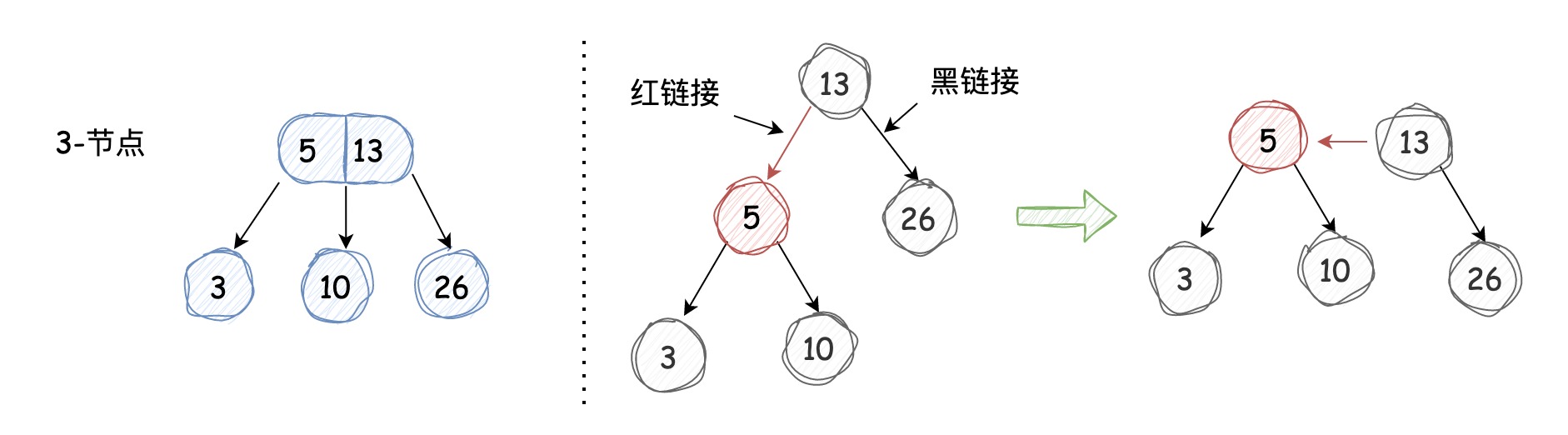
我们规定被红色链接指向的节点为红色节点,被黑色链接指向的节点为黑色节点,从上图中我们也能够发现:如果我们将红链接“横过来”,它和3-节点的表示是一样的,这就是在左倾红黑树中用颜色信息表示3-节点的方式,确切地说,3-节点是由两个2-节点组成,并且其中一个2-节点被另一个2-节点用红链接左引用。
可以说左倾红黑树就是一棵2-3搜索树,它满足如下条件:
-
根节点是黑色的
-
红链接均为左引用
-
没有任何一个节点同时和两条红链接相连
-
任意叶子节点到根节点路径上的黑色节点数量相同,即该树是黑色平衡的
2-3搜索树始终能保持完美平衡,那么任意叶子节点到根节点的距离是相等的。左倾红黑树又是一棵2-3搜索树,其中的黑链接是2-3搜索树中的普通链接,那么左倾红黑树中被黑色链接引用的黑色节点也必然是完美平衡的,所以任意叶子节点到根节点路径上的黑色节点数量必然相同。
性质我们已经理解了,接下来我们看看左倾红黑树的代码实现:
节点定义
上文我们已经规定,被红链接引用的节点为红色,被黑色链接引用的节点为黑色,我们在节点中添加color字段来标记颜色:True表示红色,False表示黑色,定义如下:
1public class LeftLeaningRedBlackTree {
2
3    private static final boolean RED = true;
4
5    private static final boolean BLACK = false;
6
7    static class Node {
8
9        int key;
10
11        int value;
12
13        boolean color;
14
15        Node left;
16
17        Node right;
18
19        public Node(int key, int value, boolean color) {
20            this.key = key;
21            this.value = value;
22            this.color = color;
23        }
24    }
25
26    /**
27     * 判断节点是否为红色
28     */
29    private boolean isRed(Node node) {
30        if (node == null) {
31            return false;
32        } else {
33            return node.color == RED;
34        }
35    }
36}
37
旋转
插入和删除操作可能会使左倾红黑树出现红链接右引用或者左右引用都是红链接的情况,造成黑色不平衡,为了始终满足左倾红黑树的性质,我们需要通过旋转操作进行修复。
左旋
如果有红链接右引用,我们可以通过左旋操作将其调整为红链接左引用,过程如下图所示:
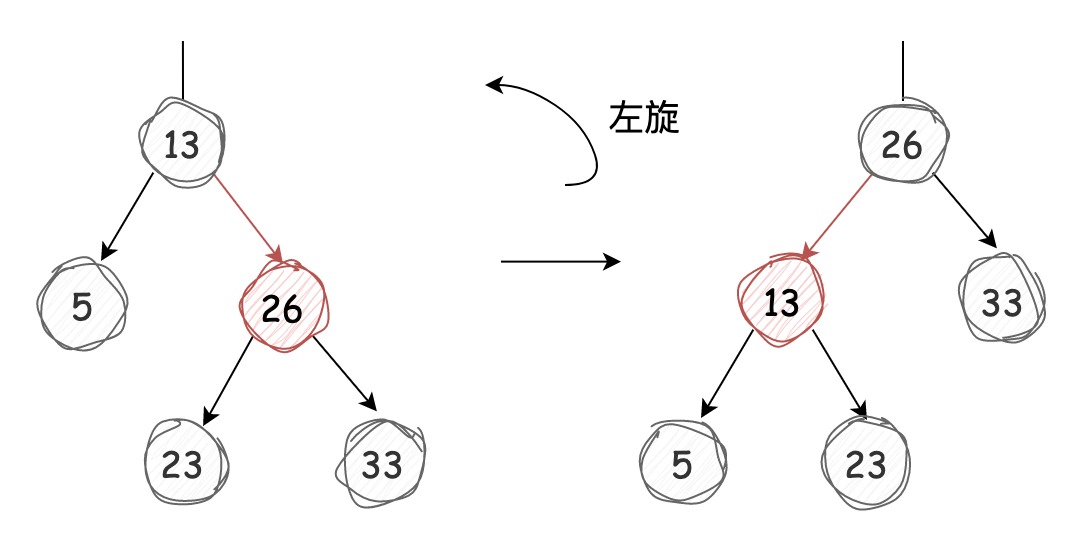
代码如下:
1    /**
2     * 左旋
3     */
4    private Node rotateLeft(Node node) {
5        Node newRoot = node.right;
6        node.right = newRoot.left;
7        newRoot.left = node;
8
9        newRoot.color = node.color;
10        node.color = RED;
11
12        return newRoot;
13    }
14
旋转完成后可以发现,左旋是将两个键中较小的作为根节点转变为较大的作为根节点。
右旋
右旋是和左旋完全相反的动作,它能将红链接左引用旋转成红链接右引用,过程如下图所示:
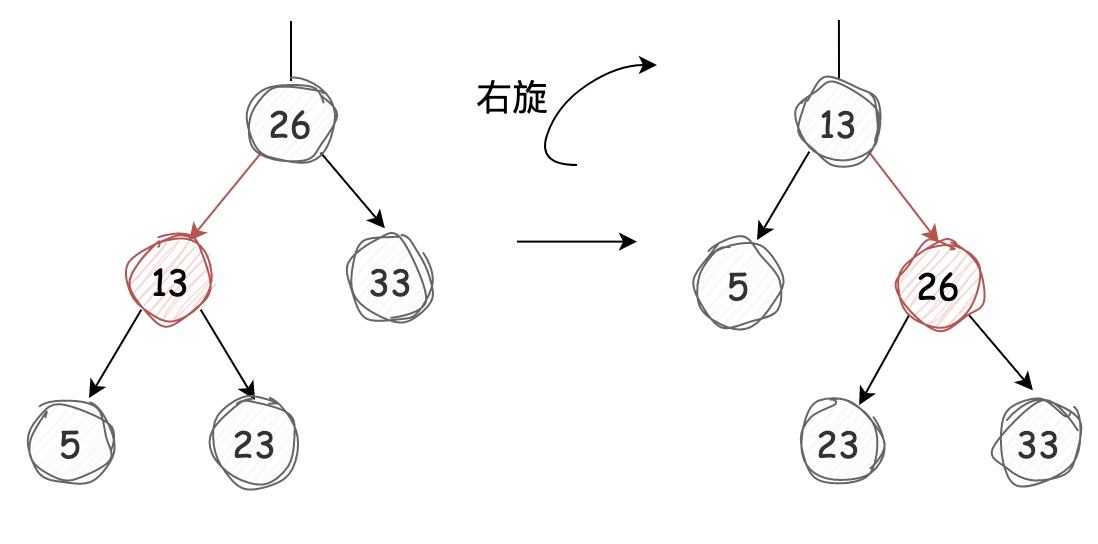
代码如下:
1    /**
2     * 右旋
3     */
4    private Node rotateRight(Node node) {
5        Node newRoot = node.left;
6        node.left = newRoot.right;
7        newRoot.right = node;
8
9        newRoot.color = node.color;
10        node.color = RED;
11
12        return newRoot;
13    }
14
右旋是将两个键中较大的作为根节点转变为较小的作为根节点。
左旋和右旋的方法返回值都是Node,旋转完成后父节点对旋转节点的引用会发生改变,在插入节点时旋转操作可以保持左倾红黑树的有序性和完美平衡性,也就是说我们在红黑树中进行旋转时无需为它的有序性和完美平衡性担心。
插入节点
插入的每个节点默认红色,之后根据插入后节点颜色情况,使用旋转操作进行修复,我们分情况讨论:
向2-节点中插入
向2-节点中插入节点很简单:如果新键值比老键小,那么将该节点被老节点红链接左引用即可;如果新键值比老键大,那么该节点需要被老节点红链接右引用,因为左倾红黑树中红链接不能左引用,所以我们需要左旋进行调节,过程图示如下:

向3-节点中插入
向3-节点中插入分三种情况,我们分别进行讨论:
- 新节点大于3-节点中的两个键值
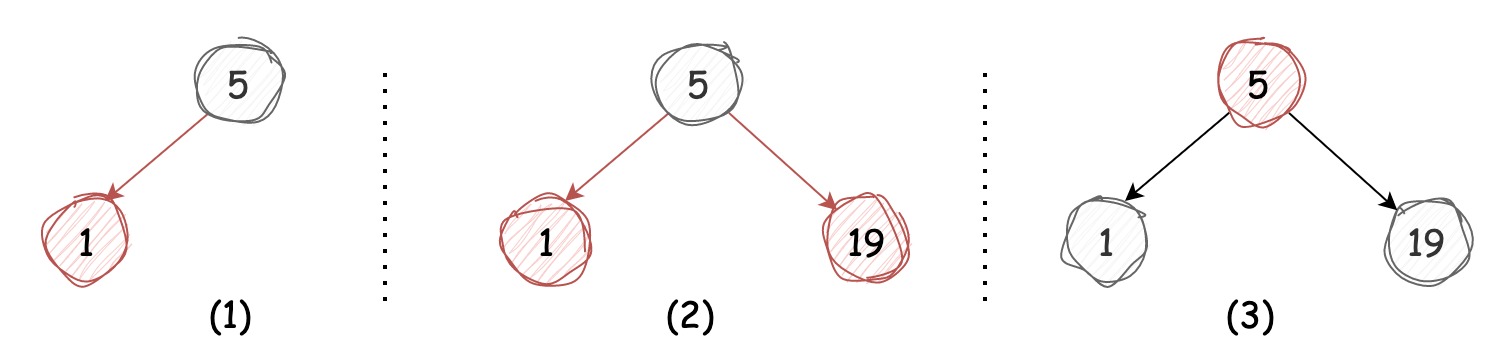
这种情况该节点被3-节点右引用,前文中我们说过,在3-节点中插入新节点可以临时转化成4-节点进行处理,4-节点又能转换成3个2-节点,那么我们得到的就是一颗树高为 2 的平衡树,此时根节点的左右引用均为红链接,我们可以将它们全部转换成黑链接(反色处理),如下图所示:
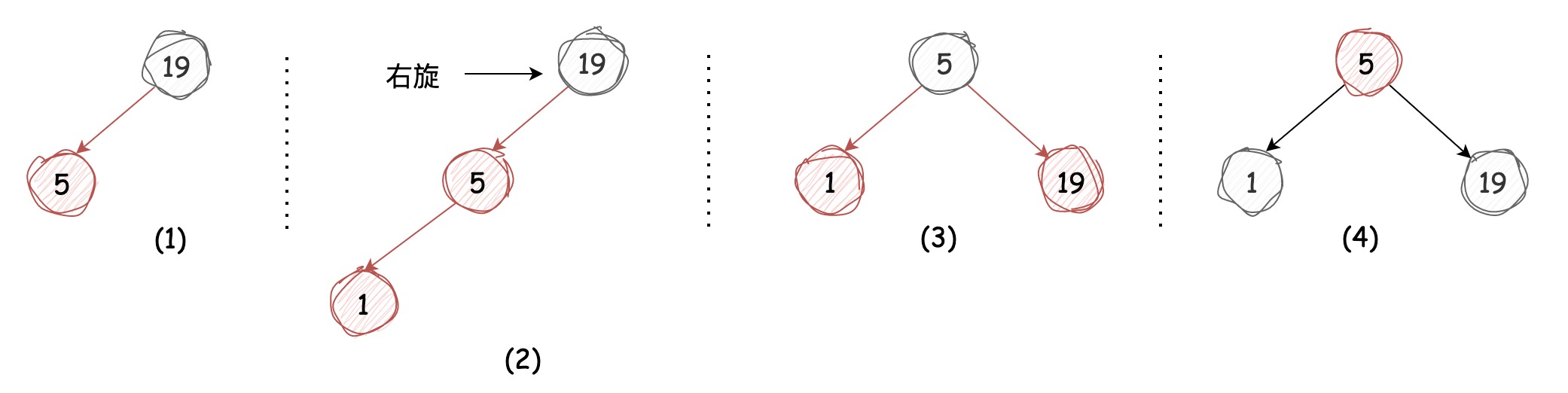
- 新节点小于3-节点中的两个键值
这种情况该节点被3-节点左引用,这样会出现两条红链接连续的情况,我们只需将上层的红链接右旋,这样便转换成了我们上述的第一种情况,过程如下图所示:
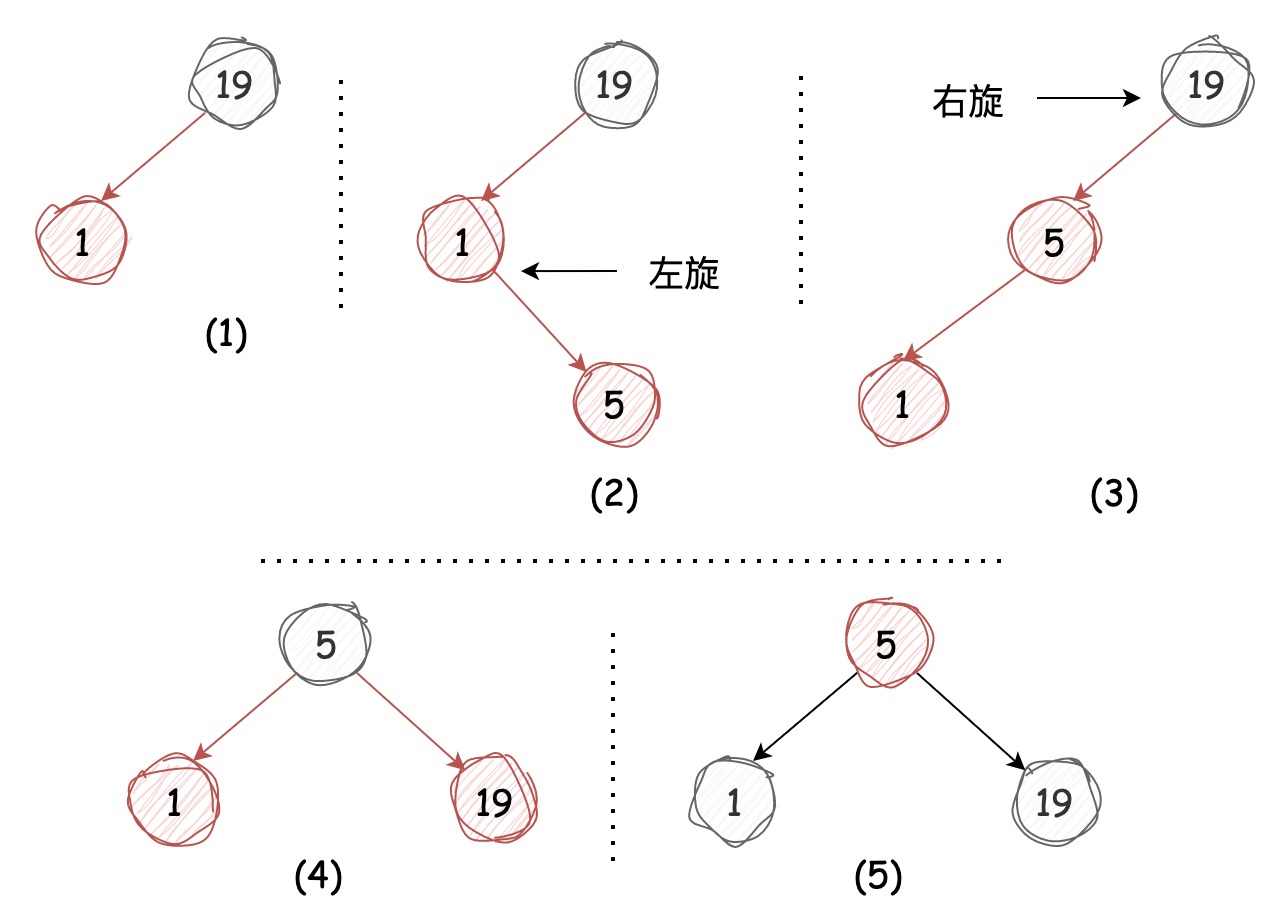
- 新节点介于3-节点的两键值中间
这种情况仍然会出现两条红链接连续的情况,我们只需要将下层的红链接左旋,便转换成了上述的第二种情况,过程如下图所示:
颜色转换
我们需要为上述将某个节点的两条红链接转换成黑链接的动作定义flipColors方法,在图示中能够发现除了将左右节点转换成黑色外,该节点被转换成了红色,颜色转换在本质上和旋转操作同样都是局部的,并不会影响整棵树的黑色平衡性。该节点颜色转换成红色后,相当于将其送入了它的父节点,意味着在父节点插入了一个新键,我们需要按照上述插入节点的对应情况进行处理。
1    /**
2     * 颜色转换
3     */
4    private void flipColors(Node node) {
5        node.color = RED;
6        node.left.color = BLACK;
7        node.right.color = BLACK;
8    }
9
不过,这对于根节点来说,并不能完全按照这种规则进行颜色转换,因为如果根节点是红色的,那么说明根节点为3-节点中较小的节点,但实际上并非如此(根节点始终为其中较大的值)。所以我们每次插入节点时需要保证根节点是黑色的,而且每当根节点由红色转变为黑色时,都意味着树高增加了 1。
在3-节点中插入节点后,将临时转换成4-节点,并将4-节点的中键作为红色节点插入到它的父节点中(无论是左引用还是右引用),中键作为红色节点插入父节点无异于处理新插入一个红色节点,我们需要不断地重复这个过程,直到遇到根节点或2-节点,这样我们就能始终保持左倾红黑树和2-3搜索树的一一对应关系。
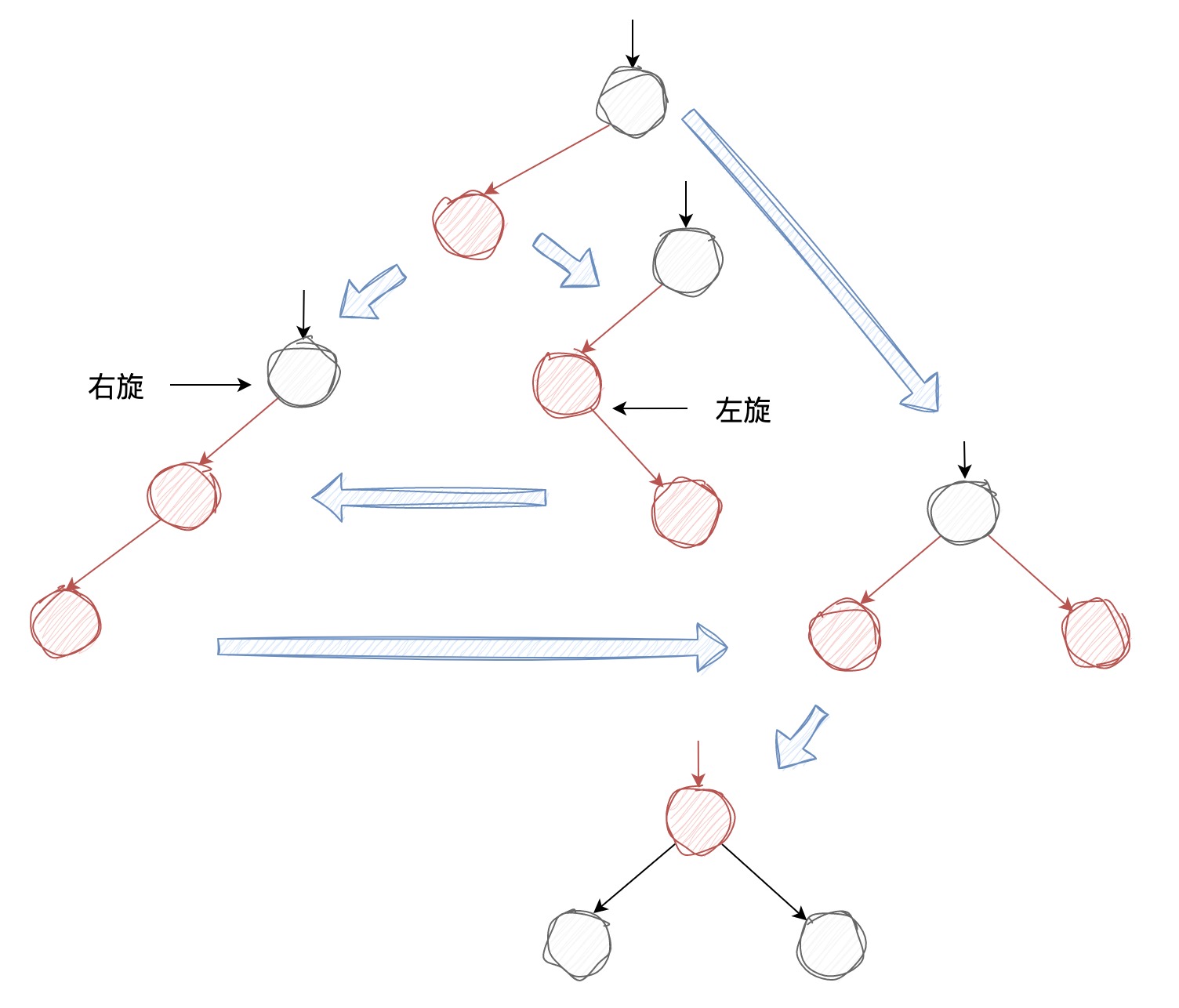
上图对应了节点插入后,执行旋转和颜色转换的所有情况。这些保持树平衡的操作需要在该插入节点到根节点路径上(回溯)的所有节点执行,规则如下:
-
如果某节点的右节点是红色,左节点为空或为黑色,需要左旋
-
如果某节点的左节点是红色,该左节点的左节点仍是红色,需要右旋
-
如果某节点的左节点和右节点均为红色,需要执行颜色转换
现在我们已经讨论了插入节点时所有可能出现的情况,接下来我们要实现左倾红黑树的插入方法。它的实现是在普通二叉搜索树的插入方法上进行了扩展,添加了保持树平衡性的逻辑,而平衡性的保持又是由下到上的,所以我们需要将旋转和颜色转换的逻辑放在递归逻辑之后,也就是我们在回溯时修复树的平衡,代码如下:
1    /**
2     * 插入节点
3     */
4    public void put(Integer key, Integer value) {
5        root = put(root, key, value);
6        // 根节点永远都是黑色
7        root.color = BLACK;
8    }
9
10    /**
11     * 插入节点的执行逻辑
12     */
13    private Node put(Node node, Integer key, Integer value) {
14        if (node == null) {
15            return new Node(key, value, RED);
16        }
17
18        if (key > node.key) {
19            node.right = put(node.right, key, value);
20        } else if (key < node.key) {
21            node.left = put(node.left, key, value);
22        } else {
23            node.value = value;
24        }
25        // 将3-节点的红链接右引用左旋
26        if (isRed(node.right) && !isRed(node.left)) {
27            node = rotateLeft(node);
28        }
29        // 将4-节点两条连续的红链接左引用左旋
30        if (isRed(node.left) && isRed(node.left.left)) {
31            node = rotateRight(node);
32        }
33        // 进行颜色转换并将红链接在树中向上传递
34        if (isRed(node.left) && isRed(node.right)) {
35            flipColor(node);
36        }
37
38        return node;
39    }
40
删除节点
删除节点方法是左倾红黑树中最复杂的实现,所以接下来的内容可能会让大家觉得有一些困难,但是千万不要灰心,我在学习的时候也是重复了很多遍才理解了这个过程,也请大家多给自己一些耐心。
左倾红黑树在执行删除的过程中,如果直接删除一个2-节点,会留下空链接,这样会破坏树的完美平衡性,如下图所示:
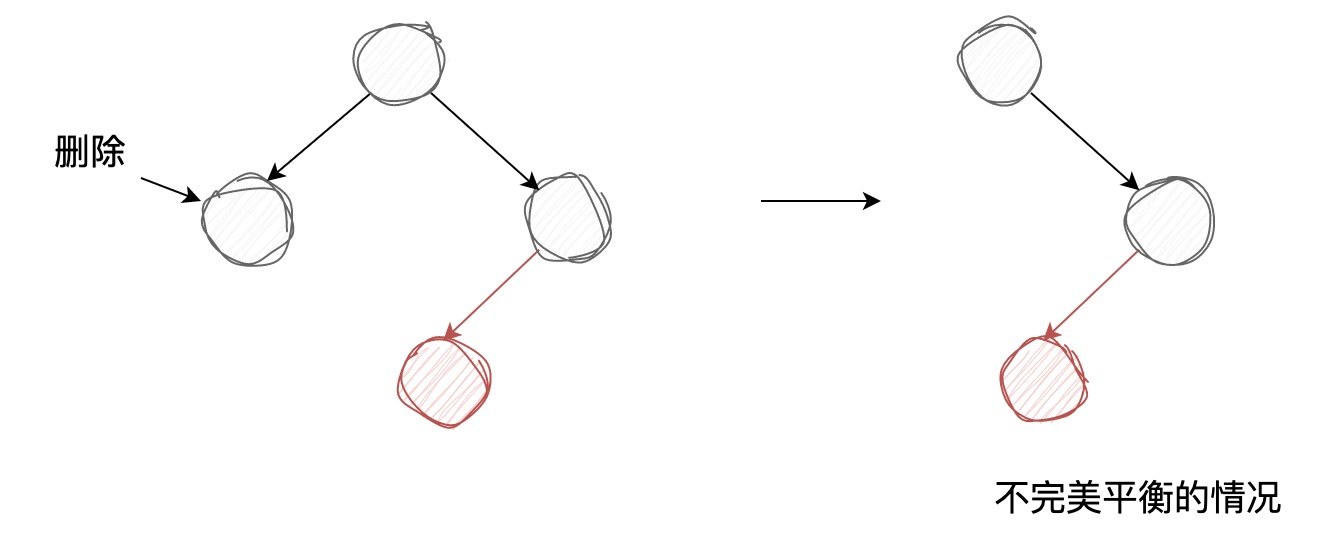
所以,在执行删除之前,需要将被删除节点转换成3-节点或临时的4-节点的一部分,这样才能保证删除节点前后左倾红黑树一直都是完美平衡的,相应地,如果被删除节点为3-节点或4-节点,那么直接移除它是不影响树的完美平衡的。
接下来我们以删除最小节点为例,讲解下节点删除的过程。
删除最小节点
既然我们需要将被删除的2-节点转换成3-或4-节点的一部分,那么我们该如何转换呢?
我们先看第一种情况,要被删除的节点和它的兄弟节点都是2-节点。根据上文中插入节点的逻辑,两个黑色的左右子节点是由4-节点转换颜色后得到的,那么我们可以再对其进行颜色转换,使之再成为4-节点,被删除节点也就成了4-节点的一部分,此时将其删除就不会影响树的平衡性了。不过在删除之后,虽然树的平衡性不被影响,但是红链接右引用不符合左倾红黑树的性质,需要左旋操作来修复,过程图示如下:
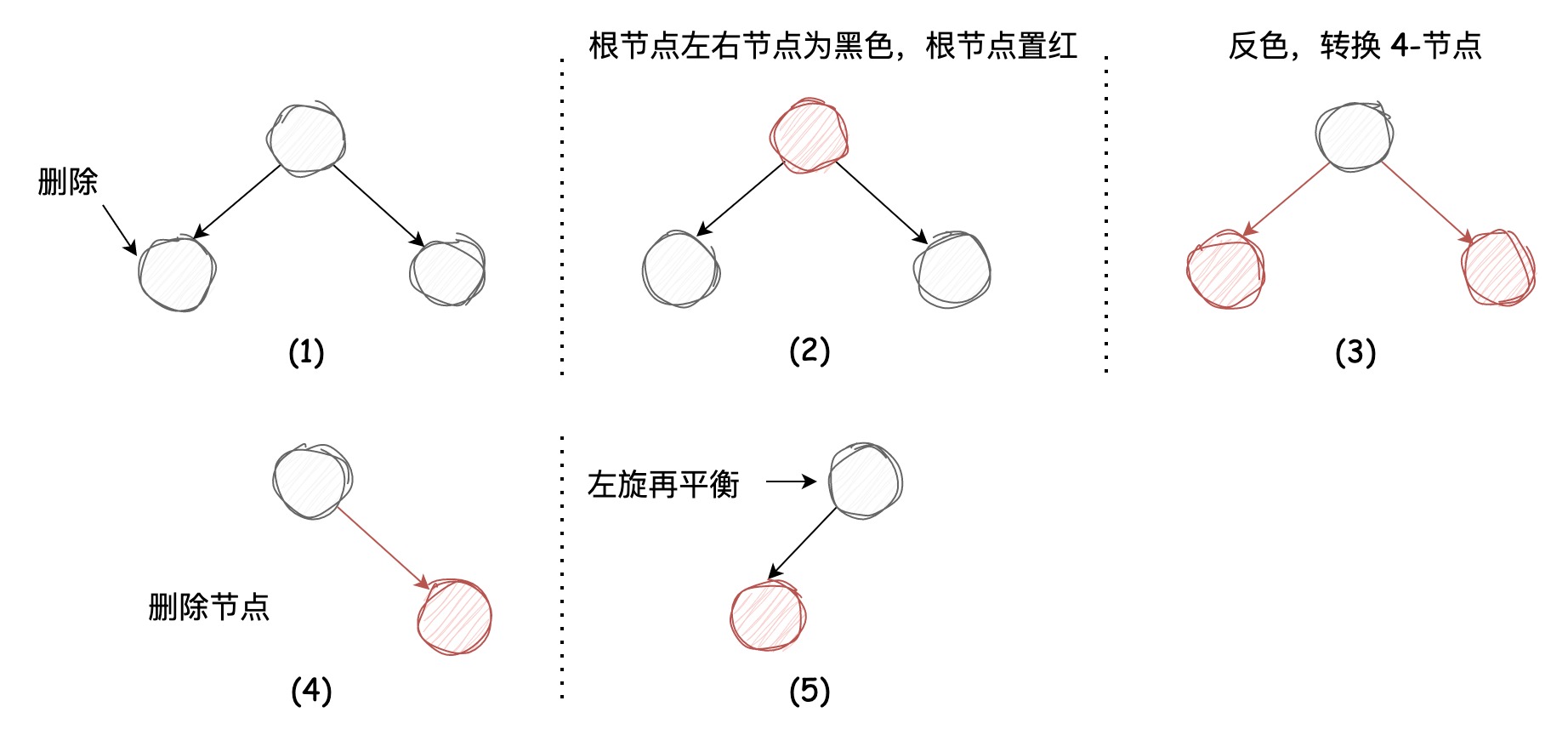
图示中由(1)到(2)将根节点转化成了红色,不知道大家还记不记得,在插入节点时4-节点转换成3个2-节点不只将左右节点转换成了黑色,还将该节点染成了红色,表示该节点会插入到父节点中,由于该节点为根节点,所以在(1)中表示为黑色,图(2)将根节点切换回了红色,对应了4-节点转换成3个2-节点的一般情况,图(3)中将这3个节点颜色均取反便得到了4-节点
我们接着看第二种情况,要被删除的节点为2-节点,它的兄弟节点为3-节点,《算法》中介绍了“借键方法”:左子节点将根节点中较小的节点借过来组成3-节点,根节点将右节点中较小的节点借过来保持自身原来节点样式不变,而右节点便成了一个2-节点,借键完毕后再将左子节点(3-节点)中较小的键(红色节点)移除,不会影响树的完美平衡性,图示如下:
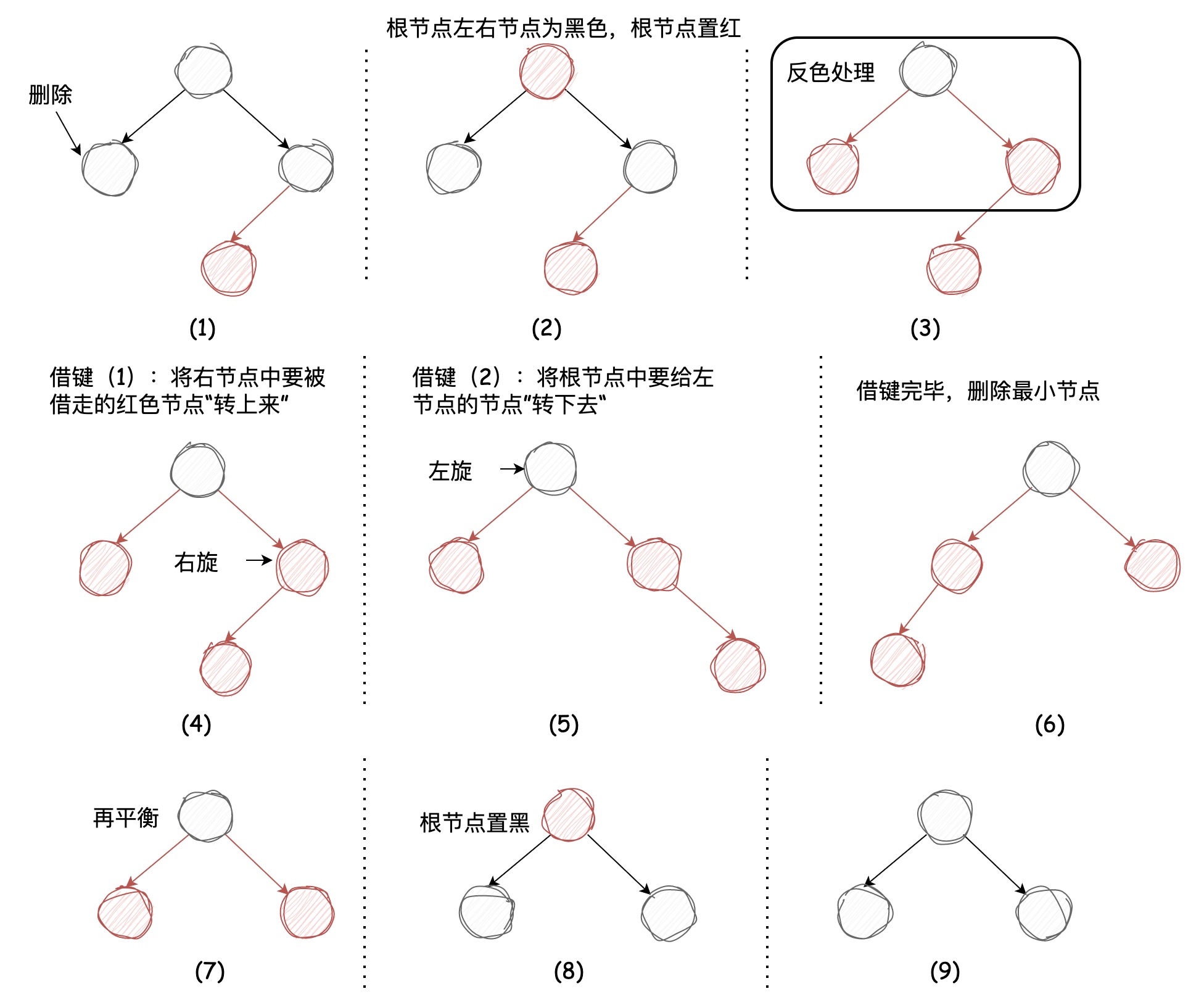
现在我们已经整理好了删除最小节点的过程,试着写一下代码:
1    /**
2     * 删除最小节点
3     */
4    public void deleteMin() {
5        if (!isRed(root.left) && !isRed(root.right)) {
6            root.color = RED;
7        }
8        root = deleteMin(root);
9        // 根节点永远都是黑色
10        if (root != null) {
11            root.color = BLACK;
12        }
13    }
14
15    /**
16     * 删除最小节点
17     */
18    private Node deleteMin(Node node) {
19        if (node.left == null) {
20            return null;
21        }
22
23        // 判断当前节点和左子节点是不是3-节点,不是的话执行借键逻辑
24        if (!isRed(node.left) && !isRed(node.left.left)) {
25            node = moveRedLeft(node);
26        }
27        node.left = deleteMin(node.left);
28
29        return balance(node);
30    }
31
32    /**
33     * 从右向左借键
34     */
35    private Node moveRedLeft(Node node) {
36        flipColors(node);
37        // 兄弟节点为3-节点的情况
38        if (isRed(node.right.left)) {
39            node.right = rotateRight(node.right);
40            node = rotateLeft(node);
41        }
42
43        return node;
44    }
45
46    /**
47     * 从下到上再平衡
48     */
49    private Node balance(Node node) {
50        if (isRed(node.right)) {
51            node = rotateLeft(node);
52        }
53        if (isRed(node.left) && isRed(node.left.left)) {
54            node = rotateRight(node);
55        }
56        if (isRed(node.left) && isRed(node.right)) {
57            flipColors(node);
58        }
59
60        return node;
61    }
62
需要注意的是,在插入节点定义的flipColors如下,本质上在插入节点时,该操作是将当前节点颜色取反:
1    private void flipColors(Node node) {
2        node.color = RED;
3        node.left.color = BLACK;
4        node.right.color = BLACK;
5    }
6
现在将该方法改成了反色处理,为了在删除节点方法中复用,如下:
1    private void flipColors(Node node) {
2        node.color = !node.color;
3        node.left.color = !node.left.color;
4        node.right.color = !node.right.color;
5    }
6
本质上,删除最小节点的过程是从上到下不断地将当前节点染红,保证当前节点始终不为2-节点,避免移除节点后发生树的不平衡,因为不知道什么时候能找到最小节点,所以该路径上的每个节点都需要执行该操作。
删除最大节点
删除最大节点我们只讨论被删除节点为2-节点,其兄弟节点为3-节点的情况,另一种被删除节点和它的兄弟节点均为2-节点的情况非常简单,不再赘述。
其兄弟节点为3-节点时,我们仍需要采用“借键”的方法,过程如下图所示:
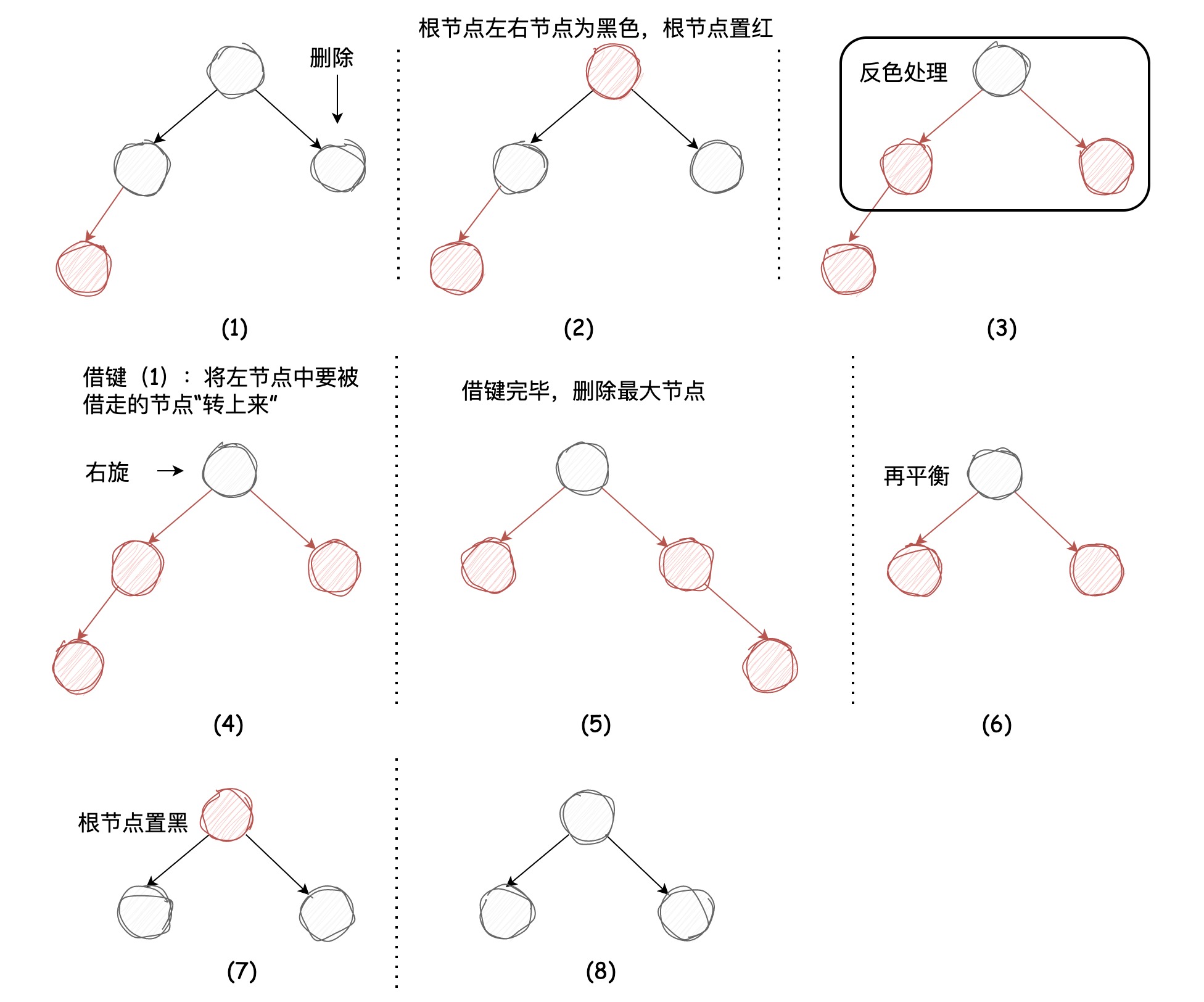
删除最大节点的代码逻辑如下所示:
1    /**
2     * 删除最大节点
3     */
4    public void deleteMax() {
5        if (!isRed(root.left) && !isRed(root.right)) {
6            root.color = RED;
7        }
8        root = deleteMax(root);
9        // 根节点永远都是黑色
10        if (root != null) {
11            root.color = BLACK;
12        }
13    }
14
15    /**
16     * 删除最大节点
17     */
18    private Node deleteMax(Node node) {
19        if (isRed(node.left)) {
20            node = rotateRight(node);
21        }
22        if (node.right == null) {
23            return null;
24        }
25
26        // 当前节点的右引用不是红链接且右节点不是3-节点
27        if (!isRed(node.right) && !isRed(node.right.left)) {
28            node = moveRedRight(node);
29        }
30        node.right = deleteMax(node.right);
31
32        return balance(node);
33    }
34
35    /**
36     * 从左向右借键
37     */
38    private Node moveRedRight(Node node) {
39        flipColors(node);
40        if (isRed(node.left.left)) {
41            node = rotateRight(node);
42        }
43        return node;
44    }
45
其中有如下代码是在删除最小节点没有的:
1    private Node deleteMax(Node node) {
2        // 区别于删除最小节点的操作
3        if (isRed(node.left)) {
4            node = rotateRight(node);
5        }
6        // ...
7    }
8
我们来解释一下这段逻辑:在左倾红黑树中,如果当前节点的左节点为红色,那么会有可能存在这种情况:
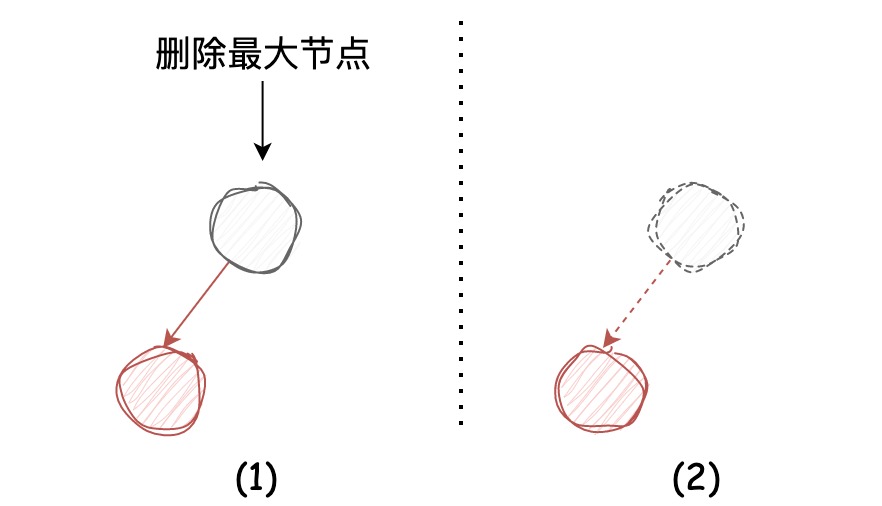
直接将图示中最大节点移除的话,会导致它的左节点丢失,为了避免,会先执行右旋,将要被删除的节点旋转到右引用的位置。
删除节点
删除节点的方法在弄明白了删除最大和最小节点的方法后,理解起来是非常容易的。它其实是删除最大节点和删除最小节点方法的结合,同样也是需要保证经过的节点为3-节点或临时的4-节点,在找到对应节点时,将该节点值替换为右子树中的最小节点值,再执行删除右子树最小节点,删除完成后执行平衡修复,大家需要关注其中的注释信息,如下:
1    /**
2     * 删除节点
3     */
4    public void delete(Integer key) {
5        if (!isRed(root.left) && !isRed(root.right)) {
6            root.color = RED;
7        }
8        root = delete(root, key);
9        if (root != null) {
10            root.color = BLACK;
11        }
12    }
13
14    /**
15     * 删除节点
16     */
17    private Node delete(Node node, Integer key) {
18        if (key < node.key) {
19            // 要删除的节点在左子树,保证当前节点为红色
20            if (!isRed(node.left) && !isRed(node.left.left)) {
21                node = moveRedLeft(node);
22            }
23            node.left = delete(node.left, key);
24        } else {
25            if (isRed(node.left)) {
26                node = rotateRight(node);
27            }
28            // node.right == null 可知上面右旋没有发生,右子树为 null,左节点不是红色节点,能证明左子树必然为null(满足黑色平衡)
29            if (key.equals(node.key) && node.right == null) {
30                return null;
31            }
32            // 要删除的节点在右子树
33            if (!isRed(node.right) && !isRed(node.right.left)) {
34                node = moveRedRight(node);
35            }
36
37            if (key.equals(node.key)) {
38                // 找到右子树中最小的节点替换当前节点的键和值
39                Node min = min(node.right);
40                node.key = min.key;
41                node.value = min.value;
42                // 再将该右子树最小的节点移除
43                deleteMin(node.right);
44            } else {
45                node.right = delete(node.right, key);
46            }
47        }
48
49        return balance(node);
50    }
51
为方便大家学习参考,全量代码如下:
1public class LeftLeaningRedBlackTree {
2
3    private static final boolean RED = true;
4
5    private static final boolean BLACK = false;
6
7    static class Node {
8
9        int key;
10
11        int value;
12
13        boolean color;
14
15        Node left;
16
17        Node right;
18
19        public Node(int key, int value, boolean color) {
20            this.key = key;
21            this.value = value;
22            this.color = color;
23        }
24    }
25
26    private Node root;
27
28    /**
29     * 插入节点
30     */
31    public void put(Integer key, Integer value) {
32        root = put(root, key, value);
33        // 根节点永远都是黑色
34        root.color = BLACK;
35    }
36
37    /**
38     * 插入节点的执行逻辑
39     */
40    private Node put(Node node, Integer key, Integer value) {
41        if (node == null) {
42            return new Node(key, value, RED);
43        }
44
45        if (key > node.key) {
46            node.right = put(node.right, key, value);
47        } else if (key < node.key) {
48            node.left = put(node.left, key, value);
49        } else {
50            node.value = value;
51        }
52        // 将3-节点的红链接右引用左旋
53        if (isRed(node.right) && !isRed(node.left)) {
54            node = rotateLeft(node);
55        }
56        // 将4-节点两条连续的红链接左引用左旋
57        if (isRed(node.left) && isRed(node.left.left)) {
58            node = rotateRight(node);
59        }
60        // 进行颜色转换并将红链接在树中向上传递
61        if (isRed(node.left) && isRed(node.right)) {
62            flipColors(node);
63        }
64
65        return node;
66    }
67
68    /**
69     * 删除最小节点
70     */
71    public void deleteMin() {
72        if (!isRed(root.left) && !isRed(root.right)) {
73            root.color = RED;
74        }
75        root = deleteMin(root);
76        // 根节点永远都是黑色
77        if (root != null) {
78            root.color = BLACK;
79        }
80    }
81
82    /**
83     * 删除最小节点
84     */
85    private Node deleteMin(Node node) {
86        if (node.left == null) {
87            return null;
88        }
89
90        // 判断当前节点和左子节点是不是3-节点,不是的话执行借键逻辑
91        if (!isRed(node.left) && !isRed(node.left.left)) {
92            node = moveRedLeft(node);
93        }
94        node.left = deleteMin(node.left);
95
96        return balance(node);
97    }
98
99    /**
100     * 从右向左借键
101     */
102    private Node moveRedLeft(Node node) {
103        flipColors(node);
104        // 兄弟节点为3-节点的情况
105        if (isRed(node.right.left)) {
106            node.right = rotateRight(node.right);
107            node = rotateLeft(node);
108        }
109
110        return node;
111    }
112
113    /**
114     * 删除最大节点
115     */
116    public void deleteMax() {
117        if (!isRed(root.left) && !isRed(root.right)) {
118            root.color = RED;
119        }
120        root = deleteMax(root);
121        // 根节点永远都是黑色
122        if (root != null) {
123            root.color = BLACK;
124        }
125    }
126
127    /**
128     * 删除最大节点
129     */
130    private Node deleteMax(Node node) {
131        if (isRed(node.left)) {
132            node = rotateRight(node);
133        }
134        if (node.right == null) {
135            return null;
136        }
137
138        // 当前节点的右引用不是红链接且右节点不是3-节点
139        if (!isRed(node.right) && !isRed(node.right.left)) {
140            node = moveRedRight(node);
141        }
142        node.right = deleteMax(node.right);
143
144        return balance(node);
145    }
146
147    /**
148     * 从左向右借键
149     */
150    private Node moveRedRight(Node node) {
151        flipColors(node);
152        if (isRed(node.left.left)) {
153            node = rotateRight(node);
154        }
155        return node;
156    }
157
158    /**
159     * 删除节点
160     */
161    public void delete(Integer key) {
162        if (!isRed(root.left) && !isRed(root.right)) {
163            root.color = RED;
164        }
165        root = delete(root, key);
166        if (root != null) {
167            root.color = BLACK;
168        }
169    }
170
171    /**
172     * 删除节点
173     */
174    private Node delete(Node node, Integer key) {
175        if (key < node.key) {
176            // 要删除的节点在左子树,保证当前节点为红色
177            if (!isRed(node.left) && !isRed(node.left.left)) {
178                node = moveRedLeft(node);
179            }
180            node.left = delete(node.left, key);
181        } else {
182            if (isRed(node.left)) {
183                node = rotateRight(node);
184            }
185            // node.right == null 可知上面右旋没有发生,右子树为 null,左节点不是红色节点,能证明左子树必然为null(满足黑色平衡)
186            if (key.equals(node.key) && node.right == null) {
187                return null;
188            }
189            // 要删除的节点在右子树
190            if (!isRed(node.right) && !isRed(node.right.left)) {
191                node = moveRedRight(node);
192            }
193
194            if (key.equals(node.key)) {
195                // 找到右子树中最小的节点替换当前节点的键和值
196                Node min = min(node.right);
197                node.key = min.key;
198                node.value = min.value;
199                // 再将该右子树最小的节点移除
200                deleteMin(node.right);
201            } else {
202                node.right = delete(node.right, key);
203            }
204        }
205
206        return balance(node);
207    }
208
209    /**
210     * 获取最小节点
211     */
212    private Node min(Node node) {
213        if (node.left == null) {
214            return node;
215        }
216        return min(node.left);
217    }
218
219    /**
220     * 从下到上再平衡
221     */
222    private Node balance(Node node) {
223        if (isRed(node.right)) {
224            node = rotateLeft(node);
225        }
226        if (isRed(node.left) && isRed(node.left.left)) {
227            node = rotateRight(node);
228        }
229        if (isRed(node.left) && isRed(node.right)) {
230            flipColors(node);
231        }
232
233        return node;
234    }
235
236    /**
237     * 左旋
238     */
239    private Node rotateLeft(Node node) {
240        Node newNode = node.right;
241        node.right = newNode.left;
242        newNode.left = node;
243
244        newNode.color = node.color;
245        node.color = RED;
246
247        return newNode;
248    }
249
250    /**
251     * 右旋
252     */
253    private Node rotateRight(Node node) {
254        Node newNode = node.left;
255        node.left = newNode.right;
256        newNode.right = node;
257
258        newNode.color = node.color;
259        node.color = RED;
260
261        return newNode;
262    }
263
264    /**
265     * 颜色转换
266     */
267    private void flipColors(Node node) {
268        node.color = !node.color;
269        node.left.color = !node.left.color;
270        node.right.color = !node.right.color;
271    }
272
273    /**
274     * 判断节点是否为红色
275     */
276    private boolean isRed(Node node) {
277        if (node == null) {
278            return false;
279        } else {
280            return node.color == RED;
281        }
282    }
283}
284
巨人的肩膀
-
《算法 第四版》:第 3.3 章 平衡查找树
-
维基百科 - 平衡二元搜寻树
-
维基百科 - AVL树
-
知乎 - 关于AVL树和红黑树的一点看法
-
维基百科 - 左倾红黑树
-
LeetCode - 红黑树从入门到看开
-
知乎 - 有人能讲清楚《Algorithms》中左倾红黑树(LLRB)删除操作的每一行代码吗?
作者:京东物流 王奕龙
来源:京东云开发者社区 自猿其说 Tech 转载请注明来源