
首先,需要生成验证码字符串,方式很多,下面提供一种,根据指定源的方式来生成验证码
/** * 使用系统默认字符源生成验证码 * * @param verifySize * 验证码长度 * @return */ public static String generateVerifyCode(int verifySize) { return generateVerifyCode(verifySize, VERIFY_CODES); }
核心方法如下:
/** * 使用指定源生成验证码 * * @param verifySize * 验证码长度 * @param sources * 验证码字符源 * @return */ public static String generateVerifyCode(int verifySize, String sources) { if (sources == null || sources.length() == 0) { sources = VERIFY_CODES; } int codesLen = sources.length(); Random rand = new Random(System.currentTimeMillis()); StringBuilder verifyCode = new StringBuilder(verifySize); for (int i = 0; i < verifySize; i++) { verifyCode.append(sources.charAt(rand.nextInt(codesLen - 1))); } return verifyCode.toString(); }
在指定源数据内,随机产生指定长度的字符串作为验证码,默认的源字符串为:
// 使用到Algerian字体,系统里没有的话需要安装字体,字体只显示大写,去掉了1,0,i,o几个容易混淆的字符 public static final String VERIFY_CODES = "23456789ABCDEFGHJKLMNPQRSTUVWXYZ";
接下来输出字符串图片,这里提供接收文件和流的两种重载方式,方法如下:
1    /**     * 生成随机验证码文件,并返回验证码值     *      * @param w     * @param h     * @param outputFile     * @param verifySize     * @return     * @throws IOException     */    public static String outputVerifyImage(int w, int h, File outputFile, int verifySize) throws IOException {        String verifyCode = generateVerifyCode(verifySize);        outputImage(w, h, outputFile, verifyCode);        return verifyCode;    }
2
3    /**     * 输出随机验证码图片流,并返回验证码值     *      * @param w     * @param h     * @param os     * @param verifySize     * @return     * @throws IOException     */    public static String outputVerifyImage(int w, int h, OutputStream os, int verifySize) throws IOException {        String verifyCode = generateVerifyCode(verifySize);        outputImage(w, h, os, verifyCode);        return verifyCode;    }
上面是提供给外部调用的入口方法,生成验证码,然后输出图片,返回验证码值,输出验证码图片的两个重载方法如下:
/** * 生成指定验证码图像文件 * * @param w * @param h * @param outputFile * @param code * @throws IOException */ public static void outputImage(int w, int h, File outputFile, String code) throws IOException { if (outputFile == null) { return; } File dir = outputFile.getParentFile(); if (!dir.exists()) { dir.mkdirs(); } try { outputFile.createNewFile(); FileOutputStream fos = new FileOutputStream(outputFile); outputImage(w, h, fos, code); fos.close(); } catch (IOException e) { throw e; } }
该方法会转到另一个重载方法,也是最核心的方法:
/** * 输出指定验证码图片流 * * @param w * @param h * @param os * @param code * @throws IOException */ public static void outputImage(int w, int h, OutputStream os, String code) throws IOException { int verifySize = code.length(); BufferedImage image = new BufferedImage(w, h, BufferedImage.TYPE_INT_RGB); Random rand = new Random(); Graphics2D g2 = image.createGraphics(); g2.setRenderingHint(RenderingHints.KEY_ANTIALIASING, RenderingHints.VALUE_ANTIALIAS_ON); Color[] colors = new Color[5]; Color[] colorSpaces = new Color[] { Color.WHITE, Color.CYAN, Color.GRAY, Color.LIGHT_GRAY, Color.MAGENTA, Color.ORANGE, Color.PINK, Color.YELLOW }; float[] fractions = new float[colors.length]; for (int i = 0; i < colors.length; i++) { colors[i] = colorSpaces[rand.nextInt(colorSpaces.length)]; fractions[i] = rand.nextFloat(); } Arrays.sort(fractions); g2.setColor(Color.GRAY);// 设置边框色 g2.fillRect(0, 0, w, h); Color c = getRandColor(200, 250); g2.setColor(c);// 设置背景色 g2.fillRect(0, 2, w, h - 4); // 绘制干扰线 Random random = new Random(); g2.setColor(getRandColor(160, 200));// 设置线条的颜色 for (int i = 0; i < 20; i++) { int x = random.nextInt(w - 1); int y = random.nextInt(h - 1); int xl = random.nextInt(6) + 1; int yl = random.nextInt(12) + 1; g2.drawLine(x, y, x + xl + 40, y + yl + 20); } // 添加噪点 float yawpRate = 0.05f;// 噪声率 int area = (int) (yawpRate * w * h); for (int i = 0; i < area; i++) { int x = random.nextInt(w); int y = random.nextInt(h); int rgb = getRandomIntColor(); image.setRGB(x, y, rgb); } shear(g2, w, h, c);// 使图片扭曲 g2.setColor(getRandColor(100, 160)); int fontSize = h - 4; Font font = new Font("Algerian", Font.ITALIC, fontSize); g2.setFont(font); char[] chars = code.toCharArray(); for (int i = 0; i < verifySize; i++) { AffineTransform affine = new AffineTransform(); affine.setToRotation(Math.PI / 4 * rand.nextDouble() * (rand.nextBoolean() ? 1 : -1), (w / verifySize) * i + fontSize / 2, h / 2); g2.setTransform(affine); g2.drawChars(chars, i, 1, ((w - 10) / verifySize) * i + 5, h / 2 + fontSize / 2 - 10); } g2.dispose(); ImageIO.write(image, "jpg", os); }
使用画板,绘制文字,背景,干扰线,设置扭曲等等,上面有详细注释,涉及到的相关方法如下:
1    /**     * 在一定范围内随机生成颜色值     *      * @param fc     * @param bc     * @return     */    private static Color getRandColor(int fc, int bc) {        if (fc > 255)            fc = 255;        if (bc > 255)            bc = 255;        int r = fc + random.nextInt(bc - fc);        int g = fc + random.nextInt(bc - fc);        int b = fc + random.nextInt(bc - fc);        return new Color(r, g, b);    }
2
3    /**     * 随机生成颜色值     *      * @return     */    private static int getRandomIntColor() {        int[] rgb = getRandomRgb();        int color = 0;        for (int c : rgb) {            color = color << 8;            color = color | c;        }        return color;    }
4
5    /**     * 随机生成rgb值     *      * @return     */    private static int[] getRandomRgb() {        int[] rgb = new int[3];        for (int i = 0; i < 3; i++) {            rgb[i] = random.nextInt(255);        }        return rgb;    }
6
7    /**     * 使图片扭曲     *      * @param g     * @param w1     * @param h1     * @param color     */    private static void shear(Graphics g, int w1, int h1, Color color) {        shearX(g, w1, h1, color);        shearY(g, w1, h1, color);    }
8
9    /**     * X方向扭曲     *      * @param g     * @param w1     * @param h1     * @param color     */    private static void shearX(Graphics g, int w1, int h1, Color color) {        int period = random.nextInt(2);        boolean borderGap = true;        int frames = 1;        int phase = random.nextInt(2);        for (int i = 0; i < h1; i++) {            double d = (double) (period >> 1)                    * Math.sin((double) i / (double) period + (6.2831853071795862D * (double) phase) / (double) frames);            g.copyArea(0, i, w1, 1, (int) d, 0);            if (borderGap) {                g.setColor(color);                g.drawLine((int) d, i, 0, i);                g.drawLine((int) d + w1, i, w1, i);            }        }    }
10
11/**     * Y方向扭曲     *      * @param g     * @param w1     * @param h1     * @param color     */    private static void shearY(Graphics g, int w1, int h1, Color color) {        int period = random.nextInt(40) + 10; // 50;        boolean borderGap = true;        int frames = 20;        int phase = 7;        for (int i = 0; i < w1; i++) {            double d = (double) (period >> 1)                    * Math.sin((double) i / (double) period + (6.2831853071795862D * (double) phase) / (double) frames);            g.copyArea(i, 0, 1, h1, 0, (int) d);            if (borderGap) {                g.setColor(color);                g.drawLine(i, (int) d, i, 0);                g.drawLine(i, (int) d + h1, i, h1);            }        }    }
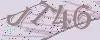
效果图如下:
官网博客地址:
https://blog.csdn.net/u010142437/article/details/103086171
本文分享自微信公众号 - 源代码社区(ydmsq666)。
如有侵权,请联系 support@oschina.cn 删除。
本文参与“OSC源创计划”,欢迎正在阅读的你也加入,一起分享。