
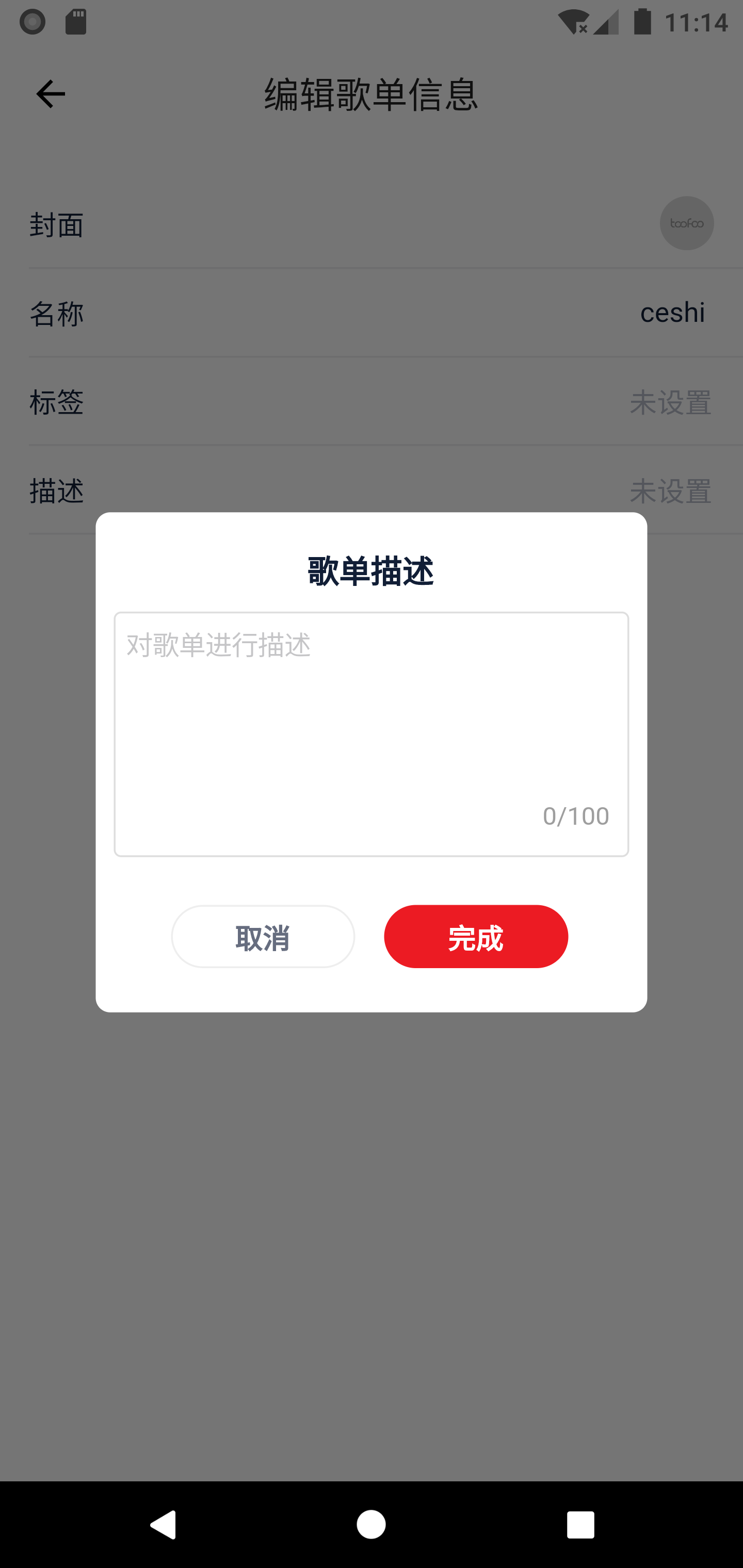
Screenshot_1612840493.png
要实现一个这样对话框。难点是什么?
难点
自定义一个Widget 继承Dialog
class SongSheetIntroduceDialog extends Dialog
在我们输入文本之后下面的输入字数会变,可能马上你会想到使用setState不就完了嘛!....可是Dialog 并没有setState方法
我想到的解决办法就是输入文本框单独提取出来继承StatefulWidget 这样就可以使用setState方法来更新了。
不多说了分享一下代码。分享使人快乐!!!!
1import 'package:flutter/cupertino.dart';
2import 'package:flutter/material.dart';
3import 'package:toofoo/common/color/colorsUtil.dart';
4import 'package:toofoo/common/screenAdaper/ScreenAdaper.dart';
5
6import 'introduce_input.dart';
7
8typedef CancelCallback = void Function();
9typedef OkCallback = void Function(String inputTxt);
10
11// ignore: must_be_immutable
12class SongSheetIntroduceDialog extends Dialog {
13  final CancelCallback cancelCallback;
14  final OkCallback okCallback;
15  String inputText = '';
16
17  SongSheetIntroduceDialog({Key key, this.cancelCallback, this.okCallback}) : super(key: key);
18
19  @override
20  Widget build(BuildContext context) {
21    return Padding(
22      padding: EdgeInsets.all(53),
23      child: Material(
24        type: MaterialType.transparency,
25        child: Column(
26          mainAxisAlignment: MainAxisAlignment.center,
27          children: [
28            Container(
29              decoration: ShapeDecoration(
30                  color: Color(0xFFFFFFFF),
31                  shape: RoundedRectangleBorder(
32                      borderRadius: BorderRadius.all(
33                    Radius.circular(8.0),
34                  ))),
35              child: Column(
36                children: [
37                  Padding(
38                    padding: EdgeInsets.fromLTRB(10, 19, 10, 10),
39                    child: Text(
40                      '歌单描述',
41                      style: TextStyle(
42                          fontWeight: FontWeight.bold,
43                          fontSize: ScreenAdaper.sp(32),
44                          color: ColorsUtil.hexStringColor('#111E36')),
45                      maxLines: 1,
46                    ),
47                  ),
48                  Column(
49                    crossAxisAlignment: CrossAxisAlignment.start,
50                    children: [
51                      InputWidget(
52                        placeholder: '对歌单进行描述',
53                        onChanged: (String txt){
54                          inputText = txt;
55                        },
56                      ),
57                      _buttonWidget()
58                    ],
59                  )
60                ],
61              ),
62            ),
63          ],
64        ),
65      ),
66    );
67  }
68
69  Widget _buttonWidget() {
70    return Container(
71      margin: EdgeInsets.only(top: 10, bottom: 18),
72      child: Row(
73        mainAxisAlignment: MainAxisAlignment.center,
74        children: [
75          FlatButton(
76            padding: EdgeInsets.all(2),
77            // 水波纹颜色
78            colorBrightness: Brightness.light,
79            shape: RoundedRectangleBorder(
80                borderRadius: BorderRadius.all(Radius.circular(18)),
81                side: BorderSide(
82                    color: Color(0xFFFFFFFF),
83                    style: BorderStyle.solid,
84                    width: 1)),
85            clipBehavior: Clip.antiAlias,
86            onPressed: () {
87              print('----');
88              cancelCallback();
89            },
90            child: Container(
91              alignment: Alignment.center,
92              width: 102,
93              height: 35,
94              decoration: BoxDecoration(
95                  border: Border.all(
96                      color: ColorsUtil.hexStringColor('#EEEEEE'), width: 1),
97                  borderRadius: BorderRadius.circular((18.0))),
98              child: Text(
99                '取消',
100                style: TextStyle(
101                    fontWeight: FontWeight.bold,
102                    fontSize: ScreenAdaper.sp(28),
103                    color: ColorsUtil.hexStringColor('#666D7F')),
104                maxLines: 1,
105              ),
106            ),
107          ),
108          SizedBox(
109            width: 10,
110          ),
111          FlatButton(
112            padding: EdgeInsets.all(4),
113            // 水波纹颜色
114            colorBrightness: Brightness.light,
115            shape: RoundedRectangleBorder(
116                borderRadius: BorderRadius.all(Radius.circular(18)),
117                side: BorderSide(
118                    color: Color(0xFFFFFFFF),
119                    style: BorderStyle.solid,
120                    width: 1)),
121            clipBehavior: Clip.antiAlias,
122            onPressed: () {
123              print('----');
124              okCallback(inputText);
125            },
126            child: Container(
127              alignment: Alignment.center,
128              width: 102,
129              height: 35,
130              decoration: BoxDecoration(
131                  color: ColorsUtil.hexStringColor('#EC1B23'),
132                  borderRadius: BorderRadius.circular((18.0))),
133              child: Text(
134                '完成',
135                style: TextStyle(
136                    fontWeight: FontWeight.bold,
137                    fontSize: ScreenAdaper.sp(28),
138                    color: ColorsUtil.hexStringColor('#FFFFFF')),
139                maxLines: 1,
140              ),
141            ),
142          )
143        ],
144      ),
145    );
146  }
147}
148
输入框部分
1import 'package:flutter/cupertino.dart';
2import 'package:flutter/material.dart';
3import 'package:flutter_screenutil/screenutil.dart';
4import 'package:toofoo/common/base_component/base_image.dart';
5import 'package:toofoo/common/base_component/base_text.dart';
6import 'package:toofoo/common/divider/custom_divider.dart';
7import 'package:toofoo/common/toast/toast_util.dart';
8import 'package:toofoo/views/control_module/song_order_page/model/EquipmentLineReserve.dart';
9import 'package:toofoo/views/disccover_module/song_sheet_detail/model/SongMoreDialogModel.dart';
10import 'package:toofoo/views/disccover_module/song_sheet_detail/model/UserCollectionTrackIceDTO.dart';
11
12import '../state.dart';
13
14typedef OnChanged = void Function(String txt);
15
16class InputWidget extends StatefulWidget {
17  const InputWidget({
18    this.placeholder='请输入',
19    this.onChanged,
20    this.maxLength = 100,
21    this.maxLines = 10,
22  });
23
24  final String placeholder;
25  final OnChanged onChanged;
26  final int maxLength;
27  final int maxLines;
28
29  @override
30  _InputWidgetState createState() => _InputWidgetState();
31}
32
33class _InputWidgetState extends State<InputWidget> {
34
35  String result = '';
36
37  @override
38  Widget build(BuildContext context) {
39    return _textInput();
40  }
41
42  Widget _textInput() {
43    return Stack(
44      alignment: AlignmentDirectional.bottomEnd,
45      children: [
46        Container(
47          height: 136,
48          decoration: BoxDecoration(
49            color: Colors.white,
50            borderRadius: BorderRadius.all(
51              Radius.circular(4.0),
52            ),
53            border: Border.all(color: Color(0xFFDEDEDE)),
54          ),
55          alignment: AlignmentDirectional.topStart,
56          margin: EdgeInsets.only(bottom: 10,left: 10,right: 10),
57          child: CupertinoTextField(
58            placeholder: widget.placeholder,
59            style: TextStyle(fontSize: 15, color: Colors.black),
60            decoration: BoxDecoration(
61              borderRadius: BorderRadius.all(Radius.circular(2)),
62            ),
63            maxLines: widget.maxLines,
64            maxLength: widget.maxLength,
65            textInputAction: TextInputAction.unspecified,
66            onChanged: (str) {
67              setState(() {
68                result = str;
69                if(widget.onChanged != null){
70                  widget.onChanged(str);
71                }
72              });
73            },
74          ),
75        ),
76        Container(
77          margin: EdgeInsets.only(bottom: 25, right: 20),
78          child: Text(
79            result.length.toString() + '/'+widget.maxLength.toString(),
80            style: TextStyle(color: Colors.grey),
81          ),
82        )
83      ],
84    );
85  }
86
87}
88
使用
1void _showSongSheetIntroduceDialog(BuildContext context, Dispatch dispatch) {
2  showDialog(
3      context: context,
4      builder: (context) {
5        return SongSheetIntroduceDialog(
6          cancelCallback: () {
7            Navigator.pop(context);
8          },
9          okCallback: (String inputTxt) {
10            Navigator.pop(context);
11
12          },
13        );
14      });
15}
本文同步分享在 博客“赵哥窟”(JianShu)。
如有侵权,请联系 support@oschina.cn 删除。
本文参与“OSC源创计划”,欢迎正在阅读的你也加入,一起分享。