
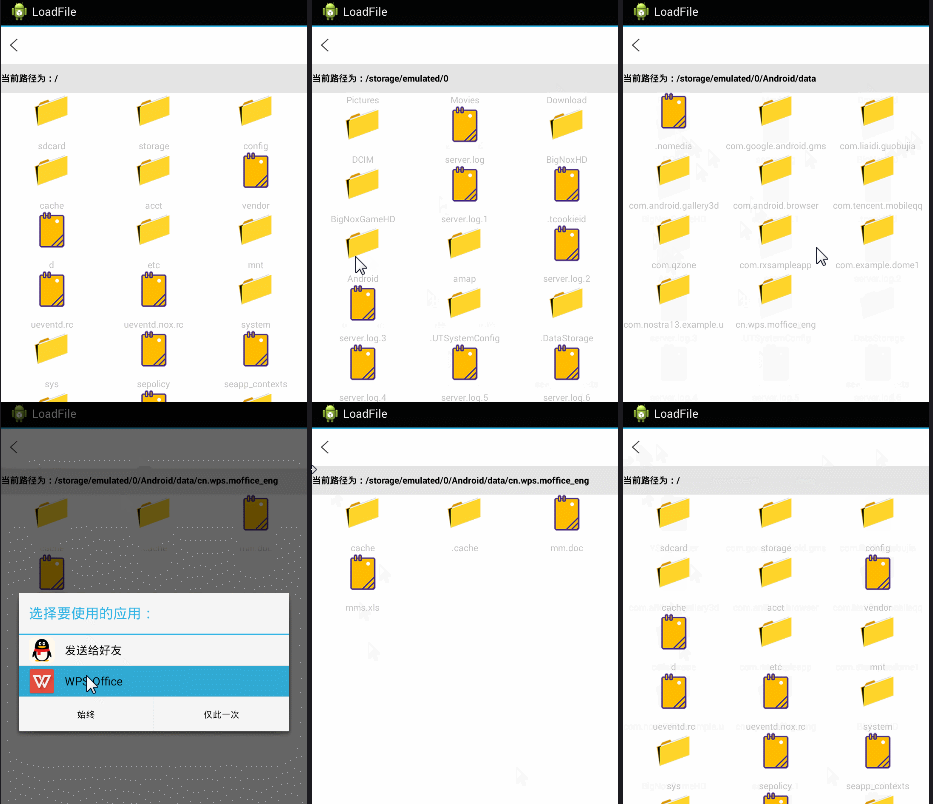
此案例主要说的是Android使用GridView加载SD卡下所有目录,文件夹多层遍历,文件图标修改,设置文件对应打开方式等功能。
如图:
1public class GridViewFile extends Activity implements View.OnClickListener {
2
3	private Context context;
4	private TextView tv_title, textView;
5	private GridView listView;
6	private final String MUSIC_PATH = "/";
7
8	// 记录当前路径下 的所有文件的数组
9	File currentParent;
10	// 记录当前路径下的所有文件的文件数组
11	File[] currentFiles;
12
13	@Override
14	protected void onCreate(Bundle savedInstanceState) {
15		super.onCreate(savedInstanceState);
16		setContentView(R.layout.activity_main);
17		context = this;
18		initView();
19	}
20
21	public void initView() {
22		findViewById(R.id.public_top_img_close).setOnClickListener(this);
23		listView = (GridView) findViewById(R.id.gridview);
24		textView = (TextView) findViewById(R.id.llss);
25		onLoad();
26	}
27
28	public void onLoad() {
29		ListSongsName();
30
31	}
32
33	private void ListSongsName() {
34
35		// 获取系统的SD卡目录
36		File root = new File(MUSIC_PATH);
37		// 如果SD卡存在
38		if (root.exists()) {
39			currentParent = root;
40			currentFiles = root.listFiles();// 获取root目录下的所有文件
41			// 使用当前陆慕下的全部文件,文件夹来填充ListView
42			inflateListView(currentFiles);
43		}
44		// 为ListView的列表项的单击事件绑定监视器
45		listView.setOnItemClickListener(new AdapterView.OnItemClickListener() {
46			@Override
47			public void onItemClick(AdapterView<?> parent, View view,
48					int position, long id) {
49				// 用户点击了文件,则调用手机已安装软件操作该文件
50				if (currentFiles[position].isFile()) {
51					onError(currentFiles[position].getPath() + "1");
52					Intent intent = OpenFile.openFile(currentFiles[position]
53							.getPath());
54					startActivity(intent);
55				} else {
56
57					// 获取currentFiles[position]路径下的所有文件
58					File[] tmp = currentFiles[position].listFiles();
59					if (tmp == null || tmp.length == 0) {
60						Toast.makeText(GridViewFile.this, "空文件夹!",
61								Toast.LENGTH_SHORT).show();
62					}// if
63					else {
64						// 获取用户单击的列表项对应的文件夹,设为当前的父文件夹
65						currentParent = currentFiles[position];
66						// 保存当前文件夹内的全部问价和文件夹
67						currentFiles = tmp;
68						inflateListView(currentFiles);
69					}
70				}
71			}
72		});
73
74	}
75
76	// 更新列表
77	private void inflateListView(File[] files) {
78		if (files.length == 0)
79			Toast.makeText(GridViewFile.this, "sd卡不存在", Toast.LENGTH_SHORT)
80					.show();
81		else {
82			// 创建一个List集合,List集合的元素是Map
83			List<Map<String, Object>> listItems = new ArrayList<Map<String, Object>>();
84			for (int i = 0; i < files.length; i++) {
85				Map<String, Object> listItem = new HashMap<String, Object>();
86				// 如果当前File是文件夹,使用folder图标;否则使用file图标
87				Log.i("path", files[i].getPath());
88				Log.i("path", files[i].getName());
89				if (files[i].isDirectory())
90					listItem.put("icon", R.drawable.file_wenjianjia);
91				// else if(files[i].isFi)
92				else
93					listItem.put("icon", R.drawable.file_wenjian1);
94				listItem.put("fileName", files[i].getName());
95				// 添加List项
96				listItems.add(listItem);
97			}
98			// 创建一个SimpleAdapter
99			SimpleAdapter simpleAdapter = new SimpleAdapter(this, listItems,
100					R.layout.acheshi_item, new String[] { "icon", "fileName" },
101					new int[] { R.id.imageView1, R.id.text_path });
102			// 位ListView设置Adpter
103			listView.setAdapter(simpleAdapter);
104			try {
105				textView.setText("当前路径为:" + currentParent.getCanonicalPath());
106			} catch (IOException e) {
107				e.printStackTrace();
108			}
109		}
110	}
111
112	@Override
113	public void onClick(View v) {
114		onbey();
115	}
116
117	// 返回上层菜单
118	private void onbey() {
119		try {
120			if (!MUSIC_PATH.equals(currentParent.getCanonicalPath())) {
121				// 获取上一层目录
122				currentParent = currentParent.getParentFile();
123				// 列出当前目录下的所有文件
124				currentFiles = currentParent.listFiles();
125				// 再次更新ListView
126				inflateListView(currentFiles);
127			} else {
128				new AlertDialog.Builder(this)
129						.setIcon(R.drawable.ic_launcher)
130						.setTitle("提示")
131						.setMessage("确定要退出吗?")
132						.setPositiveButton("确定",
133								new DialogInterface.OnClickListener() {
134									@Override
135									public void onClick(DialogInterface dialog,
136											int which) {
137										finish();
138									}
139								})
140						.setNegativeButton("取消",
141								new DialogInterface.OnClickListener() {
142									@Override
143									public void onClick(DialogInterface dialog,
144											int which) {
145									}
146								}).create().show();
147			}
148		} catch (Exception e) {
149			e.printStackTrace();
150		}
151	}
152
153	public void onError(Object error) {
154		Toast.makeText(getApplicationContext(), error + "", Toast.LENGTH_LONG)
155				.show();
156	}
157
158	protected void onDestroy() {
159		super.onDestroy();
160	}
161
162}
不要忘记在AndroidManifest.xml加权限哦!
1 <!-- SD卡权限 -->
2    <uses-permission android:name="android.permission.WRITE_EXTERNAL_STORAGE" />
3    <uses-permission android:name="android.permission.MOUNT_UNMOUNT_FILESYSTEMS" />