
CA(Certificate Authority)证书颁发机构主要负责证书的颁发、管理以及归档和吊销。证书内包含了拥有证书者的姓名、地址、电子邮件帐号、公钥、证书有效期、发放证书的CA、CA的数字签名等信息。证书主要有三大功能:加密、签名、身份验证。
1.什么是CA认证?
CA认证,即CA认证机构,为电子签名相关各方提供真实性、可靠性验证的行为。
2.什么是CA证书?
证书实际是由证书签证机关(CA)签发的对用户的公钥的认证。
3.CA证书类型?
- 证书颁发机构自签名证书
- 服务器证书
- 用户证书
二. CA服务器部署
1. 部署环境
1[root@linux-ca ~]# touch /etc/pki/CA/index.txt  #index.txt:索引文件,用于匹配证书编号;
2[root@linux-ca ~]# echo 01 >/etc/pki/CA/serial  #serial:证书序列号文件,只在首次生成证书时赋值。
3[root@linux-ca ~]# cat /etc/pki/CA/serial
401
2. 生成密钥
[root@linux-ca private]# (umask 077; openssl genrsa -out /etc/pki/CA/private/cakay.pem 2048)
genrsa:生成私钥;
-out:私钥的存放路径,cakey.pem:为密钥名,与配置文件中保持一致;
2048:密钥长度,默认为1024。
3. 修改配置文件/etc/pki/tls/openssl.cnf
140 [ CA_default ]
2 41
3 42 dir             = /etc/pki/CA           # Where everything is kept
4 43 certs           = $dir/certs            # Where the issued certs are kept
5 44 crl_dir         = $dir/crl              # Where the issued crl are kept
6 45 database        = $dir/index.txt        # database index file.
7 46 #unique_subject = no                    # Set to 'no' to allow creation of
8 47                                         # several ctificates with same subject.
9 48 new_certs_dir   = $dir/newcerts         # default place for new certs.
10 49
11 50 certificate     = $dir/cacert.pem       # The CA certificate
12 51 serial          = $dir/serial           # The current serial number
13 52 crlnumber       = $dir/crlnumber        # the current crl number
14 53                                         # must be commented out to leave a V1 CRL
15 54 crl             = $dir/crl.pem          # The current CRL
16 55 private_key     = $dir/private/cakey.pem# The private key
17 56 RANDFILE        = $dir/private/.rand    # private random number file
18
19 83 # For the CA policy
20 84 [ policy_match ]
21 85 countryName             = match
22 86 stateOrProvinceName     = match
23 87 organizationName        = match
24 88 organizationalUnitName  = optional
25 89 commonName              = supplied
26 90 emailAddress            = optional
27
28128 [ req_distinguished_name ]
29129 countryName                     = Country Name (2 letter code)
30130 countryName_default             = US
31131 countryName_min                 = 2
32132 countryName_max                 = 2
33133
34134 stateOrProvinceName             = State or Province Name (full name)
35135 stateOrProvinceName_default     = California
36136
37137 localityName                    = Locality Name (eg, city)
38138 localityName_default            = Redwood City
39139
40140 0.organizationName              = Organization Name (eg, company)
41141 0.organizationName_default      = Electronic Arts, Inc.
42142
43143 # we can do this but it is not needed normally :-)
44144 #1.organizationName             = Second Organization Name (eg, company)
45145 #1.organizationName_default     = World Wide Web Pty Ltd
46146
47147 organizationalUnitName          = Organizational Unit Name (eg, section)
48148 organizationalUnitName_default  = EA Online/pogo.com
49149
50150 commonName                      = Common Name (eg, your name or your server\'s hostname)
51151 commonName_max                  = 64
52152 commonName_default              =
53153
54154 emailAddress                    = Email Address
55155 emailAddress_max                = 64
56156 emailAddress_default            =
4. CA 创建自签根证书
1[root@linux-ca CA]# openssl req -new -x509 -key /etc/pki/CA/private/cakay.pem -out /etc/pki/CA/cacert.pem -days 365
2You are about to be asked to enter information that will be incorporated
3into your certificate request.
4What you are about to enter is what is called a Distinguished Name or a DN.
5There are quite a few fields but you can leave some blank
6For some fields there will be a default value,
7If you enter '.', the field will be left blank.
8-----
9Country Name (2 letter code) [US]:
10State or Province Name (full name) [California]:
11Locality Name (eg, city) [Redwood City]:
12Organization Name (eg, company) [Electronic Arts, Inc.]:
13Organizational Unit Name (eg, section) [EA Online/pogo.com]:
14Common Name (eg, your name or your server's hostname) []:cacert
15Email Address []:vxxxxxxxxxxxxxxxxx
req:生成证书签署请求;
-x509:生成自签署证书;
-days n:证书的有效天数;
-new:新请求;
-key /path/to/keyfile:指定私钥文件;
-out /path/to/somefile:输出文件位置。
三. 客户端申请证书
1. 生成客户端私钥
1[root@web ~]# mkdir ssl
2[root@web ~]# cd ssl/
3[root@web ssl]# (umask 077; openssl genrsa -out /root/ssl/web.key 2048)
4Generating RSA private key, 2048 bit long modulus
5.......................................+++
6.................................................+++
7e is 65537 (0x10001)
2. 生成证书请求文件
1[root@web ssl]# openssl req -new -key /root/ssl/web.key -out /root/ssl/web.csr
2You are about to be asked to enter information that will be incorporated
3into your certificate request.
4What you are about to enter is what is called a Distinguished Name or a DN.
5There are quite a few fields but you can leave some blank
6For some fields there will be a default value,
7If you enter '.', the field will be left blank.
8-----
9Country Name (2 letter code) [XX]:US
10State or Province Name (full name) []:California
11Locality Name (eg, city) [Default City]:Redwood City
12Organization Name (eg, company) [Default Company Ltd]:Electronic Arts, Inc.
13Organizational Unit Name (eg, section) []:EA Online/pogo.com
14Common Name (eg, your name or your server's hostname) []:web
15Email Address []:xxxxxxxxxxx
3. 将生成的申请文件发送到CA颁发服务器
[root@web ssl]# scp web.csr root@10.17.160.241:/etc/pki/CA/csr/
四. CA服务器为客户端颁发证书
1.为客户端颁发证书
1[root@linux-ca CA]# openssl ca -in /etc/pki/CA/csr/web.csr -out /etc/pki/CA/certs/web.crt -days 365
2Using configuration from /etc/pki/tls/openssl.cnf
3Check that the request matches the signature
4Signature ok
5Certificate Details:
6        Serial Number: 1 (0x1)
7        Validity
8            Not Before: May 15 06:58:48 2019 GMT
9            Not After : May 14 06:58:48 2020 GMT
10        Subject:
11            countryName               = US
12            stateOrProvinceName       = California
13            organizationName          = Electronic Arts, Inc.
14            organizationalUnitName    = EA Online/pogo.com
15            commonName                = web
16            emailAddress              = vli@contractor.ea.com
17        X509v3 extensions:
18            X509v3 Basic Constraints:
19                CA:FALSE
20            Netscape Comment:
21                OpenSSL Generated Certificate
22            X509v3 Subject Key Identifier:
23                4E:FE:C1:E2:17:92:C6:D1:48:42:70:1F:59:95:FA:9D:49:76:B0:47
24            X509v3 Authority Key Identifier:
25                keyid:82:81:30:91:40:F8:D2:FD:B4:D5:A8:52:DF:FE:D2:62:12:38:53:7F
26
27Certificate is to be certified until May 14 06:58:48 2020 GMT (365 days)
28Sign the certificate? [y/n]:y
29
30
311 out of 1 certificate requests certified, commit? [y/n]y
32Write out database with 1 new entries
33Data Base Updated
2. 将生成的证书发送给申请的客户端
五. 吊销证书
1. 获取证书serial
1[root@linux-ca CA]# openssl x509 -in certs/web.crt -noout -serial -subject
2serial=01
3subject= /C=US/ST=California/O=Electronic Arts, Inc./OU=EA Online/pogo.com/CN=web/emailAddress=xxxxxxxxxxxxxx
x509:证书格式;
-in:要吊销的证书;
-noout:不输出额外信息;
-serial:显示序列号;
-subject:显示subject信息。
二) CA验证信息
1、节点提交的serial和subject信息来验证与index.txt文件中的信息是否一致

2、吊销证书

-revoke:删除证书。
查看被吊销的证书列表

3、生成吊销证书的编号(如果是第一次吊销)

4、更新证书吊销列表

-gencrl:生成证书吊销列表;
5、查看crl文件内容
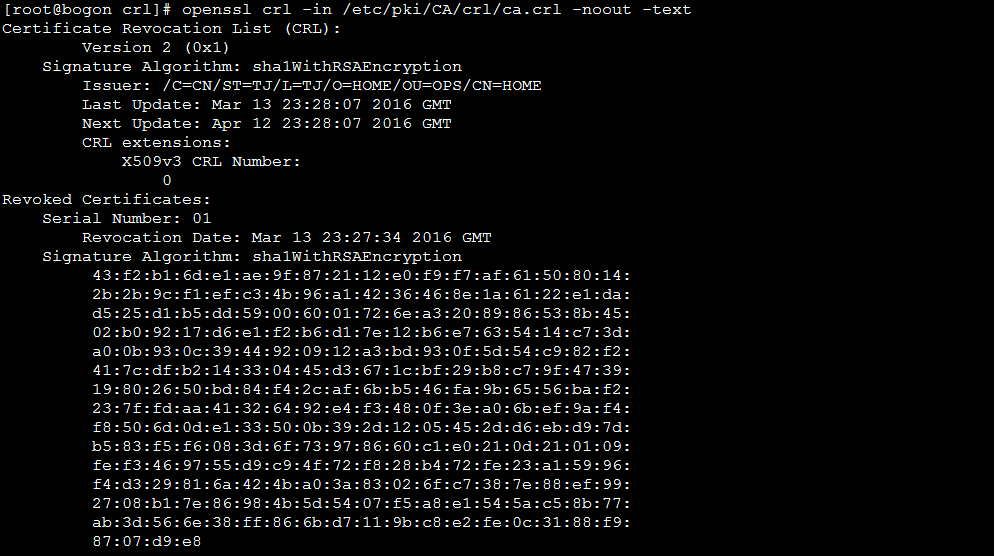
-text:以文本形式显示。