[TOC]
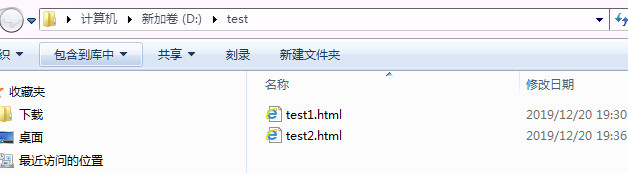
使用freemarker将页面生成html文件,本节测试html文件生成的方法:
1、使用模板文件静态化 定义模板文件,使用freemarker静态化程序生成html文件。 2、使用模板字符串静态化 定义模板字符串,使用freemarker静态化程序生成html文件。
1. pom.xml配置
1<?xml version="1.0" encoding="UTF-8"?>
2<project xmlns="http://maven.apache.org/POM/4.0.0" xmlns:xsi="http://www.w3.org/2001/XMLSchema-instance"
3         xsi:schemaLocation="http://maven.apache.org/POM/4.0.0 https://maven.apache.org/xsd/maven-4.0.0.xsd">
4    <modelVersion>4.0.0</modelVersion>
5    <parent>
6        <groupId>org.springframework.boot</groupId>
7        <artifactId>spring-boot-starter-parent</artifactId>
8        <version>2.2.2.RELEASE</version>
9        <relativePath/> <!-- lookup parent from repository -->
10    </parent>
11    <groupId>com.example</groupId>
12    <artifactId>demo</artifactId>
13    <version>0.0.1-SNAPSHOT</version>
14    <name>demo</name>
15    <description>Demo project for Spring Boot</description>
16
17    <properties>
18        <java.version>1.8</java.version>
19    </properties>
20
21    <dependencies>
22        <dependency>
23            <groupId>org.springframework.boot</groupId>
24            <artifactId>spring-boot-starter-web</artifactId>
25        </dependency>
26        <dependency>
27            <groupId>org.springframework.boot</groupId>
28            <artifactId>spring-boot-starter-freemarker</artifactId>
29        </dependency>
30        <dependency>
31            <groupId>org.projectlombok</groupId>
32            <artifactId>lombok</artifactId>
33        </dependency>
34        <dependency>
35            <groupId>org.apache.commons</groupId>
36            <artifactId>commons-io</artifactId>
37            <version>1.3.2</version>
38        </dependency>
39        <dependency>
40            <groupId>org.springframework.boot</groupId>
41            <artifactId>spring-boot-starter-test</artifactId>
42            <scope>test</scope>
43            <exclusions>
44                <exclusion>
45                    <groupId>org.junit.vintage</groupId>
46                    <artifactId>junit-vintage-engine</artifactId>
47                </exclusion>
48            </exclusions>
49        </dependency>
50    </dependencies>
51
52    <build>
53        <plugins>
54            <plugin>
55                <groupId>org.springframework.boot</groupId>
56                <artifactId>spring-boot-maven-plugin</artifactId>
57            </plugin>
58        </plugins>
59    </build>
60
61</project>
62
2. application.yml配置
1server:
2  port: 8088
3spring:
4  application:
5    name: test-freemarker
6  #    freemarker配置
7  freemarker:
8    cache: false  #关闭模板缓存,方便测试
9    settings:
10      template_update_delay: 0  #检查模板更新延迟时间,设置为0表示立即检查,如果时间大于0会有缓存不方便进行模板测试
11    template-loader-path: classpath:/templates
12    charset: UTF-8
13    check-template-location: true
14    suffix: .ftl
15    content-type: text/html
16    expose-request-attributes: true
17    expose-session-attributes: true
18    request-context-attribute: request
19
3. 使用模板文件静态化
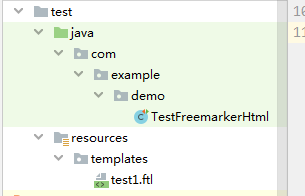
3.1 创建测试类,编写测试方法
1package com.example.demo;
2
3import freemarker.template.Configuration;
4import freemarker.template.Template;
5import freemarker.template.TemplateException;
6
7import org.apache.commons.io.IOUtils;
8import org.junit.jupiter.api.Test;
9import org.springframework.boot.test.context.SpringBootTest;
10import org.springframework.ui.freemarker.FreeMarkerTemplateUtils;
11
12import java.io.File;
13import java.io.FileOutputStream;
14import java.io.IOException;
15import java.io.InputStream;
16import java.util.HashMap;
17import java.util.Map;
18
19/**
20 * @author john
21 * @date 2019/12/20 - 19:09
22 */
23@SpringBootTest
24public class TestFreemarkerHtml {
25    //基于模板生成静态化文件
26    @Test
27    public void testGenerateHtml() throws IOException, TemplateException {
28        //创建配置类
29        Configuration configuration = new Configuration(Configuration.getVersion());
30//设置模板路径
31        String classpath = this.getClass().getResource("/").getPath();
32        configuration.setDirectoryForTemplateLoading(new File(classpath + "/templates/"));
33        //设置字符集
34        //configuration.setDefaultEncoding("UTF‐8");
35        //加载模板
36        Template template = configuration.getTemplate("test1.ftl");
37        //数据模型
38        Map<String, Object> map = new HashMap<>();
39        map.put("name", "john");
40        //静态化
41        String content = FreeMarkerTemplateUtils.processTemplateIntoString(template, map);
42        //静态化内容
43        System.out.println(content);
44        InputStream inputStream = IOUtils.toInputStream(content);
45        //输出文件
46        FileOutputStream fileOutputStream = new FileOutputStream(new File("d:/test/test1.html"));
47        int copy = IOUtils.copy(inputStream, fileOutputStream);
48    }
49}
50
编写模板
1<html>
2<head>
3    <title>hello world!</title>
4</head>
5<body>
6${name}<br/>
7<#assign text="{'bank':'工商银行','account':'10101920201920212'}" />
8<#assign data=text?eval />
9开户行:${data.bank} 账号:${data.account}
10</body>
11</html>
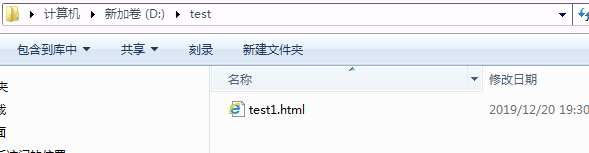
生成文件
3.2 使用模板字符串静态化
1package com.example.demo;
2
3import freemarker.cache.StringTemplateLoader;
4import freemarker.template.Configuration;
5import freemarker.template.Template;
6import freemarker.template.TemplateException;
7
8import org.apache.commons.io.IOUtils;
9import org.junit.jupiter.api.Test;
10import org.springframework.boot.test.context.SpringBootTest;
11import org.springframework.ui.freemarker.FreeMarkerTemplateUtils;
12
13import java.io.File;
14import java.io.FileOutputStream;
15import java.io.IOException;
16import java.io.InputStream;
17import java.util.HashMap;
18import java.util.Map;
19
20/**
21 * @author john
22 * @date 2019/12/20 - 19:09
23 */
24@SpringBootTest
25public class TestFreemarkerHtml {
26    //基于模板字符串生成静态化文件
27    @Test
28    public void testGenerateHtmlByString() throws IOException, TemplateException {
29        //创建配置类
30        Configuration configuration = new Configuration(Configuration.getVersion());
31        //模板内容,这里测试时使用简单的字符串作为模板
32        String templateString = "" +
33                "<html>\n" +
34                "  <head></head>\n" +
35                "  <body>\n" +
36                "  名称:${name}\n" +
37                "  </body>\n" +
38                "</html>";
39
40        //模板加载器
41        StringTemplateLoader stringTemplateLoader = new StringTemplateLoader();
42        stringTemplateLoader.putTemplate("template", templateString);
43        configuration.setTemplateLoader(stringTemplateLoader);
44        //得到模板
45        Template template = configuration.getTemplate("template", "utf‐8");
46        //数据模型
47        Map<String, Object> map = new HashMap<>();
48        map.put("name", "john");
49        //静态化
50        String content = FreeMarkerTemplateUtils.processTemplateIntoString(template, map);
51        //静态化内容
52        System.out.println(content);
53        InputStream inputStream = IOUtils.toInputStream(content);
54        //输出文件
55        FileOutputStream fileOutputStream = new FileOutputStream(new File("d:/test/test2.html"));
56        IOUtils.copy(inputStream, fileOutputStream);
57    }
58}
59