
记录一下搭建 Spring Cloud 过程中踩过的一些坑,测试的东西断断续续已经弄了好多了,一直没有时间整理搭建过程,时间啊时间
Spring 版本
- Spring Boot:2.0.6.RELEASE
- Spring Cloud:Finchley.SR2
多环境配置切换
使用 Spring Cloud 来处理
多配置的切换在开发中真是很常用,能有效提高效率。一些成熟的框架基本都有关于配置切换的解决方案,当然了 Spring Cloud 也不例外!
先看看我的配置文件结构:

配置文件通过后缀区分:dev - 开发环境配置,test - 测试环境配置,prod - 生产环境配置。
bootstrap.yml 文件来配置加载那个配置文件:
1spring:
2  profiles:
3    active: dev
spring.profiles.active 配置的就是需要加载的配置文件,这样就能通过配置来加载不同的配置文件。
这里说明一下配置的加载流程:bootstrap.yml ----> bootstrap-{profile}.yml ----> application.yml ----> application-{profile}.yml
也就是说,无论 bootstrap 还是 appliction 都可以做多环境配置切换的。
但是,我们一般都是打包成 jar 包来运行,这样分别打包还是有点麻烦,所以可以打包一个 jar 包,通过添加启动参数来加载不同的配置:
1java -jar xxx.jar --spring.profiles.active=dev 表示使用开发环境的配置
2java -jar xxx.jar --spring.profiles.active=test 表示使用测试环境的配置
3java -jar xxx.jar --spring.profiles.active=prod 表示使用生产环境的配置
这里贴一个我封装的启动 jar 包的 shell 脚本:
1#!/bin/bash
2JAR_DIR='/data'
3JAR_FILE=''
4LOG_DIR='/dev/null'
5CONF_ENV='dev'
6JAR_NUM=1
7
8if read -t 30 -p "Enter the jar storage directory(default: $JAR_DIR): " I_JAR_DIR
9then
10
11    if [ "$I_JAR_DIR" != "" ]
12    then
13        if [ ! -d "$I_JAR_DIR" ];then
14            echo "Error: Directory does not exist;"
15            exit 1
16        fi
17        JAR_DIR=$I_JAR_DIR
18    fi
19
20else
21    echo
22    echo "Error: Sorry, too slow"
23    exit 1
24fi
25
26JAR_FILE_LIST=$(ls -1 $JAR_DIR | awk '/.*\.jar$/')
27if [ "$JAR_FILE_LIST" = "" ]
28then
29    echo "Error: There is no runnable jar package"
30    exit 1
31else
32    echo "--------------------------------------------------"
33    echo "$JAR_FILE_LIST" | awk '/.*\.jar$/{print NR,$0}'
34    echo "--------------------------------------------------"
35
36    if read -t 30 -p "Enter the line number to run the jar package(default: $JAR_NUM): " I_JAR_NUM
37    then
38        if [ "$I_JAR_NUM" = "" ];then
39            I_JAR_NUM=$JAR_NUM
40        fi
41        if [ ! -n "$(echo $I_JAR_NUM| sed -n "/^[0-9]\+$/p")" ] || [ $I_JAR_NUM -lt 1 ]
42        then
43            echo "Error: Illegal jar package line number"
44            exit 1
45        else
46            JARSTR=$(echo "$JAR_FILE_LIST" | awk '{print $0 "|||"}')
47            OLD_IFS="$IFS"
48            IFS="|||"
49            JAR_TEM=($JARSTR)
50            IFS="$OLD_IFS"
51            JAR_ARRAY=()
52            JAR_ARRAY_i=1
53            for var in ${JAR_TEM[@]}
54            do
55                if [ "$var" != "" ]
56                then
57                    JAR_ARRAY[$JAR_ARRAY_i]=$var
58                    JAR_ARRAY_i=$(($JAR_ARRAY_i+1))
59                fi
60            done
61            JAR_NUM=$I_JAR_NUM
62        fi
63
64    else
65        echo
66        echo "Error: Sorry, too slow"
67        exit 1
68    fi
69fi
70
71if read -t 30 -p "Enter the log storage directory(default: $LOG_DIR): " I_LOG_DIR
72then
73
74    if [ "$I_LOG_DIR" != "" ]
75    then
76        if [ ! -d "$I_LOG_DIR" ];then
77            echo "Error: Directory does not exist;"
78            exit 1
79        fi
80        LOG_DIR=$I_LOG_DIR
81    fi
82
83else
84    echo
85    echo "Error: Sorry, too slow"
86    exit 1
87fi
88
89if read -t 30 -p "Input configuration environment(default: $CONF_ENV): " I_CONF_ENV
90then
91
92    if [ "$I_CONF_ENV" != "" ]
93    then
94        CONF_ENV=$I_CONF_ENV
95    fi
96
97else
98    echo
99    echo "Error: Sorry, too slow"
100    exit 1
101fi
102
103ln -sf /usr/share/zoneinfo/Asia/Shanghai /etc/localtime
104
105if [ "$LOG_DIR" != "/dev/null" ]
106then
107    LOG_URI=${LOG_DIR%*/}/${JAR_ARRAY[$JAR_NUM]}_"$CONF_ENV"_$(date "+%Y_%b_%d_%H_%M_%S_%N").txt
108else
109    LOG_URI=$LOG_DIR
110fi
111exec java -jar ${JAR_DIR%*/}/${JAR_ARRAY[$JAR_NUM]} > $LOG_URI --spring.profiles.active=$CONF_ENV &
112echo "The successful running."
使用环境变量来处理
也有很多人选择使用这种方式来处理,这主要是使用场景是使用 Docker 构建 Sprign 项目,通过运行容器时候初始化一些环境变量来指定配置。
可以参考下面的文件了解一下:
docker-compose.yml:
1# local development configuration
2
3version: '2.1'
4services:
5  standalone.eureka-develop:
6    extends:
7      service: base-eureka
8      file: docker-compose-base.yml
9    container_name: ${CONTAINER_HOST_NAME:-standalone.eureka}
10    environment:
11    - CONTAINER_HOST_NAME=${CONTAINER_HOST_NAME:-standalone.eureka}
12    - EUREKA_CLIENT_FETCHREGISTRY=false
13    - EUREKA_CLIENT_REGISTERWITHEUREKA=false
14    - EUREKA_CLIENT_SERVICEURL_DEFAULTZONE=http://${SPRING_SECURITY_USER_NAME:-user}:${SPRING_SECURITY_USER_PASSWORD:-user_pass}@standalone.eureka:${SERVER_PORT:-8761}/eureka/
15    #- EUREKA_INSTANCE_HOSTNAME=${CONTAINER_HOST_NAME:-standalone.eureka}
16    - EUREKA_INSTANCE_IPADDRESS=${HOST_IPADDRESS:-172.16.238.10}
17
18
19    - EUREKA_INSTANCE_REGISTRY_DEFAULTOPENFORTRAFFICCOUNT=${EUREKA_INSTANCE_REGISTRY_DEFAULTOPENFORTRAFFICCOUNT:-1}
20    - EUREKA_SERVER_ENABLESELFPRESERVATION=${EUREKA_SERVER_ENABLESELFPRESERVATION:-true}
21    - EUREKA_SERVER_RENEWALPERCENTTHRESHOLD=${EUREKA_SERVER_RENEWALPERCENTTHRESHOLD:-0.25}
22
23
24    - SPRING_APPLICATION_NAME=standalone.eureka
25    - SPRING_CLOUD_CLIENT_HOSTNAME=${CONTAINER_HOST_NAME:-standalone.eureka}
26    - SPRING_CLOUD_CLIENT_IPADDRESS=${HOST_IPADDRESS:-172.16.238.10}
27    - SPRING_PROFILES_ACTIVE=develop.env,manual_ip_hostname,port_nonsecure,standalone
28
29
30
31    hostname: ${CONTAINER_HOST_NAME:-standalone.eureka}
32    networks:
33      local-network:
34        ipv4_address: 172.16.238.10
35        #ipv6_address: 2001:3984:3989::10
36    ports:
37    - "${SERVER_PORT:-8761}:${SERVER_PORT:-8761}"
38    volumes:
39    - data:/home/alpine/data
40    - tmp:/tmp
41
42networks:
43  # docker network create --driver=bridge --ipam-driver=default --subnet=172.16.238.0/24 local-network
44  # docker network ls
45  # docker network inspect local-network
46  local-network:
47    external: true
48    driver: bridge
49    enable_ipv6: true
50    ipam:
51      driver: default
52      config:
53      - subnet: 172.16.238.0/24
54      #- subnet: 2001:3984:3989::/64
55
56volumes:
57  data:
58    driver: local
59    driver_opts:
60      type: none
61      device: ${PWD}/data/data
62      o: bind
63  tmp:
64    driver: local
65    driver_opts:
66      type: none
67      device: ${PWD}/data/tmp
68      o: bind
application.yml
1eureka.client:
2#  # Indicates whether server can redirect a client request to a backup server/cluster.
3#  # If set to false, the server will handle the request directly,
4#  # If set to true, it may send HTTP redirect to the client, with a new server location.
5#  # default: false
6#  allow-redirects: false
7#  # Gets the list of availability zones (used in AWS data centers) for the region in which this instance resides.
8#  # The changes are effective at runtime at the next registry fetch cycle as specified by registryFetchIntervalSeconds.
9#  # default: <blank-value>
10#  #availability-zones:
11#  # Gets the name of the implementation which implements BackupRegistry to fetch the registry information
12#  # as a fall back option for only the first time when the eureka client starts.
13#  # This may be needed for applications which needs additional resiliency for registry information without which it cannot operate.
14#  # default: <blank-value>
15#  #backup-registry-impl:
16#  # Cache refresh executor exponential back off related property.
17#  # It is a maximum multiplier value for retry delay, in case where a sequence of timeouts occurred.
18#  # default: 10
19#  cache-refresh-executor-exponential-back-off-bound: 10
20#  # The thread pool size for the cacheRefreshExecutor to initialise with
21#  # default: 2
22#  cache-refresh-executor-thread-pool-size: 2
23#  # EurekaAccept name for client data accept
24#  # default: <blank-value>
25#  #client-data-accept:
26#  # This is a transient config and once the latest codecs are stable, can be removed (as there will only be one)
27#  # default: <blank-value>
28#  #decoder-name:
29#  # Indicates whether the eureka client should disable fetching of delta and should rather resort to getting the full registry information.
30#  # Note that the delta fetches can reduce the traffic tremendously, because the rate of change with the eureka server is normally much lower than the rate of fetches.
31#  # The changes are effective at runtime at the next registry fetch cycle as specified by registryFetchIntervalSeconds
32#  # default: false
33#  disable-delta: false
34#  # Get a replacement string for Dollar sign <code>$</code> during serializing/deserializing information in eureka server.
35#  # default: _-
36#  #dollar-replacement: _-
37#  # Flag to indicate that the Eureka client is enabled.
38#  # default: true
39#  #   client是否可用, 通常测试时不需要启用真实服务时需要
40#  enabled: true
41#  # This is a transient config and once the latest codecs are stable, can be removed (as there will only be one)
42#  # default: <blank-value>
43#  #encoder-name:
44#  # Get a replacement string for underscore sign <code>_</code> during serializing/deserializing information in eureka server.
45#  # default: __
46#  #escape-char-replacement: __
47#  # Indicates how much time (in seconds) that the HTTP connections to eureka server can stay idle before it can be closed.
48#  # In the AWS environment, it is recommended that the values is 30 seconds or less,
49#  # since the firewall cleans up the connection information after a few mins leaving the connection hanging in limbo
50#  # default: 30
51#  #   单位s, 一个到Eureka的Http连接在关闭前可以保持Idle状态的最大时间
52#  eureka-connection-idle-timeout-seconds: 30
53#  # default eureka
54#  eureka-server-u-r-l-context: eureka
55#  # Indicates how long to wait (in seconds) before a connection to eureka server needs to timeout.
56#  # Note that the connections in the client are pooled by org.apache.http.client.HttpClient and
57#  # this setting affects the actual connection creation and also the wait time to get the connection from the pool.
58#  # default: 5
59#  eureka-server-connect-timeout-seconds: 5
60#  # Gets the DNS name to be queried to get the list of eureka servers.
61#  # This information is not required if the contract returns the service urls by implementing serviceUrls.
62#  # The DNS mechanism is used when useDnsForFetchingServiceUrls is set to true and
63#  # the eureka client expects the DNS to configured a certain way so that it can fetch changing eureka servers dynamically.
64#  # The changes are effective at runtime.
65#  # default: <blank-value>
66#  #eureka-server-d-n-s-name:
67#  # Gets the port to be used to construct the service url to contact eureka server when the list of eureka servers come from the DNS.
68#  # This information is not required if the contract returns the service urls eurekaServerServiceUrls(String).
69#  # The DNS mechanism is used when useDnsForFetchingServiceUrls is set to true and
70#  # the eureka client expects the DNS to configured a certain way so that it can fetch changing eureka servers dynamically.
71#  # The changes are effective at runtime.
72#  # default: <blank-value>
73#  #eureka-server-port:
74#  # Indicates how long to wait (in seconds) before a read from eureka server needs to timeout.
75#  # default: 8
76#  #   单位s, 读数据超时时长
77#  eureka-server-read-timeout-seconds: 8
78#  # Gets the total number of connections that is allowed from eureka client to all eureka servers.
79#  # default: 200
80#  #   Client到Eureka的最大连接数
81#  eureka-server-total-connections: 200
82#  # Gets the total number of connections that is allowed from eureka client to a eureka server host.
83#  # default: 50
84#  #   Client到单个Eureka的最大链接数
85#  eureka-server-total-connections-per-host: 50
86#  # Gets the URL context to be used to construct the service url to contact eureka server when the list of eureka servers come from the DNS.
87#  # This information is not required if the contract returns the service urls from eurekaServerServiceUrls.
88#  # The DNS mechanism is used when useDnsForFetchingServiceUrls is set to true and
89#  # the eureka client expects the DNS to configured a certain way so that it can fetch changing eureka servers dynamically.
90#  # The changes are effective at runtime.
91#  # default: <blank-value>
92#  #eureka-server-u-r-l-context:
93#  # Indicates how often(in seconds) to poll for changes to eureka server information.
94#  # Eureka servers could be added or removed and this setting controls how soon the eureka clients should know about it.
95#  # default: 0
96#  #   单位s, 客户端拉取Eureka的状态变化(Instances增删)的时间间隔
97#  eureka-service-url-poll-interval-seconds: 0
98  # Indicates whether this client should fetch eureka registry information from eureka server.
99  # default: true
100  #   是否从Eureka获取集群Instances信息
101  fetch-registry: ${EUREKA_CLIENT_FETCHREGISTRY:false}
102#  # Comma separated list of regions for which the eureka registry information will be fetched.
103#  # It is mandatory to define the availability zones for each of these regions as returned by availabilityZones.
104#  # Failing to do so, will result in failure of discovery client startup.
105#  # default: <blank-value>
106#  #fetch-remote-regions-registry:
107#  # Indicates whether to get the applications after filtering the applications for instances with only InstanceStatus UP states.
108#  # default: true
109#  #   是否只给出处于存活(UP)状态的应用
110#  filter-only-up-instances: true
111#  # Indicates whether the content fetched from eureka server has to be compressed whenever it is supported by the server.
112#  # The registry information from the eureka server is compressed for optimum network traffic.
113#  # default: true
114#  #   如果Eureka服务端支持, Client从Eureka获取gzip压缩过的数据
115#  g-zip-content: true
116  # see: https://github.com/spring-cloud/spring-cloud-netflix/blob/v1.4.4.RELEASE/spring-cloud-netflix-eureka-client/src/main/java/org/springframework/cloud/netflix/eureka/EurekaDiscoveryClientConfiguration.java
117  healthcheck.enabled: ${EUREKA_CLIENT_HEALTHCHECK_ENABLED:true}
118#  # Heartbeat executor exponential back off related property.
119#  # It is a maximum multiplier value for retry delay, in case where a sequence of timeouts occurred.
120#  # default: 10
121#  heartbeat-executor-exponential-back-off-bound: 10
122#  # The thread pool size for the heartbeatExecutor to initialise with
123#  # default: 2
124#  #   向Eureka发送心跳的线程池大小
125#  heartbeat-executor-thread-pool-size: 2
126#  # Indicates how long initially (in seconds) to replicate instance info to the eureka server
127#  # default: 40
128#  #   单位s, 启动后, 间隔多少时间后开始复制instance info到Eureka
129#  initial-instance-info-replication-interval-seconds: 40
130#  # Indicates how often(in seconds) to replicate instance changes to be replicated to the eureka server.
131#  # default: 30
132#  #   单位s, 每间隔多少时间复制instance info变动到Eureka
133#  instance-info-replication-interval-seconds: 30
134#  # Indicates whether to log differences between the eureka server and the eureka client in terms of registry information.
135#  # Eureka client tries to retrieve only delta changes from eureka server to minimize network traffic.
136#  # After receiving the deltas, eureka client reconciles the information from the server to verify it has not missed out some information.
137#  # Reconciliation failures could happen when the client has had network issues communicating to server.
138#  # If the reconciliation fails, eureka client gets the full registry information.
139#  # While getting the full registry information, the eureka client can log the differences between the client and the server and this setting controls that.
140#  # The changes are effective at runtime at the next registry fetch cycle as specified by registryFetchIntervalSecondsr
141#  # default: false
142#  #   是否记录Eureka与Client之间关于注册信息的差异
143#  log-delta-diff: false
144#  # If set to true, local status updates via ApplicationInfoManager will trigger on-demand (but rate limited) register/updates to remote eureka servers
145#  # default: true
146#  #   通过ApplicationInfoManager修改的状态变化是否更新到Eureka
147#  on-demand-update-status-change: true
148#  # Indicates whether or not this instance should try to use the eureka server in the same zone for latency and/or other reason.
149#  # Ideally eureka clients are configured to talk to servers in the same zone
150#  # The changes are effective at runtime at the next registry fetch cycle as specified by registryFetchIntervalSeconds
151#  # default: true
152#  #   倾向使用于Client处在同一Zone内的Eureka
153#  prefer-same-zone-eureka: true
154#  # default: <blank-value>
155#  #property-resolver:
156#  # Gets the proxy host to eureka server if any.
157#  # default: <blank-value>
158#  #proxy-host:
159#  # Gets the proxy password if any.
160#  # default: <blank-value>
161#  #roxy-password:
162#  # Gets the proxy port to eureka server if any.
163#  # default: <blank-value>
164#  #proxy-port:
165#  # Gets the proxy user name if any.
166#  # default: <blank-value>
167#  #proxy-user-name:
168  # Gets the region (used in AWS datacenters) where this instance resides.
169  # default: us-east-1
170  region: ${EUREKA_CLIENT_REGION:us-east-1}
171  # Indicates whether or not this instance should register its information with eureka server for discovery by others.
172  # In some cases, you do not want your instances to be discovered whereas you just want do discover other instances.
173  # default: true
174  #   是否将服务发布到Eureka
175  register-with-eureka: ${EUREKA_CLIENT_REGISTERWITHEUREKA:false}
176#  # Indicates how often(in seconds) to fetch the registry information from the eureka server.
177#  # default: 30
178#  #   单位s, 间隔多长时间从Eureka获取注册信息
179#  registry-fetch-interval-seconds: 30
180  # Indicates whether the client is only interested in the registry information for a single VIP.
181  # default: <blank-value>
182  #registry-refresh-single-vip-address:
183  # Map of availability zone to list of fully qualified URLs to communicate with eureka server.
184  # Each value can be a single URL or a comma separated list of alternative locations.
185  # Typically the eureka server URLs carry protocol,host,port,context and version information if any.
186  # Example: http://ec2-256-156-243-129.compute-1.amazonaws.com:7001/eureka/
187  # The changes are effective at runtime at the next service url refresh cycle as specified by eurekaServiceUrlPollIntervalSeconds.
188  # default: <blank-value>
189  service-url:
190    #   Note:
191    #   Peer Awareness Mode: eureka.client.service-url.defaultZone's hosts affect DS Replicas value on dashboard
192    #   Standalone Mode: Notice that the serviceUrl is pointing to the same host as the local instance.
193    #   Note: must use 'defaultZone' here, otherwise cluster peers can not find replicas (can not see each other).
194    #   split by comma
195    defaultZone: ${EUREKA_CLIENT_SERVICEURL_DEFAULTZONE:http://${security.user.name:user}:${security.user.password:user_pass}@${EUREKA_INSTANCE_HOSTNAME:standalone.eureka}:${server.port}/eureka/}
196#  # default: <blank-value>
197#  #transport:
198#  # Indicates whether the eureka client should use the DNS mechanism to fetch a list of eureka servers to talk to.
199#  # When the DNS name is updated to have additional servers, that information is used immediately after
200#  # the eureka client polls for that information as specified in eurekaServiceUrlPollIntervalSeconds.
201#  # Alternatively, the service urls can be returned serviceUrls, but the users should implement their own mechanism to return the updated list in case of changes.
202#  # The changes are effective at runtime.
203#  # default: false
204#  #use-dns-for-fetching-service-urls:
205
206#eureka.dashboard:
207#  # Flag to enable the Eureka dashboard. Default true.
208#  # default: true
209#  #   whether enable dashboard
210#  enabled: true
211#  # The path to the Eureka dashboard (relative to the servlet path). Defaults to "/".
212#  # default: /
213#  #   path of dashboard
214#  path: /
215
216eureka.instance:
217#  # Gets the AWS autoscaling group name associated with this instance.
218#  # This information is specifically used in an AWS environment to automatically put an instance out of service after the instance is launched and it has been disabled for traffic..
219#  # default: <blank-value>
220#  #a-s-g-name:
221#  # Get the name of the application group to be registered with eureka.
222#  # default: <blank-value>
223#  #   application name on (register to) eureka
224#  #app-group-name:
225  # Get the name of the application to be registered with eureka.
226  # default: unknown
227  #   application name on (register to) eureka, all instances of an application must use same value
228  appname: ${SPRING_APPLICATION_NAME:standalone.eureka}
229#  # Returns the data center this instance is deployed. This information is used to get some AWS specific instance information if the instance is deployed in AWS.
230#  # default: <blank-value>
231#  #data-center-info:
232#  # default: []
233#  #default-address-resolution-order: []
234#  # default: <blank-value>
235#  #environment:
236#  # Gets the relative health check URL path for this instance.
237#  # The health check page URL is then constructed out of the hostname and the type of communication - secure or unsecure as specified in securePort and nonSecurePort.
238#  # It is normally used for making educated decisions based on the health of the instance - for example,
239#  # it can be used to determine whether to proceed deployments to an entire farm or stop the deployments without causing further damage.
240#  #   健康检查URL的ContextPath
241#  # default: /health
242#  health-check-url-path: /health
243#  # Gets the absolute home page URL for this instance.
244#  # The users can provide the homePageUrlPath if the home page resides in the same instance talking to eureka,
245#  # else in the cases where the instance is a proxy for some other server, users can provide the full URL.
246#  # If the full URL is provided it takes precedence.
247#  # It is normally used for informational purposes for other services to use it as a landing page.
248#  # The full URL should follow the format http://${eureka.hostname}:7001/ where the value ${eureka.hostname} is replaced at runtime.
249#  # default: <blank-value>
250#  #   instance's URL
251#  #home-page-url:
252#  # Gets the relative home page URL Path for this instance. The home page URL is then constructed out of the hostName and the type of communication - secure or unsecure.
253#  # It is normally used for informational purposes for other services to use it as a landing page.
254#  # default: /
255#  #   instance's context-path
256#  home-page-url-path: /
257#  # default: <blank-value>
258#  #host-info:
259  # The hostname if it can be determined at configuration time (otherwise it will be guessed from OS primitives).
260  # default: <blank-value>
261  #   eureka.instance.hostname affect Status->instances's url href (not text) value on dashboard
262  hostname: ${EUREKA_INSTANCE_HOSTNAME:${spring.cloud.client.hostname:standalone.eureka}}
263#  # default: <blank-value>
264#  #inet-utils:
265#  # Initial status to register with remote Eureka server.
266#  # default: <blank-value>
267#  #   注册到Eureka时的初始状态
268#  #initial-status:
269#  # Indicates whether the instance should be enabled for taking traffic as soon as it is registered with eureka.
270#  # Sometimes the application might need to do some pre-processing before it is ready to take traffic.
271#  # default: false
272#  #   实例注册后是否可以立刻提供服务, 通常注册后在提供服务前还需要做些预处理
273#  instance-enabled-onit: false
274  # Get the IPAdress of the instance.
275  # This information is for academic purposes only as
276  # the communication from other instances primarily happen using the information supplied in {@link #getHostName(boolean)}.
277  # default: <blank-value>
278  #   如果未找到IP地址, 集群结点间无法互相注册
279  ip-address: ${EUREKA_INSTANCE_IPADDRESS:${spring.cloud.client.ip-address:127.0.0.1}}
280#  # Indicates the time in seconds that the eureka server waits since it received the last heartbeat
281#  # before it can remove this instance from its view and there by disallowing traffic to this instance.
282#  # Setting this value too long could mean that the traffic could be routed to the instance
283#  # even though the instance is not alive.
284#  # Setting this value too small could mean, the instance may be taken out of traffic because of temporary network glitches.
285#  # This value to be set to atleast higher than the value specified in leaseRenewalIntervalInSeconds.
286#  # default: 90
287#  #   单位s, 实例可被Eureka移除的秒数, 从Eureka最后一次收到实例心跳消息计算
288#  lease-expiration-duration-in-seconds: 90
289#  # Indicates how often (in seconds) the eureka client needs to send heartbeats to eureka server to indicate that it is still alive.
290#  # If the heartbeats are not received for the period specified in leaseExpirationDurationInSeconds,
291#  # eureka server will remove the instance from its view, there by disallowing traffic to this instance.
292#  # Note that the instance could still not take traffic if it implements HealthCheckCallback and then decides to make itself unavailable.
293#  # default: 30
294#  #   单位s, Client发送心跳的时间间隔
295#  lease-renewal-interval-in-seconds: 30
296#  # Get the namespace used to find properties. Ignored in Spring Cloud.
297#  # default: eureka
298#  #   查找属性时使用的名称空间, spring-cloud中已忽略
299#  namespace: eureka
300  # Flag to say that, when guessing a hostname, the IP address of the server should be used in preference to the hostname reported by the OS.
301  # default: false
302  #   当猜测hostname时, 是否优先使用IP地址
303  prefer-ip-address: ${EUREKA_INSTANCE_PREFERIPADDRESS:false}
304#  registry:
305#    # Value used in determining when leases are cancelled, default to 1 for standalone. Should be set to 0 for peer replicated eurekas
306#    # default: 1
307#    default-open-for-traffic-count: ${EUREKA_INSTANCE_REGISTRY_DEFAULTOPENFORTRAFFICCOUNT:1}
308#    # default: 1
309#    expected-number-of-renews-per-min: 1
310#  # Gets the absolute status page URL path for this instance.
311#  # The users can provide the statusPageUrlPath if the status page resides in the same instance talking to eureka,
312#  # else in the cases where the instance is a proxy for some other server, users can provide the full URL.
313#  # If the full URL is provided it takes precedence.
314#  # It is normally used for informational purposes for other services to find about the status of this instance.
315#  # Users can provide a simple HTML indicating what is the current status of the instance.
316#  # default: <blank-value>
317#  #   状态页URL, 到Root级别
318#  #status-page-url:
319#  # Gets the relative status page URL path for this instance.
320#  # The status page URL is then constructed out of the hostName and the type of communication - secure or unsecure as specified in securePort and nonSecurePort.
321#  # It is normally used for informational purposes for other services to find about the status of this instance.
322#  # Users can provide a simple HTML indicating what is the current status of the instance.
323#  # default: /info
324#  #   状态页URL的ContextPath
325#  status-page-url-path: /info
326
327eureka.server:
328#  a-s-g-cache-expiry-timeout-ms: 0
329#  a-s-g-query-timeout-ms: 300
330#  a-s-g-update-interval-ms: 0
331#  a-w-s-access-id:
332#  a-w-s-secret-key:
333#  #   是否批量复制
334#  batch-replication: false
335#  binding-strategy:
336#  #   Non-positive
337#  #delta-retention-timer-interval-in-ms: 0
338#  disable-delta: false
339#  disable-delta-for-remote-regions: false
340#  disable-transparent-fallback-to-other-region: false
341#  e-i-p-bind-rebind-retries: 3
342#  e-i-p-binding-retry-interval-ms: 0
343#  e-i-p-binding-retry-interval-ms-when-unbound: 0
344#  enable-replicated-request-compression: false
345  enable-self-preservation: ${EUREKA_SERVER_ENABLESELFPRESERVATION:true}
346#  #   Non-positive
347#  #eviction-interval-timer-in-ms: 0
348#  g-zip-content-from-remote-region: true
349#  json-codec-name:
350#  list-auto-scaling-groups-role-name: ListAutoScalingGroups
351#  log-identity-headers: true
352#  max-elements-in-peer-replication-pool: 10000
353#  max-elements-in-status-replication-pool: 10000
354#  #   单位分钟, 节点间负责复制信息的线程的最大空闲时间
355#  max-idle-thread-age-in-minutes-for-peer-replication: 15
356#  #   单位分钟, 节点间负责复制status的线程的最大空闲时间
357#  max-idle-thread-in-minutes-age-for-status-replication: 10
358#  #   复制信息的最大线程数
359#  max-threads-for-peer-replication: 20
360#  #   复制status的最大线程数
361#  max-threads-for-status-replication: 1
362#  #   复制信息的最大时长
363#  max-time-for-replication: 30000
364#  #   复制信息的最小线程数
365#  min-threads-for-peer-replication: 5
366#  #   复制status的最小线程数
367#  min-threads-for-status-replication: 1
368#  number-of-replication-retries: 5
369#  #   Non-positive
370#  #peer-eureka-nodes-update-interval-ms: 0
371#  #   Non-positive
372#  #peer-eureka-status-refresh-time-interval-ms: 0
373#  #   单位ms, 节点间连接超时
374#  peer-node-connect-timeout-ms: 200
375#  #   单位s, 节点间连接空闲超时
376#  peer-node-connection-idle-timeout-seconds: 30
377#  #   单位ms, 节点间read超时
378#  peer-node-read-timeout-ms: 200
379#  #   节点总连接数上限
380#  peer-node-total-connections: 1000
381#  #   节点与单个主机之间的连接数上限
382#  peer-node-total-connections-per-host: 500
383#  prime-aws-replica-connections: true
384#  #   org.springframework.core.env.PropertyResolver
385#  #property-resolver:
386#  rate-limiter-burst-size: 10
387#  rate-limiter-enabled: false
388#  rate-limiter-full-fetch-average-rate: 100
389#  rate-limiter-privileged-clients:
390#  rate-limiter-registry-fetch-average-rate: 500
391#  rate-limiter-throttle-standard-clients: false
392#  registry-sync-retries: 0
393#  registry-sync-retry-wait-ms: 0
394#  #   a map
395#  #remote-region-app-whitelist:
396#  remote-region-connect-timeout-ms: 1000
397#  remote-region-connection-idle-timeout-seconds: 30
398#  remote-region-fetch-thread-pool-size: 20
399#  remote-region-read-timeout-ms: 1000
400#  remote-region-registry-fetch-interval: 30
401#  remote-region-total-connections: 1000
402#  remote-region-total-connections-per-host: 500
403#  remote-region-trust-store:
404#  remote-region-trust-store-password: changeit
405#  remote-region-urls:
406#  #   a map
407#  #remote-region-urls-with-name:
408  renewal-percent-threshold: ${EUREKA_SERVER_RENEWALPERCENTTHRESHOLD:0.25}
409#  #   Non-positive
410#  #renewal-threshold-update-interval-ms: 0
411#  response-cache-auto-expiration-in-seconds: 180
412#  #   Non-positive
413#  #response-cache-update-interval-ms: 0
414#  retention-time-in-m-s-in-delta-queue: 0
415#  route53-bind-rebind-retries: 3
416#  route53-binding-retry-interval-ms: 0
417#  route53-domain-t-t-l: 30
418#  sync-when-timestamp-differs: true
419#  use-read-only-response-cache: true
420#  wait-time-in-ms-when-sync-empty: 0 # set to 0 will break cluster
421#  xml-codec-name:
422
423logging:
424  config: classpath:log4j2-spring.xml
425  #file: ${LOG_FILE:${CONTAINER_HOST_NAME:${spring.cloud.client.hostname:${spring.application.name}-${server.port}}}}.log
426  #path: ${LOG_PATH:${user.dir}/data/logs/${spring.application.name}}
427  level:
428    jndi: ${LOGGING_LEVEL_ROOT:INFO}
429
430    org.springframework.beans.factory.annotation.InjectionMetadata: ${LOGGING_LEVEL_ROOT:INFO}
431    org.springframework.beans.factory.support.DefaultListableBeanFactory: ${LOGGING_LEVEL_ROOT:INFO}
432    org.springframework.core.env.MutablePropertySources: ${LOGGING_LEVEL_ROOT:INFO}
433    org.springframework.core.env.PropertySourcesPropertyResolver: ${LOGGING_LEVEL_ROOT:INFO}
434    org.springframework.jndi: ${LOGGING_LEVEL_ROOT:INFO}
435    org.springframework.core.type.classreading.AnnotationAttributesReadingVisitor: INFO
436    org.springframework.web.context.support.StandardServletEnvironment: ${LOGGING_LEVEL_ROOT:INFO}
437    org.springframework.security: ${LOGGING_LEVEL_ROOT:INFO}
438    root: ${LOGGING_LEVEL_ROOT:INFO}
439
440management:
441  endpoint:
442    shutdown.enabled: ${MANAGEMENT_ENDPOINT_SHUTDOWN_ENABLED:true}
443    health:
444      show-details: ${MANAGEMENT_ENDPOINT_HEALTH_SHOWDETAILS:WHEN_AUTHORIZED}
445      roles: ${MANAGEMENT_ENDPOINT_HEALTH_ROLES:ACTUATOR}
446  endpoints:
447    web: # since spring-boot 2.x
448      base-path: ${MANAGEMENT_ENDPOINTS_WEB_BASEPATH:/} # default: /actuator, management.context-path deprecated since spring-boot 2.x
449      exposure:
450        include: "${MANAGEMENT_ENDPOINTS_WEB_EXPOSURE_INCLUDE:*}"
451        exclude: "${MANAGEMENT_ENDPOINTS_WEB_EXPOSURE_EXCLUDE:}"
452
453server.port: ${SERVER_PORT:8761}
454
455spring:
456  aop.auto: false
457  application:
458    # every instance in cluster must ues same spring.application.name
459    # Peer Awareness Mode: 'eureka-cluster'
460    # Standalone Mode: 'standalone.eureka'
461    name: ${SPRING_APPLICATION_NAME:standalone.eureka}
462    # bug: https://github.com/spring-cloud/spring-cloud-netflix/issues/788
463  cloud:
464    inetutils:
465      preferred-networks: ${SPRING_CLOUD_INETUTILS_PREFERREDNETWORKS:^192\.168\..+, ^172\.30\..+, ^10\..+}
466      ignored-interfaces: ${SPRING_CLOUD_INETUTILS_IGNOREDINTERFACES:^[a-z]?tun[0-9]*, ^awdl[0-9]*, ^lo[0-9]*}
467
468  security:
469    enabled: ${SPRING_SECURITY_ENABLED:false}
470    user:
471      name: ${SPRING_SECURITY_USER_NAME:user}
472      password: ${SPRING_SECURITY_USER_PASSWORD:user_pass}
473      roles: ${SPRING_SECURITY_USER_ROLES:ACTUATOR, ADMIN, SUPERUSER, USER}
474
475
476---
477spring:
478  profiles: port_nonsecure
479
480eureka.instance:
481#  # Get the unique Id (within the scope of the appName) of this instance to be registered with eureka.
482#  # default: <blank-value>
483#  #   instance的id, 区分同一应用的不同实例
484#  #   eureka.instance.instance-id affect Status->instances's url text (not href) value on dashboard
485#  #   or spring.cloud.client.ip-address if eureka.instance.prefer-ip-address=true
486#  #   other possible values:
487#  #     ${spring.application.name}:${spring.cloud.client.ip-address}:${EUREKA_INSTANCE_NONSECUREPORT:${SERVER_PORT:8761}}:${random.value}
488#  #     ${spring.application.name}:${spring.cloud.client.hostname}:${EUREKA_INSTANCE_NONSECUREPORT:${SERVER_PORT:8761}}:${random.value}
489#  instance-id: ${spring.application.name}:${spring.cloud.client.hostname}:${EUREKA_INSTANCE_NONSECUREPORT:${SERVER_PORT:8761}}:${random.value}
490#  # Gets the absolute health check page URL for this instance.
491#  # The users can provide the healthCheckUrlPath if the health check page resides in the same instance talking to eureka,
492#  # else in the cases where the instance is a proxy for some other server, users can provide the full URL. If the full URL is provided it takes precedence.
493#  # It is normally used for making educated decisions based on the health of the instance - for example,
494#  # it can be used to determine whether to proceed deployments to an entire farm or stop the deployments without causing further damage.
495#  # The full URL should follow the format http://${eureka.hostname}:7001/ where the value ${eureka.hostname} is replaced at runtime.
496#  # default: <blank-value>
497#  #   健康检查URL, 到Root级别(HTTP)
498#  health-check-url: ${EUREKA_INSTANCE_HEALTHCHECKURL:}
499#  # Gets the metadata name/value pairs associated with this instance. This information is sent to eureka server and can be used by other instances.
500#  # default: <blank-value>
501#  #   实例元数据
502#  #metadataMap:
503#    #hostname: ${EUREKA_INSTANCE_HOSTNAME:standalone.eureka}
504#    #prot: ${EUREKA_INSTANCE_NONSECUREPORT:8761}
505#    #instanceId: ${spring.cloud.client.hostname}:${spring.application.name}:${EUREKA_INSTANCE_NONSECUREPORT:${SERVER_PORT:8761}}
506#    # or spring.cloud.client.ip-address if eureka.instance.prefer-ip-address=true
507#    #instanceId: ${spring.cloud.client.ip-address}:${spring.application.name}:${EUREKA_INSTANCE_NONSECUREPORT:${SERVER_PORT:8761}}
508  # Get the non-secure port on which the instance should receive traffic.
509  # default: 80
510  #   eureka.instance.non-secure-port affect Status->instances's url href (not text) value on dashboard
511  non-secure-port: ${EUREKA_INSTANCE_NONSECUREPORT:8761}
512  # Indicates whether the non-secure port should be enabled for traffic or not.
513  # default: true
514  non-secure-port-enabled: true
515  # Gets the virtual host name defined for this instance.
516  # This is typically the way other instance would find this instance by using the virtual host name.
517  # Think of this as similar to the fully qualified domain name, that the users of your services will need to find this instance.
518  # default: unknown
519  #virtual-host-name: unknown
520  secure-port-enabled: false
521
522---
523spring:
524  profiles: port_secure
525
526eureka.instance:
527  non-secure-port-enabled: false
528#  instance-id: ${spring.cloud.client.hostname}:${spring.application.name}:${EUREKA_INSTANCE_SECUREPORT:${SERVER_PORT:8761}}:${random.value}
529#  # Gets the absolute secure health check page URL for this instance.
530#  # The users can provide the secureHealthCheckUrl if the health check page resides in the same instance talking to eureka,
531#  # else in the cases where the instance is a proxy for some other server, users can provide the full URL.
532#  # If the full URL is provided it takes precedence.
533#  # It is normally used for making educated decisions based on the health of the instance - for example,
534#  # it can be used to determine whether to proceed deployments to an entire farm or stop the deployments without causing further damage.
535#  # The full URL should follow the format http://${eureka.hostname}:7001/ where the value ${eureka.hostname} is replaced at runtime.
536#  # default: <blank-value>
537#  #   健康检查URL, 到Root级别(HTTPS)
538#  secure-health-check-url: ${EUREKA_INSTANCE_SECUREHEALTHCHECKURL:}
539  # Indicates whether the secure port should be enabled for traffic or not.
540  # default: false
541  #   是否启用HTTPS
542  secure-port-enabled: true
543  # Get the Secure port on which the instance should receive traffic.
544  # default: 443
545  #   HTTPS端口
546  secure-port: ${EUREKA_INSTANCE_SECUREPORT:8761}
547  # Gets the secure virtual host name defined for this instance.
548  # This is typically the way other instance would find this instance by using the secure virtual host name.
549  # Think of this as similar to the fully qualified domain name, that the users of your services will need to find this instance.
550  # default: unknown
551  #secure-virtual-host-name: unknown
552
553---
554spring:
555  profiles: manual_ip_hostname
556
557spring.cloud:
558  client:
559    hostname: ${SPRING_CLOUD_CLIENT_HOSTNAME:}
560    ip-address: ${SPRING_CLOUD_CLIENT_IPADDRESS:}
561
562---
563spring:
564  profiles: peer_awareness
565
566spring.application:
567  name: ${SPRING_APPLICATION_NAME:eureka-cluster}
568
569eureka.client:
570  fetch-registry: ${EUREKA_CLIENT_FETCHREGISTRY:true}
571  register-with-eureka: ${EUREKA_CLIENT_REGISTERWITHEUREKA:true}
572
573eureka.instance:
574  appname: ${SPRING_APPLICATION_NAME:eureka-cluster}
575
576---
577spring:
578  profiles: standalone
579
580spring.application:
581  name: ${SPRING_APPLICATION_NAME:standalone.eureka}
582
583eureka.client:
584  fetch-registry: ${EUREKA_CLIENT_FETCHREGISTRY:false}
585  register-with-eureka: ${EUREKA_CLIENT_REGISTERWITHEUREKA:false}
586
587eureka.instance:
588  appname: ${SPRING_APPLICATION_NAME:standalone.eureka}
589
590---
591spring.profiles: develop.env
592
593---
594spring.profiles: it.env
595
596---
597spring.profiles: staging.env
598
599---
600spring.profiles: production.env
601#spring.profiles.include:
602#- port.nonsecure
使用这种方式的优缺点
优点:
- 这种方法使容器在配置方面更具动态性。
- 集群可以共用一个JAR包来运行,通过容器来配置。
缺点:
- 在单容器中配置是固定的,无法便捷的切换。
注册中心安全认证
注册中心的页面是直接就能访问的,这肯定不是我们所希望的,所以需要添加安全机制进行保护,这里需要用到依赖 spring-boot-starter-security
1<dependency>
2    <groupId>org.springframework.boot</groupId>
3    <artifactId>spring-boot-starter-security</artifactId>
4</dependency>
配置文件增加 spring.security.user.name 和 spring.security.user.password 配置,修改注册中心地址:
1eureka:
2  client:
3    service-url:
4      defaultZone: http://${spring.security.user.name}:${spring.security.user.password}@192.168.1.254:9010/eureka/ # 注册中心地址
5    register-with-eureka: false # 是否注册到注册中心
6    fetch-registry: false # 是否拉取服务列表
7  server:
8    enable-self-preservation: true # 是否开启注册中心保护机制
9    eviction-interval-timer-in-ms: 60000 # 服务清理间隔,毫秒
10  instance:
11    prefer-ip-address: true # 是否使用IP地址广播服务
12    lease-renewal-interval-in-seconds: 30 # 服务租约时间,秒
13    lease-expiration-duration-in-seconds: 90 # 间隔多久时间没有发送心跳,认为服务不可用,秒
14
15spring:
16  # 服务设置
17  application:
18    name: server-eureka
19  # 安全机制
20  security:
21    user:
22      name: eureka
23      password: 123456
24
25# 服务设置
26server:
27  port: 9010
使用此组件,安全是实现了,访问注册中心页面,需要登录用户名和密码了,但是问题也出现了,客户端服务一直注册不上去。我查找资料给出的解决方案是禁用 security 的 csrf,下面是处理方案,但是我使用此方案并不生效:
1@EnableWebSecurity
2    static class WebSecurityConfig extends WebSecurityConfigurerAdapter {
3        @Override
4        protected void configure(HttpSecurity http) throws Exception {
5            super.configure(http);//加这句是为了访问eureka控制台和/actuator时能做安全控制
6            http.csrf().disable();
7        }
8    }
上面的方案我使用不生效,我使用下面的方案解决的:
1package com.microview.servereureka.basic;
2
3import org.springframework.beans.factory.annotation.Value;
4import org.springframework.context.annotation.Configuration;
5import org.springframework.security.config.annotation.authentication.builders.AuthenticationManagerBuilder;
6import org.springframework.security.config.annotation.web.builders.HttpSecurity;
7import org.springframework.security.config.annotation.web.configuration.WebSecurityConfigurerAdapter;
8import org.springframework.security.crypto.password.NoOpPasswordEncoder;
9
10/**
11 * 注册中心basic认证
12 */
13@Configuration
14public class WebSecurityConfig extends WebSecurityConfigurerAdapter {
15
16    @Value("${spring.security.user.name}")
17    private String username;
18
19    @Value("${spring.security.user.password}")
20    private String password;
21
22    @Override
23    public void configure(AuthenticationManagerBuilder auth) throws Exception {
24        auth.inMemoryAuthentication()
25                .passwordEncoder(NoOpPasswordEncoder.getInstance())
26                .withUser(username).password(password)
27                .authorities("ADMIN");
28    }
29
30    @Override
31    protected void configure(HttpSecurity http) throws Exception {
32        http
33                .csrf()
34                .disable()
35                .authorizeRequests()
36                .anyRequest().authenticated()
37                .and()
38                .httpBasic();
39    }
40}
容器宿主机IP注册
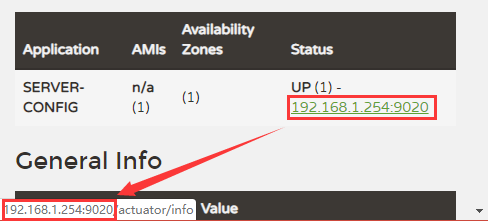
由于所有的项目都运行在 Docker 容器中,这就导致客户端注册到注册中心的 IP 地址为容器的虚拟 IP,无法通过外部访问,这里的解决方案是构建容器时候设置容器的网络模式为桥接模式。
docker-compose.yml 中配置 network_mode: "bridge"
1  ################ spring-cloud-eureka ##############
2  cloud_eureka:
3    image: ${REGISTRY_URL}/${REGISTRY_NAMESPACE}/${CLOUD_EUREKA_NAME}:${CLOUD_EUREKA_VERSION}
4    container_name: ${CLOUD_EUREKA_CONTAINER_NAME}
5    hostname: ${CLOUD_EUREKA_CONTAINER_NAME}
6    ports:
7    - "${CLOUD_EUREKA_PORT}:9010"
8    volumes:
9    - ${CLOUD_EUREKA_DATA}:/data/:rw
10    - ${CLOUD_EUREKA_LOGS}:/data/logs/:rw
11    - ${SH_DIR}:/usr/local/sh/:rw
12    tty: true
13    restart: always
14    network_mode: "bridge"
客户端配置文件中相关配置(192.168.1.254 为宿主机IP地址):
1eureka:
2  client:
3    service-url:
4      defaultZone: http://eureka:123456@192.168.1.254:9010/eureka/
5  instance:
6    instance-id: ${eureka.instance.ip-address}:${server.port}
7    ip-address: 192.168.1.254
8    prefer-ip-address: true
这样注册到注册中心的IP地址就是宿主机的IP了。
同主机多 eureka 需要特别注意:eureka 注册地址主机相同(相同的IP地址或 hostname)不会互相同步注册信息。
my spring cloud examples:https://github.com/BNDong/spring-cloud-examples
参考资料
https://blog.csdn.net/quanqxj/article/details/80592231
https://github.com/spring-cloud/spring-cloud-netflix/issues/2754
https://www.oschina.net/question/556985\_2273961
https://blog.csdn.net/qq\_36148847/article/details/79427878
https://www.youtube.com/watch?v=tFw8Nm8meqI
后记
写这篇随笔时候不知道为什么想到了看过的一个短片《断崖》,看的时候真的感受到了女主的绝望和无助。感觉自己就像女主一样,我在自己技术水平的坑里努力的爬着,好的是我爬出来了,坏的是外面还有一个更大的坑!!!人生路漫漫,且爬且珍惜!感谢阅读!