
Android系统 小米,三星,索尼手机发送桌面快键提醒数字图标,在Android系统中,众所周知不支持BadgeNumber,虽然第三方控件BadgeView可以实现应用内的数字提醒,但对于系统的图标,特别是app的logo图标很难实现数字标志,即使是绘图的方式不断修改,但这种方式天生弊端,实用性很差。但幸运的是,某些ROM厂商提供了私有的API,但也带来了难度,API的不同意意味着代码量的增加和兼容性问题更加突出。
我们现在来实现桌面logo或者说icon右上角的图标,先来看2张图,第一张来自互联网,第二张来自个人实践!(由于实验条件有限,只能测试小米的(⊙o⊙)…,有兴趣的同学测试一下其他的吧)
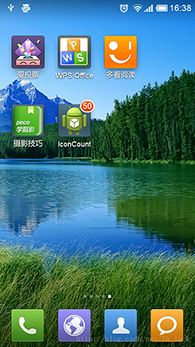
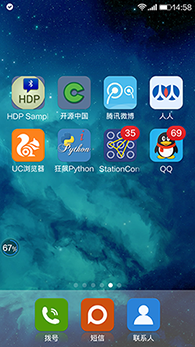
好了,上代码
1public class MainActivity extends Activity {
2      //必须使用,Activity启动页
3      private final static String lancherActivityClassName = Welcome.class.getName();
4
5	@Override
6	protected void onCreate(Bundle savedInstanceState) {
7		super.onCreate(savedInstanceState);
8		setContentView(R.layout.common_listview_layout);
9	}
10
11	@Override
12	protected void onResume() {
13		super.onResume();
14		sendBadgeNumber();
15	}
16
17	private void sendBadgeNumber() {
18		String number = "35";
19		if (TextUtils.isEmpty(number)) {
20			number = "0";
21		} else {
22			int numInt = Integer.valueOf(number);
23			number = String.valueOf(Math.max(0, Math.min(numInt, 99)));
24		}
25
26		if (Build.MANUFACTURER.equalsIgnoreCase("Xiaomi")) {
27			sendToXiaoMi(number);
28		} else if (Build.MANUFACTURER.equalsIgnoreCase("samsung")) {
29			sendToSony(number);
30		} else if (Build.MANUFACTURER.toLowerCase().contains("sony")) {
31			sendToSamsumg(number);
32		} else {
33			Toast.makeText(this, "Not Support", Toast.LENGTH_LONG).show();
34		}
35	}
36
37	private void sendToXiaoMi(String number) {
38		NotificationManager nm = (NotificationManager) getSystemService(Context.NOTIFICATION_SERVICE);
39		Notification notification = null;
40		boolean isMiUIV6 = true;
41		try {
42			NotificationCompat.Builder builder = new NotificationCompat.Builder(this);
43			builder.setContentTitle("您有"+number+"未读消息");
44			builder.setTicker("您有"+number+"未读消息");
45			builder.setAutoCancel(true);
46			builder.setSmallIcon(R.drawable.common_icon_lamp_light_red);
47			builder.setDefaults(Notification.DEFAULT_LIGHTS);
48			notification = builder.build();
49			Class miuiNotificationClass = Class.forName("android.app.MiuiNotification");
50			Object miuiNotification = miuiNotificationClass.newInstance();
51			Field field = miuiNotification.getClass().getDeclaredField("messageCount");
52			field.setAccessible(true);
53			field.set(miuiNotification, number);// 设置信息数
54			field = notification.getClass().getField("extraNotification");
55			field.setAccessible(true);
56        field.set(notification, miuiNotification);
57        Toast.makeText(this, "Xiaomi=>isSendOk=>1", Toast.LENGTH_LONG).show();
58		}catch (Exception e) {
59		    e.printStackTrace();
60		    //miui 6之前的版本
61		    isMiUIV6 = false;
62    		    Intent localIntent = new Intent("android.intent.action.APPLICATION_MESSAGE_UPDATE");
63    		    localIntent.putExtra("android.intent.extra.update_application_component_name",getPackageName() + "/"+ lancherActivityClassName );
64    		    localIntent.putExtra("android.intent.extra.update_application_message_text",number);
65    		    sendBroadcast(localIntent);
66		}
67		finally
68		{
69          if(notification!=null && isMiUIV6 )
70		   {
71		       //miui6以上版本需要使用通知发送
72			nm.notify(101010, notification);
73		   }
74		}
75
76	}
77
78	private void sendToSony(String number) {
79		boolean isShow = true;
80		if ("0".equals(number)) {
81			isShow = false;
82		}
83		Intent localIntent = new Intent();
84		localIntent.putExtra("com.sonyericsson.home.intent.extra.badge.SHOW_MESSAGE",isShow);//是否显示
85		localIntent.setAction("com.sonyericsson.home.action.UPDATE_BADGE");
86		localIntent.putExtra("com.sonyericsson.home.intent.extra.badge.ACTIVITY_NAME",lancherActivityClassName );//启动页
87		localIntent.putExtra("com.sonyericsson.home.intent.extra.badge.MESSAGE", number);//数字
88		localIntent.putExtra("com.sonyericsson.home.intent.extra.badge.PACKAGE_NAME",getPackageName());//包名
89		sendBroadcast(localIntent);
90
91		Toast.makeText(this, "Sony," + "isSendOk", Toast.LENGTH_LONG).show();
92	}
93
94	private void sendToSamsumg(String number)
95	{
96		Intent localIntent = new Intent("android.intent.action.BADGE_COUNT_UPDATE");
97		localIntent.putExtra("badge_count", number);//数字
98		localIntent.putExtra("badge_count_package_name", getPackageName());//包名
99		localIntent.putExtra("badge_count_class_name",lancherActivityClassName ); //启动页
100		sendBroadcast(localIntent);
101		Toast.makeText(this, "Samsumg," + "isSendOk", Toast.LENGTH_LONG).show();
102	}
103}
注意lancherActivityClassName 必须被配置为 启动页 android.intent.category.LAUNCHER
1 <activity
2            android:name="com.sample.activites.Welcome"
3            android:configChanges="locale|keyboard|screenSize"
4            android:label="@string/app_name"
5            android:screenOrientation="portrait" >
6            <intent-filter>
7                <action android:name="android.intent.action.MAIN" />
8
9                <category android:name="android.intent.category.LAUNCHER" />
10            </intent-filter>
11            <intent-filter>
12                <action android:name="android.intent.action.CREATE_SHORTCUT" />
13            </intent-filter>
14        </activity>
try doing it